
Rust ESP32C3开发
Rust ESP32C3开发
系统开发逐步使用Rust语言,在嵌入式领域Rust也逐步完善,本着学习Rust和ESP32的目的,搭建了ESP32C3的环境,过程中遇到了不少问题,予以记录。
ESP-IDF开发ESP32
这一部分可跳过,是使用C开发ESP32。直接看Rust 与 ESP32C3
先使用ESP-IDF环境,跑一个Hello world
ESP-IDF安装,选择v5.1
克隆项目
git clone https://github.com/espressif/esp-idf.git
在get-started/hello-world工程中,可以编译项目,编译前连接开发板,可以在设备管理里看到comx,这里为com3

使用IDF-CMD命令行,进入hello-world目录,设置目标
idf.py set-target esp32c3
打开配置界面,
idf.py menuconfig
hello-world项目不进行配置,编译
idf.py build
烧录
idf.py -p PORT flash
idf.py -p COM3 flash
烧录成功
Compressed 168688 bytes to 89398...
Writing at 0x00010000... (16 %)
Writing at 0x0001a548... (33 %)
Writing at 0x00020e66... (50 %)
Writing at 0x00028352... (66 %)
Writing at 0x0002ecae... (83 %)
Writing at 0x00035da9... (100 %)
Wrote 168688 bytes (89398 compressed) at 0x00010000 in 3.1 seconds (effective 441.4 kbit/s)...
Hash of data verified.
Compressed 3072 bytes to 103...
Writing at 0x00008000... (100 %)
Wrote 3072 bytes (103 compressed) at 0x00008000 in 0.1 seconds (effective 438.8 kbit/s)...
Hash of data verified.Leaving...
Hard resetting via RTS pin...
Done
监视输出
idf.py -p com3 monitor
Rust 与ESP32C3
参考资料
https://esp-rs.github.io/book/introduction.html
https://esp-rs.github.io/std-training/01_intro.html
https://doc.rust-lang.org/nightly/rustc/platform-support/esp-idf.html
https://esp-rs.github.io/book/overview/index.html
Rust工具链
安装
rustup toolchain install nightly-2023-02-28 --component rust-src
espressif 工具链
包含:
- cargo-espflash
- espflash
- ldproxy
安装
cargo install cargo-espflash espflash ldproxy
克隆仓库
克隆代码,并进入
git clone "https://github.com/esp-rs/std-training.git"
cd std-training
hello,board
连接开发板,
进入hardware-check目录
cd intro/hardware-check
配置你的wifi名称与密码,cfg.toml
[hardware-check]
wifi_ssid = "111111"
wifi_psk = "123451111"
编译
cargo build
报错
error: failed to run custom build command for `esp-idf-sys v0.33.0`
CMake Error at C:/Users/Rao/.espressif/esp-idf/v4.4.4/tools/cmake/component.cmake:300 (message):Include directory'C:/Users/Rao/.espressif/esp-idf/v4.4.4/components/mbedtls/mbedtls/include'is not a directory.Call Stack (most recent call first):C:/Users/Rao/.espressif/esp-idf/v4.4.4/tools/cmake/component.cmake:473 (__component_add_include_dirs)C:/Users/Rao/.espressif/esp-idf/v4.4.4/components/mbedtls/CMakeLists.txt:18 (idf_component_register)
原因是
'C:/Users/Rao/.espressif/esp-idf/v4.4.4/components/mbedtls/mbedtls/include'is not a directory.
说明这个目录位于mbedtls的submodule中, 可能没有被checkout出来
解决方法,进入C:/Users/Rao/.espressif/esp-idf/v4.4.4/components/mbedtls/
git submodule update --init --recursive
cargo run
报错
D:/Workspace/Program/ESP32/std-training/intro/hardware-check/target/riscv32imc-esp-espidf/debug/build/esp-idf-sys-281d3f81b0a0f0ca/out/build/esp-idf/mbedtls/mbedtls/library/CMakeFiles/mbedcrypto.dir/./has 201 characters. The maximum full path to an object file is 250characters (see CMAKE_OBJECT_PATH_MAX). Object filed5fa956509b7db88e8eaa02d1680138d/esp_rsa_sign_alt.c.objcannot be safely placed under this directory. The build may not workcorrectly.目录太长了,回到std-training目录,将项目映射到r:
subst r: std-trainingcd r:
进入hardware-check重新编译
cd intor/hardware-checkcargo run
成功
I (9229) wifi:set rx beacon pti, rx_bcn_pti: 0, bcn_timeout: 0, mt_pti: 25000, mt_time: 10000
I (9239) wifi: Waiting for DHCP lease...
I (9249) wifi:<ba-add>idx:0 (ifx:0, 62:1e:12:f4:12:61), tid:0, ssn:0, winSize:64
I (9319) wifi:AP's beacon interval = 102400 us, DTIM period = 2
I (10239) esp_netif_handlers: sta ip: 192.168.83.104, mask: 255.255.255.0, gw: 192.168.83.127
I (10239) wifi: Wifi DHCP info: IpInfo { ip: 192.168.83.104, subnet: Subnet { gateway: 192.168.83.127, mask: Mask(24) }, dns: Some(192.168.83.127), secondary_dns: Some(0.0.0.0) }
I (11249) hardware_check: Hello, world!
I (13249) hardware_check: Hello, world!
查看板子运行状态
espflash monitor
创建新项目
为了避免长路径问题,将一个空间映射为短路径
subst z: esp32
cd z:
由cargo-generate配置新项目
安装
cargo install cargo-generate
生成
PS z:\> cargo generate https://github.com/esp-rs/esp-idf-template cargo
⚠️   Favorite `https://github.com/esp-rs/esp-idf-template` not found in config, using it as a git repository: https://github.com/esp-rs/esp-idf-template
🤷   Project Name: hello_world
⚠️   Renaming project called `hello_world` to `hello-world`...
🔧   Destination: z:\hello-world ...
🔧   project-name: hello-world ...
🔧   Generating template ...
✔ 🤷   Which MCU to target? · esp32c3
✔ 🤷   Configure advanced template options? · false
🔧   Moving generated files into: `z:\hello-world`...
Initializing a fresh Git repository
✨   Done! New project created z:\hello-world
用vscode打开项目
code .
加一个死循环
fn main() {// It is necessary to call this function once. Otherwise some patches to the runtime// implemented by esp-idf-sys might not link properly. See https://github.com/esp-rs/esp-idf-template/issues/71esp_idf_sys::link_patches();// Bind the log crate to the ESP Logging facilitiesesp_idf_svc::log::EspLogger::initialize_default();info!("Hello, world!");loop {info!("loop ...!");std::thread::sleep(std::time::Duration::from_secs(1))}
}
编译
cargo run
一般时间会很长
运行起来
I (356) cpu_start: Starting scheduler.
I (362) hello_world: Hello, world!
I (362) hello_world: loop ...!
I (1362) hello_world: loop ...!
I (2362) hello_world: loop ...!
I (3362) hello_world: loop ...!
http客户端
进入espressif-trainnings/intro中的http-client项目,
修改wifi配置,
编译
cargo run --example http_client
完全可以自己写一个服务器,提供http服务,例如go
package mainimport "github.com/gin-gonic/gin"func main() {engine := gin.Default()engine.GET("/", func(context *gin.Context) {context.JSON(200, gin.H{"message": "Hello World",})})engine.Run("")
}该服务端提供了get请求,默认根目录,响应json数据。
在http-client/examples/http_client.rs中,
get("http://192.168.83.79/")?;
注意需要在一个局域网内,并且知道主机的ip地址。
运行
cargo run --example http_client
http服务器
提供get服务
编写wifi配置
cd .\http-server\cargo run --example http_server
我的开发板获取温度有一些异常,注释掉获取温度的代码。
http://192.168.83.104/temperature
MQTT
搭建mqtt服务器,
wsl + ubuntu+docker
https://www.emqx.io/docs/zh/v5.1/deploy/install-docker.html
拉取镜像
docker pull emqx/emqx:5.1.0
启动容器
docker run -d --name emqx -p 1883:1883 -p 8083:8083 -p 8084:8084 -p 8883:8883 -p 18083:18083 emqx/emqx:5.1.0
http://wsl-ubuntu 地址 :18083/
默认用户名及密码
admin
public
通过MQTTfx测试mqtt服务器是否正常,
https://softblade.de/en/download-2/

创建连接
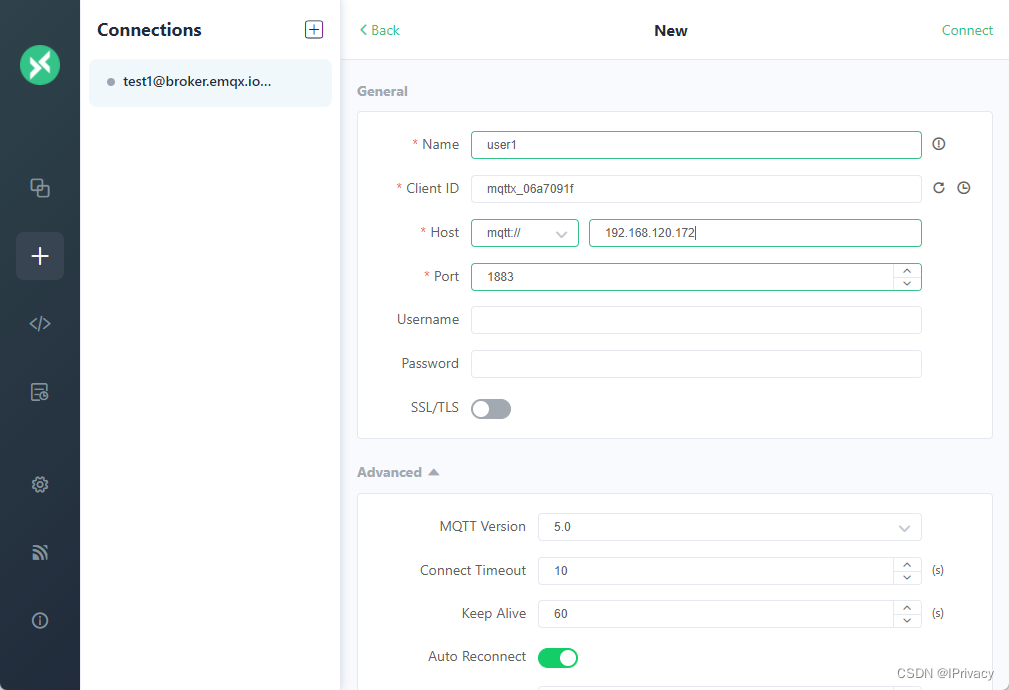
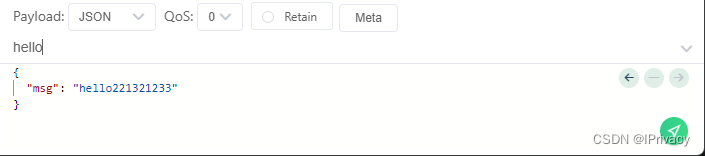
发送消息,需要往某个主题发送
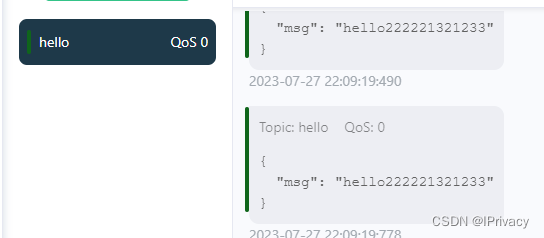
所有订阅了hello主题的客户端,都能收到消息。
cargo run --example solution_publ_rcv
后续局域网还有点问题,后面再做,
ssd1306
https://juejin.cn/post/7096077841023893511
初始化一个项目
cargo generate --git https://github.com/esp-rs/esp-idf-template cargo
PS R:\> cargo generate --git https://github.com/esp-rs/esp-idf-template cargoProject Name: ssd1306_esp32c3Renaming project called `ssd1306_esp32c3` to `ssd1306-esp32c3`...Destination: R:\ssd1306-esp32c3 ...project-name: ssd1306-esp32c3 ...Generating template ...
✔  Which MCU to target? · esp32c3
✔  Configure advanced template options? · falseMoving generated files into: `R:\ssd1306-esp32c3`...
Initializing a fresh Git repositoryDone! New project created R:\ssd1306-esp32c3
初始化外设
use esp_idf_sys as _; // If using the `binstart` feature of `esp-idf-sys`, always keep this module imported
use log::*;
use esp_idf_hal::{delay::FreeRtos,i2c::{I2cConfig, I2cDriver},peripherals::Peripherals,prelude::*,
};fn main() {// It is necessary to call this function once. Otherwise some patches to the runtime// implemented by esp-idf-sys might not link properly. See https://github.com/esp-rs/esp-idf-template/issues/71esp_idf_sys::link_patches();// Bind the log crate to the ESP Logging facilitiesesp_idf_svc::log::EspLogger::initialize_default();let peripherals = Peripherals::take().unwrap();let sda = peripherals.pins.gpio10;let scl = peripherals.pins.gpio8;let config = I2cConfig::new().baudrate(400.kHz().into());let i2c = I2cDriver::new(peripherals.i2c0, sda, scl, &config).unwrap();info!("Hello, world!");
}
还不太行,留坑
esp_idf_sys::link_patches();
// Bind the log crate to the ESP Logging facilities
esp_idf_svc::log::EspLogger::initialize_default();
let peripherals = Peripherals::take().unwrap();let sda = peripherals.pins.gpio10;
let scl = peripherals.pins.gpio8;let config = I2cConfig::new().baudrate(400.kHz().into());
let i2c = I2cDriver::new(peripherals.i2c0, sda, scl, &config).unwrap();info!("Hello, world!");
}
还不太行,留坑
相关文章:
Rust ESP32C3开发
Rust ESP32C3开发 系统开发逐步使用Rust语言,在嵌入式领域Rust也逐步完善,本着学习Rust和ESP32的目的,搭建了ESP32C3的环境,过程中遇到了不少问题,予以记录。 ESP-IDF开发ESP32 这一部分可跳过,是使用C开…...

【Spring Cloud Gateway 新一代网关】—— 每天一点小知识
💧 S p r i n g C l o u d G a t e w a y 新一代网关 \color{#FF1493}{Spring Cloud Gateway 新一代网关} SpringCloudGateway新一代网关💧 🌷 仰望天空,妳我亦是行人.✨ 🦄 个人主页——微风撞见云的博客&a…...

Java 中的关键字 final 和 static
一、关键字 final final 修饰符可以用来修饰类、方法和变量,final 修饰的类不能够被继承,修饰的方法不能被继承类重新定义,修饰的变量为常量,是不可修改的。 1.1 final 变量 final 有"最后的、最终的"的含义…...

Spring Cloud OpenFeign 全教程
1. 声明式 REST 客户端: Feign Feign 是一个声明式的 Web Service 客户端。它使编写 Web Service 客户端更容易。要使用 Feign,需要创建一个接口并对其进行注解。它有可插拔的注解支持,包括 Feign 注解和 JAX-RS 注解。Feign 还支持可插拔的…...
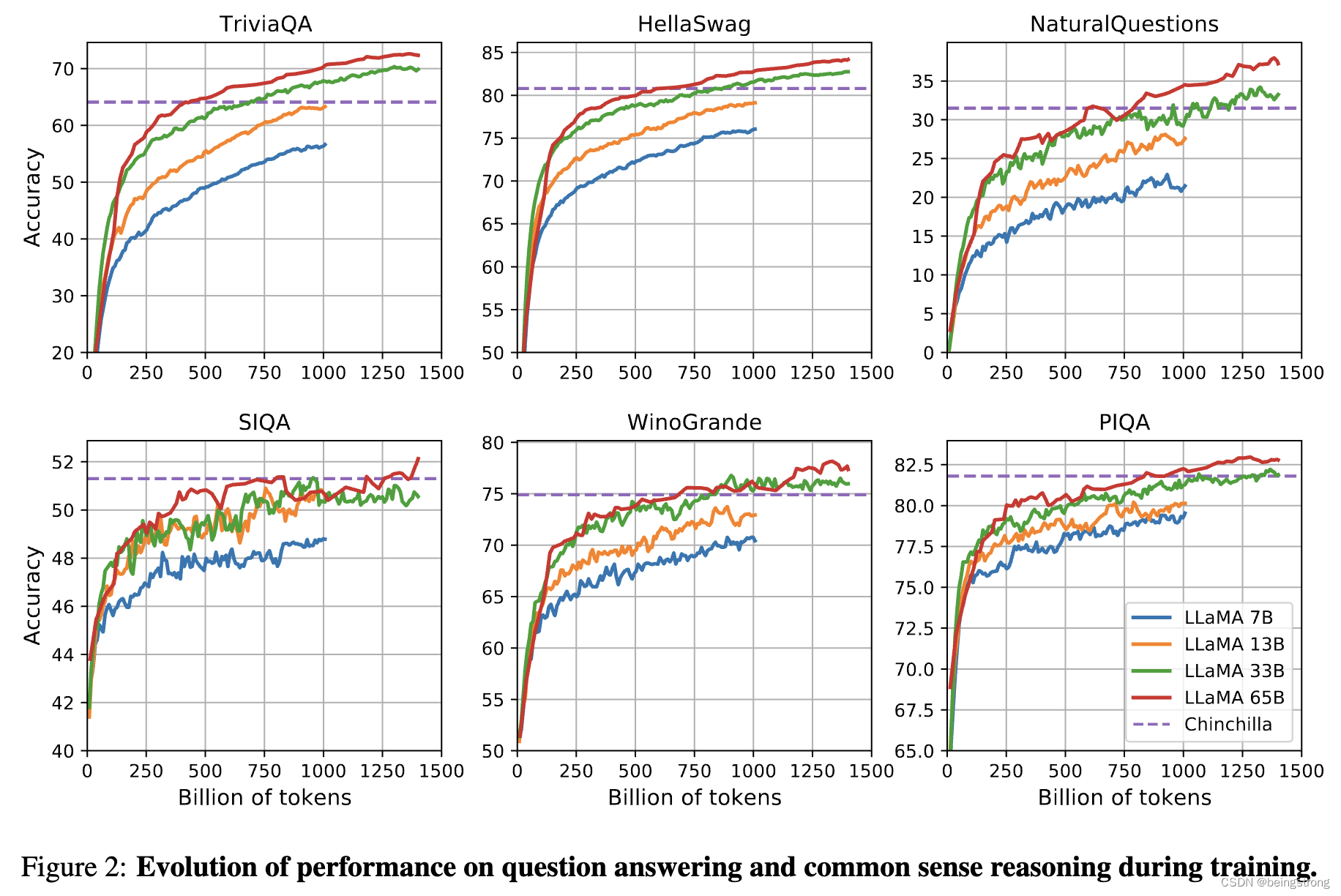
LLaMA模型论文《LLaMA: Open and Efficient Foundation Language Models》阅读笔记
文章目录 1. 简介2.方法2.1 预训练数据2.2 网络架构2.3 优化器2.4 高效的实现 3.论文其余部分4. 参考资料 1. 简介 LLaMA是meta在2023年2月开源的大模型,在这之后,很多开源模型都是基于LLaMA的,比如斯坦福大学的羊驼模型。 LLaMA的重点是比…...

了解Unity编辑器 之组件篇Effects(十一)
一、Halo:是一个可用于游戏对象的特效组件,它可以在对象周围添加一个光晕效果 Color属性: 用于设置Halo的颜色。你可以通过选择颜色面板中的颜色来指定光晕的外观。选择适当的颜色可以使光晕与游戏场景中的其他元素相匹配或突出显示。 Size属性: 用于设…...

笔记整理-SpringBoot中的扩展点
SpringBoot有哪些扩展点 aware 感知类接口 aware系列的扩展接口,允许spring应用感知/获取特定的上下文环境或对象。bean生命周期控制类接口 bean生命周期类的接口,可以控制spring容器对bean的处理。app生命周期控制类接口 app生命周期控制类接口…...

各系统的目录信息路径
Windows系统: 查看系统版本——C:\boot.ini IIS配置文件——C:\windows\system32\inetsrv\MetaBase.xml 存储Windows系统初次安装的密码——C:\windows\repair\sam Mysql配置——C:\ProgramFiles\mysql\my.ini MySQL root密码——C:\P…...
)
Asp.Net 使用Log4Net (封装帮助类)
Asp.Net 使用Log4Net (封装帮助类) 1. 创建Log4Net帮助类 首先,在你的项目中创建一个Log4Net帮助类,用于封装Log4Net的配置和日志记录逻辑。 using log4net; using log4net.Config;public class LogHelper {private static readonly ILog log LogMan…...
全志F1C200S嵌入式驱动开发(lcd屏幕驱动)
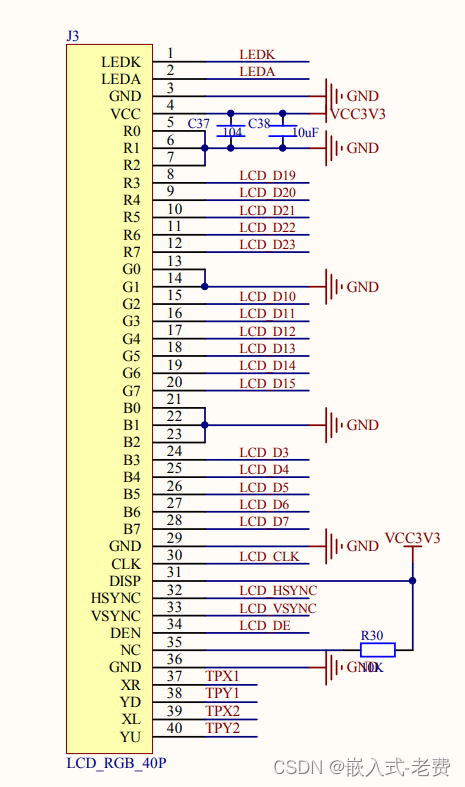
【 声明:版权所有,欢迎转载,请勿用于商业用途。 联系信箱:feixiaoxing @163.com】 lcd RGB屏幕作为比较经济、实用的显示工具,在实际场景中使用较多。它的信号来说,一般也比较简单,除了常规的数据信号,剩下来就是行同步、场同步、数据使能和时钟信号了。数据信…...
dubbo原理框架设计
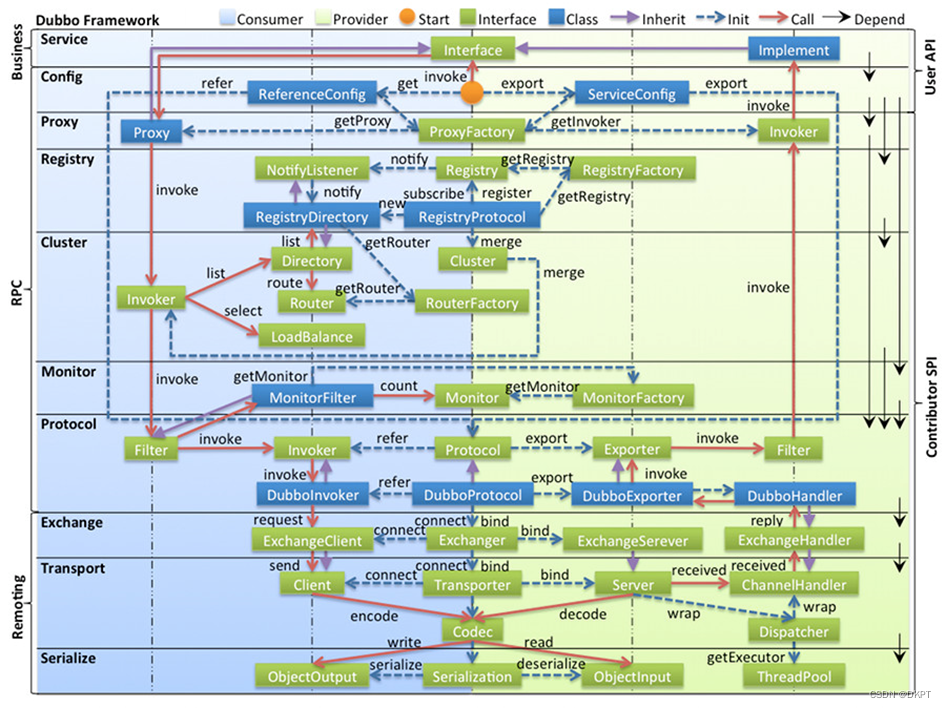
dubbo原理框架设计 (1)config 配置层:对外配置接口,以 ServiceConfig, ReferenceConfig 为中心,可以直接初始化配置类,也可以通过 spring 解析配置生成配置类。 (2)proxy 服务代理…...

【数据挖掘】使用 LSTM 进行时间和序列预测
一、说明 每天,人类在执行诸如过马路之类的任务时都会做出被动预测,他们估计汽车的速度和与汽车的距离,或者通过猜测球的速度并相应地定位手来接球。这些技能是通过经验和实践获得的。然而,由于涉及众多变量,预测天气或…...
)
Typescript第四章 函数(声明和调用,注解参数类型,多态,类型别名,泛型)
第四章 函数 ts中声明和调用函数的不同方式签名重载多态函数多态类型声明 4.1 声明和调用函数 在js中函数是一等对象,我们可以像对象那样使用函数,可以复制给变量,可以作为参数传递,返回值,赋值给对象的原型&#x…...

大数据-Spark批处理实用广播Broadcast构建一个全局缓存Cache
1、broadcast广播 在Spark中,broadcast是一种优化技术,它可以将一个只读变量缓存到每个节点上,以便在执行任务时使用。这样可以避免在每个任务中重复传输数据。 2、构建缓存 import org.apache.spark.sql.SparkSession import org.apache.s…...

Android Service的生命周期,两种启动方法,有什么区别
Android Service的生命周期,两种启动方法,有什么区别 Android Service是一种后台组件,用于在后台执行长时间运行的任务,而无需与用户界面进行交互。Service具有自己的生命周期,其主要包含以下几个状态:创建…...
测试开源C#人脸识别模块ViewFaceCore(5:质量检测和眼睛状态检测)
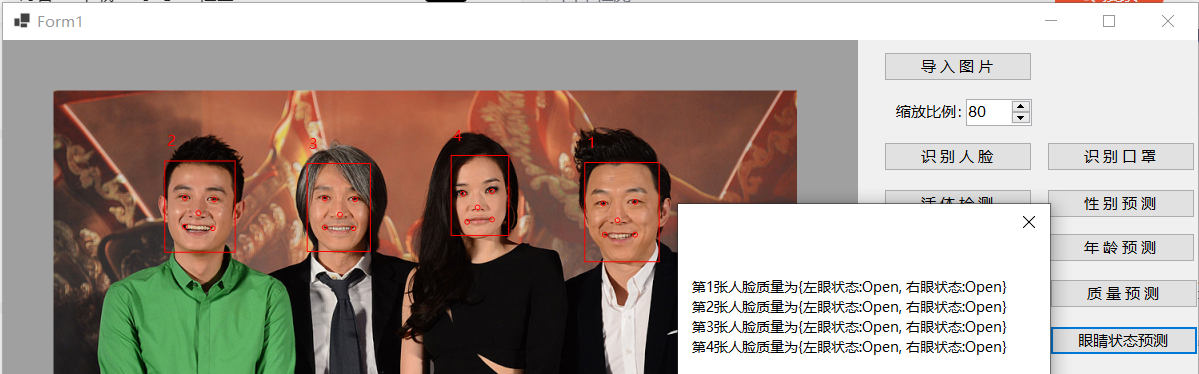
ViewFaceCore模块中的FaceQuality支持预测人脸质量,最初以为是预测人体体重,实际测试过程中才发现是评估人脸图片质量,主要调用Detect函数执行图片质量检测操作,其函数原型如下所示: //// 摘要:// 人脸质量评估///…...

Go语言网络库net/http
Go语言网络库net/http Http 协议(Hyper Text Transfer Protocol,超文本传输协议)是一个简单的请求-响应协议,它通常运行在 TCP 之 上。超文本传输协议是互联网上应用最为广泛的一种网络传输协议,所有的WWW文件都必须遵守这个标准。 Http 协…...
Acwing.91 最短Hamilton路径(动态规划)
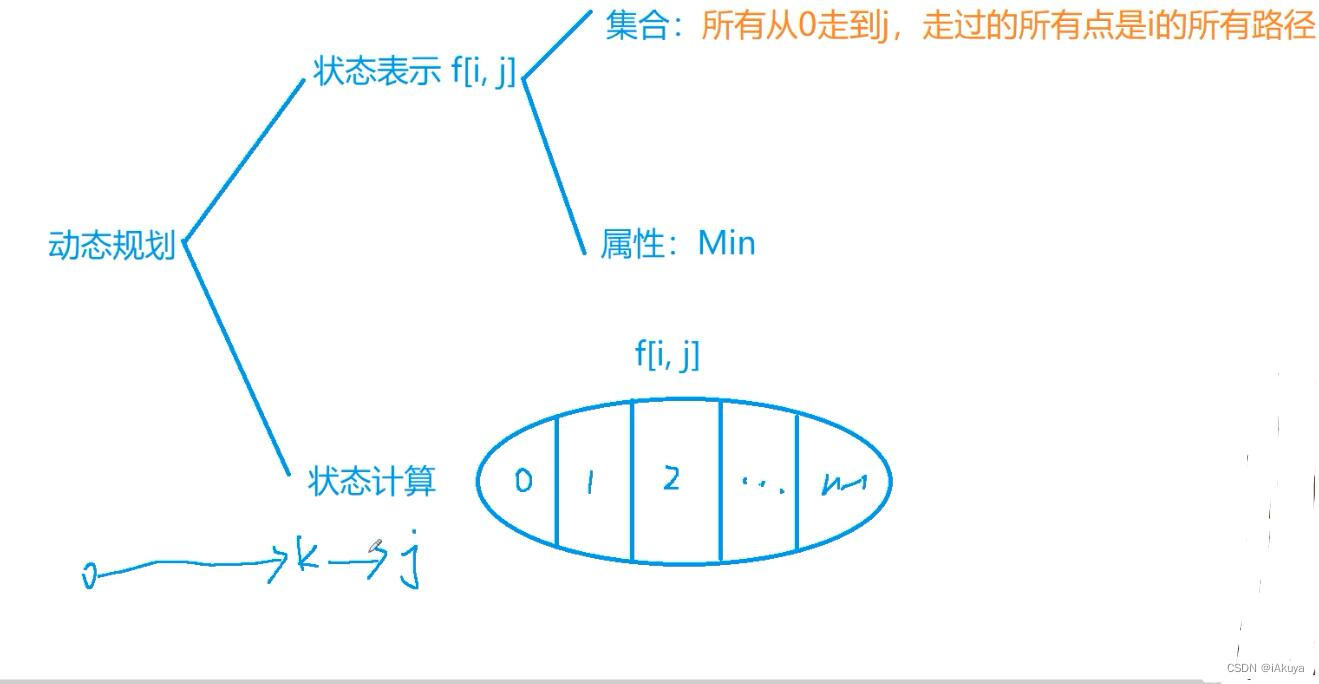
题目 给定一张n个点的带权无向图,点从0~n-1标号,求起点0到终点n-1的最短Hamilton路径。Hamilton路径的定义是从0到n-1不重不漏地经过每个点恰好一次。 输入格式 第—行输入整数n。 接下来n行每行n个整数,其中第i行第j个整数表示点i到j的距…...

[hfut] [important] v4l2 vedio使用总结/opevx/ffpeg/v4l2/opencv/cuda
(158条消息) linux驱动camera//test ok_感知算法工程师的博客-CSDN博客 (158条消息) linux V4L2子系统——v4l2架构(1)之整体架构_感知算法工程师的博客-CSDN博客 (158条消息) linux V4L2子系统——v4l2的结构体(2)之video_devi…...
2023年深圳杯数学建模A题影响城市居民身体健康的因素分析
2023年深圳杯数学建模 A题 影响城市居民身体健康的因素分析 原题再现: 以心脑血管疾病、糖尿病、恶性肿瘤以及慢性阻塞性肺病为代表的慢性非传染性疾病(以下简称慢性病)已经成为影响我国居民身体健康的重要问题。随着人们生活方式的改变&am…...

Wechat2RSS:微信公众号转RSS订阅工具
文章目录Wechat2RSS:微信公众号转RSS订阅工具Wechat2RSS:微信公众号转RSS订阅工具 ttttmr开源的Wechat2RSS项目,目前在GitHub上获得1409颗Star,项目地址为https://github.com/ttttmr/Wechat2RSS。该工具的核心作用是将微信公众号…...

Redis分布式锁进阶第二十篇
一、本篇前置衔接 第二十篇我们完成了全系列终局复盘,整理了故障排查SOP与企业级落地铁律。常规单资源锁、热点分片锁、隔离锁全部讲透,但真实复杂业务永远不是单一资源:下单要扣库存、扣优惠券、扣积分、冻结余额,多资源并行争抢…...
)
Windows10下V-REP教育版安装保姆级教程(附百度网盘资源与避坑点)
Windows10系统V-REP教育版完整安装指南:从下载到实战避坑在机器人仿真和自动化控制领域,V-REP(现更名为CoppeliaSim)作为一款功能强大的跨平台机器人仿真软件,已经成为众多工科学生和研究人员的首选工具。特别是其教育…...

【DeepSeek集成测试黄金标准】:20年专家亲授5大避坑指南与自动化落地框架
更多请点击: https://intelliparadigm.com 第一章:DeepSeek集成测试黄金标准的演进与核心价值 集成测试在大语言模型工程化落地过程中已从“验证功能可用”跃迁为“保障推理一致性、上下文鲁棒性与安全边界的三位一体质量门禁”。DeepSeek系列模型&…...

DAIR-V2X-V数据集深度评测:与KITTI、nuScenes比,它到底强在哪?
DAIR-V2X-V数据集深度评测:与KITTI、nuScenes比,它到底强在哪? 当技术团队着手开发面向中国道路的自动驾驶系统时,数据集的选择往往成为第一个关键决策点。过去十年间,KITTI和nuScenes等国际数据集一直是行业标杆&…...

2026这6款神级降AIGC平台大公开,一键让AIGC率直逼绝对安全线!
步入 2026 年,学术圈的风向早已不是从前的模样。曾经大家还在为查重率发愁,如今却陷入了更棘手的困境——如何在不破坏论文专业性的前提下,彻底消除 AI 痕迹?随着 AIGC 检测技术不断进化,高校对论文的审核标准也愈发严…...

AutoWall终极指南:如何在Windows上轻松设置炫酷动态壁纸
AutoWall终极指南:如何在Windows上轻松设置炫酷动态壁纸 【免费下载链接】AutoWall 🌌 Live wallpapers on Windows 7/8/10/11 using open-source wallpaper engine 项目地址: https://gitcode.com/gh_mirrors/au/AutoWall 厌倦了千篇一律的静态桌…...

终极解决方案:Windows Cleaner免费开源工具,3步彻底解决C盘爆红问题
终极解决方案:Windows Cleaner免费开源工具,3步彻底解决C盘爆红问题 【免费下载链接】WindowsCleaner Windows Cleaner——专治C盘爆红及各种不服! 项目地址: https://gitcode.com/gh_mirrors/wi/WindowsCleaner 你是否也经历过这样的…...

纯硬件实现I2C协议:从逻辑门到传感器通信的深度实践
1. 项目概述:用纯硬件“解剖”I2C总线很多朋友在玩传感器,尤其是温湿度传感器时,都绕不开I2C这个通信协议。市面上绝大多数的教程和方案,都会告诉你:找个单片机(比如Arduino、STM32),…...

麒麟桌面CVE-2024-1086漏洞深度修复指南
1. 这个漏洞不是“修个补丁就完事”:麒麟桌面系统CVE-2024-1086的真实威胁图谱你可能刚在安全通告里看到“麒麟桌面系统修复CVE-2024-1086”,顺手点了个更新,心里想着“又一个内核提权漏洞,打上补丁不就完了?”——我去…...