
easyui实用点
easyui实用点
1.下拉框(input框只能选不能手动输入编辑)
data-options="editable:false"//不可编辑2.日期框,下拉框,文本框等class
class="easyui-datebox"//不带时分秒
class="easyui-datetimebox"//带时分秒
class="easyui-combobox"//下拉框
class="easyui-textbox"//文本框
3.第一个输入框填写之后第二个设置成必填
1.输入联系人之后 联系电话变成必填
注意:onChange的方法要写到data-options=“onChange:onContactsChange”
<tr><td class="tdTitle">联系人</td><td style="padding-left: 0.5%"><input class="easyui-textbox" name="contacts" style="width: 99%" data-options="onChange:onContactsChange" /></td><td class="tdTitle">联系电话</td><td style="padding-left: 0.5%"><input class="easyui-textbox" name="phone" id="phoneInput" style="width: 99%" data-options="validType:'mobile'" /></td></tr>
2.onContactsChange()方法
function onContactsChange() {var contactsInput = $('input[name="contacts"]');var phoneInput = $('#phoneInput');if (contactsInput.val().trim() !== '') {phoneInput.textbox('options').required = true;phoneInput.textbox('textbox').validatebox({ required: true, validType: 'mobile' });} else {phoneInput.textbox('options').required = false;phoneInput.textbox('textbox').validatebox({ required: false });}
}
4.是否必填
data-options="required:true"//普通input框
data-options="multiline:true"//文本框中的必填
missingMessage:'请填写名称'//必填之后的提示语
5.将数据回填到form表中
$('#customerForm').form('load', row);
6.双击查看详情
function iconClick(index) {//获取指定行的数据,并将其保存到 row 变量中。点击哪一行的数据var row = $('#datagrid').datagrid('getRows')[index];$('#dialogContainer').dialog({//EasyUI 对话框// title: '客商信息详情',href: '${ctx}/test15',//引入页面split: false,//对话框是否显示分割线closed: false,//对话框是否处于关闭状态cache: false,//是否缓存对话框的内容closable: false,//表示对话框是否可以被关闭title: '',//将对话框标题头隐藏draggable: false,//用于控制对话框是否可以拖动。fit: true, // 将对话框铺满整个屏幕onLoad: function () { // 将父节点的分类编码设置到文本框中$('#customerForm').form('load', row);//加载数据回写到表单中$('#customerForm input').prop('readonly', true); //将所有输入框变只读$('#foundTime').datebox('readonly', true);$('#notes').textbox('readonly', true);$('#submitFormBtn').hide(); // 隐藏保存和返回按钮$('#meetName').css('margin-top', '6%'); // 将表格的上边距设置为20px$.ajax({//子表信息url: ctx + "/conPayment/selectAll?id=" + row.customerListId,type: "get",success: function (data) {if (data) {// 将 data 的值动态设置到 addRow() 函数中的输入框中addRowInfo(data);// 将所有输入框设置为只读$('#accountTable input').prop('readonly', true);}}});// $('#form-buttons').hide(); // 隐藏保存和返回按钮}});$("#dialogContainer").dialog('center');//将对话框居中显示。}
7.获取子表的输入内容 并且存成list
1.前端表单存
function selectList() {var list = [];// 定义一个列表,用于保存输入框的值$.each($("#accountTable tbody tr"), function (index, item) {list[index] = {paymentName: $(this).find("[name=paymentName]").val(),bankAccount: $(this).find("[name=bankAccount]").val(),bankName: $(this).find("[name=bankName]").val(),paymentInfoId: $(this).find("[name=paymentInfoId]").val()}});return JSON.stringify(list);
}
2.前端和主表一起提交
$('#customerForm').form('submit', {url: ctx + "/conCustomerList/customerListSave",onSubmit: function (param) {param.jsonStr = selectList();//带子表数据一起提交到后台},success: function (result) {if (result) {layer.msg('操作成功', {icon: 1,time: 1500,offset: 't',area: '200px'}, function () {$('#customerForm').form('clear');$('#dialogContainer').dialog('close');$('#datagrid').datagrid('reload');});} else {layer.msg('操作失败', {icon: 2,time: 1500,offset: 't',anim: 6,area: '200px'});}}});
3.后台拿到数据
/*** 正常提交 添加or 保存** @param entity* @return*/@RequestMapping(value = "/customerListSave")@ResponseBodypublic JsonMsg meetSave(ConCustomerList entity, HttpServletRequest request) {entity.setIsUse("Y");String jsonStr = request.getParameter("jsonStr");conCustomerListService.customerListSave(entity, jsonStr);return new JsonMsg(true, "操作成功", null);}
4.对拿到的数据 进行反序列化 存成实体类
public void customerListSave(ConCustomerList entity, String jsonStr) {conCustomerListDao.save(entity);//需要hutool包List<PaymentInfo> lists = JSONUtil.toList(jsonStr, PaymentInfo.class);for (PaymentInfo list : lists) {list.setIsUse("Y");list.setCustomerListId(entity.getCustomerListId());}conPaymentInfoDao.saveAll(lists);}
8.数据列表
$('#datagrid').datagrid({url: ctx + "/conCustomerList/selectPageAll?id=" + nodeId + "&search=" + matterName,method: 'get',pageList: [20, 30, 40],pageSize: 20,pagination: true,singleSelect: true,toolbar: '#toolbar',toolbarAlign: 'right',header: "#toolHeader",fit: true, // 将表格大小适应父容器的大小width: 1500, // 设置表格的宽度scrollbarSize: 20, // 设置滚动条的大小scrollbarWidth: 20, // 设置滚动条的宽度frozenColumns: [[// 其他固定的列定义{field: 'id', title: '序号', width: 50, align: 'center', formatter: function (value, row, index) {// 自增序号的 formatter 函数var pageSize = $('#datagrid').datagrid('options').pageSize;return (index + 1) + (pageSize * ($('#datagrid').datagrid('options').pageNumber - 1));}},{field: 'opt', title: '明细', width: 50, align: 'center',formatter: function (value, row, index) {return '<div οnclick="iconClick(' + index + ')"> <i class="layui-icon" style="font-size: 24px;color: #3399cc"></i></div>';}},{field: 'appellation', title: '单位名称/姓名', align: 'center', width: 150}]],columns: [[{field: 'unitCode',title: '统一单位代码/身份证号码',align: 'center',width: 180,formatter: function (value, row, index) {if (value && value.length == 18) {return value.substr(0, 6) + '******' + value.substr(12, 6);} else {return value;}}},{field: 'registerPlace', title: '注册地', align: 'center', width: 120},{field: 'contacts', title: '联系人', align: 'center', width: 120},{field: 'phone', title: '联系电话', align: 'left', width: 120},{field: 'customerCode', title: '客商编号', align: 'center', width: 120},{field: 'bankAccount',title: '银行行号',align: 'left',width: 400,formatter: function (value, row, index) {return '<span title="' + value + '">' + value + '</span>';}}]], onDblClickRow: function (rowIndex, rowData) {// 双击行事件处理逻辑iconClick(rowIndex);}});
9.校验表单是否正确
1.电话号码、身份证号等是否正确
输入框中加入data-options=“validType:‘mobile’”
<td class="tdTitle">联系电话</td><td style="padding-left: 0.5%"><input class="easyui-textbox" name="phone" id="phoneInput" style="width: 99%" data-options="validType:'mobile'" /></td>xxxxxxxxxx data-options="validType:'mobile'" <td class="tdTitle">联系电话</td> <td style="padding-left: 0.5%"> <input class="easyui-textbox" name="phone" id="phoneInput" style="width: 99%" data-options="validType:'mobile'" /> </td>
2.js中
$.extend($.fn.validatebox.defaults.rules, {mobile: {validator: function(value) {// 判断手机号格式是否正确return /^1[3-9]\d{9}$/.test(value);},message: '请输入正确的手机号码'}
});
10.下拉框设置默认值(是否)
<tr><td style=text-align:right><label>是否内部单位:</label></td><td><input id="isInternalUnit" name="isInternalUnit" style="width: 280px" 			class="easyui-combobox"data-options="editable:false,value:'2',//默认是否valueField:'value',textField:'text',panelHeight:'auto',//适应宽度data:[{value:'1',text:'是'},{value:'2',text:'否'},]"></td>
</tr>
11.想统计一样 单独单开一个 小窗口(人员选择框 也是同理)
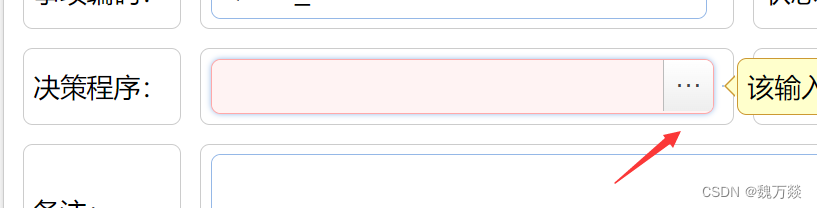
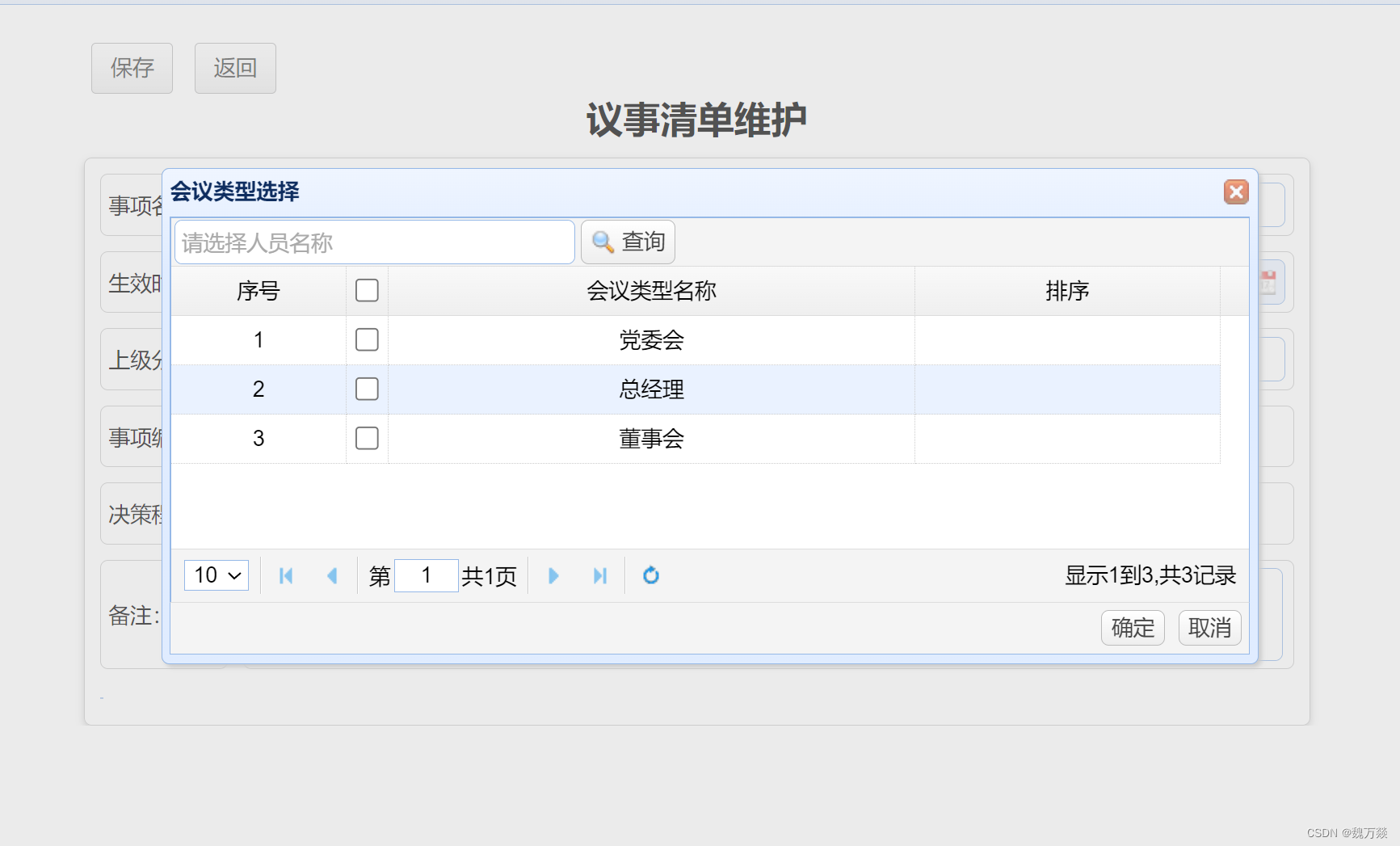
1.前端选择有三个小点的按钮
<td><label>决策程序:</label></td><td><input class="easyui-textbox" style="width: 100%" id="decisionPro"><input id="decisionProId" name="decisionPro" type="hidden" class="easyui-textbox"/></td>
2.盒子
<div id="decisionProbox" class="easyui-dialog" closed="true"><div id="decisiondataGrid"></div><div id="adddecisiontools"><a href="#" class="easyui-linkbutton" style="height: 23px"onclick="chooseSave()">确定</a><a href="#" class="easyui-linkbutton" style="height: 23px"onclick="cancelSave()">取消</a></div>
</div><div id="toolHeader2" class="tools"><input id="searchUserName" prompt="请选择人员名称" style="width:260px" class="easyui-textbox"><a href="#" class="easyui-linkbutton" id="searchBtn" iconCls="icon-search" onclick="searchName()">查询</a>
</div>
3.js中 点击三个点按钮触发
$('#decisionPro').textbox({required: true,buttonAction: "right",buttonText: "···",onClickButton: function () {$("#decisionProbox").dialog({title: "会议类型选择  ",fid:true,maximize: true,cache: false,buttons: "#adddecisiontools",modal: true,closed: false,onOpen: function () {$('#decisiondataGrid').datagrid('reload'); // 重新加载数据$(this).dialog('center'); // 将对话框居中显示},onClose: function () {// 获取选中行并取消勾选var rows = $('#decisiondataGrid').datagrid('getSelections');$.each(rows, function (i, row) {var index = $('#decisiondataGrid').datagrid('getRowIndex', row);$('#decisiondataGrid').datagrid('uncheckRow', index);});// 根据排序字段对选中的行进行排序rows.sort(function (a, b) {return a.sort - b.sort;});// 将排序后的数据设置回表格中$.each(rows, function (i, row) {var index = $('#decisiondataGrid').datagrid('getRowIndex', row);$('#decisiondataGrid').datagrid('updateRow', {index: index,row: {sort: row.sort  // 只修改排序字段的值,不修改名称}});});}});}
});
4.数据加载
var ed;
$('#decisiondataGrid').datagrid({toolbar: "#toolHeader2",url: ctx + "/meetUser/findAll",method: 'get',fitColumns: true,pageList: [5, 10, 15],pagesize: 5,pagination: true,width: 700,height: 250,singleSelect: false,onSelectAll:function (rows){$.each(rows,function (index,value) {$('#decisiondataGrid').datagrid('beginEdit',index);})},onUnselectAll: function () {var rows = $('#decisiondataGrid').datagrid('getRows');$.each(rows, function (index, row) {$('#decisiondataGrid').datagrid('endEdit', index);});$('#decisiondataGrid').datagrid('reload'); // 刷新数据表格},onClickRow: function(index, row) {// 检查是否单击了勾选框var ck = $(this).datagrid('getChecked');var isCheck = false;for (var i = 0; i < ck.length; i++) {if (ck[i].id === row.id) {isCheck = true;break;}}// 如果单击了勾选框,则开始编辑该行if (isCheck) {$('#decisiondataGrid').datagrid('beginEdit', index);ed=$(this).datagrid('getEditor', {index: index, field: 'sort'});}else{$('#decisiondataGrid').datagrid('reload'); // 刷新数据表格}},columns: [[{field: 'id', title: '序号', width: 20, align: 'center', formatter: function (value, row, index) {// 自增序号的 formatter 函数var pageSize = $('#decisiondataGrid').datagrid('options').pageSize;return (index + 1) + (pageSize * ($('#decisiondataGrid').datagrid('options').pageNumber - 1));}},{field: 'checked', title: '勾选框', checkbox: 'multiple'},{field: 'meetingName', title: '会议类型名称', width: 60, align: 'center', halign: 'center'},{field: 'sort', title: '排序', width: 35, align: 'center', halign: 'center',editor: {type: 'numberbox',options: {required: true,precision: 0}}},{field: 'meetingId', title: '会议类型编号', width: 0, hidden: true}]]
});
12.设置值
$('#endTime').textbox('setValue', i.endTime);//文本框设置值$("input[name='state'][value='1']").prop("checked", true);//单选框通过name设置选中
相关文章:
easyui实用点
easyui实用点 1.下拉框(input框只能选不能手动输入编辑) data-options"editable:false"//不可编辑2.日期框,下拉框,文本框等class class"easyui-datebox"//不带时分秒 class"easyui-datetimebox"…...

算法训练营第五十六天||● 583. 两个字符串的删除操作 ● 72. 编辑距离 ● 编辑距离总结篇
● 583. 两个字符串的删除操作 这道题涉及到两个字符串删除操作,注意递推公式,理解不到位,需要再次做 确定dp数组(dp table)以及下标的含义 dp[i][j]:以i-1为结尾的字符串word1,和以j-1位结尾…...
C语言每日一题:10.不使用+-*/实现加法+找到所有数组中消失的数。
题目一: 题目链接: 思路一: 1.两个数二进制之间进行异或如果不产生进位操作那么两个数的和就是就是两个数进行异或的结果。 举例:5(0101)2(0010)进行异或等于:7…...
LibreSSL SSL_connect: SSL_ERROR_SYSCALL in connection to github.com:443
1、问题: https://github.com/CocoaPods/Specs.git/:LibreSSL SSL_connect: SSL_ERROR_SYSCALL in connection to github.com:443的解决办法 出现这个问题的原因基本都是代理的问题: 只需要加上代理就可以了: #http代理 git conf…...

JS数组的详解与使用
什么是数组? 数组是一种有序的集合,有长度和索引,以及身上有许多的API方法 面试题:数组和伪数组的区别:数组和伪数组都有长度和索引,区别是数组身上有许多的API方法 而伪数组身上不存在这些API方法创建数组…...

c++ / python / java / PHP / SQL / Ruby / Objective-C / JavaScript 发展史
c发展史 C是由丹尼斯里奇和肯汤普森在1970年代早期开发的C语言的扩展。C最初被称为“C with Classes”,是在1980年代初期由比雅尼斯特劳斯特鲁普开发的。 1983年,斯特劳斯特鲁普将C with Classes重新命名为C。在1985年,C编译器的第一个版本被…...

Linux第一个小程序-进度条(缓冲区概念)
1.\r和\n C语言中有很多字符 a.可显字符 b.控制字符 对于回车其实有两个动作,首先换行,在将光标指向最左侧 \r :回车 \n:换行 下面举个例子: 把\n去掉会怎样 什么都没输出。为什么? 2.缓冲区概念 观察下两个…...
CentOS7环境安装tomcat
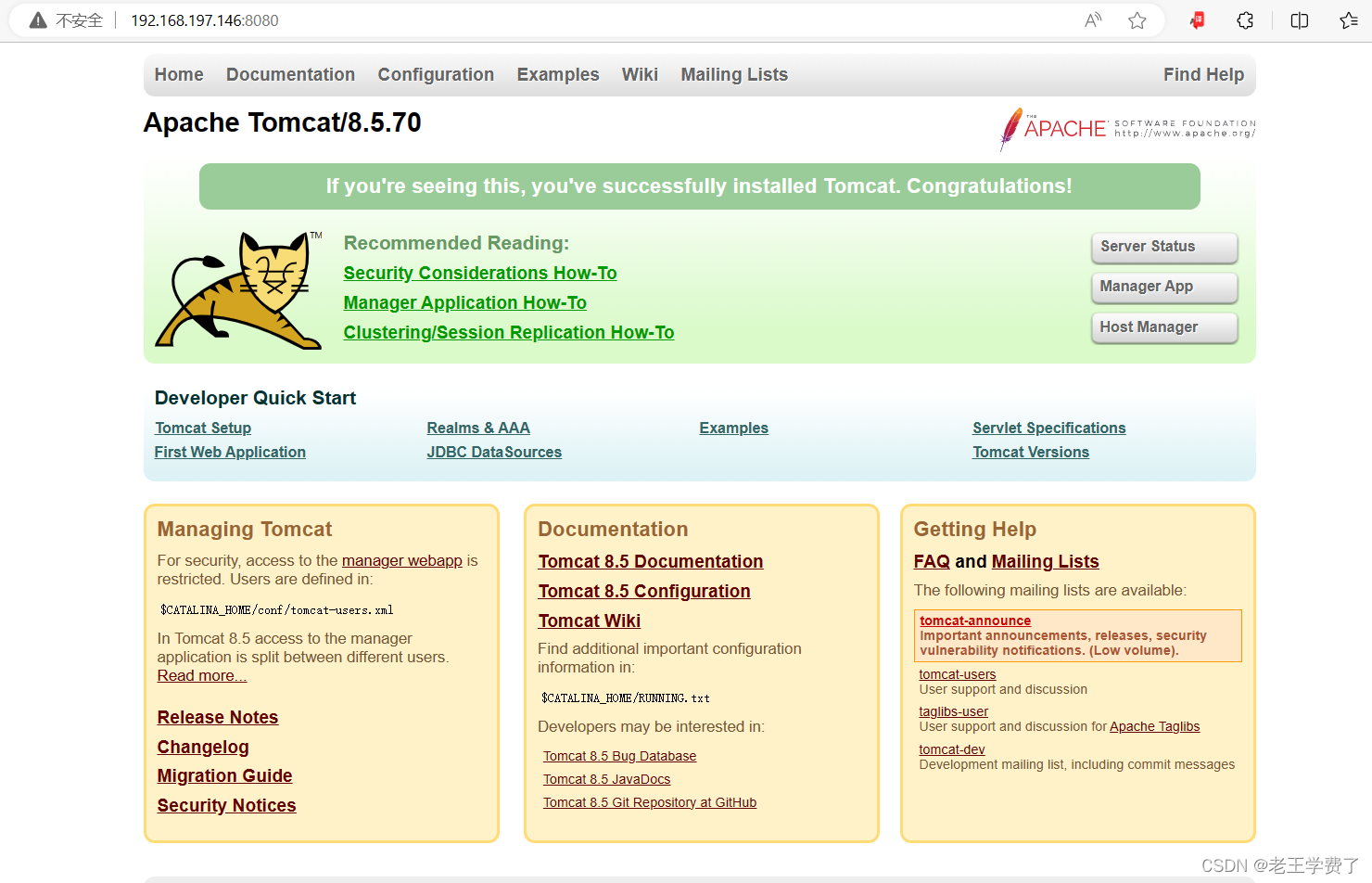
环境准备 由于是在练习,为了方便,我们可以 1.关闭防火墙 systemctl disable firewalld.service systemctl stop firewalld.service 2.关闭selinux 在/etc/selinux/config中,设置: SELINUXdisabled 3.准备jdk---》jdk-8u333-li…...

C# 中使用ValueTask优化异步方法
概要 我们在开发过程中,经常使用async的异步方法,但是有些时候,异步的方法中,可能包含一些同步的处理。本文主要介绍通过ValueTask这个struct,优化异步处理的方法性能。 代码及实现 有些时候我们会缓存一些数据在内…...

KVM创建新的虚拟机(图形化)
1.启动kvm管理器 [rootlocalhost ~]# virt-manager2.点击创建虚拟机 3.选择所需os安装镜像 4.选择合适的内存大小和CPU 5.创建所需磁盘 6.命名创建的虚拟机...

正则表达式在格式校验中的应用以及包装类的重要性
文章目录 正则表达式:做格式校验包装类:在基本数据类型与引用数据类型间的桥梁总结 在现代IT技术岗位的面试中,掌握正则表达式的应用以及理解包装类的重要性是非常有益的。这篇博客将围绕这两个主题展开,帮助读者更好地面对面试挑…...

Docker使用之java项目工程的部署
同样本文的基础建立在已在目标服务器(以linux为示例)上安装了docker,安装教程请移步度娘 若容器存在请先停止,在删除,然后删除镜像重新编译 //停止容器 sudo docker stop datatransfer//删除容器 sudo docker rm dat…...
3ds Max如何进行合成的反射光泽通道渲染
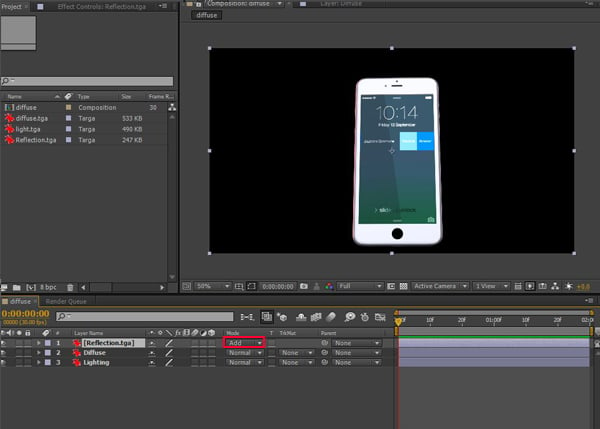
推荐: NSDT场景编辑器 助你快速搭建可二次开发的3D应用场景 1. 准备场景 步骤 1 打开 3ds Max。smart_phone.max打开已 随教程提供。 打开 3ds Max 步骤 2 按 M 打开材质编辑器。选择空材料 槽。单击漫射通道。它将打开材质/贴图浏览器窗口。选择位图࿰…...

114、Spring AOP是如何实现的?它和AspectJ有什么区别?
Spring AOP是如何实现的?它和AspectJ有什么区别? 一、AOP的理解1、spring aop:动态代理实现2、spring aop 和 AspectJ的区别3、小图一、AOP的理解 其实,AOP只是一种编程思想,表示面向切面编程,如果想实现这种思想,可以使用动态代理啊,第三方的框架 AspectJ啊等等。 1…...
正则表达式速通
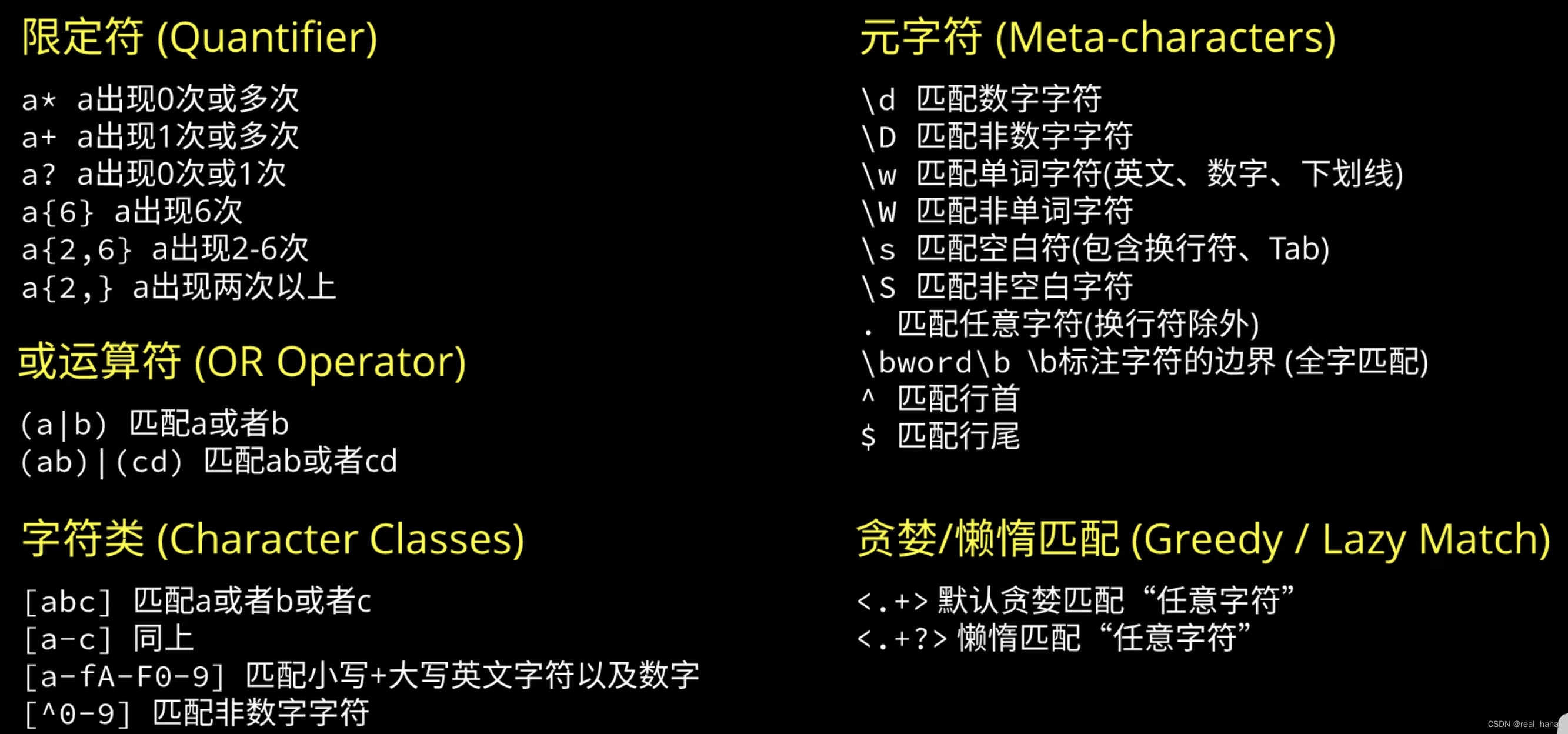
简介 正则表达式,我们可以看作通配符的增强版,可以帮我们匹配指定规则的字符串,在计算机中应用广泛,比如说爬虫、网站的登录表单等。 原视频:https://www.bilibili.com/video/BV1da4y1p7iZ 学习正则表达式的常用工具…...
数据可视化(5)热力图及箱型图
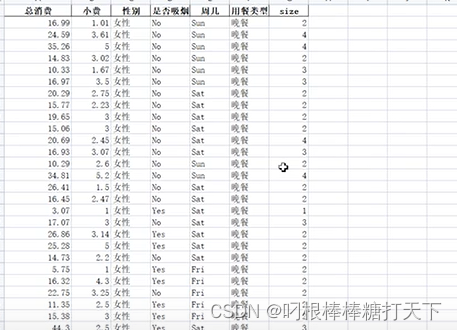
1.热力图 #基本热力图 #imshow(x) #x,数据 x[[1,2],[3,4],[5,6],[7,8],[9,10]] plt.imshow(x) plt.show() #使用热力图分析学生的成绩 dfpd.read_excel(学生成绩表.xlsx) #:表示行号 截取数学到英语的列数 xdf.loc[:,"数学":英语].…...

React 组件通信-全面解析
父子组件通信 // 导入 import { useState } from "react";import "./App.scss"; import { defaultTodos } from "./components/module/contentData";// 子组件 const Module ({ id, done, text, onToggle, onDelData }) > {return (<div…...

“深入理解Spring Boot:快速构建微服务架构的利器“
标题:深入理解Spring Boot:快速构建微服务架构的利器 摘要:Spring Boot是一种基于Spring框架的开源项目,它通过自动化配置和约定优于配置的原则,使得开发者能够快速构建微服务架构。本文将深入介绍Spring Boot的特点和…...

SpringBoot超级详解
1.父工程的父工程 在父工程的父工程中的核心依赖,专门用来版本管理的 版本管理。 2.父工程 资源过滤问题,都帮解决了,什么配置文件,都已经配置好了,资源过滤问题是帮助,过滤解决让静态资源文件能够过滤到…...
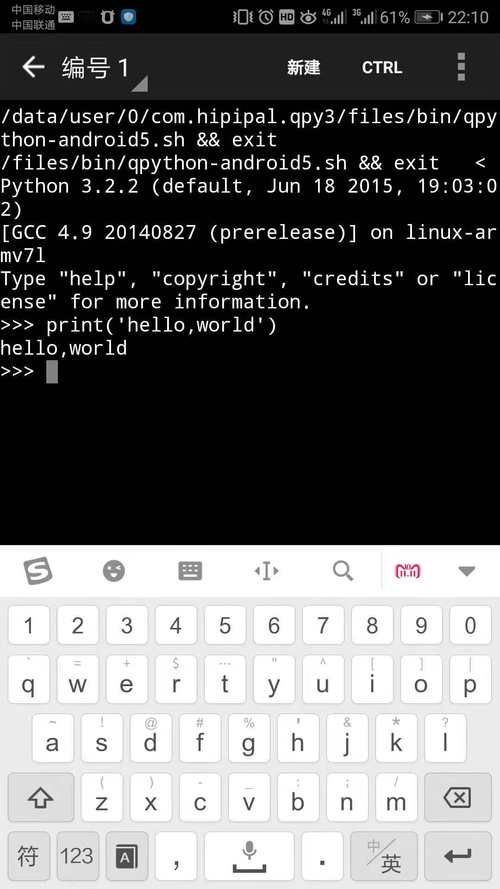
手机的python怎么运行文件,python在手机上怎么运行
大家好,小编来为大家解答以下问题,手机上的python怎么运行程序,手机的python怎么运行文件,今天让我们一起来看看吧! 1、python程序怎么在手机上运行 python语言应用很广泛,自己也很喜欢使用它,其…...

5分钟完成Switch注入:TegraRcmGUI终极图形化工具完整指南
5分钟完成Switch注入:TegraRcmGUI终极图形化工具完整指南 【免费下载链接】TegraRcmGUI C GUI for TegraRcmSmash (Fuse Gele exploit for Nintendo Switch) 项目地址: https://gitcode.com/gh_mirrors/te/TegraRcmGUI Switch注入对于许多Nintendo Switch用户…...

Jenga框架双引擎设计:视频生成效率优化解析
1. Jenga框架核心设计解析Jenga视频生成框架的核心创新在于其双引擎设计:渐进式分辨率(ProRes)和动态块稀疏注意力(AttenCarve)。这两种技术协同工作,解决了Transformer架构在视频生成中的计算效率瓶颈。1.1 渐进式分辨率技术(ProRes)ProRes采用分阶段生…...

欢迎新Buddy:DataBuddy
大数据人自己的原生Agent来了!腾讯云大数据智能体工作台DataBuddy正式发布。用户通过自然语言对话,即可完成数据接入、开发、治理、分析全链路任务,不用再在多个页面之间切换操作,一句话说清目标,Agent自己跑完全流程。…...
)
别再乱调了!用Audition参数均衡器拯救你的干音(附实战预设)
别再乱调了!用Audition参数均衡器拯救你的干音(附实战预设) 录制完一段音频后,你是否经常遇到这样的困扰:人声听起来闷闷的像隔了层棉被,或是尖锐刺耳到让人皱眉,又或者整体浑浊不清缺乏层次感&…...

英特尔现代代码开发挑战:实战性能优化与工具链应用指南
1. 项目概述:一场面向开发者的实战演练最近深度参与并复盘了英特尔举办的“现代代码开发挑战”网络研讨会,感触颇深。这远不止是一场普通的技术分享会,而是一个精心设计的、让开发者亲手“触摸”现代硬件性能潜力的实战沙盒。如果你是一名C/C…...

铁路局信息化综合管理平台总体设计方案
一、五层架构支撑全域智能化 平台以感知、网络、数据、平台、应用五层架构贯通铁路资源数字化链路,为铁路局打造横向到边、纵向到底的智能化管理底座。 应用层-业务功能模块–物资仓储、卧具跟踪、工具管理、档案管理等业务功能模块 平台层-微服务与技术中心–提…...

深度学习-基于YOLOv8的香蕉成熟度检测系统 YOLOV8预训练模型如何训练香蕉成熟度检测数据集
深度学习-基于YOLOv8的香蕉成熟度检测系统,包括 全部源码 完整标注的数据集 训练好的模型及训练结果 项目运行教程 内含 10000 张数据集,包括 [‘freshripe’, ‘freshunripe’, ‘overripe’, ‘ripe’, ‘rotten’, ‘unripe’],6 类本项目…...

第一性原理缺陷计算准备:以氢掺杂氧化镓为例的VASP实践指南
1. 项目概述:从“掺杂”到“缺陷”的计算准备在半导体材料研究领域,尤其是宽禁带半导体,对材料进行掺杂以调控其电学、光学性质是核心课题之一。氧化镓(Ga2O3)作为一种新兴的超宽禁带半导体,因其在功率电子…...

SwinFusion论文精读与代码复现:拆解‘跨域远程学习’如何让图像融合效果开挂
SwinFusion技术解析:跨域远程学习如何重塑图像融合范式 图像融合技术正经历一场由Transformer架构引领的范式变革。传统方法在全局依赖建模和跨域交互方面的局限性,催生了基于Swin Transformer的创新解决方案。本文将深入剖析SwinFusion这一通用图像融合…...

JS逆向实战:加密库动态Hook的工程化落地方法
1. 这不是写个console.log就能搞定的事:为什么主流加密库的Hook总在关键时刻失效“JS逆向实战:一键Hook主流加密库的调试与拦截”——看到这个标题,很多刚入行的朋友第一反应是:“不就是给CryptoJS、SM2、RSA.js这些库的encrypt方…...