
spring security + oauth2 使用RedisTokenStore 以json格式存储
1.项目架构

2.自己对 TokenStore 的 redis实现
package com.enterprise.auth.config;import org.springframework.data.redis.connection.RedisConnection;
import org.springframework.data.redis.connection.RedisConnectionFactory;
import org.springframework.data.redis.core.Cursor;
import org.springframework.data.redis.core.ScanOptions;
import org.springframework.security.oauth2.common.ExpiringOAuth2RefreshToken;
import org.springframework.security.oauth2.common.OAuth2AccessToken;
import org.springframework.security.oauth2.common.OAuth2RefreshToken;
import org.springframework.security.oauth2.provider.OAuth2Authentication;
import org.springframework.security.oauth2.provider.token.AuthenticationKeyGenerator;
import org.springframework.security.oauth2.provider.token.DefaultAuthenticationKeyGenerator;
import org.springframework.security.oauth2.provider.token.TokenStore;
import org.springframework.security.oauth2.provider.token.store.redis.JdkSerializationStrategy;
import org.springframework.security.oauth2.provider.token.store.redis.RedisTokenStore;
import org.springframework.security.oauth2.provider.token.store.redis.RedisTokenStoreSerializationStrategy;
import org.springframework.util.ClassUtils;
import org.springframework.util.ReflectionUtils;import java.lang.reflect.Method;
import java.nio.charset.StandardCharsets;
import java.util.*;public class MyRedisTokenStore implements TokenStore {private static final String ACCESS = "access:";private static final String AUTH_TO_ACCESS = "auth_to_access:";private static final String AUTH = "auth:";private static final String REFRESH_AUTH = "refresh_auth:";private static final String ACCESS_TO_REFRESH = "access_to_refresh:";private static final String REFRESH = "refresh:";private static final String REFRESH_TO_ACCESS = "refresh_to_access:";private static final String CLIENT_ID_TO_ACCESS = "client_id_to_access:";private static final String UNAME_TO_ACCESS = "uname_to_access:";private static final boolean springDataRedis_2_0 = ClassUtils.isPresent("org.springframework.data.redis.connection.RedisStandaloneConfiguration", RedisTokenStore.class.getClassLoader());private final RedisConnectionFactory connectionFactory;private AuthenticationKeyGenerator authenticationKeyGenerator = new DefaultAuthenticationKeyGenerator();private RedisTokenStoreSerializationStrategy serializationStrategy = new MyRedisTokenStoreSerializationStrategy();private String prefix = "";private Method redisConnectionSet_2_0;public MyRedisTokenStore(RedisConnectionFactory connectionFactory) {this.connectionFactory = connectionFactory;if (springDataRedis_2_0) {this.loadRedisConnectionMethods_2_0();}}public void setAuthenticationKeyGenerator(AuthenticationKeyGenerator authenticationKeyGenerator) {this.authenticationKeyGenerator = authenticationKeyGenerator;}public void setSerializationStrategy(RedisTokenStoreSerializationStrategy serializationStrategy) {this.serializationStrategy = serializationStrategy;}public void setPrefix(String prefix) {this.prefix = prefix;}private void loadRedisConnectionMethods_2_0() {this.redisConnectionSet_2_0 = ReflectionUtils.findMethod(RedisConnection.class, "set", new Class[]{byte[].class, byte[].class});}private RedisConnection getConnection() {return this.connectionFactory.getConnection();}private byte[] serialize(Object object) {return this.serializationStrategy.serialize(object);}private byte[] serializeKey(String object) {return this.serialize(this.prefix + object);}private OAuth2AccessToken deserializeAccessToken(byte[] bytes) {return (OAuth2AccessToken)this.serializationStrategy.deserialize(bytes, OAuth2AccessToken.class);}private OAuth2Authentication deserializeAuthentication(byte[] bytes) {return (OAuth2Authentication)this.serializationStrategy.deserialize(bytes, OAuth2Authentication.class);}private OAuth2RefreshToken deserializeRefreshToken(byte[] bytes) {return (OAuth2RefreshToken)this.serializationStrategy.deserialize(bytes, OAuth2RefreshToken.class);}private byte[] serialize(String string) {return this.serializationStrategy.serialize(string);}private String deserializeString(byte[] bytes) {return this.serializationStrategy.deserializeString(bytes);}public OAuth2AccessToken getAccessToken(OAuth2Authentication authentication) {String key = this.authenticationKeyGenerator.extractKey(authentication);byte[] serializedKey = this.serializeKey("auth_to_access:" + key);byte[] bytes = null;RedisConnection conn = this.getConnection();try {bytes = conn.get(serializedKey);} finally {conn.close();}OAuth2AccessToken accessToken = this.deserializeAccessToken(bytes);if (accessToken != null) {OAuth2Authentication storedAuthentication = this.readAuthentication(accessToken.getValue());if (storedAuthentication == null || !key.equals(this.authenticationKeyGenerator.extractKey(storedAuthentication))) {this.storeAccessToken(accessToken, authentication);}}return accessToken;}public OAuth2Authentication readAuthentication(OAuth2AccessToken token) {return this.readAuthentication(token.getValue());}public OAuth2Authentication readAuthentication(String token) {byte[] bytes = null;RedisConnection conn = this.getConnection();try {bytes = conn.get(this.serializeKey("auth:" + token));} finally {conn.close();}OAuth2Authentication var4 = this.deserializeAuthentication(bytes);return var4;}public OAuth2Authentication readAuthenticationForRefreshToken(OAuth2RefreshToken token) {return this.readAuthenticationForRefreshToken(token.getValue());}public OAuth2Authentication readAuthenticationForRefreshToken(String token) {RedisConnection conn = this.getConnection();OAuth2Authentication var5;try {byte[] bytes = conn.get(this.serializeKey("refresh_auth:" + token));OAuth2Authentication auth = this.deserializeAuthentication(bytes);var5 = auth;} finally {conn.close();}return var5;}public void storeAccessToken(OAuth2AccessToken token, OAuth2Authentication authentication) {byte[] serializedAccessToken = this.serialize((Object)token);byte[] serializedAuth = this.serialize((Object)authentication);byte[] accessKey = this.serializeKey("access:" + token.getValue());byte[] authKey = this.serializeKey("auth:" + token.getValue());byte[] authToAccessKey = this.serializeKey("auth_to_access:" + this.authenticationKeyGenerator.extractKey(authentication));byte[] approvalKey = this.serializeKey("uname_to_access:" + getApprovalKey(authentication));byte[] clientId = this.serializeKey("client_id_to_access:" + authentication.getOAuth2Request().getClientId());RedisConnection conn = this.getConnection();try {conn.openPipeline();if (springDataRedis_2_0) {try {this.redisConnectionSet_2_0.invoke(conn, accessKey, serializedAccessToken);this.redisConnectionSet_2_0.invoke(conn, authKey, serializedAuth);this.redisConnectionSet_2_0.invoke(conn, authToAccessKey, serializedAccessToken);} catch (Exception var24) {throw new RuntimeException(var24);}} else {conn.set(accessKey, serializedAccessToken);conn.set(authKey, serializedAuth);conn.set(authToAccessKey, serializedAccessToken);}if (!authentication.isClientOnly()) {conn.sAdd(approvalKey, new byte[][]{serializedAccessToken});}conn.sAdd(clientId, new byte[][]{serializedAccessToken});if (token.getExpiration() != null) {int seconds = token.getExpiresIn();conn.expire(accessKey, (long)seconds);conn.expire(authKey, (long)seconds);conn.expire(authToAccessKey, (long)seconds);conn.expire(clientId, (long)seconds);conn.expire(approvalKey, (long)seconds);}OAuth2RefreshToken refreshToken = token.getRefreshToken();if (refreshToken != null && refreshToken.getValue() != null) {byte[] refresh = this.serialize(token.getRefreshToken().getValue());byte[] auth = this.serialize(token.getValue());byte[] refreshToAccessKey = this.serializeKey("refresh_to_access:" + token.getRefreshToken().getValue());byte[] accessToRefreshKey = this.serializeKey("access_to_refresh:" + token.getValue());if (springDataRedis_2_0) {try {this.redisConnectionSet_2_0.invoke(conn, refreshToAccessKey, auth);this.redisConnectionSet_2_0.invoke(conn, accessToRefreshKey, refresh);} catch (Exception var23) {throw new RuntimeException(var23);}} else {conn.set(refreshToAccessKey, auth);conn.set(accessToRefreshKey, refresh);}if (refreshToken instanceof ExpiringOAuth2RefreshToken) {ExpiringOAuth2RefreshToken expiringRefreshToken = (ExpiringOAuth2RefreshToken)refreshToken;Date expiration = expiringRefreshToken.getExpiration();if (expiration != null) {int seconds = Long.valueOf((expiration.getTime() - System.currentTimeMillis()) / 1000L).intValue();conn.expire(refreshToAccessKey, (long)seconds);conn.expire(accessToRefreshKey, (long)seconds);}}}conn.closePipeline();} finally {conn.close();}}private static String getApprovalKey(OAuth2Authentication authentication) {String userName = authentication.getUserAuthentication() == null ? "" : authentication.getUserAuthentication().getName();return getApprovalKey(authentication.getOAuth2Request().getClientId(), userName);}private static String getApprovalKey(String clientId, String userName) {return clientId + (userName == null ? "" : ":" + userName);}public void removeAccessToken(OAuth2AccessToken accessToken) {this.removeAccessToken(accessToken.getValue());}public OAuth2AccessToken readAccessToken(String tokenValue) {byte[] key = this.serializeKey("access:" + tokenValue);byte[] bytes = null;RedisConnection conn = this.getConnection();try {bytes = conn.get(key);} finally {conn.close();}OAuth2AccessToken var5 = this.deserializeAccessToken(bytes);return var5;}public void removeAccessToken(String tokenValue) {byte[] accessKey = this.serializeKey("access:" + tokenValue);byte[] authKey = this.serializeKey("auth:" + tokenValue);byte[] accessToRefreshKey = this.serializeKey("access_to_refresh:" + tokenValue);RedisConnection conn = this.getConnection();try {conn.openPipeline();conn.get(accessKey);conn.get(authKey);conn.del(new byte[][]{accessKey});conn.del(new byte[][]{accessToRefreshKey});conn.del(new byte[][]{authKey});List<Object> results = conn.closePipeline();byte[] access = (byte[])((byte[])results.get(0));byte[] auth = (byte[])((byte[])results.get(1));OAuth2Authentication authentication = this.deserializeAuthentication(auth);if (authentication != null) {String key = this.authenticationKeyGenerator.extractKey(authentication);byte[] authToAccessKey = this.serializeKey("auth_to_access:" + key);byte[] unameKey = this.serializeKey("uname_to_access:" + getApprovalKey(authentication));byte[] clientId = this.serializeKey("client_id_to_access:" + authentication.getOAuth2Request().getClientId());conn.openPipeline();conn.del(new byte[][]{authToAccessKey});conn.sRem(unameKey, new byte[][]{access});conn.sRem(clientId, new byte[][]{access});conn.del(new byte[][]{this.serialize("access:" + key)});conn.closePipeline();}} finally {conn.close();}}public void storeRefreshToken(OAuth2RefreshToken refreshToken, OAuth2Authentication authentication) {byte[] refreshKey = this.serializeKey("refresh:" + refreshToken.getValue());byte[] refreshAuthKey = this.serializeKey("refresh_auth:" + refreshToken.getValue());byte[] serializedRefreshToken = this.serialize((Object)refreshToken);RedisConnection conn = this.getConnection();try {conn.openPipeline();if (springDataRedis_2_0) {try {this.redisConnectionSet_2_0.invoke(conn, refreshKey, serializedRefreshToken);this.redisConnectionSet_2_0.invoke(conn, refreshAuthKey, this.serialize((Object)authentication));} catch (Exception var13) {throw new RuntimeException(var13);}} else {conn.set(refreshKey, serializedRefreshToken);conn.set(refreshAuthKey, this.serialize((Object)authentication));}if (refreshToken instanceof ExpiringOAuth2RefreshToken) {ExpiringOAuth2RefreshToken expiringRefreshToken = (ExpiringOAuth2RefreshToken)refreshToken;Date expiration = expiringRefreshToken.getExpiration();if (expiration != null) {int seconds = Long.valueOf((expiration.getTime() - System.currentTimeMillis()) / 1000L).intValue();conn.expire(refreshKey, (long)seconds);conn.expire(refreshAuthKey, (long)seconds);}}conn.closePipeline();} finally {conn.close();}}public OAuth2RefreshToken readRefreshToken(String tokenValue) {byte[] key = this.serializeKey("refresh:" + tokenValue);byte[] bytes = null;RedisConnection conn = this.getConnection();try {bytes = conn.get(key);} finally {conn.close();}OAuth2RefreshToken var5 = this.deserializeRefreshToken(bytes);return var5;}public void removeRefreshToken(OAuth2RefreshToken refreshToken) {this.removeRefreshToken(refreshToken.getValue());}public void removeRefreshToken(String tokenValue) {byte[] refreshKey = this.serializeKey("refresh:" + tokenValue);byte[] refreshAuthKey = this.serializeKey("refresh_auth:" + tokenValue);byte[] refresh2AccessKey = this.serializeKey("refresh_to_access:" + tokenValue);byte[] access2RefreshKey = this.serializeKey("access_to_refresh:" + tokenValue);RedisConnection conn = this.getConnection();try {conn.openPipeline();conn.del(new byte[][]{refreshKey});conn.del(new byte[][]{refreshAuthKey});conn.del(new byte[][]{refresh2AccessKey});conn.del(new byte[][]{access2RefreshKey});conn.closePipeline();} finally {conn.close();}}public void removeAccessTokenUsingRefreshToken(OAuth2RefreshToken refreshToken) {this.removeAccessTokenUsingRefreshToken(refreshToken.getValue());}private void removeAccessTokenUsingRefreshToken(String refreshToken) {byte[] key = this.serializeKey("refresh_to_access:" + refreshToken);List<Object> results = null;RedisConnection conn = this.getConnection();try {conn.openPipeline();conn.get(key);conn.del(new byte[][]{key});results = conn.closePipeline();} finally {conn.close();}if (results != null) {byte[] bytes = (byte[])((byte[])results.get(0));String accessToken = this.deserializeString(bytes);if (accessToken != null) {this.removeAccessToken(accessToken);}}}private List<byte[]> getByteLists(byte[] approvalKey, RedisConnection conn) {Long size = conn.sCard(approvalKey);List<byte[]> byteList = new ArrayList(size.intValue());Cursor cursor = conn.sScan(approvalKey, ScanOptions.NONE);while(cursor.hasNext()) {Object next = cursor.next();byteList.add(next.toString().getBytes(StandardCharsets.UTF_8));}return byteList;}public Collection<OAuth2AccessToken> findTokensByClientIdAndUserName(String clientId, String userName) {byte[] approvalKey = this.serializeKey("uname_to_access:" + getApprovalKey(clientId, userName));List<byte[]> byteList = null;RedisConnection conn = this.getConnection();try {byteList = this.getByteLists(approvalKey, conn);} finally {conn.close();}if (byteList != null && byteList.size() != 0) {List<OAuth2AccessToken> accessTokens = new ArrayList(byteList.size());Iterator var7 = byteList.iterator();while(var7.hasNext()) {byte[] bytes = (byte[])var7.next();OAuth2AccessToken accessToken = this.deserializeAccessToken(bytes);accessTokens.add(accessToken);}return Collections.unmodifiableCollection(accessTokens);} else {return Collections.emptySet();}}public Collection<OAuth2AccessToken> findTokensByClientId(String clientId) {byte[] key = this.serializeKey("client_id_to_access:" + clientId);List<byte[]> byteList = null;RedisConnection conn = this.getConnection();try {byteList = this.getByteLists(key, conn);} finally {conn.close();}if (byteList != null && byteList.size() != 0) {List<OAuth2AccessToken> accessTokens = new ArrayList(byteList.size());Iterator var6 = byteList.iterator();while(var6.hasNext()) {byte[] bytes = (byte[])var6.next();OAuth2AccessToken accessToken = this.deserializeAccessToken(bytes);accessTokens.add(accessToken);}return Collections.unmodifiableCollection(accessTokens);} else {return Collections.emptySet();}}
}
3.自定义序列化类
package com.enterprise.auth.config;import com.google.gson.Gson;
import org.springframework.security.oauth2.provider.token.store.redis.BaseRedisTokenStoreSerializationStrategy;import java.nio.charset.StandardCharsets;
import java.util.Map;public class MyRedisTokenStoreSerializationStrategy extends BaseRedisTokenStoreSerializationStrategy {@Override//反序列化内部protected <T> T deserializeInternal(byte[] bytes, Class<T> aClass) {String s = new String(bytes);Gson gson = new Gson();return gson.fromJson(s,aClass);}@Override//反序列化字符串内部protected String deserializeStringInternal(byte[] bytes) {return new String(bytes);}@Override//序列化内部protected byte[] serializeInternal(Object o) {Gson gson = new Gson();String json = gson.toJson(o);return json.getBytes(StandardCharsets.UTF_8);}@Override//序列化内部protected byte[] serializeInternal(String s) {return  s.getBytes(StandardCharsets.UTF_8);}
}
4.配置使用redis类型的 TokenStore
package com.enterprise.auth.config;import org.springframework.beans.factory.annotation.Autowired;
import org.springframework.context.annotation.Bean;
import org.springframework.context.annotation.Configuration;
import org.springframework.data.redis.connection.RedisConnectionFactory;
import org.springframework.security.oauth2.provider.token.TokenStore;@Configuration
public class MyRedisTokenStoreConfig {@Autowiredprivate RedisConnectionFactory redisConnectionFactory;@Beanpublic TokenStore tokenStore() {MyRedisTokenStore redisTokenStore = new MyRedisTokenStore(redisConnectionFactory);return redisTokenStore;}
}
5.完成认证模块的编写后,测试登录
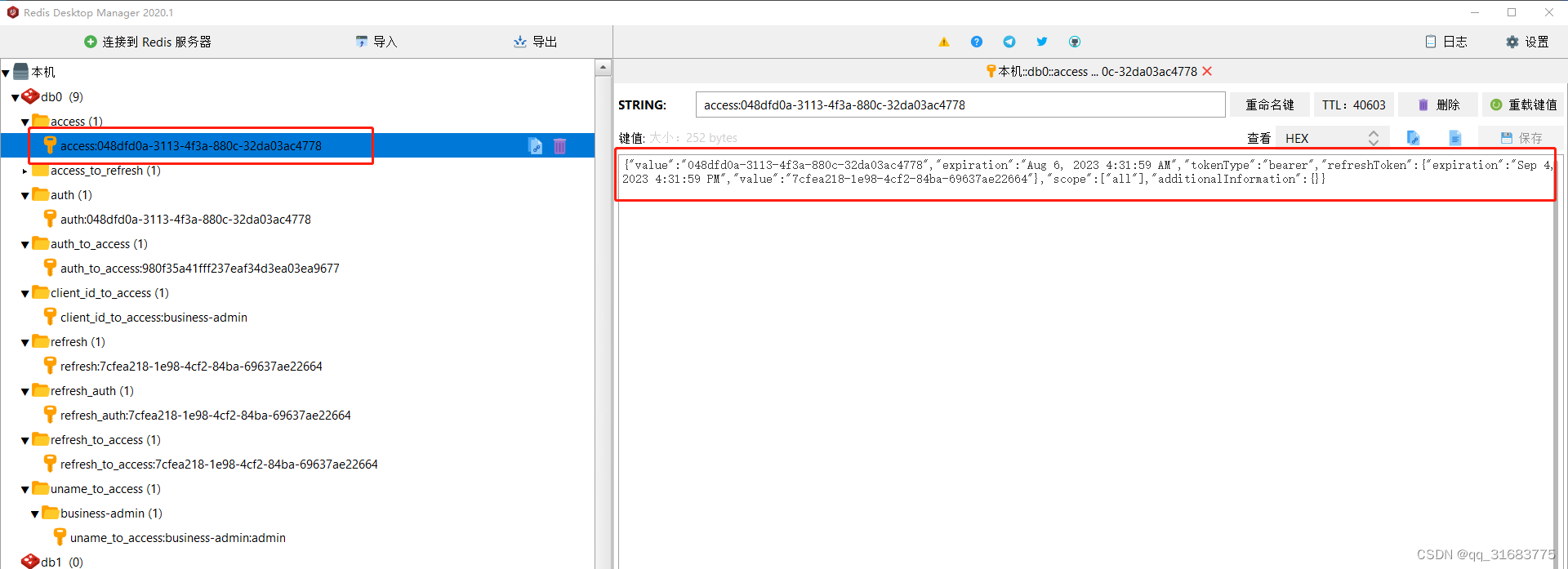
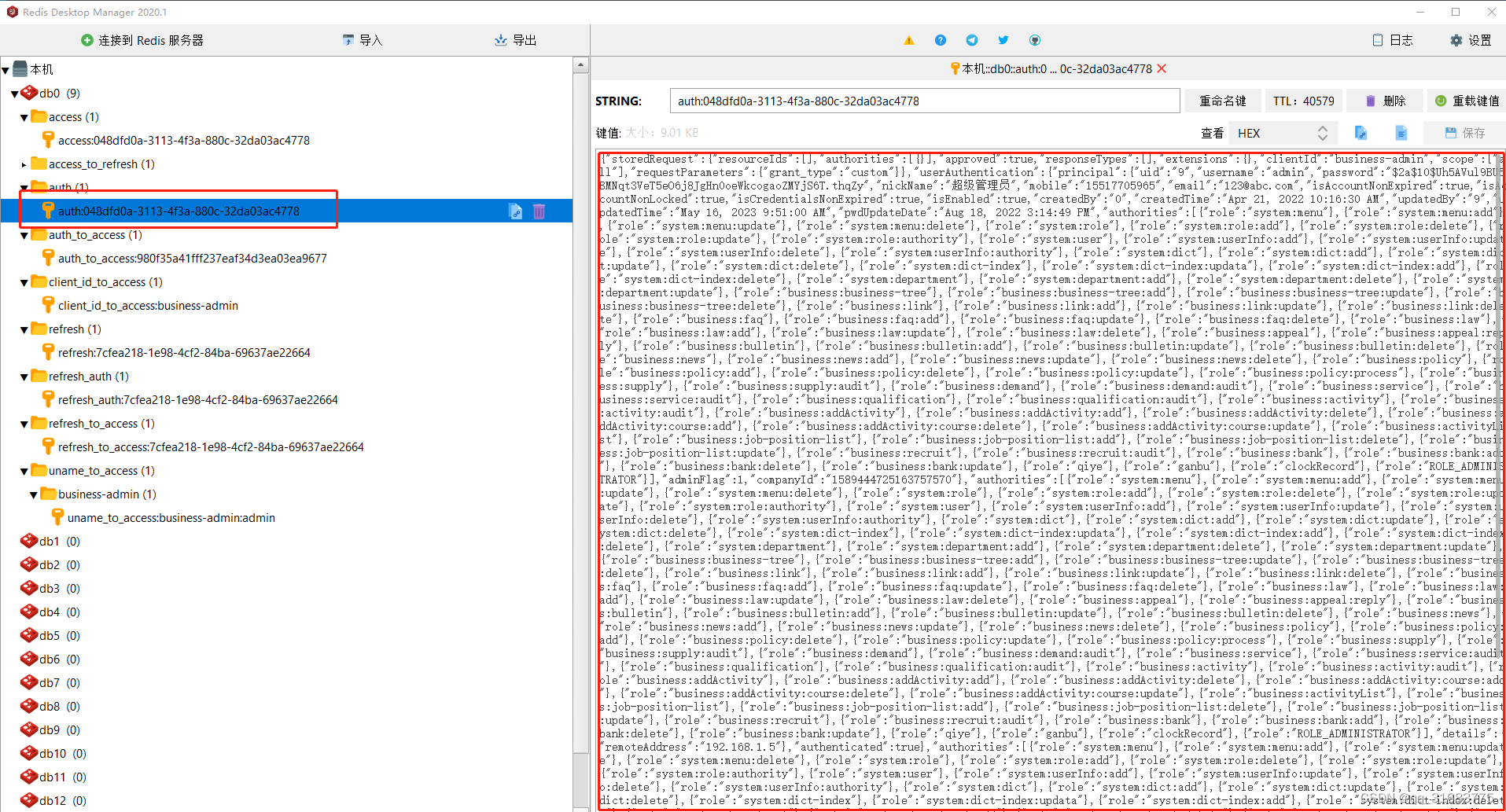
json已经保存在数据库了
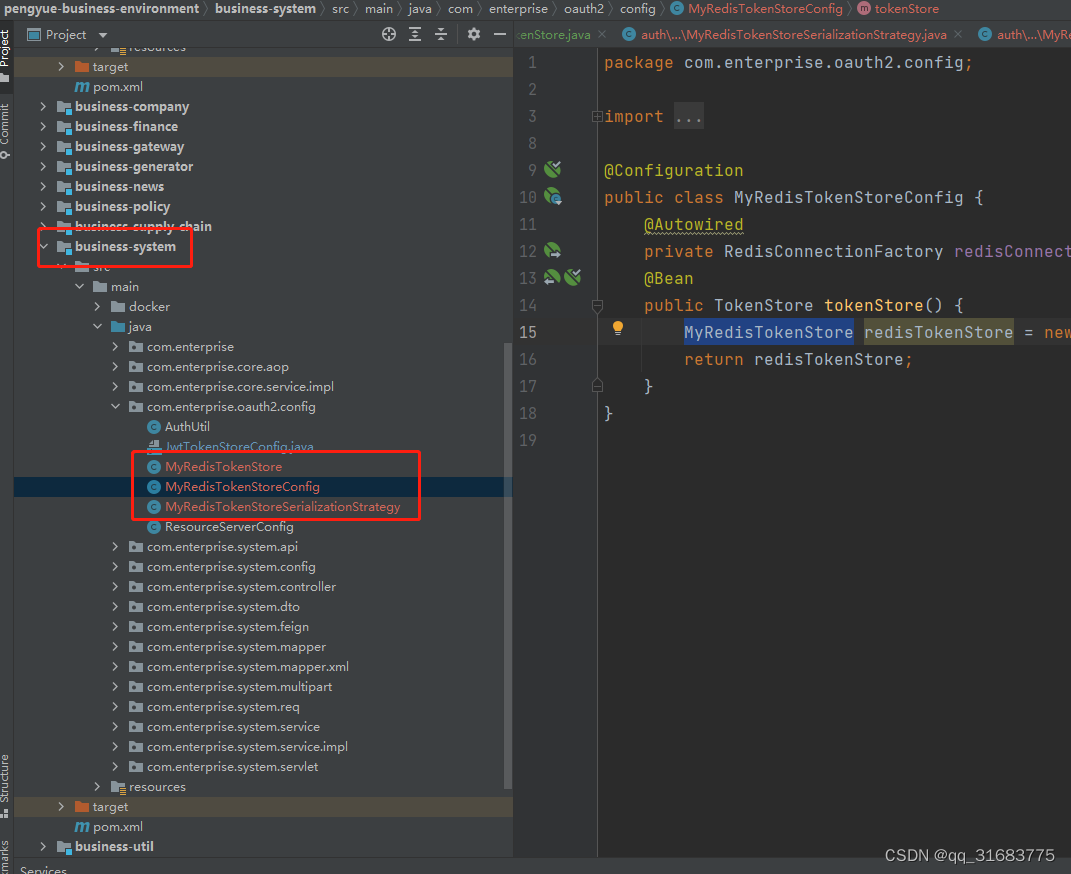
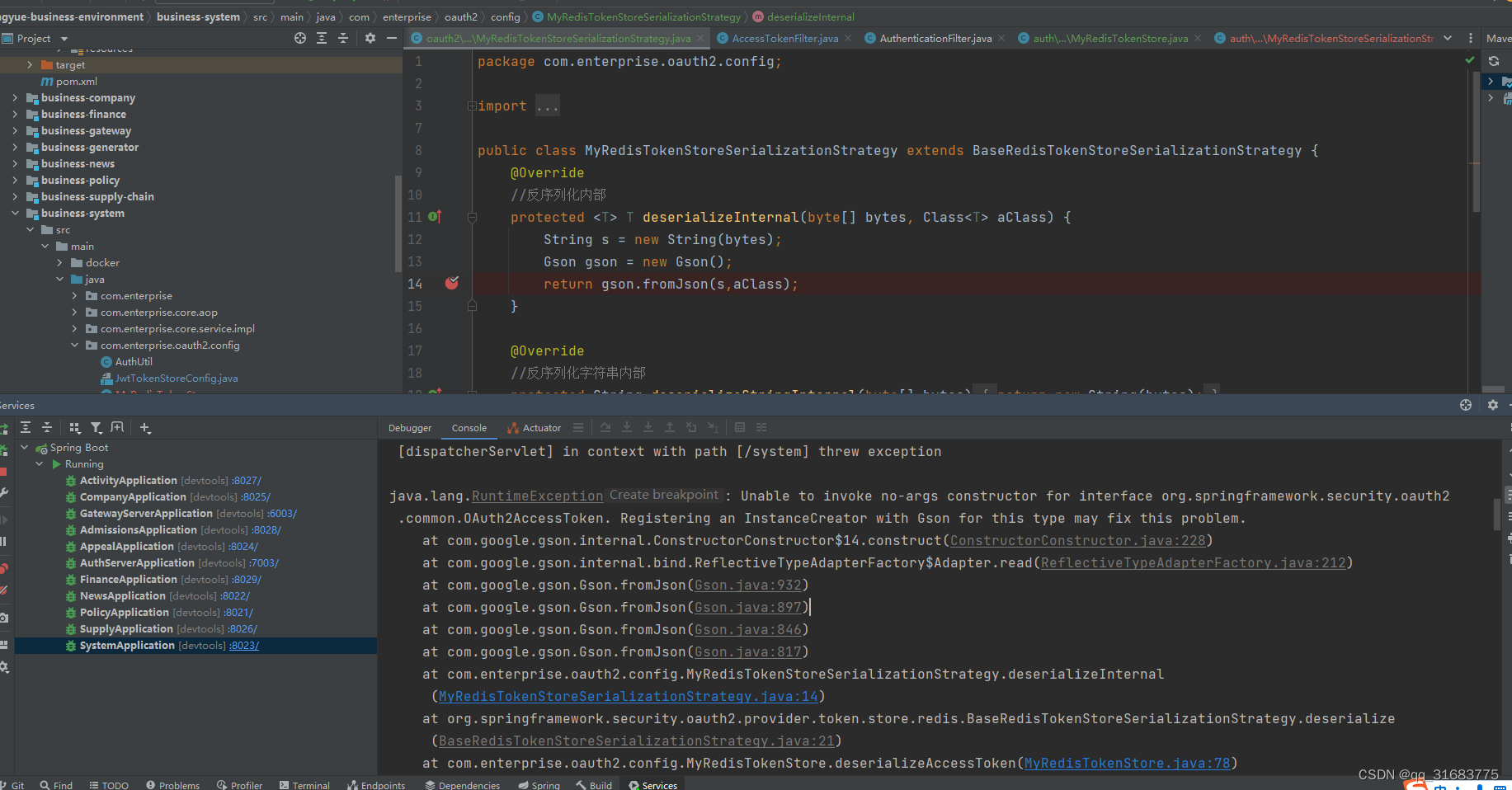
但是!!!!!,保存没问题,取出来的时候就有问题了,把这三个文件复制到资源服务器,让资源服务器也用MyRedisTokenStore 的方式读取权限信息.
然后访问,到json权限信息转成实体类的时候,就有问题了,各种各样oauth2 中的数据实体类,没有构造方法,无法创建对象,先转成map在手动新建对象同样不行,

redis中的配置已经读到了
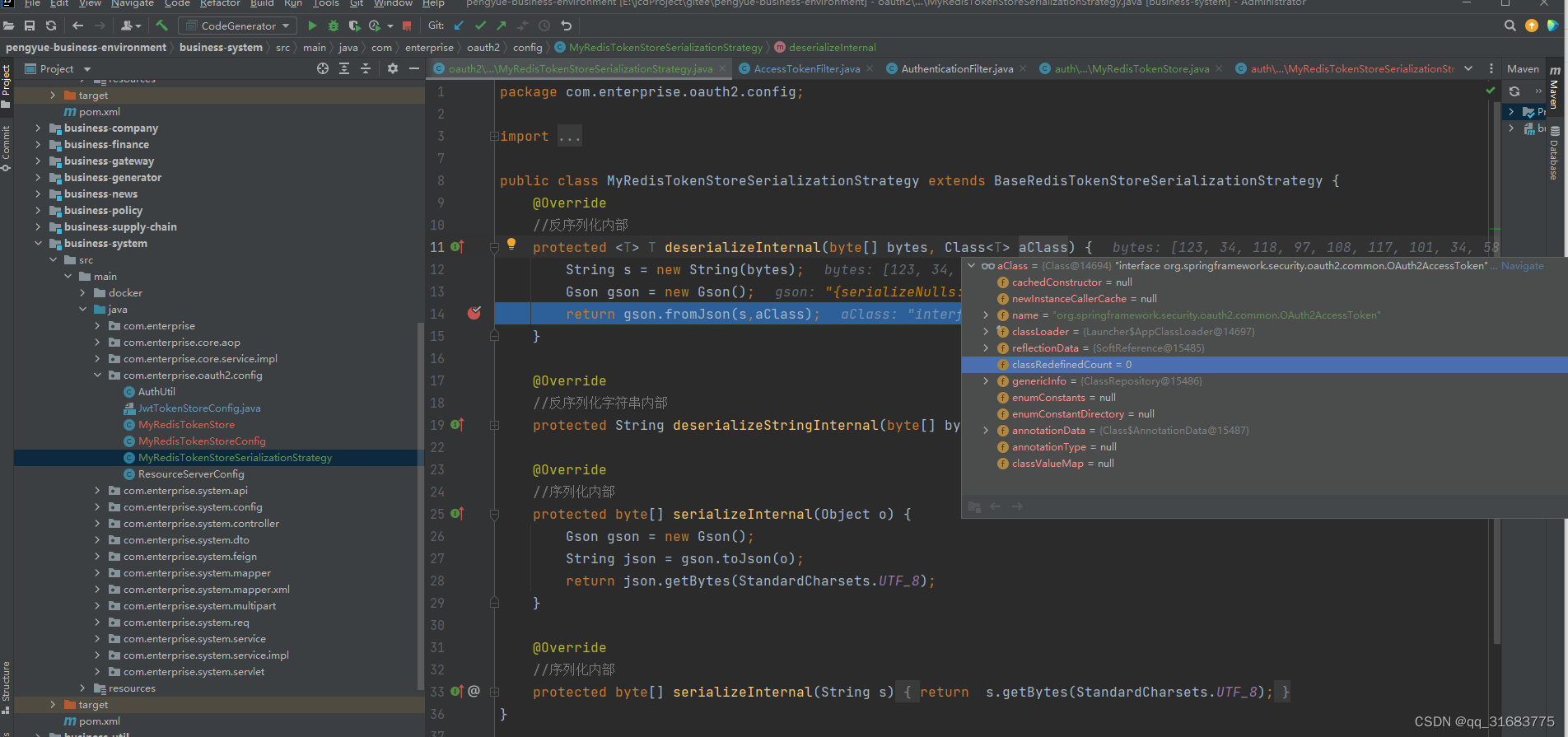
但是需要实例化的对象类路径,这么长一串,没有构造方法,无法新建对象.
报错>>>
结束<<<<<<<<
相关文章:
spring security + oauth2 使用RedisTokenStore 以json格式存储
1.项目架构 2.自己对 TokenStore 的 redis实现 package com.enterprise.auth.config;import org.springframework.data.redis.connection.RedisConnection; import org.springframework.data.redis.connection.RedisConnectionFactory; import org.springframework.data.redis…...
css position: sticky;实现上下粘性布局,中间区域滚动
sticky主要解决的问题 1、使用absolute和fixed中间区域需要定义高度2、使用absolute和fixed底部需要写padding-bottom 避免列表被遮挡住一部分(底部是浮窗的时候,需要动态的现实隐藏) <!DOCTYPE html> <html lang"en"&…...

解密HTTP代理爬虫中的IP代理选择与管理策略
在当今数据驱动的世界中,HTTP代理爬虫作为一项重要的数据采集工具,其成功与否往往取决于IP代理的选择与管理策略。作为一家专业的HTTP代理产品供应商,我们深知IP代理在数据采集中的重要性。在本文中,我们将分享一些关于HTTP代理爬…...
pytorch入门
详细安装教程和环境配置可以看:Python深度学习:安装Anaconda、PyTorch(GPU版)库与PyCharm_哔哩哔哩_bilibili 跟学课程:B站我是土堆 pytorch中两个实用函数: dir():打开 help():说明书…...

Redis | 主从模式
Redis | 主从模式 1. 简介 Redis主从模式(Replication)是Redis提供的一种数据备份和高可用性解决方案。通过主从复制,可以将一个Redis服务器的数据复制到其他多个从服务器,从而实现数据的备份和读写分离,提高系统的性…...

C# Blazor 学习笔记(8):row/col布局开发
文章目录 前言相关文章代码row和col组件B_rowB_col结构 使用 前言 可能是我用的element ui和 uView这种第三方组件用的太多了。我上来就希望能使用这些组件。但是目前Blazor目前的生态其实并不完善,所以很多组件要我们自己写。 我们对组件的要求是 我们在组件化一共…...

金融供应链智能合约 -- 智能合约实例
前提 Ownable:监管者合约,有一个函数能转让监管者。 SupplyChainFin:供应链金融合约,银行、公司信息上链,公司和银行之间的转账。 发票:记录者交易双方和交易金额等的一种记录数据。如:我在超市买了一瓶水,超市给我开了一张发票。 Ownable // SPDX-…...

论文《Contrastive Meta Learning with Behavior Multiplicity for Recommendation》阅读
论文《Contrastive Meta Learning with Behavior Multiplicity for Recommendation》阅读 论文概况论文主要贡献Background & Motivation方法论单行为图神经网络(Behavior-aware GNN)多行为对比学习元对比编码模型训练 实验部分论文总结 论文概况 今…...

K8S 部署 RocketMQ
文章目录 添加模板部署本地访问 集群使用 kubesphere 作为工具 添加模板 添加 helm 模板 helm repo add rocketmq-repo https://helm-charts.itboon.top/rocketmq helm repo update rocketmq-repo编写 value.yaml 文件 配置主从节点的个数,例子为单节点 broker:…...

[Docker]入门之docker-compose
一,Docker-compose简介 1,Docker-compose简介 Docker-Compose项目是Docker官方的开源项目,负责实现对Docker容器集群的快速编排。 Docker-Compose将所管理的容器分为三层,分别是工程(project),…...

SAP ABAP中使用函数ALSM_EXCEL_TO_INTERNAL_TABLE读取EXCEL中不同的SHEET数据
SAP提供了标准的读取EXCEL的函数(ALSM_EXCEL_TO_INTERNAL_TABLE),但是此标准函数无法满足对同一EXCEL 进行不同SHEET的数据读取,一下方法就是教你如何通过修改程序来实现ALSM_EXCEL_TO_INTERNAL_TABLE读取多个SHEET; …...
Rust 编程小技巧摘选(6)
目录 Rust 编程小技巧(6) 1. 打印字符串 2. 重复打印字串 3. 自定义函数 4. 遍历动态数组 5. 遍历二维数组 6. 同时遍历索引和值 7. 迭代器方法的区别 8. for_each() 用法 9. 分离奇数和偶数 10. 判断素数(质数) Rust 编程小技巧(6) 1. 打印…...

如何保证Redis缓存和数据库的一致性问题
熟练掌握Redis缓存技术? 那么请问Redis缓存中有几种读写策略,又是如何保证与数据库的一致性问题 今天来聊一聊常用的三种缓存读写策略 Cache Aside Pattern Cache Aside Pattern 是我们平时使用比较多的一个缓存读写模式,比较适合读请求比…...

【数据分析入门】人工智能、数据分析和深度学习是什么关系?如何快速入门 Python Pandas?
目录 一、前言二、数据分析和深度学习的区别三、人工智能四、深度学习五、Pandas六、Pandas数据结构6.1 Series - 序列6.2 DataFrame - 数据框 七、输入、输出7.1 读取/写入CSV7.2 读取/写入Excel7.3 读取和写入 SQL 查询及数据库表 八、调用帮助九、选择(这里可以参考上一篇文…...

JavaScript 里三个点 ... 的用法
// table表头数据let tableHeadData deepClone(data);let tableCacheData [];//表格缓存对比if (!parent && isCacheHeadData) {// 缓存数据keylet tableCacheKey ${window.location.pathname}-${$self.attr(id)}if (localStorage.getItem(tableCacheKey)) {//根据缓…...
Linux修改系统语言
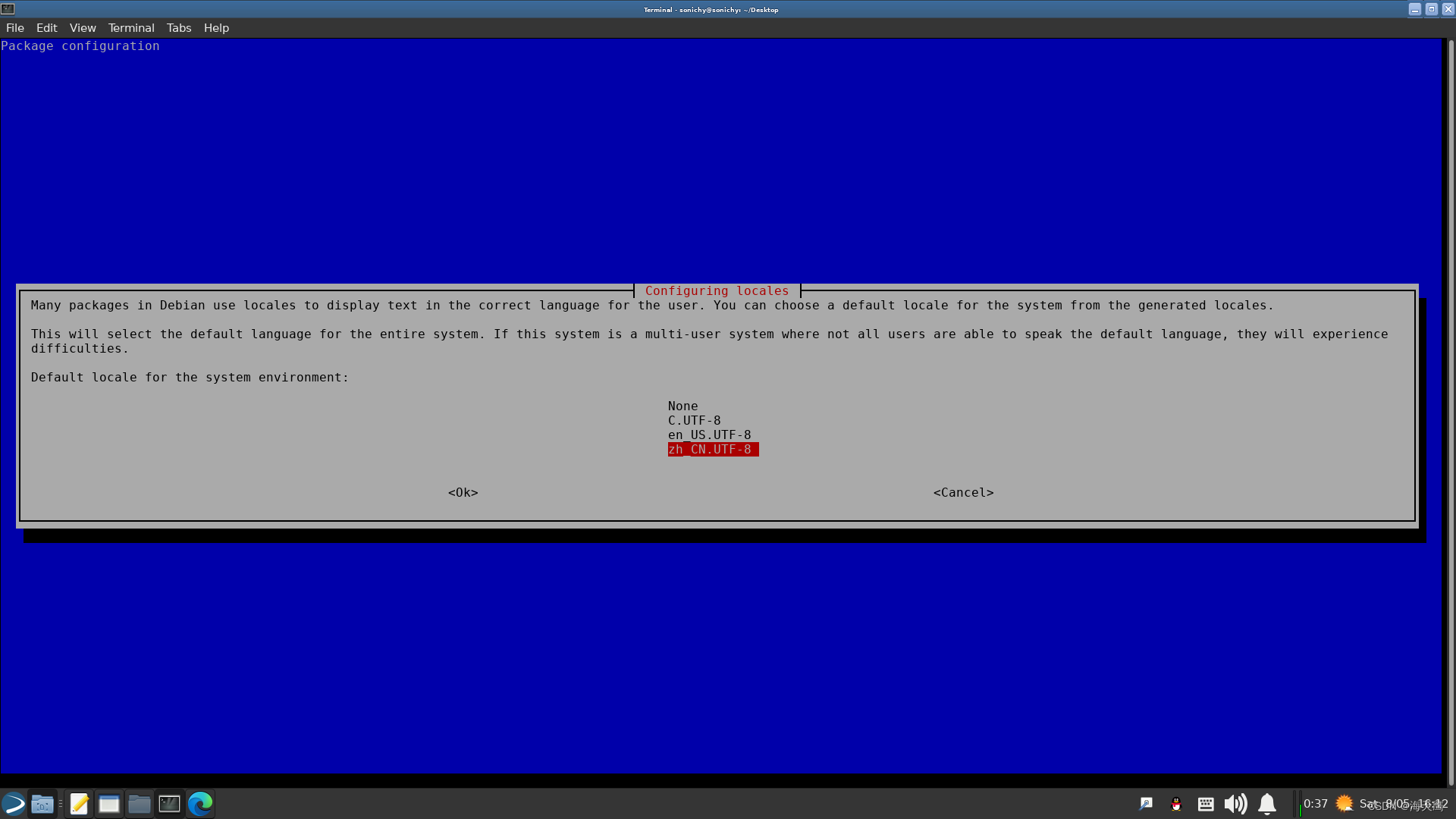
sudo dpkg-reconfigure locales 按pagedown键,移动红色光标到 zh_CN.UTF-8 UTF-8,空格标记*号(没标记下一页没有这一项),回车。 下一页选择 zh_CN.UTF-8。 如果找不到 dpkg-reconfigure whereis dpkg-reconfigure …...
Spring注解开发
目录 1、简介 2、原始注解 2.1、注解种类 2.2、组件扫描 2.3、具体使用 2.3.1、xml配置 2.3.2、注解配置 3、⭐新注解 3.1、新注解种类 3.2、实践 3.3、运行结果 3.4、警告信息 1、简介 Spring框架提供了许多注解,用于在Java类中进行配置和标记…...
图像处理库(Opencv, Matplotlib, PIL)以及三者之间的转换
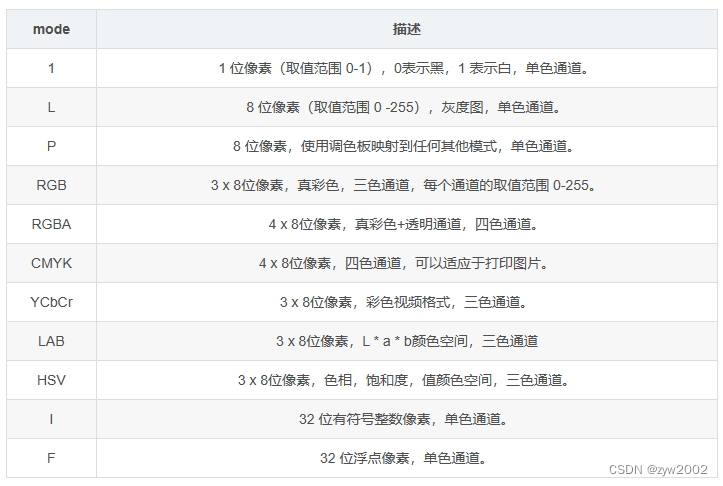
文章目录 1. Opencv2. Matplotlib3. PIL4. 三者的区别和相互转换5. Torchvision 中的相关转换库5.1 ToPILImage([mode])5.2 ToTensor5.3 PILToTensor 1. Opencv opencv的基本图像类型可以和numpy数组相互转化,因此可以直接调用torch.from_numpy(img) 将图像转换成t…...

html+Vue+封装axios实现发送请求
在html中使用Vue和Axios时,可以在HTML中引入Vue库和Axios库,然后使用Vue的语法和指令来创建Vue组件和模板。在Vue组件中,你可以使用Axios发送HTTP请求来获取数据,并将数据绑定到Vue模板中进行展示。 <template><div>&…...

GoogLeNet卷积神经网络输出数据形参分析-笔记
GoogLeNet卷积神经网络输出数据形参分析-笔记 分析结果为: 输入数据形状:[10, 3, 224, 224] 最后输出结果:linear_0 [10, 1] [1024, 1] [1] 子空间执行逻辑 def forward_old(self, x):# 支路1只包含一个1x1卷积p1 F.relu(self.p1_1(x))# 支路2包含 1…...

3个真实场景告诉你,Avogadro 2分子建模软件如何改变化学研究方式
3个真实场景告诉你,Avogadro 2分子建模软件如何改变化学研究方式 【免费下载链接】avogadroapp Avogadro is an advanced molecular editor designed for cross-platform use in computational chemistry, molecular modeling, bioinformatics, materials science, …...

FPGA存储资源怎么选?一张图看懂LUTRAM、BRAM和URAM的适用场景与性能差异
FPGA存储资源选型指南:LUTRAM、BRAM与URAM的深度对比与实战选择 在FPGA设计的世界里,存储资源的选择往往决定了整个系统的性能和效率。想象一下,你正在为一个高性能图像处理系统设计FPGA架构,需要在片上实现一个容量为128Kb的帧缓…...

Windows防撤回补丁终极指南:微信QQ消息永久保存的完整解决方案
Windows防撤回补丁终极指南:微信QQ消息永久保存的完整解决方案 【免费下载链接】RevokeMsgPatcher :trollface: A hex editor for WeChat/QQ/TIM - PC版微信/QQ/TIM防撤回补丁(我已经看到了,撤回也没用了) 项目地址: https://gi…...

终极指南:3步让苹果触控板在Windows上获得原生级体验
终极指南:3步让苹果触控板在Windows上获得原生级体验 【免费下载链接】mac-precision-touchpad Windows Precision Touchpad Driver Implementation for Apple MacBook / Magic Trackpad 项目地址: https://gitcode.com/gh_mirrors/ma/mac-precision-touchpad …...
的完整用法)
别让拼写检查器坑了你的代码!Visual Studio中自定义排除字典(exclusion.dic)的完整用法
深度定制Visual Studio拼写检查:打造团队专属的exclusion.dic解决方案 当你在Visual Studio中看到熟悉的红色波浪线时,第一反应可能是代码出现了语法错误。但仔细一看,却发现是拼写检查器在提醒你"Hint"不是一个有效的英文单词。这…...

用$monitor给Verilog模块装个‘实时仪表盘’:以UART回环测试为例的调试实战
用$monitor给Verilog模块装个‘实时仪表盘’:以UART回环测试为例的调试实战 在数字电路验证的浩瀚海洋中,调试就像是在黑暗中寻找灯塔的过程。传统波形调试如同手持火炬前行,而$monitor系统任务则为我们装上了全景雷达——它能自动捕捉信号变…...

STM32体重秤电子秤称重超重报警Proteus仿真资源包
STM32体重秤电子秤称重超重报警Proteus仿真资源包 【下载地址】STM32体重秤电子秤称重超重报警Proteus仿真资源包 本资源包提供了基于STM32单片机的体重秤电子秤称重超重报警系统的完整解决方案。资源内容包括源代码、Proteus仿真文件以及全套相关资料,帮助用户快速…...

别再只会抄电路图了!深入拆解LM317数据手册,搞懂可调稳压电源每个电阻电容的作用
从数据手册到实战设计:LM317可调稳压电源的深度解析 在电子设计领域,能够读懂并应用集成电路数据手册是区分初级玩家和专业工程师的重要标志。LM317作为经典的线性稳压器,其数据手册中蕴含的设计智慧远比大多数教科书上的标准电路图丰富得多。…...

Windows触控板驱动终极实战:让苹果设备在Windows平台重获新生
Windows触控板驱动终极实战:让苹果设备在Windows平台重获新生 【免费下载链接】mac-precision-touchpad Windows Precision Touchpad Driver Implementation for Apple MacBook / Magic Trackpad 项目地址: https://gitcode.com/gh_mirrors/ma/mac-precision-touc…...
)
别再傻傻分不清!4脚和2脚的电感,在开关电源里到底怎么用?(附实物接线图)
4脚与2脚电感实战指南:开关电源中的精准识别与焊接技巧 在维修老式电脑电源时,我曾亲眼目睹一位工程师将四脚电感误焊到差模滤波位置,导致整机EMI测试超标30dB。这个价值两万元的教训让我意识到——引脚数量不仅是外观差异,更是电…...