
QML 自定义时间编辑控件
一.展示效果
qml自定义时间编辑控件
二.主界面调用
//main.qml
import QtQuick 2.12
import QtQuick.Controls 2.5
import QtQuick.Window 2.12
import "./qml"Window
{visible: truewidth: 400height: 300title: qsTr("Hello World")property date originDate: new Date()       //原始时间property var theme: QtObject {id: themeobjectName: "theme"property string fontFamily: 'Microsoft YaHei'property real fontSize: 14property int fontWeight: Font.Normalproperty color textColor: '#222222'property color borderColor: '#D3D3D3'property color sameMonthDateTextColor: "#444"property color selectedDateColor: Qt.platform.os === "osx" ? "#3778d0" : "#3778d0"property color selectedDateTextColor: "white"property color differentMonthDateTextColor: "#bbb"property color invalidDatecolor: "#dddddd"}Row{spacing: 10width: 120height: 35Text{color: "#ffffff"width: 40height:35antialiasing: truefont {family: theme.fontFamilypixelSize: theme.fontSizeweight: theme.fontWeight}text: qsTr('时间:')}CustomTimeEdit{id: timeEidtcolor: Qt.rgba(18/255,62/255,68/255,1)height: parent.height - 2width: 120selectionColor: theme.selectedDateColorhour: originDate.getHours()minute: originDate.getMinutes()}}
}
三.时间编辑控件封装
//CustomTimeEdit.qml
import QtQuick 2.11
import QtQuick.Controls 2.4Rectangle {id: timeEditproperty string timeproperty int hour: 0property int minute: 0property int timePointWidth: 24property int controlWidth: 60property color selectionColor: 'blue'property var theme: QtObject {id: themeobjectName: "theme"property string fontFamily: 'Microsoft YaHei'property real fontSize: 14property int fontWeight: Font.Normalproperty color textColor: '#222222'property color borderColor: '#D3D3D3'}border.width: 1border.color: theme.borderColorwidth: 160height: 26color: "#57b9a5"Row{id:timeTextspacing:1width: parent.width - control.widthheight: parent.heightTextInput {id: hoursheight: parent.heightcolor: "#ffffff"//enabled: falsewidth: timePointWidthfont {family: theme.fontFamilypixelSize: theme.fontSize - 1weight: theme.fontWeight}selectByMouse: truemaximumLength: 2selectionColor: timeEdit.selectionColormouseSelectionMode: TextInput.SelectWordsvalidator: IntValidator{bottom: 0; top: 23;}verticalAlignment: Text.AlignVCenterhorizontalAlignment: Text.AlignHCentertext: hour < 10 ? '0'+ hour: hour >= 24 ? 0 : houronEditingFinished:{hour = parseInt(hours.text.trim())}onActiveFocusChanged: {if (activeFocus){hours.selectAll();minutes.deselect();}}onTextChanged: {if (activeFocus){//hours.selectAll();//minutes.deselect();}}}Text {id: separatorwidth:6height: parent.heightcolor: "#ffffff"verticalAlignment: Text.AlignVCenterhorizontalAlignment: Text.AlignHCentertext: ":"}TextInput {id: minutesheight: parent.heightcolor: "#ffffff"width: timePointWidthfont {family: theme.fontFamilypixelSize: theme.fontSize - 1weight: theme.fontWeight}selectByMouse: truemaximumLength: 2//enabled: falseselectionColor: timeEdit.selectionColormouseSelectionMode: TextInput.SelectWordsvalidator: IntValidator{bottom: 0; top: 59;}verticalAlignment: Text.AlignVCenterhorizontalAlignment: Text.AlignHCentertext: minute < 10 ? '0'+ minute: minute >= 60 ? 0 : minuteonEditingFinished:{minute = parseInt(minutes.text.trim())}onActiveFocusChanged: {if (activeFocus){minutes.selectAll();hours.deselect();}}onTextChanged: {if (activeFocus){//minutes.selectAll();//hours.deselect();}}}}Rectangle{id: controlwidth: controlWidthanchors.right: parent.rightanchors.rightMargin: 1anchors.top: parent.topanchors.topMargin: 1anchors.bottom: parent.bottomanchors.bottomMargin: 1color: Qt.rgba(18/255,62/255,68/255,1)Canvas {id:timeIncanchors.right: parent.rightanchors.rightMargin: 0anchors.bottom: parent.bottomanchors.bottomMargin: 0anchors.top: parent.topanchors.topMargin: 0width: parent.heightheight:  parent.heightonPaint: {var ctx = getContext("2d")ctx.lineWidth = 1ctx.strokeStyle = Qt.rgba(100/255,1,1,1)ctx.beginPath()ctx.moveTo(width/4,height*5/8)ctx.lineTo(width/2,height*3/8)ctx.lineTo(width*3/4,height*5/8)//ctx.closePath()ctx.stroke()}MouseArea{anchors.fill: parentonClicked: {if (minutes.activeFocus){minute = parseInt(minutes.text.trim())minute = minute + 1;if(minute > 59){minute = 0}}else{hour = parseInt(hours.text.trim())hour = hour + 1;if(hour > 23){hour = 0;}if (!hours.activeFocus){hours.selectAll();}}}}}Canvas {anchors.right: timeInc.leftanchors.rightMargin: 0anchors.bottom: parent.bottomanchors.bottomMargin: 0anchors.top: parent.topanchors.topMargin: 0width: parent.heightheight:  parent.heightonPaint: {var ctx = getContext("2d")ctx.lineWidth = 1ctx.strokeStyle = Qt.rgba(100/255,1,1,1)ctx.beginPath()ctx.moveTo(width/4,height*3/8)ctx.lineTo(width/2,height*5/8)ctx.lineTo(width*3/4,height*3/8)//ctx.closePath()ctx.stroke()}MouseArea{anchors.fill: parentonClicked: {if (minutes.activeFocus){minute = parseInt(minutes.text.trim())minute = minute - 1;if(minute < 0){minute = 59}}else{hour = parseInt(hours.text.trim())hour = hour - 1;if(hour < 0){hour = 23;}if (!hours.activeFocus){hours.selectAll();}}}}}}
}
相关文章:

QML 自定义时间编辑控件
一.展示效果 qml自定义时间编辑控件 二.主界面调用 //main.qml import QtQuick 2.12 import QtQuick.Controls 2.5 import QtQuick.Window 2.12 import "./qml"Window {visible: truewidth: 400height: 300title: qsTr("Hello World")property date origi…...
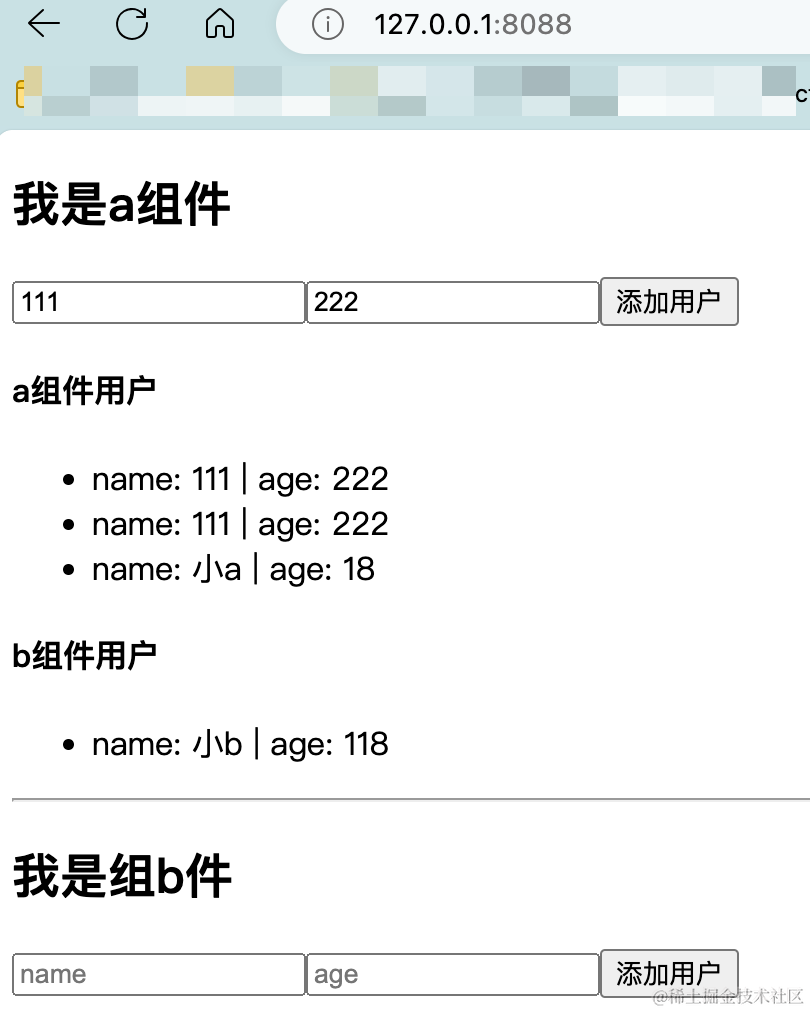
后端程序员入门react笔记(八)-redux的使用和项目搭建
一个更好用的文档 添加链接描述 箭头函数的简化 //简化前 function countIncreAction(data) {return {type:"INCREMENT",data} } //简化后 const countIncreAction data>({type:"INCREMENT",data })react UI组件库相关资料 组件库连接和推荐 antd组…...
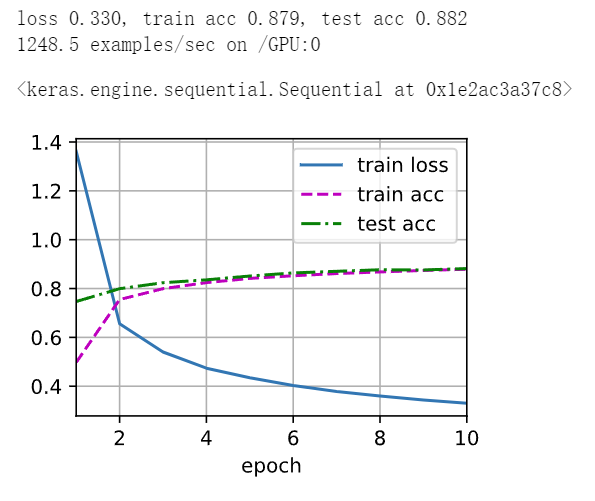
深度学习 精选笔记(13.2)深度卷积神经网络-AlexNet模型
学习参考: 动手学深度学习2.0Deep-Learning-with-TensorFlow-bookpytorchlightning ①如有冒犯、请联系侵删。 ②已写完的笔记文章会不定时一直修订修改(删、改、增),以达到集多方教程的精华于一文的目的。 ③非常推荐上面(学习参考&#x…...
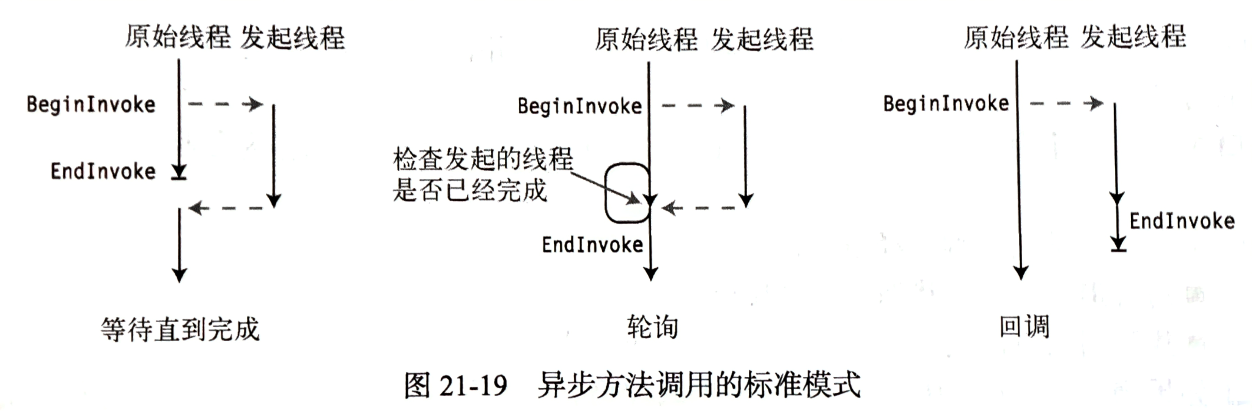
【C#图解教程】笔记
文章目录 1. C#和.NET框架.NET框架的组成.NET框架的特点CLRCLICLI的重要组成部分各种缩写 2. C#编程概括标识符命名规则: 多重标记和值格式化数字字符串对齐说明符格式字段标准数字格式说明符标准数字格式说明符 表 3. 类型、存储和变量数据成员和函数成员预定义类型…...
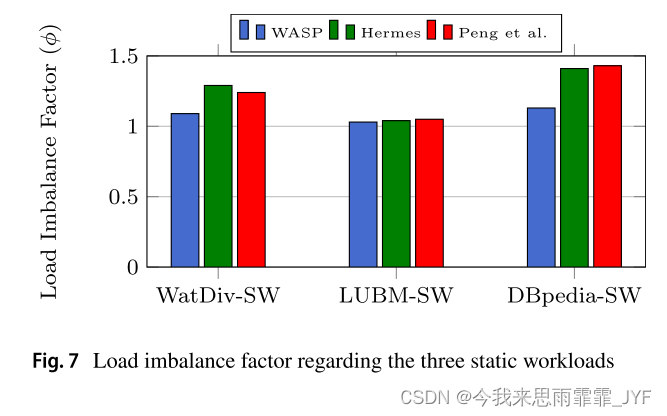
A Workload‑Adaptive Streaming Partitioner for Distributed Graph Stores(2021)
用于分布式图存储的工作负载自适应流分区器 对象:动态流式大图 划分方式:混合割 方法:增量重划分 考虑了图查询算法,基于动态工作负载 考虑了双动态:工作负载动态;图拓扑结构动态 缺点:分配新顶…...
鸿蒙Harmony应用开发—ArkTS声明式开发(基础手势:Search)
搜索框组件,适用于浏览器的搜索内容输入框等应用场景。 说明: 该组件从API Version 8开始支持。后续版本如有新增内容,则采用上角标单独标记该内容的起始版本。 子组件 无 接口 Search(options?: { value?: string, placeholder?: Reso…...

GPIO八种工作模式实践总结
到目前为止我还是没搞懂,GPIO口输入输出模式下,PULLUP、PULLDOWN以及NOPULL之间的区别,从实践角度讲,也就是我亲自测试来看,能划分的区别有以下几点: GPIO_INPUT 在输入模式下使用HAL_GPIO_WritePin不能改变…...
ElementUI两个小坑
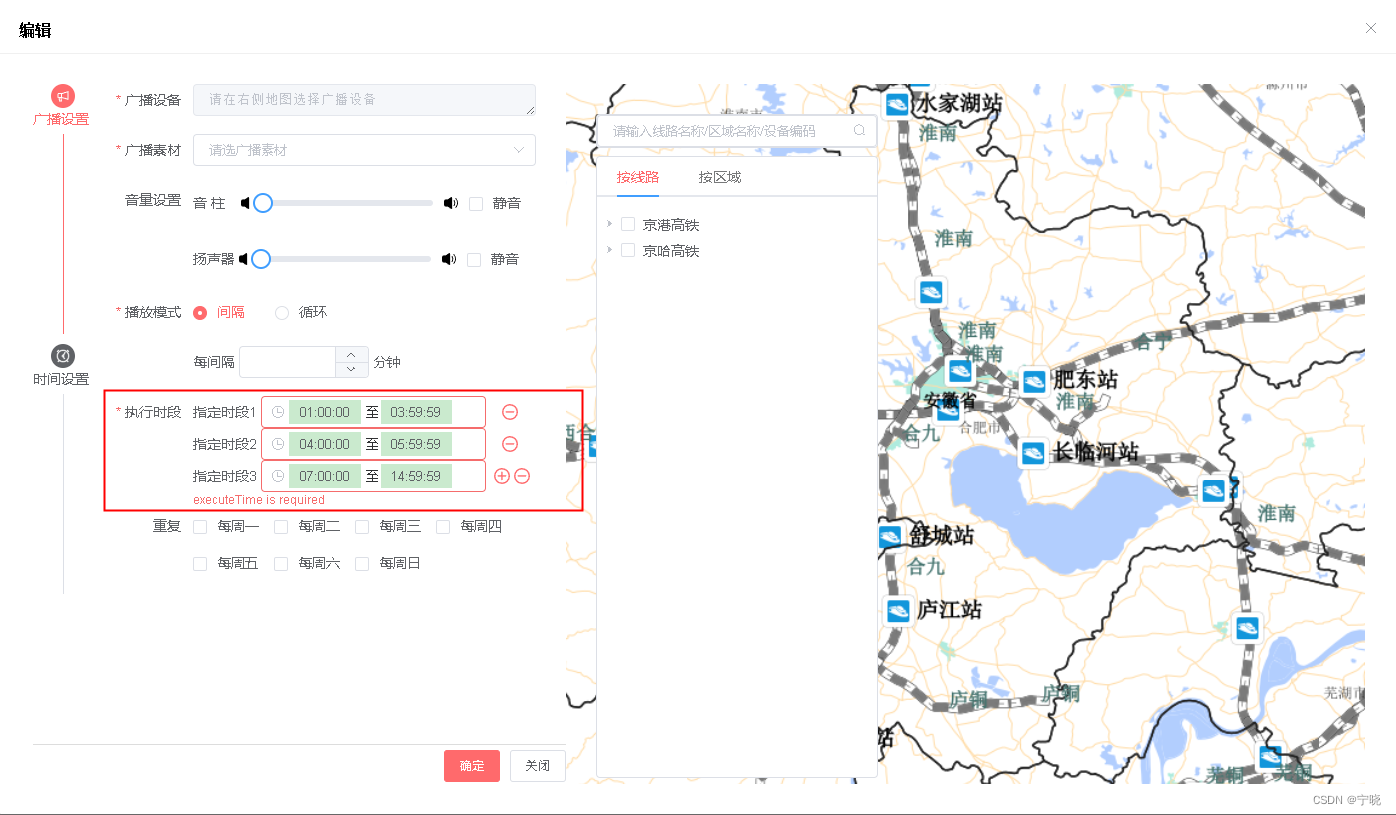
1.form表单绑定的是一个对象,表单里的一个输入项是对象的一个属性之一,修改输入项,表单没刷新的问题, <el-form :model"formData" :rules"rules" ref"editForm" class"demo-ruleForm"…...

前端基础——HTML傻瓜式入门(2)
该文章Github地址:https://github.com/AntonyCheng/html-notes 在此介绍一下作者开源的SpringBoot项目初始化模板(Github仓库地址:https://github.com/AntonyCheng/spring-boot-init-template & CSDN文章地址:https://blog.c…...
操作系统(AndroidIOS)图像绘图的基本原理
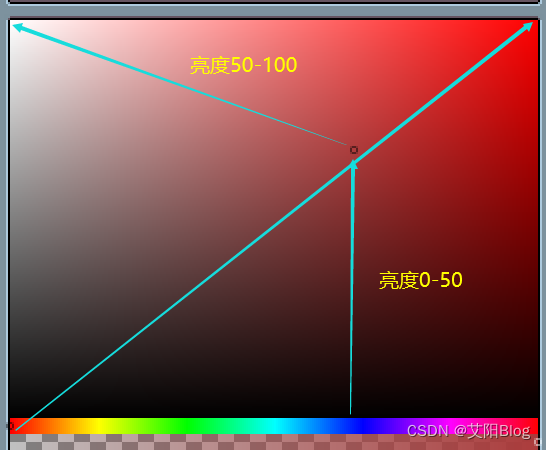
屏幕显示图像的过程 我们知道,屏幕是由一个个物理显示单元组成,每一个单元我们可以称之为一个物理像素点,而每一个像素点可以发出多种颜色。 而图像,就是在不同的物理像素点上显示不同的颜色构成的。 像素点的颜色 像素的颜色是…...
测试用例的设计(2)
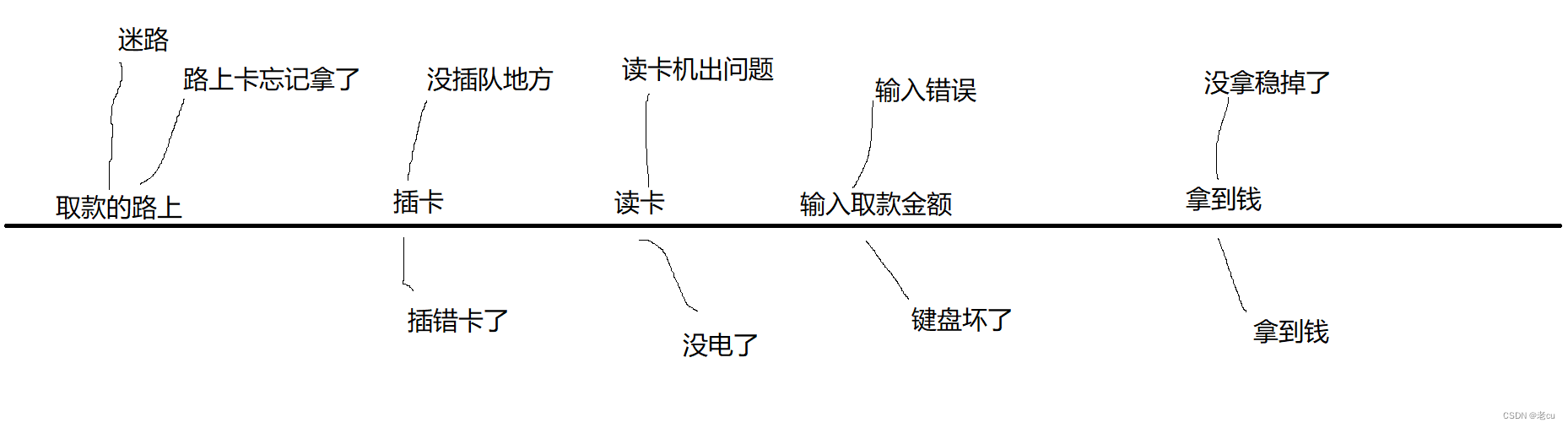
目录 1.前言 2.正交排列(正交表) 2.1什么是正交表 2.2正交表的例子 2.3正交表的两个重要性质 3.如何构造一个正交表 3.1下载工具 3.1构造前提 4.场景设计法 5.错误猜测法 1.前言 我们在前面的文章里讲了测试用例的几种设计方法,分别是等价类发,把测试例子划分成不同的类…...

HTML与CSS
前言 Java 程序员一提起前端知识,心情那是五味杂陈,百感交集。 说不学它吧,说不定进公司以后,就会被抓壮丁去时不时写点前端代码说学它吧,HTML、CSS、JavaScript 哪个不得下大功夫才能精通?学一点够不够用…...

App推广不再难!Xinstall神器助你快速获客,提升用户留存
在如今的移动互联网时代,App推广已经成为了各大应用商家争夺用户的重要手段。然而,面对竞争激烈的市场环境,如何快速提升推广效率,先人一步获得用户呢?这就需要我们借助专业的App全渠道统计服务商——Xinstall的力量。…...

MySQL建表以及excel内容导入
最近自学MySQL的使用,需要将整理好的excel数据导入数据库中,记录一下数据导入流程。 --建立数据库 create table SP_sjk ( --增加列 id NUMBER(20), mc VARCHAR2(300) ) /*表空间储存参数配置。一个数据库从逻辑上来说是由一个或多个表空间所组成&#…...

让el-input与其他组件能够显示在同一行
让el-input与其他组件能够显示在同一行 说明:由于el-input标签使用会默认占满一行,所以在某些需要多个展示一行的时候不适用,因此需要能够跟其他组件显示在同一行。 效果: 1、el-input标签内使用css属性inline 111<el-inp…...
)
学完Efficient c++ (44-45)
条款 44:将与参数无关的代码抽离模板 模板可以节省时间和避免代码重复,编译器会为填入的每个不同模板参数具现化出一份对应的代码,但长此以外,可能会造成代码膨胀(code bloat),生成浮夸的二进制…...
鸿蒙Harmony应用开发—ArkTS声明式开发(容器组件:ColumnSplit)
将子组件纵向布局,并在每个子组件之间插入一根横向的分割线。 说明: 该组件从API Version 7开始支持。后续版本如有新增内容,则采用上角标单独标记该内容的起始版本。 子组件 可以包含子组件。 ColumnSplit通过分割线限制子组件的高度。初始…...
jenkins部署go应用 基于docker-compose
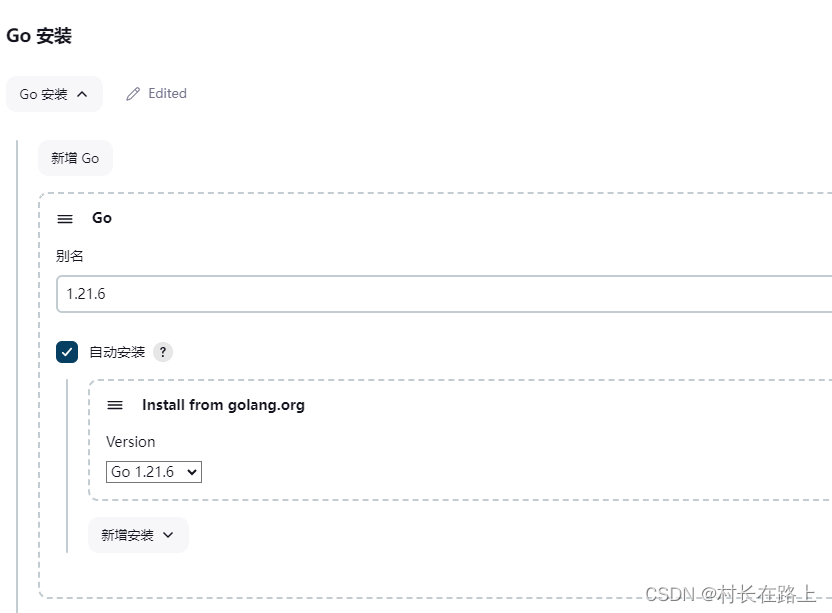
丢弃旧的的构建 github 拉取代码 指定go的编译版本 安装插件 拉取代码是排除指定的配置文件 比如 conf/config.yaml 文件 填写配置文件内容 比如测试环境一些主机信息 等 可以配置里面 构建的时候选择此文件替换开发提交的配置文件。。。。 编写docker-compose 文件 docker…...
【晴问算法】入门篇—贪心算法—整数配对
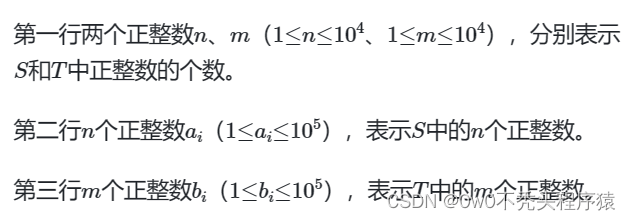
题目描述 有两个正整数集合S、T,其中S中有n个正整数,T中有m个正整数。定义一次配对操作为:从两个集合中各取出一个数a和b,满足a∈S、b∈T、a≤b,配对的数不能再放回集合。问最多可以进行多少次这样的配对操作。 输入描…...
)
九种背包问题(C++)
0-1背包,背包大小target,占用容积vec[i][0],可以带来的利益是vec[i][1] 一件物品只能取一次,先遍历物品然后遍历背包更新不同容积下最大的利益 int func(vector<vector<int>>&vec,int target){vector<int>dp(target1,…...

告别多头对接!DMXAPI 为企业打造国产大模型 “统一入口”
一、企业 AI 落地的普遍痛点:被接口和平台消耗的成本在企业数字化转型的浪潮中,AI 大模型已经成为标配,但很多企业在落地时,都会陷入一个共同的困境:为了满足不同业务场景的需求,需要同时对接 DeepSeek、阿…...

Hermes Agent工具如何自定义接入Taotoken提供商
🚀 告别海外账号与网络限制!稳定直连全球优质大模型,限时半价接入中。 👉 点击领取海量免费额度 Hermes Agent工具如何自定义接入Taotoken提供商 Hermes Agent 是一款功能强大的AI智能体开发框架,它支持通过自定义提供…...

昇腾CANN elec-ops-simulation 实战:电力系统仿真——潮流计算与暂态稳定分析在 NPU 上的加速
电力系统仿真:500 节点电网的牛顿-拉夫逊潮流计算 → 解 10001000 稀疏雅可比矩阵(每迭代 1 次矩阵求逆)→ CPU 迭代 15 次 2.4s。实时调度要求 < 100ms → NPU 加速:雅可比矩阵求解用 Cube 单元做批量小矩阵 LU 分解 → 每迭…...

OpenCore Legacy Patcher完整指南:让老旧Mac焕发新生,运行最新macOS
OpenCore Legacy Patcher完整指南:让老旧Mac焕发新生,运行最新macOS 【免费下载链接】OpenCore-Legacy-Patcher Experience macOS just like before 项目地址: https://gitcode.com/GitHub_Trending/op/OpenCore-Legacy-Patcher 你是否有一台被苹…...

还在古法编程?OpenAI Codex 全自动编程!稳定中转 Token 保姆级教程
OpenAI Codex 从安装到进阶实战|终端 AI 编程完全指南(2026 最新) 摘要:OpenAI Codex 是目前最强大的终端 AI 编程工具,支持代码生成、项目重构、Bug 修复、脚本自动化、批量代码优化等全场景能力。本文从零起步&…...

TigerVNC跨平台远程桌面解决方案:构建企业级安全连接的技术实践
TigerVNC跨平台远程桌面解决方案:构建企业级安全连接的技术实践 【免费下载链接】tigervnc High performance, multi-platform VNC client and server 项目地址: https://gitcode.com/gh_mirrors/ti/tigervnc 在数字化转型浪潮中,远程桌面访问已成…...

初创公司如何通过Taotoken快速为产品原型注入多种AI能力
🚀 告别海外账号与网络限制!稳定直连全球优质大模型,限时半价接入中。 👉 点击领取海量免费额度 初创公司如何通过Taotoken快速为产品原型注入多种AI能力 对于初创公司而言,资源有限、时间紧迫是常态。产品原型的快速…...

基于ZYNQ MPSoC 在多轴伺服电机驱动器中的架构设计与工程实践
一、引言在工业机器人、数控机床、导弹舵机、相控阵列天线、自动化产线等高精工业场景中,多轴伺服电机独立控制 高精度同步是核心刚需。目前行业主流两种传统方案都存在明显瓶颈:纯 DSP 软件方案:串行中断执行,单 DSP 算力有限&a…...

微软365 OAuth令牌劫持:静默持久化攻击与防御实战
1. 这不是漏洞预警,而是一场正在发生的“静默接管”你有没有遇到过这样的情况:IT管理员在后台看到某个用户账户持续发起异常的Exchange Online PowerShell连接,但该用户坚称自己没操作;或者安全团队收到Azure AD登录日志告警&…...

JMeter实战:从接口测试到性能基线的全链路压测指南
1. 这不是“点点点就能跑通”的测试,而是用JMeter撬动系统稳定性的杠杆很多人第一次打开JMeter,以为它就是个“高级版Postman”:填URL、选方法、点执行,看到Response里有JSON就松一口气——“接口通了,测试完了”。我带…...