
C++多线程环境下的单例类对象创建
使用C++无锁编程实现多线程下的单例模式
贺志国
2023.8.1
在多线程环境下创建一个类的单例对象,要比单线程环境下要复杂很多。下面介绍在多线程环境下实现单例模式的几种方法。
一、尺寸较小的类单例对象创建
如果待创建的单例类SingletonForMultithread内包含的成员变量较少,整个类占用的内存空间较小,则可使用局部静态变量来创建单例对象。C++ 11标准保证在进入多线程前,已完成静态类对象的构建。如果类的尺寸较大,静态变量存储栈区无法容纳该类的单例对象,则禁止使用该方法。例如:64位Linux系统默认栈的最大空间为8 MB,64位Windows系统默认栈的最大空间为1 MB,当待创建的单例对象尺寸接近或超过上述栈的默认存储空间时,如使用该方法创建则会导致程序崩溃。示例代码如下所示:
class SmallSingletonForMultithread {public:static SmallSingletonForMultithread& GetInstance() {static SmallSingletonForMultithread instance;return instance;}private:SmallSingletonForMultithread() = default;~SmallSingletonForMultithread() = default;SmallSingletonForMultithread(const SmallSingletonForMultithread&) = delete;SmallSingletonForMultithread& operator=(const SmallSingletonForMultithread&) = delete;SmallSingletonForMultithread(SmallSingletonForMultithread&&) = delete;SmallSingletonForMultithread& operator=(SmallSingletonForMultithread&&) = delete;
};
二、尺寸较大的类单例对象创建(要求显式调用销毁函数来避免内存泄漏)
在实际工作中,由于某些单例类的尺寸较大,静态变量存储栈区无法容纳该单例对象,因此无法使用上述方法来创建单例对象,这时需要使用new在堆区动态创建单例对象。为了避免多线程环境下对于单例对象的抢夺,可使用C++无锁编程来实现。需要付出的代价就是,最后一个调用者需要显式地调用销毁函数DestoryInstance来避免内存泄漏,示例代码如下所示:
#include <atomic>
#include <cassert>
#include <mutex>class SingletonForMultithread {public:static SingletonForMultithread* GetInstance() {if (!instance_.load(std::memory_order_acquire)) {auto* new_ptr = new SingletonForMultithread;SingletonForMultithread* old_ptr = nullptr;if (!instance_.compare_exchange_strong(old_ptr, new_ptr,std::memory_order_release,std::memory_order_relaxed)) {// If the CAS operation fails, another thread has created a singleton// object, and it's necessary to delete the temporary object created by// the current thread.delete new_ptr;new_ptr = nullptr;}}return instance_.load(std::memory_order_relaxed);}static void DestoryInstance() {if (instance_.load(std::memory_order_acquire)) {auto* old_ptr = instance_.load(std::memory_order_relaxed);SingletonForMultithread* new_ptr = nullptr;if (instance_.compare_exchange_strong(old_ptr, new_ptr,std::memory_order_release,std::memory_order_relaxed)) {// If the CAS operation succeeds, the current thread obtains the// original object and can safely delete it.delete old_ptr;old_ptr = nullptr;}}}private:SingletonForMultithread() = default;~SingletonForMultithread() = default;SingletonForMultithread(const SingletonForMultithread&) = delete;SingletonForMultithread& operator=(const SingletonForMultithread&) = delete;SingletonForMultithread(SingletonForMultithread&&) = delete;SingletonForMultithread& operator=(SingletonForMultithread&&) = delete;private:static std::atomic<SingletonForMultithread*> instance_;
};// Static member variable initialization
std::atomic<SingletonForMultithread*> SingletonForMultithread::instance_;int main() {auto* singleton = SingletonForMultithread::GetInstance();assert(singleton != nullptr);singleton->DestoryInstance();return 0;
}
三、尺寸较大的类单例对象创建(使用std::unique_ptr<T>和std::call_once实现)
很多时候,我们无法显式地调用销毁函数来避免内存泄漏,这时就可借助std::unique_ptr<T>和std::call_once来实现,示例代码如下:
#include <cassert>
#include <memory>
#include <mutex>class SingletonForMultithread {public:~SingletonForMultithread() = default;static SingletonForMultithread* GetInstance() {static std::unique_ptr<SingletonForMultithread> instance;static std::once_flag only_once;std::call_once(only_once,[]() { instance.reset(new (std::nothrow) SingletonForMultithread); });return instance.get();}private:SingletonForMultithread() = default;SingletonForMultithread(const SingletonForMultithread&) = delete;SingletonForMultithread& operator=(const SingletonForMultithread&) = delete;SingletonForMultithread(SingletonForMultithread&&) = delete;SingletonForMultithread& operator=(SingletonForMultithread&&) = delete;
};int main() {auto* singleton = SingletonForMultithread::GetInstance();assert(singleton != nullptr);return 0;
}
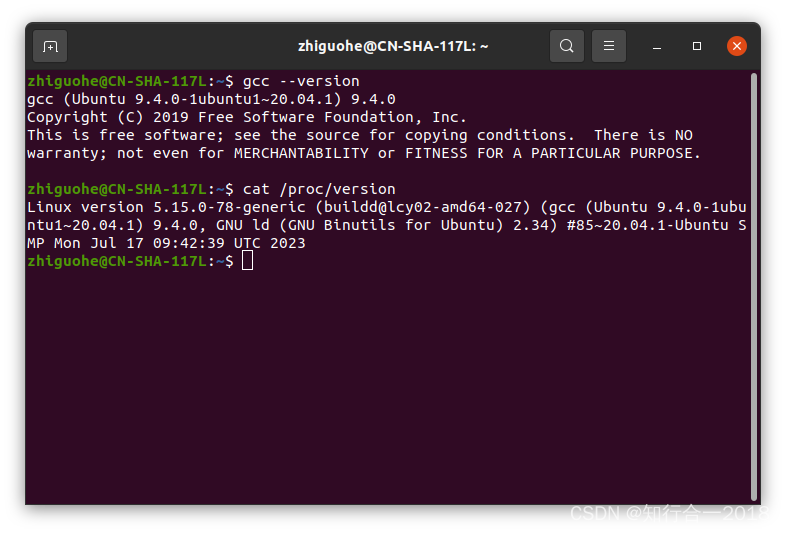
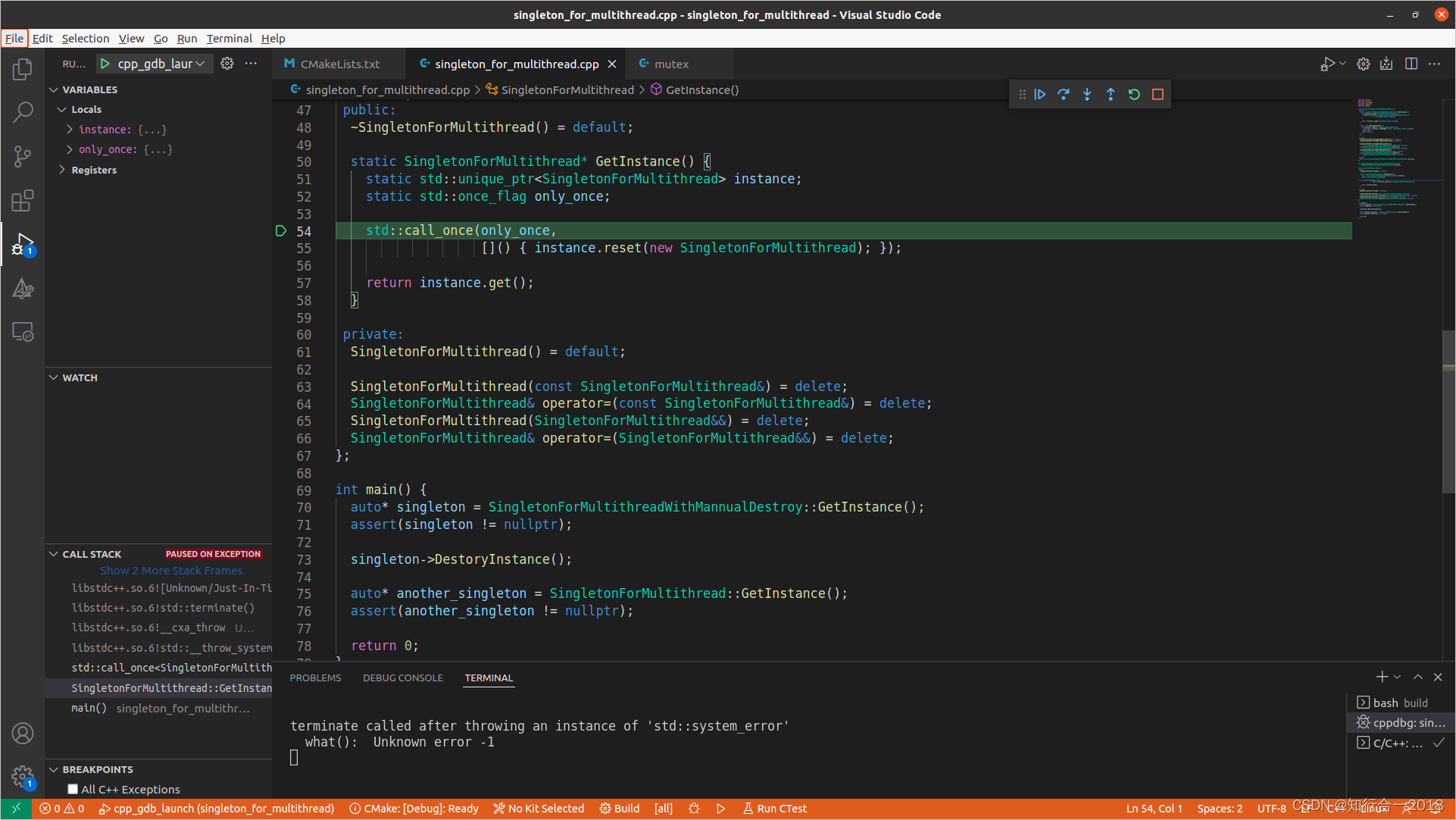
但我在Ubuntu 20.04系统上使用GCC 9.4.0似乎无法正常完成任务,会抛出异常,产生core dump,原因暂不详。
四、尺寸较大的类单例对象创建(使用std::unique_ptr<T>和std::atomic_flag实现)
第三节借助std::unique_ptr<T>和std::call_once来实现单例对象的创建,同时避免显式地调用销毁函数来避免内存泄漏。这种方法在Ubuntu 20.04系统上使用GCC 9.4.0实现时似乎会导致程序core dump。于是我们使用std::atomic_flag替换std::call_once来完成任务。基本思想如下:首先定义一个静态的无锁标志变量std::atomic_flag start_flag,并将其初始值设置为ATOMIC_FLAG_INIT。第一次调用start_flag.test_and_set(std::memory_order_relaxed)函数时,由于start_flag的状态是ATOMIC_FLAG_INIT,该函数返回false,于是可调用instance.reset(new SingletonForMultithread)创建单例对象。第二次直至第N次调用start_flag.test_and_set(std::memory_order_relaxed)函数时,因为start_flag的状态已被设置,该函数返回true,创建单例对象的语句instance.reset(new SingletonForMultithread)永远不会被再次执行,这就达到了只创建一次的目的。同时,因为使用静态的智能指针变量std::unique_ptr<SingletonForMultithread> instance来管理单例对象,于是不再需要显式地回收内存,只要程序结束,静态变量自动清除,智能指针对象instance会在其析构函数中释放内存。
由于new运算符创建单例对象可能耗时较长,为了避免其他线程在单例对象创建到一半的过程中读取到不完整的对象,导致未定义的行为,我们使用另一个原子变量std::atomic<bool> finished来确保创建动作已正确完成,不选用另一个无锁标志变量std::atomic_flag的原因是,该类在C++ 20标准前未提供单独的测试函数test。finished.store(true, std::memory_order_release);与while (!finished.load(std::memory_order_acquire))的内存顺序,实现了synchronizes-with与happens-before关系,保证在while (!finished.load(std::memory_order_acquire))成功时,instance.reset(new SingletonForMultithread);必定执行完毕,单例对象的创建是完整的。
完整的示例代码如下:
#include <atomic>
#include <cassert>
#include <memory>
#include <mutex>
#include <thread>
#include <vector>using namespace std::chrono_literals;namespace {
constexpr size_t kThreadNum = 2000;
}class SingletonForMultithread {public:~SingletonForMultithread() = default;static SingletonForMultithread* GetInstance() {static std::unique_ptr<SingletonForMultithread> instance;static std::atomic_flag start_flag = ATOMIC_FLAG_INIT;static std::atomic<bool> finished(false);if (!start_flag.test_and_set(std::memory_order_relaxed)) {// The object created by the `new` operator may be relatively large and// time-consuming, therefore another atomic variable 'finished' is used to// ensure that other threads read a fully constructed singleton object. Do// not consider using another `std::atomic_flag`. Because it doesn't// provide a separate `test` function before the C++ 20 standard.instance.reset(new (std::nothrow) SingletonForMultithread);finished.store(true, std::memory_order_release);}// Wait in a loop until the singleton object is fully created, using// `std::this_thread::yield()` to save CPU resources.while (!finished.load(std::memory_order_acquire)) {std::this_thread::yield();}return instance.get();}private:SingletonForMultithread() {// Simulate a constructor that takes a relative long time.std::this_thread::sleep_for(10ms);}SingletonForMultithread(const SingletonForMultithread&) = delete;SingletonForMultithread& operator=(const SingletonForMultithread&) = delete;SingletonForMultithread(SingletonForMultithread&&) = delete;SingletonForMultithread& operator=(SingletonForMultithread&&) = delete;
};int main() {std::vector<std::thread> customers;for (size_t i = 0; i < kThreadNum; ++i) {customers.emplace_back(&SingletonForMultithread::GetInstance);}for (size_t i = 0; i < kThreadNum; ++i) {customers[i].join();}auto* singleton = SingletonForMultithread::GetInstance();assert(singleton != nullptr);return 0;
}
相关文章:
C++多线程环境下的单例类对象创建
使用C无锁编程实现多线程下的单例模式 贺志国 2023.8.1 在多线程环境下创建一个类的单例对象,要比单线程环境下要复杂很多。下面介绍在多线程环境下实现单例模式的几种方法。 一、尺寸较小的类单例对象创建 如果待创建的单例类SingletonForMultithread内包含的成…...

“深入解析JVM内部机制:从字节码到垃圾回收“
标题:深入解析JVM内部机制:从字节码到垃圾回收 摘要:本文将从字节码生成、类加载、运行时数据区域和垃圾回收等方面深入解析JVM的内部机制,并通过示例代码展示其工作原理和实践应用。 正文: 一、字节码生成 JVM是基…...

音频系统项目与音频算法研究方向分类
+我V hezkz17进数字音频系统研究开发交流答疑群(课题组) 音频系统项目与音频算法研究方向分类 一 音频系统项目产品分类 1 收音机,数字收音机,复读机 2 耳机,蓝牙耳机,TWS蓝牙耳机, 3 立体声音箱,AI智能音箱, 4 音频功放,车载功放, 5 音响,普通音响,Soundbar音响…...
单例模式和工厂模式
目录 今日良言:关关难过关关过,步步难行步步行 一、单例模式 1.饿汉模式 2.懒汉模式 二、工厂模式 今日良言:关关难过关关过,步步难行步步行 一、单例模式 首先来解释一下,什么是单例模式。 单例模式也就是单个…...
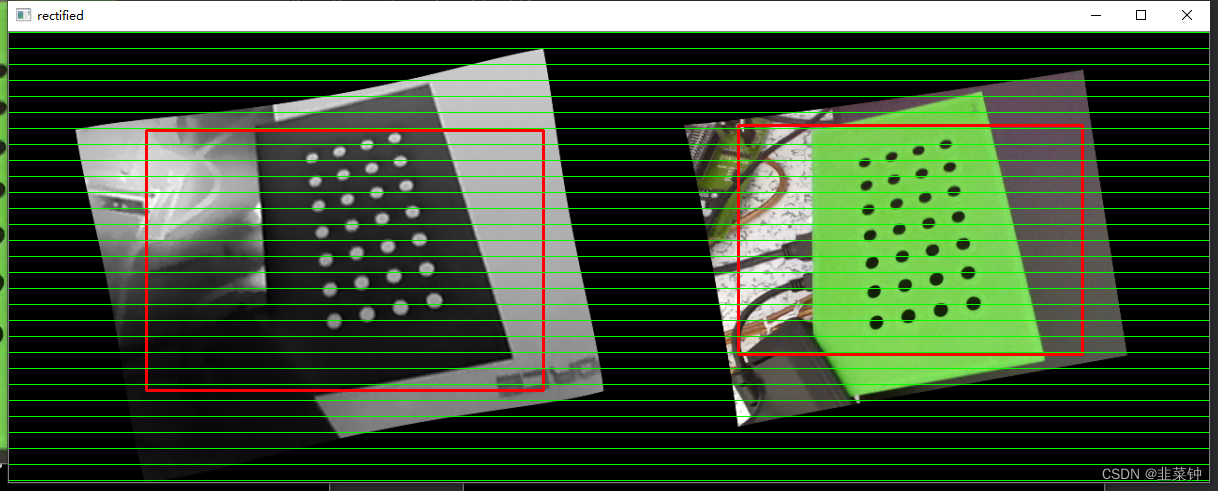
两个镜头、视野、分辨率不同的相机(rgb、红外)的视野校正
文章目录 背景实际效果查找资料资料1资料2 解决方案最终结果 背景 目前在做的项目用到两个摄像头,一个是热成像摄像头、另一个是普通的rgb摄像头。 一开始的目标是让他们像素级重合,使得点击rgb图像时,即可知道其像素对应的温度。但是在尝试…...
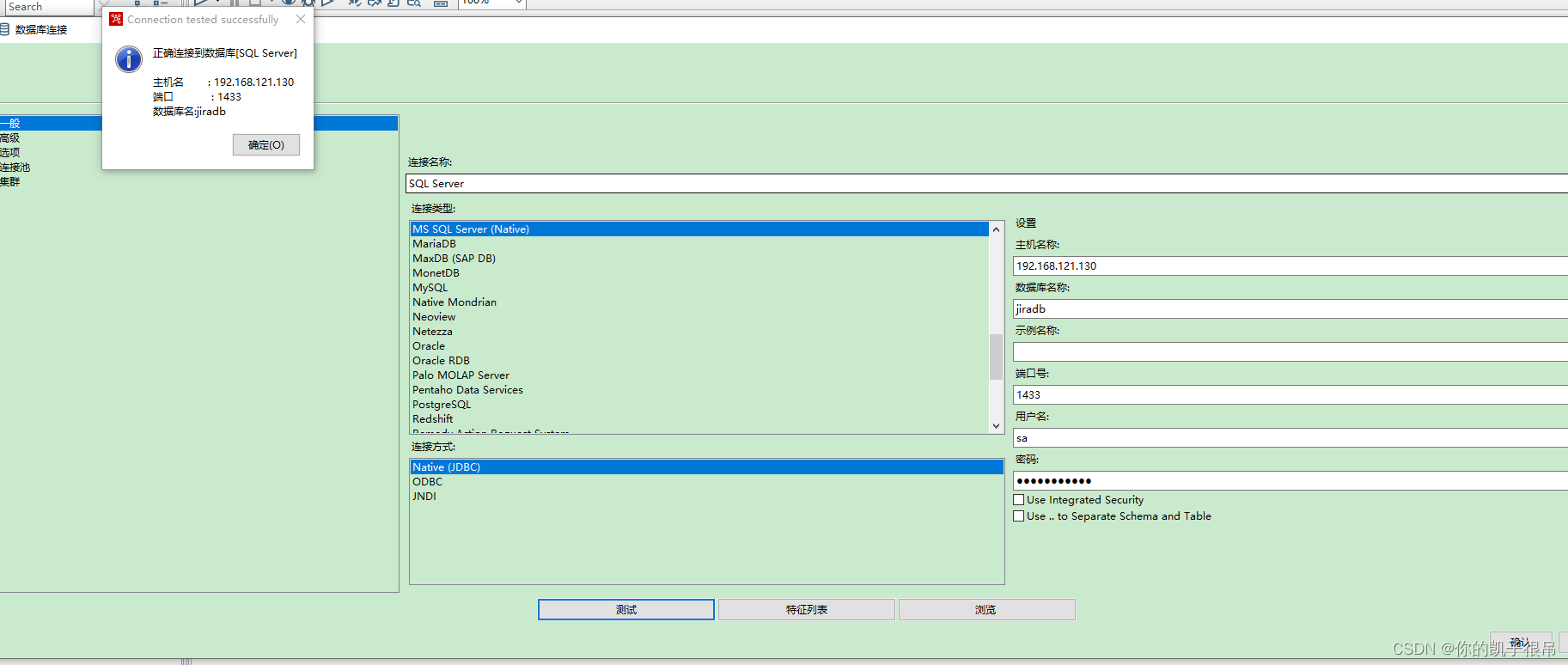
kettle 连接jdbc
DM JDBC连接 oracle JDBC连接 PG JDBC连接 SQLSERVER JDBC连接...

PyTorch中加载模型权重 A匹配B|A不匹配B
在做深度学习项目时,从头训练一个模型是需要大量时间和算力的,我们通常采用加载预训练权重的方法,而我们往往面临以下几种情况: 未修改网络,A与B一致 很简单,直接.load_state_dict() net ANet(num_cla…...

@FeignClient指定多个url实现负载均衡
C知道回答的如下: 在使用 FeignClient 调用多个 URL 实现负载均衡时,可以使用 Spring Cloud Ribbon 提供的功能来实现。下面是一个示例代码: 首先,在Spring Boot主类上添加EnableFeignClients注解启用Feign Client功能。 Spring…...
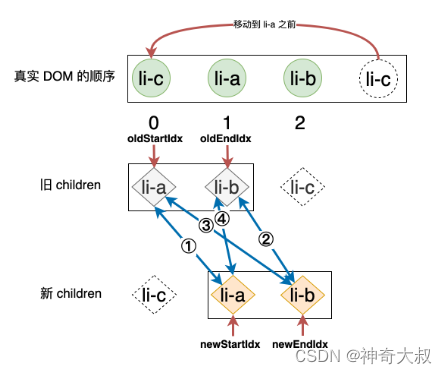
vue diff 双端比较算法
文章目录 双端指针比较策略命中策略四命中策略二命中策略三命中策略一未命中四种策略,遍历旧节点列表新增情况一新增情况二 删除节点双端比较的优势 双端指针 使用四个变量 oldStartIdx、oldEndIdx、newStartIdx 以及 newEndIdx 分别存储旧 children 和新 children …...
)
初识React: 基础(概念 特点 高效原因 虚拟DOM JSX语法 组件)
1.什么是React? React是一个由Facebook开源的JavaScript库,它主要用于构建用户界面。React的特点是使用组件化的思想来构建界面,使得代码的可复用性和可维护性大大提高。React还引入了虚拟DOM的概念,减少了对真实DOM的直接操作,…...
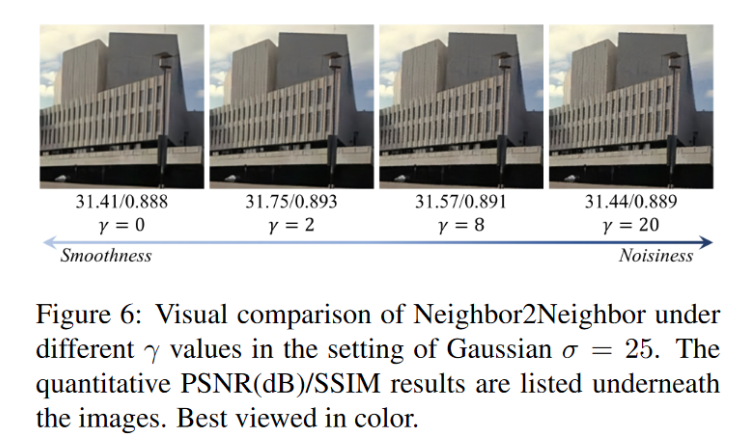
自监督去噪:Neighbor2Neighbor原理分析与总结
文章目录 1. 方法原理1.1 先前方法总结1.2 Noise2Noise回顾1.3 从Noise2Noise到Neighbor2Neighbor1.4 框架结构2. 实验结果3. 总结 文章链接:https://arxiv.org/abs/2101.02824 参考博客:https://arxiv.org/abs/2101.02824 1. 方法原理 1.1 先前方法总…...
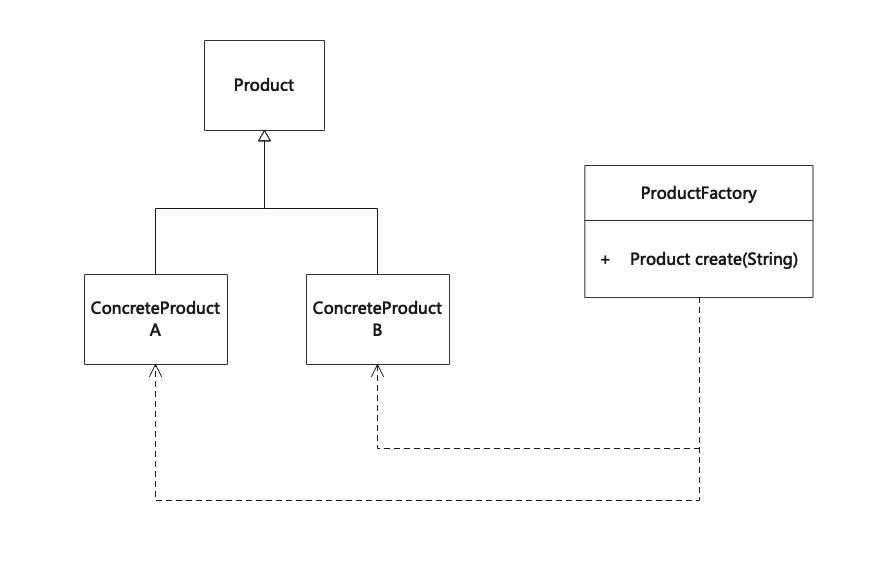
简单工厂模式(Simple Factory)
简单工厂模式,又称为静态工厂方法(Static Factory Method)模式。在简单工厂模式中,可以根据参数的不同返回不同类的实例。简单工厂模式专门定义一个类来负责创建其他类的实例,被创建的实例通常都具有共同的父类。简单工厂模式不属于GoF的23个…...

Agent:OpenAI的下一步,亚马逊云科技站在第5层
什么是Agent?在大模型语境下,可以理解成能自主理解、规划、执行复杂任务的系统。Agent也将成为新的起点,成为各行各业构建新一代AI应用必不可少的组成部分。 对此,初创公司Seednapse AI创始人提出构建AI应用的五层基石理论&#…...
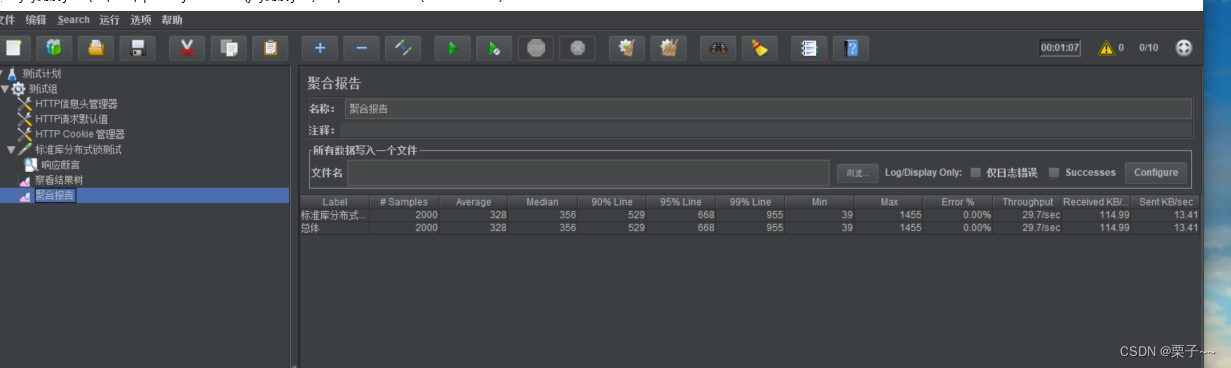
JMeter 4.x 简单使用
文章目录 前言JMeter 4.x 简单使用1. 启动2. 设置成中文3. 接口测试3.1. 设置线程组3.2. HTTP信息请求头管理器3.3. 添加HTTP请求默认值3.4. 添加HTTP cookie 管理3.5. 添加http请求3.5.1. 添加断言 3.6. 添加监听器-查看结果树3.7. 添加监听器-聚合报告 4. 测试 前言 如果您觉…...

深入NLTK:Python自然语言处理库高级教程
在前面的初级和中级教程中,我们了解了NLTK库中的基本和进阶功能,如词干提取、词形还原、n-gram模型和词云的绘制等。在本篇高级教程中,我们将深入探索NLTK的更多高级功能,包括句法解析、命名实体识别、情感分析以及文本分类。 一…...

React 用来解析html 标签的方法
在React中,解析HTML标签通常是使用JSX(JavaScript XML)语法的一部分。JSX允许您在JavaScript代码中编写类似HTML的标记,然后通过React进行解析和渲染。 以下是React中解析HTML标签的几种常见方式: 直接在JSX中使用标…...

【C++】做一个飞机空战小游戏(五)——getch()控制两个飞机图标移动(控制光标位置)
[导读]本系列博文内容链接如下: 【C】做一个飞机空战小游戏(一)——使用getch()函数获得键盘码值 【C】做一个飞机空战小游戏(二)——利用getch()函数实现键盘控制单个字符移动【C】做一个飞机空战小游戏(三)——getch()函数控制任意造型飞机图标移动 【C】做一个飞…...
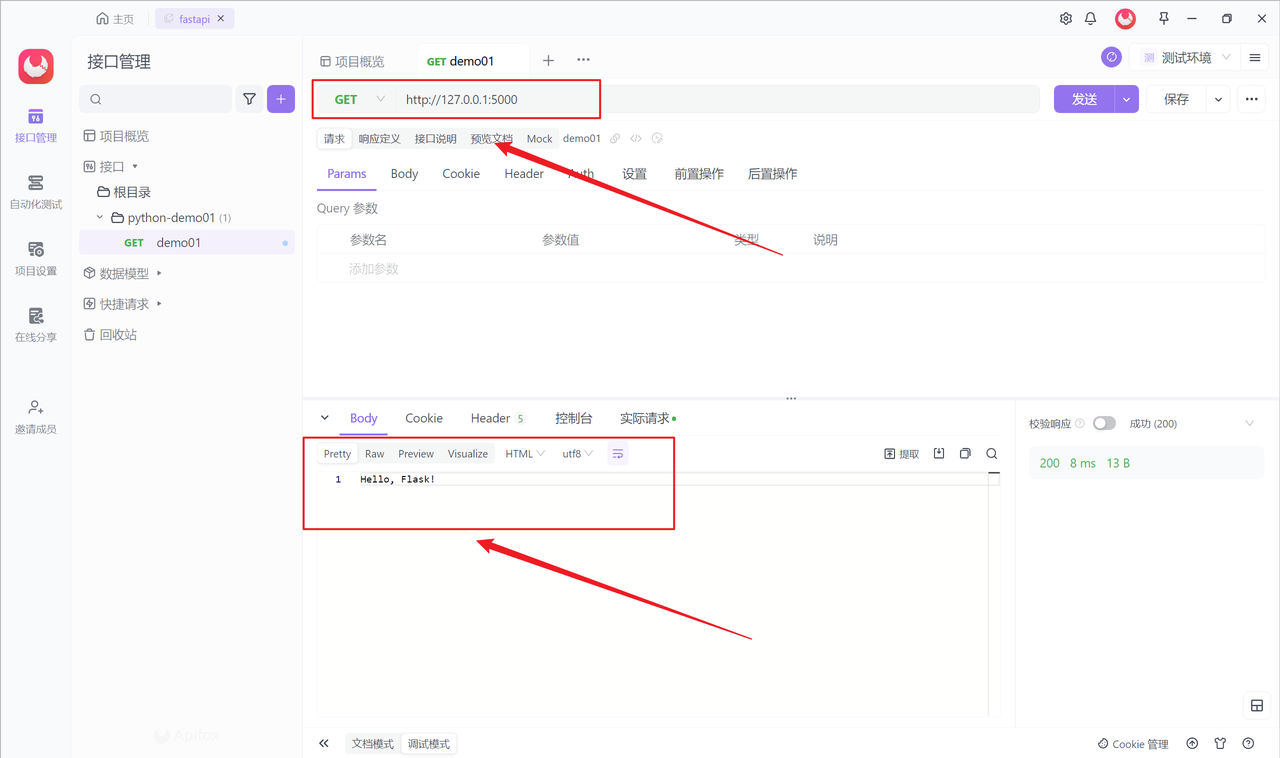
Flask 是什么?Flask框架详解及实践指南
Flask 是一个轻量级的 Python Web 框架,它被广泛用于构建 Web 应用程序和 API。Flask 简单易用,具有灵活性和可扩展性,是许多开发者喜欢用其构建项目的原因。本文将介绍 Flask 是什么以及如何使用它来构建 Web 应用程序,同时提供一…...
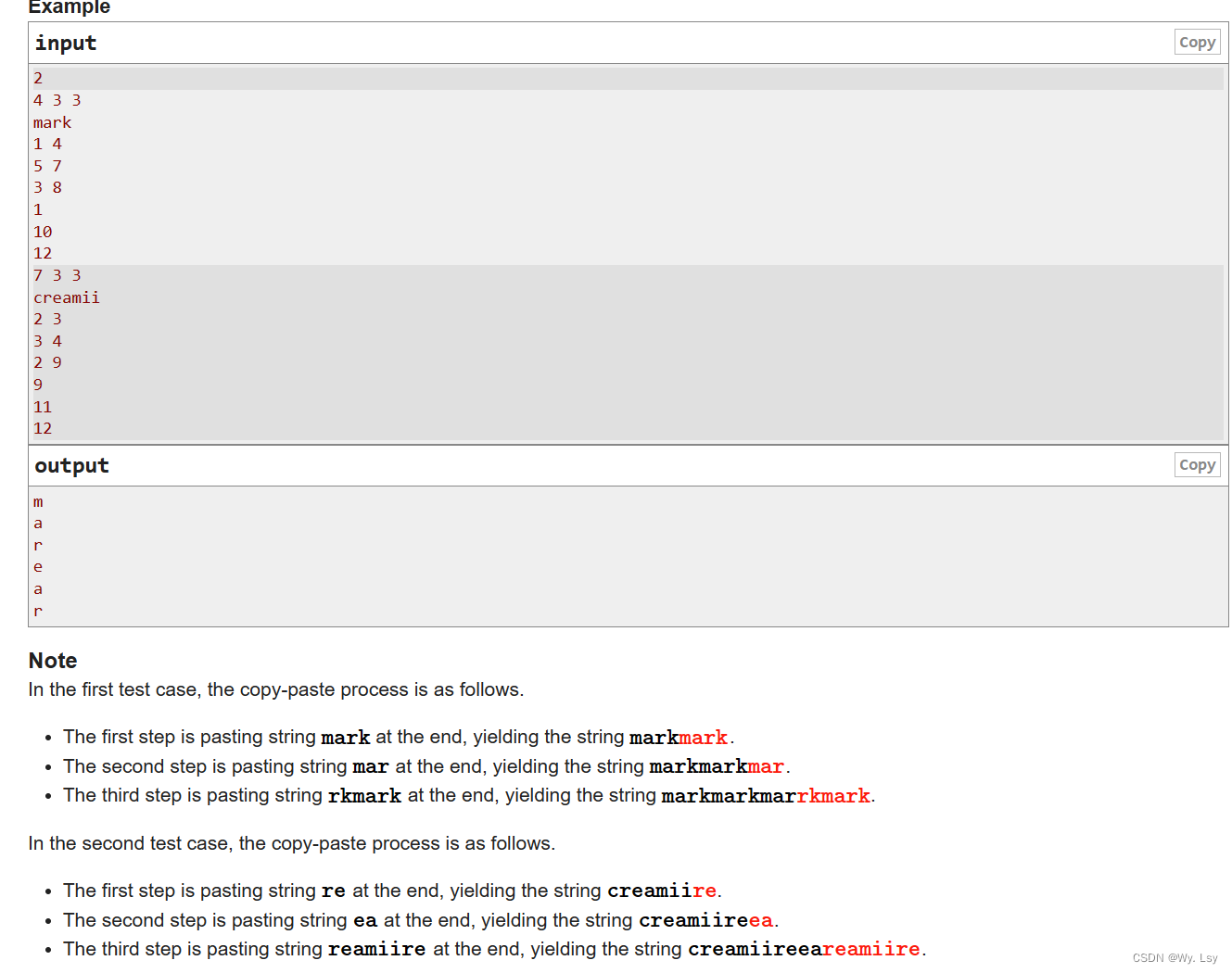
C. Mark and His Unfinished Essay - 思维
分析: 直接模拟操作会mle,可以每次复制记录对应源字符串的下标,可以记录每次字符串增加的长度的左右端点下标,可以发现左端点与读入的l是对应的,因此就可以向前移到l的位置,这样层层递归,就能找…...

Java的变量与常量
目录 变量 声明变量 变量的声明类型 变量的声明方式:变量名 变量名的标识符 初始化变量 常量 关键字final 类常量 总结 变量和常量都是用来存储值和数据的基本数据类型存储方式,但二者之间有一些关键差别。 变量 在Java中,每个变…...

强力解锁:5分钟掌握暗黑破坏神2存档编辑器的核心功能
强力解锁:5分钟掌握暗黑破坏神2存档编辑器的核心功能 【免费下载链接】d2s-editor 项目地址: https://gitcode.com/gh_mirrors/d2/d2s-editor 你是否曾为刷取一件心仪的暗黑2装备耗费数小时?是否想快速测试不同的角色build却苦于重复练级&#x…...

避坑指南:用3dMax一键房屋插件时,为什么你的窗洞总创建失败?
3dMax一键房屋插件窗洞创建失败的深度排查手册 引言 在建筑可视化与室内设计领域,3dMax的一键房屋插件确实为设计师节省了大量重复劳动时间。然而,许多中级用户在尝试创建窗洞时,常常遭遇各种意料之外的失败——从简单的按钮灰色不可点击&…...

财经类大学生考什么证书?2026年最新考证指南与含金量解析
每到开学季或者寒暑假,总有不少财经专业的同学私下问我:“现在的就业环境这么卷,我是不是该把能考的证都考了?” 看着大家手里厚厚的备考资料和焦虑的眼神,我特别能理解这种心情。毕竟在财经这个圈子里,证书…...

麦肯锡AI揭秘:AI的真正价值不在算法,而在重构组织与结构竞争力
【摘者按:麦肯锡在《The State of AI 2025》报告中深刻指出,AI的真正价值早已超越了单纯的算法性能,其核心在于通过“重构”来重塑企业的组织与结构竞争力。当企业走出“试点炼狱”,不再将AI视为简单的技术堆砌,而是将…...

智绘低空新图景:黎阳之光以数智技术赋能低空经济高质量发展
在长三角一体化战略纵深推进、新质生产力加速培育的时代浪潮中,低空经济正成为驱动区域经济转型升级的重要引擎。华东师范大学大虹桥低空经济研究院的成立,为行业搭建起“理论实践技术人才”的全链条创新平台;而北京黎阳之光科技有限公司&…...

保姆级教程:用QGIS的SRTM-Downloader插件,5分钟搞定中国区域地形图下载与渲染
5分钟极速出图:QGIS地形图制作全流程实战指南 当你在凌晨三点赶制项目报告,或是课程作业截止前两小时突然需要一张专业地形图时,传统GIS软件的复杂操作流程往往让人抓狂。本文将带你用QGIS的SRTM-Downloader插件,像点外卖一样简单…...

我的第一个CANOpen主站:手把手教你用CanFestival-3源码配置心跳、SYNC和PDO映射
我的第一个CANOpen主站:手把手教你用CanFestival-3源码配置心跳、SYNC和PDO映射 当你第一次面对工业现场总线协议时,那种既兴奋又忐忑的心情我至今记忆犹新。CANOpen作为工业自动化领域的"普通话",其主站开发往往是工程师进阶路上的…...

Cortex-M0中断与系统控制:从NVIC、SysTick到低功耗实战解析
1. 项目概述:从零开始理解Cortex-M0的中断与系统控制如果你正在接触基于ARM Cortex-M0内核的微控制器,比如STM32F0系列、NXP的LPC800系列,或者是一些国产的M0芯片,那么“中断”和“系统控制”这两个词,绝对是你绕不开的…...

WinMerge对比日志和备份文件?用过滤器精准匹配,效率翻倍
WinMerge对比日志和备份文件?用过滤器精准匹配,效率翻倍 在日常运维和办公场景中,我们经常需要对比不同版本的日志文件或备份文件。比如app.log.1和app.log.2的差异分析,或者report_20240520.xlsx与report_20240521.xlsx的内容比对…...

FanControl完全指南:5步打造Windows风扇智能控制系统
FanControl完全指南:5步打造Windows风扇智能控制系统 【免费下载链接】FanControl.Releases This is the release repository for Fan Control, a highly customizable fan controlling software for Windows. 项目地址: https://gitcode.com/GitHub_Trending/fa/…...