
hive on tez资源控制
sql
insert overwrite table dwintdata.dw_f_da_enterprise2
select *
from dwintdata.dw_f_da_enterprise;
hdfs文件大小数量展示


注意这里文件数有17个 共计321M 最后是划分为了21个task
为什么会有21个task?不是128M 64M 或者说我这里小于128 每个文件一个map吗?
tez ui日志


再仔细看每个task的日志
map0 data_source=CSIG/HIVE_UNION_SUBDIR_1/000008_0:0+16903572
map1 data_source=CSIG/HIVE_UNION_SUBDIR_1/000000_0:0+16960450
map2 data_source=CSIG/HIVE_UNION_SUBDIR_1/000003_0:0+16808165
map3 data_source=CSIG/HIVE_UNION_SUBDIR_1/000001_0:0+17007259
map4 data_source=CSIG/HIVE_UNION_SUBDIR_1/000006_0:0+16877230
map5 data_source=CSIG/HIVE_UNION_SUBDIR_1/000004_0:0+16941186
map6 data_source=hehe/HIVE_UNION_SUBDIR_2/000004_0:0+16777216
map7 data_source=hehe/HIVE_UNION_SUBDIR_2/000002_0:0+16777216
map8 data_source=CSIG/HIVE_UNION_SUBDIR_1/000002_0:0+16946639
map9 data_source=CSIG/HIVE_UNION_SUBDIR_1/000009_0:0+16855768
map10 data_source=hehe/HIVE_UNION_SUBDIR_2/000001_0:0+16777216
map11 data_source=CSIG/HIVE_UNION_SUBDIR_1/000005_0:0+16872517
map12 data_source=hehe/HIVE_UNION_SUBDIR_2/000000_0:0+16777216
map13 data_source=hehe/HIVE_UNION_SUBDIR_2/000006_0:0+16777216
map14 data_source=hehe/HIVE_UNION_SUBDIR_2/000000_0:16777216+729642 注意这里啊
data_source=hehe/HIVE_UNION_SUBDIR_2/000001_0:16777216+7188613
map15 data_source=CSIG/HIVE_UNION_SUBDIR_1/000007_0:0+16761291
map16 data_source=hehe/HIVE_UNION_SUBDIR_2/000005_0:0+16777216
map17 data_source=hehe/HIVE_UNION_SUBDIR_2/000003_0:0+16777216
map18 data_source=hehe/HIVE_UNION_SUBDIR_2/000002_0:16777216+7404916
data_source=hehe/HIVE_UNION_SUBDIR_2/000005_0:16777216+7341669
map19 data_source=hehe/HIVE_UNION_SUBDIR_2/000003_0:16777216+7378488
data_source=hehe/HIVE_UNION_SUBDIR_2/000006_0:16777216+7268763
map20 data_source=hehe/HIVE_UNION_SUBDIR_2/000004_0:16777216+7070700
data_source=hehe/000001_0:0+12488
16777216 这是一个什么数?大家要敏感下 1024*1024*16=16777216=16M 说明map只能读16M?
我18个文件中其中总量是321M 因为有一些不满16M 所以最后分为21个map 。那为什么是16M的map呢?
tez.grouping.min-size=16777216
tez.grouping.max-size=134217728 --128M
tez.grouping.split-waves=1.7
借用以前看到过的一篇文章
Hive 基于Tez引擎 map和reduce数的参数控制原理与调优经验_tez.grouping.max-size_abcdggggggg的博客-CSDN博客
这里好像说的通,但是又好像说不通 最低16M最高128M 那如果我是64M的文件呢?
分成1个map 还是64/16=4个map 还是64+64 2个map

mapper数的测试
测试参数set tez.grouping.min-size
测试1
set tez.grouping.min-size=16777216;


map数21个,reduce数2个,文件数21个,花费时间6s
测试2
set tez.grouping.min-size=67108864; --64M

 map数8个,reduce数2个,生成文件数12个 花费时间8s
测试3
set tez.grouping.min-size=134217728 ;


map数5个,reduce个数2个,生成文件数8个,花费时间11s
结论分析
说明map读取的越大,时间越快(不一定啊。你要是map设置1k。。) 生成的文件越少
源码解析
看到上面那位博主写到一个参数tez.grouping.split-count,始终找不到只能找源码了。我发现
老哥也没好好搞。
https://github.com/apache/tez/blob/master/tez-mapreduce/src/main/java/org/apache/tez/mapreduce/grouper/TezSplitGrouper.java#L187
set tez.grouping.by-length=true 默认是true
set tez.grouping.by-count=false 默认是false
set tez.grouping.max-size=1024*1024*1024L --这是java定义的 你自己算了写好。
set tez.grouping.min-size=50*1024*1024
//originalSplits 数据文件分成了多少个切片
//之前算出来的切片数public List<GroupedSplitContainer> getGroupedSplits(Configuration conf,List<SplitContainer> originalSplits, int desiredNumSplits,String wrappedInputFormatName,SplitSizeEstimatorWrapper estimator,SplitLocationProviderWrapper locationProvider) throwsIOException, InterruptedException {LOG.info("Grouping splits in Tez");Objects.requireNonNull(originalSplits, "Splits must be specified");//这里获取设置的参数tez.grouping.by-countint configNumSplits = conf.getInt(TEZ_GROUPING_SPLIT_COUNT, 0);if (configNumSplits > 0) {// always use config override if specified//desiredNumSplits 是tez算大概要多少  我们设置了始终以我们的为准desiredNumSplits = configNumSplits;LOG.info("Desired numSplits overridden by config to: " + desiredNumSplits);}if (estimator == null) {estimator = DEFAULT_SPLIT_ESTIMATOR;}if (locationProvider == null) {locationProvider = DEFAULT_SPLIT_LOCATION_PROVIDER;}List<GroupedSplitContainer> groupedSplits = null;String emptyLocation = "EmptyLocation";String localhost = "localhost";String[] emptyLocations = {emptyLocation};groupedSplits = new ArrayList<GroupedSplitContainer>(desiredNumSplits);//看所有文件是不是都是本地,个人猜测是数据文件都是有3个节点么,这个任务比如说运行再node11,数据有可能再node12 和node11 node13boolean allSplitsHaveLocalhost = true;long totalLength = 0;Map<String, LocationHolder> distinctLocations = createLocationsMap(conf);// go through splits and add them to locationsfor (SplitContainer split : originalSplits) {totalLength += estimator.getEstimatedSize(split);String[] locations = locationProvider.getPreferredLocations(split);if (locations == null || locations.length == 0) {locations = emptyLocations;allSplitsHaveLocalhost = false;}//判断是不是本地。for (String location : locations ) {if (location == null) {location = emptyLocation;allSplitsHaveLocalhost = false;}if (!location.equalsIgnoreCase(localhost)) {allSplitsHaveLocalhost = false;}distinctLocations.put(location, null);}}//如果我们配置了group_count 并且文件切片数量>0//或者我们没有配置group_count 并且文件数==0 就走if  肯定是上面的情况if (! (configNumSplits > 0 ||originalSplits.size() == 0)) {// numSplits has not been overridden by config// numSplits has been set at runtime// there are splits generated// desired splits is less than number of splits generated// Do sanity checks//desiredNumSplits已经等于我们配置的数量了,int splitCount = desiredNumSplits>0?desiredNumSplits:originalSplits.size();//获取文件总大小 320M 337336647/ 3 =112,445,549long lengthPerGroup = totalLength/splitCount;//获取我们配置的group最大sizelong maxLengthPerGroup = conf.getLong(TEZ_GROUPING_SPLIT_MAX_SIZE,TEZ_GROUPING_SPLIT_MAX_SIZE_DEFAULT);//获取我们配置的group最小sizelong minLengthPerGroup = conf.getLong(TEZ_GROUPING_SPLIT_MIN_SIZE,TEZ_GROUPING_SPLIT_MIN_SIZE_DEFAULT);if (maxLengthPerGroup < minLengthPerGroup ||minLengthPerGroup <=0) {throw new TezUncheckedException("Invalid max/min group lengths. Required min>0, max>=min. " +" max: " + maxLengthPerGroup + " min: " + minLengthPerGroup);}//如果我们配置的group count 不合理? 比如100G的文件 你配置了1个count 此时1个group100G 属于 >128M或者这里1Gif (lengthPerGroup > maxLengthPerGroup) {//切片太大了。// splits too big to work. Need to override with max size.//就按照总大小/max +1来 因为没除尽所以+1 也就是按最大的来 int newDesiredNumSplits = (int)(totalLength/maxLengthPerGroup) + 1;LOG.info("Desired splits: " + desiredNumSplits + " too small. " +" Desired splitLength: " + lengthPerGroup +" Max splitLength: " + maxLengthPerGroup +" New desired splits: " + newDesiredNumSplits +" Total length: " + totalLength +" Original splits: " + originalSplits.size());desiredNumSplits = newDesiredNumSplits;} else if (lengthPerGroup < minLengthPerGroup) {// splits too small to work. Need to override with size.int newDesiredNumSplits = (int)(totalLength/minLengthPerGroup) + 1;/*** This is a workaround for systems like S3 that pass the same* fake hostname for all splits.*/if (!allSplitsHaveLocalhost) {desiredNumSplits = newDesiredNumSplits;}LOG.info("Desired splits: " + desiredNumSplits + " too large. " +" Desired splitLength: " + lengthPerGroup +" Min splitLength: " + minLengthPerGroup +" New desired splits: " + newDesiredNumSplits +" Final desired splits: " + desiredNumSplits +" All splits have localhost: " + allSplitsHaveLocalhost +" Total length: " + totalLength +" Original splits: " + originalSplits.size());}}if (desiredNumSplits == 0 ||originalSplits.size() == 0 ||desiredNumSplits >= originalSplits.size()) {// nothing set. so return all the splits as isLOG.info("Using original number of splits: " + originalSplits.size() +" desired splits: " + desiredNumSplits);groupedSplits = new ArrayList<GroupedSplitContainer>(originalSplits.size());for (SplitContainer split : originalSplits) {GroupedSplitContainer newSplit =new GroupedSplitContainer(1, wrappedInputFormatName, cleanupLocations(locationProvider.getPreferredLocations(split)),null);newSplit.addSplit(split);groupedSplits.add(newSplit);}return groupedSplits;}
//总大小处于切片数 by-lengthlong lengthPerGroup = totalLength/desiredNumSplits;
//数据所在的节点数 int numNodeLocations = distinctLocations.size();
//每个节点含有的切片数 by-nodeint numSplitsPerLocation = originalSplits.size()/numNodeLocations;
//每个group含有的切片数int numSplitsInGroup = originalSplits.size()/desiredNumSplits;// allocation loop here so that we have a good initial size for the listsfor (String location : distinctLocations.keySet()) {distinctLocations.put(location, new LocationHolder(numSplitsPerLocation+1));}Set<String> locSet = new HashSet<String>();
//对所有切片开始遍历for (SplitContainer split : originalSplits) {locSet.clear();String[] locations = locationProvider.getPreferredLocations(split);if (locations == null || locations.length == 0) {locations = emptyLocations;}for (String location : locations) {if (location == null) {location = emptyLocation;}locSet.add(location);}for (String location : locSet) {LocationHolder holder = distinctLocations.get(location);holder.splits.add(split);}}
//按大小划分group 默认trueboolean groupByLength = conf.getBoolean(TEZ_GROUPING_SPLIT_BY_LENGTH,TEZ_GROUPING_SPLIT_BY_LENGTH_DEFAULT);
//按指定count划分groupboolean groupByCount = conf.getBoolean(TEZ_GROUPING_SPLIT_BY_COUNT,TEZ_GROUPING_SPLIT_BY_COUNT_DEFAULT);
//按照节点划分groupboolean nodeLocalOnly = conf.getBoolean(TEZ_GROUPING_NODE_LOCAL_ONLY,TEZ_GROUPING_NODE_LOCAL_ONLY_DEFAULT);if (!(groupByLength || groupByCount)) {throw new TezUncheckedException("None of the grouping parameters are true: "+ TEZ_GROUPING_SPLIT_BY_LENGTH + ", "+ TEZ_GROUPING_SPLIT_BY_COUNT);}
//打印日志信息分析LOG.info("Desired numSplits: " + desiredNumSplits +" lengthPerGroup: " + lengthPerGroup +" numLocations: " + numNodeLocations +" numSplitsPerLocation: " + numSplitsPerLocation +" numSplitsInGroup: " + numSplitsInGroup +" totalLength: " + totalLength +" numOriginalSplits: " + originalSplits.size() +" . Grouping by length: " + groupByLength +" count: " + groupByCount +" nodeLocalOnly: " + nodeLocalOnly);// go through locations and group splits
//处理到第几个切片了int splitsProcessed = 0;List<SplitContainer> group = new ArrayList<SplitContainer>(numSplitsInGroup);Set<String> groupLocationSet = new HashSet<String>(10);boolean allowSmallGroups = false;boolean doingRackLocal = false;int iterations = 0;
//对每一个切片开始遍历while (splitsProcessed < originalSplits.size()) {iterations++;int numFullGroupsCreated = 0;for (Map.Entry<String, LocationHolder> entry : distinctLocations.entrySet()) {group.clear();groupLocationSet.clear();String location = entry.getKey();LocationHolder holder = entry.getValue();SplitContainer splitContainer = holder.getUnprocessedHeadSplit();if (splitContainer == null) {// all splits on node processedcontinue;}int oldHeadIndex = holder.headIndex;long groupLength = 0;int groupNumSplits = 0;do {
//这个groupgroup.add(splitContainer);groupLength += estimator.getEstimatedSize(splitContainer);groupNumSplits++;holder.incrementHeadIndex();splitContainer = holder.getUnprocessedHeadSplit();} while(splitContainer != null&& (!groupByLength ||(groupLength + estimator.getEstimatedSize(splitContainer) <= lengthPerGroup))&& (!groupByCount ||(groupNumSplits + 1 <= numSplitsInGroup)));if (holder.isEmpty()&& !allowSmallGroups&& (!groupByLength || groupLength < lengthPerGroup/2)&& (!groupByCount || groupNumSplits < numSplitsInGroup/2)) {// group too small, reset itholder.headIndex = oldHeadIndex;continue;}numFullGroupsCreated++;// One split group createdString[] groupLocation = {location};if (location == emptyLocation) {groupLocation = null;} else if (doingRackLocal) {for (SplitContainer splitH : group) {String[] locations = locationProvider.getPreferredLocations(splitH);if (locations != null) {for (String loc : locations) {if (loc != null) {groupLocationSet.add(loc);}}}}groupLocation = groupLocationSet.toArray(groupLocation);}GroupedSplitContainer groupedSplit =new GroupedSplitContainer(group.size(), wrappedInputFormatName,groupLocation,// pass rack local hint directly to AM((doingRackLocal && location != emptyLocation)?location:null));for (SplitContainer groupedSplitContainer : group) {groupedSplit.addSplit(groupedSplitContainer);Preconditions.checkState(groupedSplitContainer.isProcessed() == false,"Duplicates in grouping at location: " + location);groupedSplitContainer.setIsProcessed(true);splitsProcessed++;}if (LOG.isDebugEnabled()) {LOG.debug("Grouped " + group.size()+ " length: " + groupedSplit.getLength()+ " split at: " + location);}groupedSplits.add(groupedSplit);}if (!doingRackLocal && numFullGroupsCreated < 1) {// no node could create a regular node-local group.// Allow small groups if that is configured.if (nodeLocalOnly && !allowSmallGroups) {LOG.info("Allowing small groups early after attempting to create full groups at iteration: {}, groupsCreatedSoFar={}",iterations, groupedSplits.size());allowSmallGroups = true;continue;}// else go rack-localdoingRackLocal = true;// re-create locationsint numRemainingSplits = originalSplits.size() - splitsProcessed;Set<SplitContainer> remainingSplits = new HashSet<SplitContainer>(numRemainingSplits);// gather remaining splits.for (Map.Entry<String, LocationHolder> entry : distinctLocations.entrySet()) {LocationHolder locHolder = entry.getValue();while (!locHolder.isEmpty()) {SplitContainer splitHolder = locHolder.getUnprocessedHeadSplit();if (splitHolder != null) {remainingSplits.add(splitHolder);locHolder.incrementHeadIndex();}}}if (remainingSplits.size() != numRemainingSplits) {throw new TezUncheckedException("Expected: " + numRemainingSplits+ " got: " + remainingSplits.size());}// doing all this now instead of up front because the number of remaining// splits is expected to be much smallerRackResolver.init(conf);Map<String, String> locToRackMap = new HashMap<String, String>(distinctLocations.size());Map<String, LocationHolder> rackLocations = createLocationsMap(conf);for (String location : distinctLocations.keySet()) {String rack = emptyLocation;if (location != emptyLocation) {rack = RackResolver.resolve(location).getNetworkLocation();}locToRackMap.put(location, rack);if (rackLocations.get(rack) == null) {// splits will probably be located in all racksrackLocations.put(rack, new LocationHolder(numRemainingSplits));}}distinctLocations.clear();HashSet<String> rackSet = new HashSet<String>(rackLocations.size());int numRackSplitsToGroup = remainingSplits.size();for (SplitContainer split : originalSplits) {if (numRackSplitsToGroup == 0) {break;}// Iterate through the original splits in their order and consider them for grouping.// This maintains the original ordering in the list and thus subsequent grouping will// maintain that orderif (!remainingSplits.contains(split)) {continue;}numRackSplitsToGroup--;rackSet.clear();String[] locations = locationProvider.getPreferredLocations(split);if (locations == null || locations.length == 0) {locations = emptyLocations;}for (String location : locations ) {if (location == null) {location = emptyLocation;}rackSet.add(locToRackMap.get(location));}for (String rack : rackSet) {rackLocations.get(rack).splits.add(split);}}remainingSplits.clear();distinctLocations = rackLocations;// adjust split length to be smaller because the data is non localfloat rackSplitReduction = conf.getFloat(TEZ_GROUPING_RACK_SPLIT_SIZE_REDUCTION,TEZ_GROUPING_RACK_SPLIT_SIZE_REDUCTION_DEFAULT);if (rackSplitReduction > 0) {long newLengthPerGroup = (long)(lengthPerGroup*rackSplitReduction);int newNumSplitsInGroup = (int) (numSplitsInGroup*rackSplitReduction);if (newLengthPerGroup > 0) {lengthPerGroup = newLengthPerGroup;}if (newNumSplitsInGroup > 0) {numSplitsInGroup = newNumSplitsInGroup;}}LOG.info("Doing rack local after iteration: " + iterations +" splitsProcessed: " + splitsProcessed +" numFullGroupsInRound: " + numFullGroupsCreated +" totalGroups: " + groupedSplits.size() +" lengthPerGroup: " + lengthPerGroup +" numSplitsInGroup: " + numSplitsInGroup);// dont do smallGroups for the first passcontinue;}if (!allowSmallGroups && numFullGroupsCreated <= numNodeLocations/10) {// a few nodes have a lot of data or data is thinly spread across nodes// so allow small groups nowallowSmallGroups = true;LOG.info("Allowing small groups after iteration: " + iterations +" splitsProcessed: " + splitsProcessed +" numFullGroupsInRound: " + numFullGroupsCreated +" totalGroups: " + groupedSplits.size());}if (LOG.isDebugEnabled()) {LOG.debug("Iteration: " + iterations +" splitsProcessed: " + splitsProcessed +" numFullGroupsInRound: " + numFullGroupsCreated +" totalGroups: " + groupedSplits.size());}}LOG.info("Number of splits desired: " + desiredNumSplits +" created: " + groupedSplits.size() +" splitsProcessed: " + splitsProcessed);return groupedSplits;}
set tez.grouping.by-length=true 默认是true
set tez.grouping.by-count=false 默认是false
set tez.grouping.node.local.only 默认是false
set tez.grouping.max-size=1024*1024*1024L=1G --这是java定义的 你自己算了写好。
set tez.grouping.min-size=50*1024*1024=50M
set tez.grouping.split-count=0
以我的为例
max=128M min=16M count=10 by-count=true by-length=true split-count=10
文件总共是320M
前面逻辑不看。反正就是以min=16M读取 有21个切片分为了21个group
如果split-count=10 320M/10=32M 32M between min and max 最后数量就是10个
如果split-count=2 320M/2=160M 不在min和max之间 所以320m/max=3 3+1=4个
后面太长 懒得看了。
反正还要根据 tez.grouping.rack-split-reduction=0.75f 再去调整一波。。
总之这个参数有用by-count有点用
测试参数tez.grouping.split-count
测试1
set tez.grouping.by-count=true;
set tez.grouping.split-count=50;

26个containner 26core 104448MB
测试2
set tez.grouping.by-count=true;
set tez.grouping.split-count=15;

26个containner 26core 104448MB
测试3
set tez.grouping.by-count=true;
set tez.grouping.split-count=10;

16个container 16core 63488MB
测试4
set tez.grouping.by-count=true;
set tez.grouping.split-count=5;

9个container 9core 34816Mb
测试5
set tez.grouping.by-count=true;
set tez.grouping.split-count=2;

5个container 5core 18432Mb
说明啥 这个参数确实有用,但是不是特别好控制map数。(可能是我不太了解源码)
但是突然感觉不对
测试6
set tez.grouping.split-count=2;
set tez.grouping.by-count=true;
set tez.grouping.by-length=false;
说明这个bycount=true 和by-length=false时才会起作用

测试7
set tez.grouping.split-count=10;
set tez.grouping.by-count=true;
set tez.grouping.by-length=false;

测试fileinputformat.split.minsize
mapreduce.input.fileinputformat.split.maxsize=256000000
mapreduce.input.fileinputformat.split.minsize=1
测试1
set mapreduce.input.fileinputformat.split.minsize=128000000
这里是18个原因就是文件个数

测试2
set mapreduce.input.fileinputformat.split.minsize=64000000
这里也是文件个数

测试3
set mapreduce.input.fileinputformat.split.minsize=16000000;
这里23就是18+多出来的那部分

测试4
set mapreduce.input.fileinputformat.split.minsize=8000000;
这里25其实也差不多 为什么不是上面23*46呢? 因为tez.min.size=16M

set mapreduce.input.fileinputformat.split.minsize=8000000;
set tez.grouping.min-size=8388608; 8M
看 果然被我猜对了。!!!!!!!!!

至此mapper数的参数调整 好像也差不多
开始测试reduce的个数
| 参数 | 默认值 | 说明 |
| mapred.reduce.tasks | -1 | 指定reduce的个数 |
| hive.exec.reducers.bytes.per.reducer | 67108864 | 每个reduce的数据处理量 |
| hive.exec.reducers.max | 1009 | reduce的最大个数 |
| hive.tez.auto.reducer.parallelism | true | 是否启动reduce自动并行 |
有点累了。
测试mapred.reduce.tasks
set mapred.reduce.tasks=4
reduce数变多了。22个container 88064 MB

set mapred.reduce.tasks=10
22个container 88064Mb

set mapred.reduce.tasks=20
28个container112640MB

测试hive.exec.reducers.bytes.per.reducer=67108864
这个默认试64M 安导里我的reduce也差不多320M 也要分成5个reduce呀;
set hive.exec.reducers.bytes.per.reducer=33554432

set hive.exec.reducers.bytes.per.reducer=8388608
没啥用,我记得这个参数以前有用的。可能引擎不一样了吧
有点累了。后面在看怎么调整container的大小
相关文章:

hive on tez资源控制
sql insert overwrite table dwintdata.dw_f_da_enterprise2 select * from dwintdata.dw_f_da_enterprise; hdfs文件大小数量展示 注意这里文件数有17个 共计321M 最后是划分为了21个task 为什么会有21个task?不是128M 64M 或者说我这里小于128 每个文件一个map…...

企业有VR全景拍摄的需求吗?能带来哪些好处?
在传统图文和平面视频逐渐疲软的当下,企业商家如何做才能让远在千里之外的客户更深入、更直接的详细了解企业品牌和实力呢?千篇一律的纸质材料已经过时了,即使制作的再精美,大家也会审美疲劳;但是你让客户远隔千里&…...

【问题解决】Git命令行常见error及其解决方法
以下是我一段时间没有使用xshell,然后用git命令行遇到的一些系列错误和他们的解决方法 遇到了这个报错: fatal: Not a git repository (or any of the parent directories): .git 我查阅一些博客和资料,可以解决的方式: git in…...

【100天精通python】Day34:使用python操作数据库_ORM(SQLAlchemy)使用
目录 专栏导读 1 ORM 概述 2 SQLAlchemy 概述 3 ORM:SQLAlchemy使用 3.1 安装SQLAlchemy: 3.2 定义数据库模型类: 3.3 创建数据表: 3.4 插入数据: 3.5 查询数据: 3.6 更新数据: 3.7 删…...
CCLINK IE转MODBUS-TCP网关modbus tcp协议详解
你是否曾经遇到过需要同时处理CCLINK IE FIELD BASIC和MODBUS两种数据协议的情况?捷米的JM-CCLKIE-TCP网关可以帮助你解决这个问题。 捷米JM-CCLKIE-TCP网关可以分别从CCLINK IE FIELD BASIC一侧和MODBUS一侧读写数据,然后将数据存入各自的缓冲区。接着…...

vue2根据不同的电脑分辨率显示页面内容及不同设备适配显示
1.安装插件: npm install postcss-px2rem px2rem-loader --save npm i lib-flexible --save 2.创建flexible.js,并在main.js引用 ;(function(win, lib) {var doc = win.document;var docEl = doc.documentElement;var metaEl = doc.querySelector(meta[name="viewport&…...

概率论:多维随机变量及分布
多维随机变量及分布 X X X为随机变量, ∀ x ∈ R , P { X ≤ x } F ( x ) \forall x\in R,P\{X\le x\}F(x) ∀x∈R,P{X≤x}F(x) 设 F ( x ) F(x) F(x)为 X X X的分布函数,则 (1) 0 ≤ F ( x ) ≤ 1 0\le F(x)\le1 0≤F(x)≤1 &am…...
flutter-第三方组件
卡片折叠 stacked_card_carousel 扫一扫组件 qr_code_scanner 权限处理组件 permission_handler 生成二维码组件 pretty_qr_code 角标组件 badges 动画组件 animations app更新 app_installer 带缓存的图片组件 cached_network_image 密码输入框 collection 图片保存 image_g…...
迪瑞克斯拉算法
迪锐克斯拉算法 简单来说就是在有向图中,给定一个图中具体的出发点,从这个点出发能够到达的所有的点,每个点的最短距离是多少。到不了的点,距离则是正无穷。有向,无负权重,可以有环。 所以说,迪…...
数据结构:力扣OJ题(每日一练)
目录 题一:环形链表 思路一: 题二:复制带随机指针的链表 思路一: 本人实力有限可能对一些地方解释的不够清晰,可以自己尝试读代码,望海涵! 题一:环形链表 给定一个链表的头节点…...
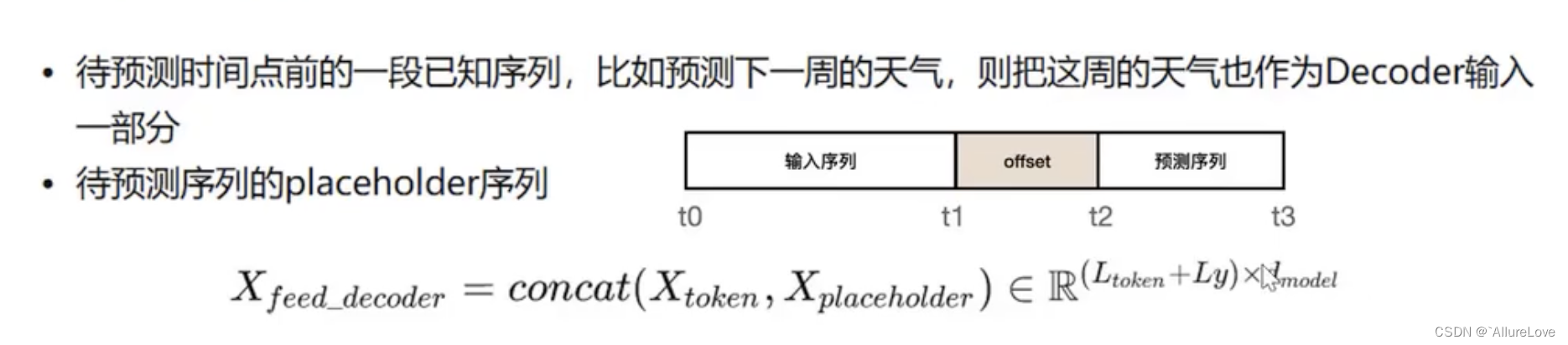
【论文阅读】基于深度学习的时序预测——Informer
系列文章链接 论文一:2020 Informer:长时序数据预测 论文二:2021 Autoformer:长序列数据预测 论文三:2022 FEDformer:长序列数据预测 论文四:2022 Non-Stationary Transformers:非平…...

机器学习 | Python实现GBDT梯度提升树模型设计
机器学习 | Python实现GBDT梯度提升树模型设计 目录 机器学习 | Python实现GBDT梯度提升树模型设计基本介绍模型描述模型使用参考资料基本介绍 机器学习 | Python实现GBDT梯度提升树模型设计。梯度提升树(Grandient Boosting)是提升树(Boosting Tree)的一种改进算法,GBDT也…...

elementUi表单恢复至初始状态并不触发表单验证
elementUi表单恢复至初始状态并不触发表单验证 1.场景再现2.解决方法 1.场景再现 左侧是树形列表,右侧是显示节点的详情,点击按钮应该就是新增一个规则的意思,表单内容是没有改变的,所以就把需要把表单恢复至初始状态并不触发表单…...
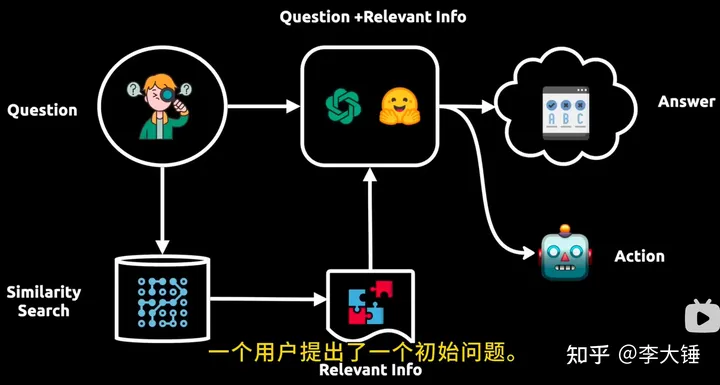
大模型相关知识
一. embedding 简单来说,embedding就是用一个低维的向量表示一个物体,可以是一个词,或是一个商品,或是一个电影等等。这个embedding向量的性质是能使距离相近的向量对应的物体有相近的含义,比如 Embedding(复仇者联盟)…...

无法在 macOS Ventura 上启动 Multipass
异常信息 ➜ ~ sudo multipass authenticate Please enter passphrase: authenticate failed: Passphrase is not set. Please multipass set local.passphrase with a trusted client. ➜ ~ multipass set local.passphrase Please enter passphrase: Please re-enter…...
算法通关村第六关——原来如此简单
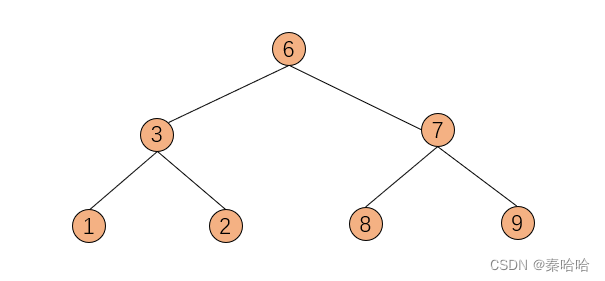
层次遍历:又叫广度优先遍历。就是从根节点开始,先访问根节点下面一层全部元素,再访问之后的层次,直到访问完二叉树的最后一层。 我们先看一下基础的层次遍历题,力扣102题:给你一个二叉树,请你返…...
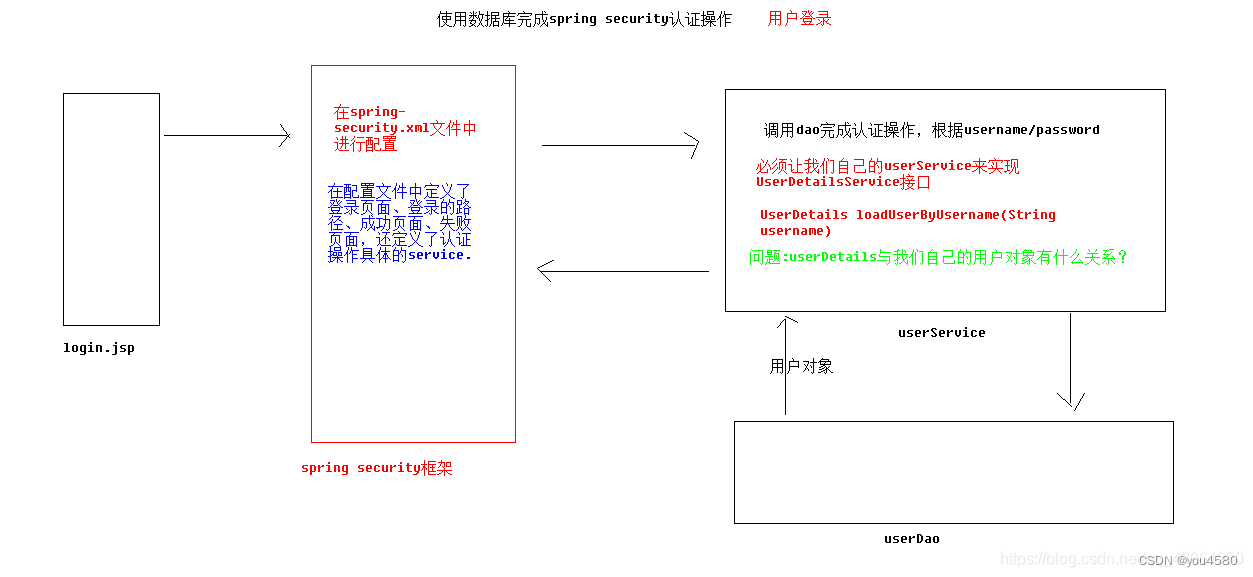
企业权限管理(八)-登陆使用数据库认证
Spring Security 使用数据库认证 在 Spring Security 中如果想要使用数据进行认证操作,有很多种操作方式,这里我们介绍使用 UserDetails 、 UserDetailsService来完成操作。 UserDetails public interface UserDetails extends Serializable { Collecti…...
第一百二十五天学习记录:C++提高:STL-deque容器(下)(黑马教学视频)
deque插入和删除 功能描述: 向deque容器中插入和删除数据 函数原型: 两端插入操作: push_back(elem); //在容器尾部添加一个数据 push_front(elem); //在容器头部插入一个数据 pop_back(); //删除容器最后一个数据 pop_front(); //删除容器…...

案例12 Spring MVC入门案例
网页输入http://localhost:8080/hello,浏览器展示“Hello Spring MVC”。 1. 创建项目 选择Maven快速构建web项目,项目名称为case12-springmvc01。 2.配置Maven依赖 <?xml version"1.0" encoding"UTF-8"?><project xm…...

【React】精选10题
1.React Hooks带来了什么便利? React Hooks是React16.8版本中引入的新特性,它带来了许多便利。 更简单的状态管理 使用useState Hook可以在函数组件中方便地管理状态,避免了使用类组件时需要继承React.Component的繁琐操作。 避免使用类组件…...

Topit:macOS窗口置顶神器,让多任务处理效率翻倍
Topit:macOS窗口置顶神器,让多任务处理效率翻倍 【免费下载链接】Topit Pin any window to the top of your screen / 在Mac上将你的任何窗口强制置顶 项目地址: https://gitcode.com/gh_mirrors/to/Topit 你是否经常在macOS上同时处理多个任务时…...

告别命令行!用Python脚本批量管理Docker容器,效率提升不止一点点
告别命令行!用Python脚本批量管理Docker容器,效率提升不止一点点每次在终端敲入docker ps、docker stop、docker rm时,你是否想过——当容器数量超过两位数,这种重复劳动是否在消耗你的生命?去年我们团队在迁移微服务架…...

为什么视频代剪辑会影响你的内容传播效果
为什么你精心拍的视频,发出去却没人看? 你有没有过这样的经历:花了一整天拍Vlog,素材画质高清、内容真实,可一剪出来就显得平淡无奇,点赞寥寥?或者婚礼当天感动全场,回看成片却像流水…...

学术写作创新突破!2026全流程AI论文工具精选指南
2026 年 AI 论文写作工具已进入全流程闭环 学术合规时代,千笔 AI(综合评分 99 分)中文学术场景标杆;Grammarly Academic与Elicit为英文论文写作首选;按需求匹配度 - 数据可信度 - 成本承受力三维模型选型,…...

碧蓝航线自动化脚本终极指南:3小时学会全自动游戏管理
碧蓝航线自动化脚本终极指南:3小时学会全自动游戏管理 【免费下载链接】AzurLaneAutoScript Azur Lane bot (CN/EN/JP/TW) 碧蓝航线脚本 | 无缝委托科研,全自动大世界 项目地址: https://gitcode.com/gh_mirrors/az/AzurLaneAutoScript 还在为碧蓝…...
)
Mysql:事务管理(中)
在前面的章节中,我们提到了 MVCC(多版本并发控制),它巧妙地通过“版本快照”解决了“读-写”冲突,实现了非阻塞读。但如果两个事务同时执行 UPDATE 操作修改同一行数据,即 写-写(Write-Write&am…...

第三卷第4章:原型模式设计思想
第三卷第4章:原型模式设计思想 目录介绍 01.案例引入与思考 1.1 痛点场景 1.2 它哪里不舒服 1.3 引出本篇主角 02.原型模式介绍 2.1 原型模式由来 2.2 原型模式定义...

WarcraftHelper终极指南:魔兽争霸3兼容性问题一站式解决方案
WarcraftHelper终极指南:魔兽争霸3兼容性问题一站式解决方案 【免费下载链接】WarcraftHelper Warcraft III Helper , support 1.20e, 1.24e, 1.26a, 1.27a, 1.27b 项目地址: https://gitcode.com/gh_mirrors/wa/WarcraftHelper 还在为《魔兽争霸3》在现代电…...

机器学习驱动储氢材料发现:从特征工程到DFT/MD验证的完整指南
1. 项目概述与核心思路氢能被视为未来清洁能源体系的关键一环,但如何安全、高效、经济地储存氢气,一直是制约其大规模应用的瓶颈。在众多储氢技术路线中,固态储氢,特别是基于金属氢化物的储氢材料,因其高体积储氢密度和…...

TV Bro电视浏览器:为智能电视打造的最佳遥控器上网解决方案
TV Bro电视浏览器:为智能电视打造的最佳遥控器上网解决方案 【免费下载链接】tv-bro Simple web browser for android optimized to use with TV remote 项目地址: https://gitcode.com/gh_mirrors/tv/tv-bro 还在为智能电视上网操作不便而烦恼吗?…...