
基于Spring Boot的中小型医院网站的设计与实现
目录
前言
一、技术栈
二、系统功能介绍
前台首页界面
用户登录界面
用户注册界面
门诊信息详情界面
预约挂号界面
药品详情界面
体检报告界面
管理员登录界面
用户管理界面
医师管理界面
科室类型管理界面
门诊信息管理界面
药库信息管理界面
预约挂号管理界面
体检报告管理界面
三、核心代码
1、登录模块
2、文件上传模块
3、代码封装
前言
本基于Spring Boot的中小型医院网站设计目标是实现用户网络预约挂号的功能,同时提高医院管理效率,更好的为广大用户服务。
本文重点阐述了中小型医院网站的开发过程,以实际运用为开发背景,基于Spring Boot框架,运用了Java技术和MYSQL数据库进行开发设计,充分保证系统的安全性和稳定性。本系统界面良好,操作简单方便,通过系统概述、系统分析、系统设计、数据库设计、系统测试这几个部分,详细的说明了系统的开发过程,最后并对整个开发过程进行了总结,实现了预约挂号管理、医师开药管理、药库信息管理、用户取药管理以及缴费清单管理等重要功能。
本基于Spring Boot的中小型医院网站运行效果稳定,操作方便、快捷,界面友好,是一个功能全面、实用性好、安全性高,并具有良好的可扩展性、可维护性的医院网站。
一、技术栈
末尾获取源码
SpringBoot+Vue+JS+ jQuery+Ajax...
二、系统功能介绍
前台首页界面
用户进入本系统可查看系统信息,包括首页、门诊信息、药库信息以及系统公告信息等。

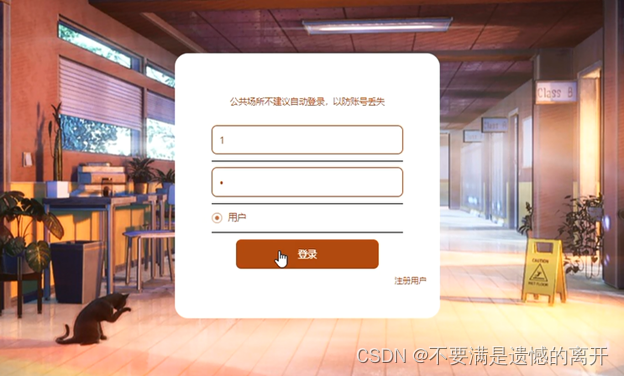
用户登录界面
用户要想实现预约挂号功能,必须登录系统,在登录界面输入正确的登录账号和密码点击登录按钮进行登录,系统会对用户输入的登录信息进行验证,信息正确则登录成功,反之登录失败
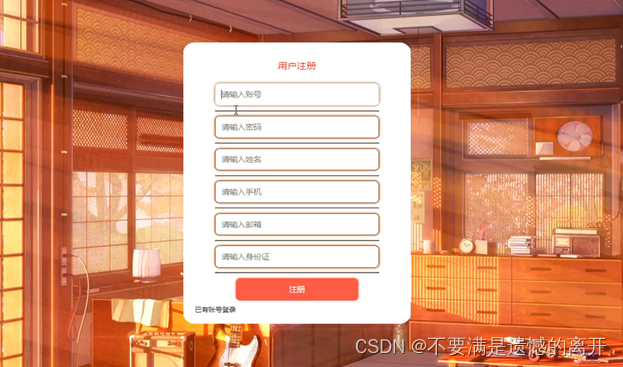
用户注册界面
没有账号的用户可进行注册操作
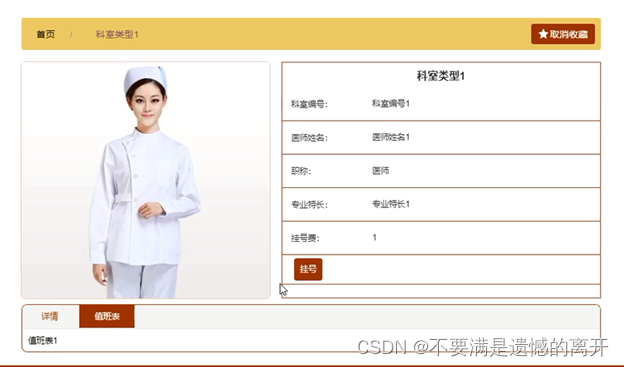
门诊信息详情界面
用户可选择门诊查看详情信息,登录后可进行预约挂号操作
预约挂号界面
用户在预约挂号时需要填写相关数据

药品详情界面
用户可选择药品查看详情信息,登录后可进行取药操作

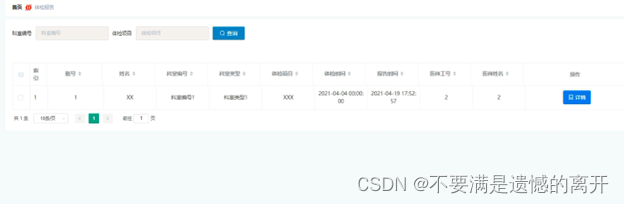
体检报告界面
用户可查看个人体检报告信息
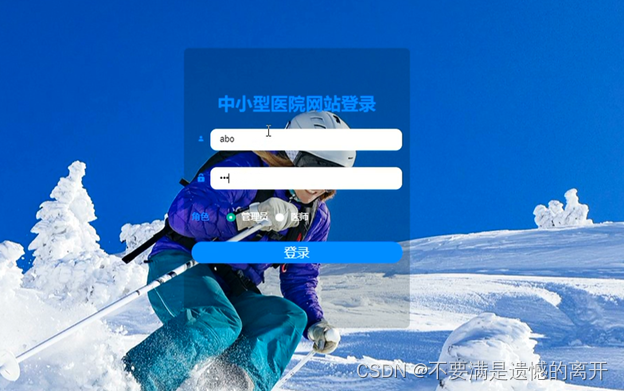
管理员登录界面
管理员要想进入系统后台对系统进行管理操作,必须登录系统后台
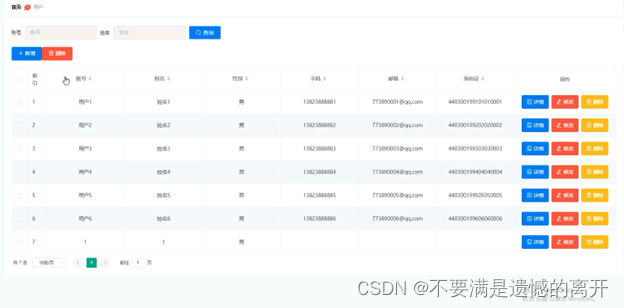
用户管理界面
管理员可增删改查用户信息
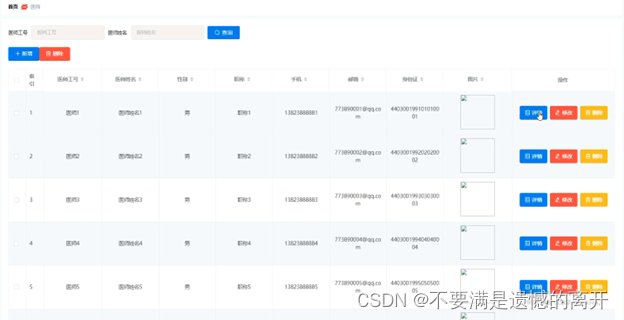
医师管理界面
管理员可查看医师信息,并可对其进行修改和删除操作,同时也可添加医师信息
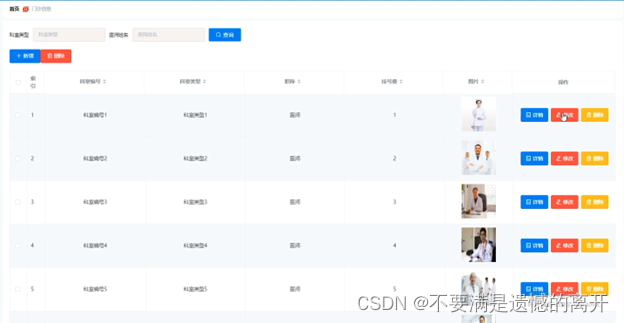
科室类型管理界面
管理员可增删改查科室类型信息

门诊信息管理界面
管理员可查看所有门诊信息,并可对其进行修改和删除操作,也可添加门诊信息
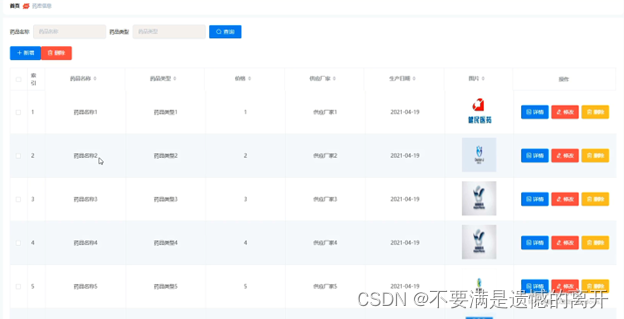
药库信息管理界面
管理员能够增删改查药库信息
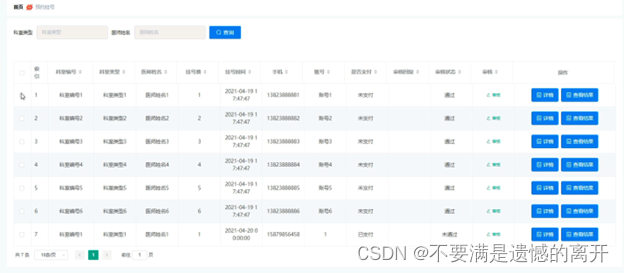
预约挂号管理界面
医师登录后可查看用户预约挂号信息,并可对其进审核和查看结果操作
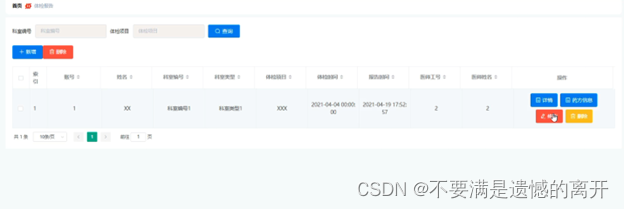
体检报告管理界面
医师可增删改查体检报告信息,并可进行添加药方信息
三、核心代码
1、登录模块
package com.controller;import java.util.Arrays;
import java.util.Calendar;
import java.util.Date;
import java.util.Map;import javax.servlet.http.HttpServletRequest;import org.springframework.beans.factory.annotation.Autowired;
import org.springframework.stereotype.Controller;
import org.springframework.web.bind.annotation.GetMapping;
import org.springframework.web.bind.annotation.PathVariable;
import org.springframework.web.bind.annotation.PostMapping;
import org.springframework.web.bind.annotation.RequestBody;
import org.springframework.web.bind.annotation.RequestMapping;
import org.springframework.web.bind.annotation.RequestParam;
import org.springframework.web.bind.annotation.ResponseBody;
import org.springframework.web.bind.annotation.RestController;import com.annotation.IgnoreAuth;
import com.baomidou.mybatisplus.mapper.EntityWrapper;
import com.entity.TokenEntity;
import com.entity.UserEntity;
import com.service.TokenService;
import com.service.UserService;
import com.utils.CommonUtil;
import com.utils.MD5Util;
import com.utils.MPUtil;
import com.utils.PageUtils;
import com.utils.R;
import com.utils.ValidatorUtils;/*** 登录相关*/
@RequestMapping("users")
@RestController
public class UserController{@Autowiredprivate UserService userService;@Autowiredprivate TokenService tokenService;/*** 登录*/@IgnoreAuth@PostMapping(value = "/login")public R login(String username, String password, String captcha, HttpServletRequest request) {UserEntity user = userService.selectOne(new EntityWrapper<UserEntity>().eq("username", username));if(user==null || !user.getPassword().equals(password)) {return R.error("账号或密码不正确");}String token = tokenService.generateToken(user.getId(),username, "users", user.getRole());return R.ok().put("token", token);}/*** 注册*/@IgnoreAuth@PostMapping(value = "/register")public R register(@RequestBody UserEntity user){
//    	ValidatorUtils.validateEntity(user);if(userService.selectOne(new EntityWrapper<UserEntity>().eq("username", user.getUsername())) !=null) {return R.error("用户已存在");}userService.insert(user);return R.ok();}/*** 退出*/@GetMapping(value = "logout")public R logout(HttpServletRequest request) {request.getSession().invalidate();return R.ok("退出成功");}/*** 密码重置*/@IgnoreAuth@RequestMapping(value = "/resetPass")public R resetPass(String username, HttpServletRequest request){UserEntity user = userService.selectOne(new EntityWrapper<UserEntity>().eq("username", username));if(user==null) {return R.error("账号不存在");}user.setPassword("123456");userService.update(user,null);return R.ok("密码已重置为:123456");}/*** 列表*/@RequestMapping("/page")public R page(@RequestParam Map<String, Object> params,UserEntity user){EntityWrapper<UserEntity> ew = new EntityWrapper<UserEntity>();PageUtils page = userService.queryPage(params, MPUtil.sort(MPUtil.between(MPUtil.allLike(ew, user), params), params));return R.ok().put("data", page);}/*** 列表*/@RequestMapping("/list")public R list( UserEntity user){EntityWrapper<UserEntity> ew = new EntityWrapper<UserEntity>();ew.allEq(MPUtil.allEQMapPre( user, "user")); return R.ok().put("data", userService.selectListView(ew));}/*** 信息*/@RequestMapping("/info/{id}")public R info(@PathVariable("id") String id){UserEntity user = userService.selectById(id);return R.ok().put("data", user);}/*** 获取用户的session用户信息*/@RequestMapping("/session")public R getCurrUser(HttpServletRequest request){Long id = (Long)request.getSession().getAttribute("userId");UserEntity user = userService.selectById(id);return R.ok().put("data", user);}/*** 保存*/@PostMapping("/save")public R save(@RequestBody UserEntity user){
//    	ValidatorUtils.validateEntity(user);if(userService.selectOne(new EntityWrapper<UserEntity>().eq("username", user.getUsername())) !=null) {return R.error("用户已存在");}userService.insert(user);return R.ok();}/*** 修改*/@RequestMapping("/update")public R update(@RequestBody UserEntity user){
//        ValidatorUtils.validateEntity(user);userService.updateById(user);//全部更新return R.ok();}/*** 删除*/@RequestMapping("/delete")public R delete(@RequestBody Long[] ids){userService.deleteBatchIds(Arrays.asList(ids));return R.ok();}
}
2、文件上传模块
package com.controller;import java.io.File;
import java.io.FileNotFoundException;
import java.io.IOException;
import java.util.Arrays;
import java.util.Date;
import java.util.HashMap;
import java.util.List;
import java.util.Map;
import java.util.Random;
import java.util.UUID;import org.apache.commons.io.FileUtils;
import org.apache.commons.lang3.StringUtils;
import org.springframework.beans.factory.annotation.Autowired;
import org.springframework.http.HttpHeaders;
import org.springframework.http.HttpStatus;
import org.springframework.http.MediaType;
import org.springframework.http.ResponseEntity;
import org.springframework.util.ResourceUtils;
import org.springframework.web.bind.annotation.PathVariable;
import org.springframework.web.bind.annotation.RequestBody;
import org.springframework.web.bind.annotation.RequestMapping;
import org.springframework.web.bind.annotation.RequestParam;
import org.springframework.web.bind.annotation.RestController;
import org.springframework.web.multipart.MultipartFile;import com.annotation.IgnoreAuth;
import com.baomidou.mybatisplus.mapper.EntityWrapper;
import com.entity.ConfigEntity;
import com.entity.EIException;
import com.service.ConfigService;
import com.utils.R;/*** 上传文件映射表*/
@RestController
@RequestMapping("file")
@SuppressWarnings({"unchecked","rawtypes"})
public class FileController{@Autowiredprivate ConfigService configService;/*** 上传文件*/@RequestMapping("/upload")public R upload(@RequestParam("file") MultipartFile file,String type) throws Exception {if (file.isEmpty()) {throw new EIException("上传文件不能为空");}String fileExt = file.getOriginalFilename().substring(file.getOriginalFilename().lastIndexOf(".")+1);File path = new File(ResourceUtils.getURL("classpath:static").getPath());if(!path.exists()) {path = new File("");}File upload = new File(path.getAbsolutePath(),"/upload/");if(!upload.exists()) {upload.mkdirs();}String fileName = new Date().getTime()+"."+fileExt;File dest = new File(upload.getAbsolutePath()+"/"+fileName);file.transferTo(dest);FileUtils.copyFile(dest, new File("C:\\Users\\Desktop\\jiadian\\springbootl7own\\src\\main\\resources\\static\\upload"+"/"+fileName));if(StringUtils.isNotBlank(type) && type.equals("1")) {ConfigEntity configEntity = configService.selectOne(new EntityWrapper<ConfigEntity>().eq("name", "faceFile"));if(configEntity==null) {configEntity = new ConfigEntity();configEntity.setName("faceFile");configEntity.setValue(fileName);} else {configEntity.setValue(fileName);}configService.insertOrUpdate(configEntity);}return R.ok().put("file", fileName);}/*** 下载文件*/@IgnoreAuth@RequestMapping("/download")public ResponseEntity<byte[]> download(@RequestParam String fileName) {try {File path = new File(ResourceUtils.getURL("classpath:static").getPath());if(!path.exists()) {path = new File("");}File upload = new File(path.getAbsolutePath(),"/upload/");if(!upload.exists()) {upload.mkdirs();}File file = new File(upload.getAbsolutePath()+"/"+fileName);if(file.exists()){/*if(!fileService.canRead(file, SessionManager.getSessionUser())){getResponse().sendError(403);}*/HttpHeaders headers = new HttpHeaders();headers.setContentType(MediaType.APPLICATION_OCTET_STREAM);    headers.setContentDispositionFormData("attachment", fileName);    return new ResponseEntity<byte[]>(FileUtils.readFileToByteArray(file),headers, HttpStatus.CREATED);}} catch (IOException e) {e.printStackTrace();}return new ResponseEntity<byte[]>(HttpStatus.INTERNAL_SERVER_ERROR);}}
3、代码封装
package com.utils;import java.util.HashMap;
import java.util.Map;/*** 返回数据*/
public class R extends HashMap<String, Object> {private static final long serialVersionUID = 1L;public R() {put("code", 0);}public static R error() {return error(500, "未知异常,请联系管理员");}public static R error(String msg) {return error(500, msg);}public static R error(int code, String msg) {R r = new R();r.put("code", code);r.put("msg", msg);return r;}public static R ok(String msg) {R r = new R();r.put("msg", msg);return r;}public static R ok(Map<String, Object> map) {R r = new R();r.putAll(map);return r;}public static R ok() {return new R();}public R put(String key, Object value) {super.put(key, value);return this;}
}
相关文章:
基于Spring Boot的中小型医院网站的设计与实现
目录 前言 一、技术栈 二、系统功能介绍 前台首页界面 用户登录界面 用户注册界面 门诊信息详情界面 预约挂号界面 药品详情界面 体检报告界面 管理员登录界面 用户管理界面 医师管理界面 科室类型管理界面 门诊信息管理界面 药库信息管理界面 预约挂号管理界面…...
uniapp iOS离线打包——如何创建App并提交版本审核?
uniapp 如何创建App,并提交版本审核? 文章目录 uniapp 如何创建App,并提交版本审核?登录 appstoreconnect创建AppiOS 预览和截屏应用功能描述技术支持App 审核信息 App 信息内容版权年龄分级 价格与销售范围App 隐私提交审核 登录…...
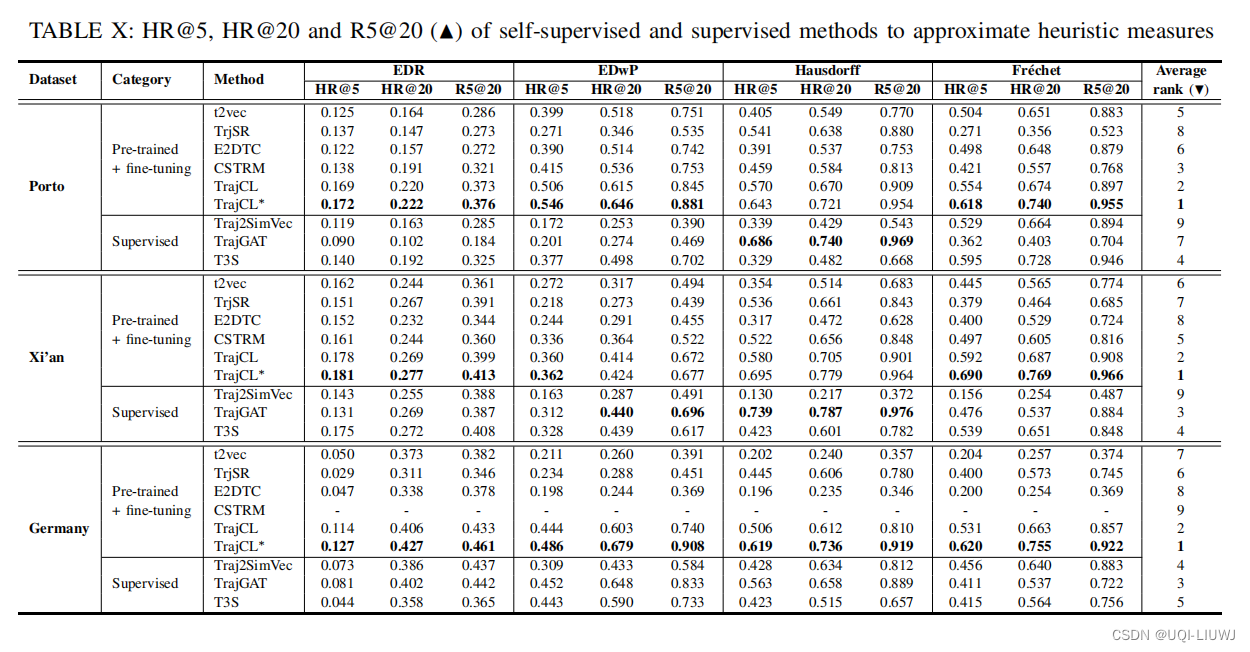
论文笔记:Contrastive Trajectory Similarity Learning withDual-Feature Attention
ICDE 2023 1 intro 1.1 背景 轨迹相似性,可以分为两类 启发式度量 根据手工制定的规则,找到两条轨迹之间基于点的匹配学习式度量 通过计算轨迹嵌入之间的距离来预测相似性值上述两种度量的挑战: 无效性: 具有不同采样率或含有噪…...

整数和字符串比较的坑
结果竟然是相同,惊呆了吧? $num1 2023快放假了; $num2 2023;if ($num1 $num2) {echo 相同; } else {echo 不相同; }num2改成字符串类型,结果:不相同,又不懵了吧? $num1 2023快放假了; $num2 2023;if…...

LeetCode 面试题 08.04. 幂集
文章目录 一、题目二、C# 题解 一、题目 幂集。编写一种方法,返回某集合的所有子集。集合中不包含重复的元素。 说明: 解集不能包含重复的子集。 示例: 输入: nums [1,2,3] 输出: [ [3], [1], [2], [1,2,3], [1,3], [2,3], [1…...

【m_listCtrl !=NULL有多个运算符与操作数匹配】2023/9/21 上午11:03:44
2023/9/21 上午11:03:44 m_listCtrl !=NULL有多个运算符与操作数匹配 2023/9/21 上午11:04:00 如果您在编译或运行代码时遇到"M_listCtrl != NULL有多个运算符与操作数匹配"的错误提示,这通常是由于以下几个原因之一: 错误使用运算符:在条件判断语句中,应该使…...

Logrus 集成 color 库实现自定义日志颜色输出字符原理
问题背景 下列代码实现了使用 Logurs 日志框架输出日志时根据级别不同,使用对应的自定义颜色进行输出。那么思考下代码的逻辑是怎么实现的呢? 效果如下: 代码如下: import ("fmt""github.com/sirupsen/logrus&q…...

【Java-LangChain:使用 ChatGPT API 搭建系统-2】语言模型,提问范式与 Token
第二章 语言模型,提问范式与 Token 在本章中,我们将和您分享大型语言模型(LLM)的工作原理、训练方式以及分词器(tokenizer)等细节对 LLM 输出的影响。我们还将介绍 LLM 的提问范式(chat format…...
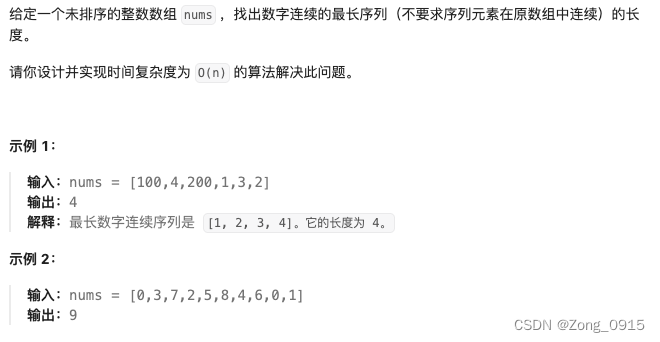
想要精通算法和SQL的成长之路 - 最长连续序列
想要精通算法和SQL的成长之路 - 最长连续序列 前言一. 最长连续序列1.1 并查集数据结构创建1.2 find 查找1.3 union 合并操作1.4 最终代码 前言 想要精通算法和SQL的成长之路 - 系列导航 并查集的运用 一. 最长连续序列 原题链接 这个题目,如何使用并查集是一个小难…...
- 制图(Draft)-工程图框选制图曲线并输出制图曲线的信息)
UG NX二次开发(C#)- 制图(Draft)-工程图框选制图曲线并输出制图曲线的信息
提示:文章写完后,目录可以自动生成,如何生成可参考右边的帮助文档 文章目录 1、前言2、在UG NX中打开一个装配体模型3、进入工程制图模块,创建工程制图4、在VS中创建一个工程项目5、在Main()中添加选择的代码(UFun)6、在Main()中添加选择的代码(NXOpen)7、框选解决方案…...
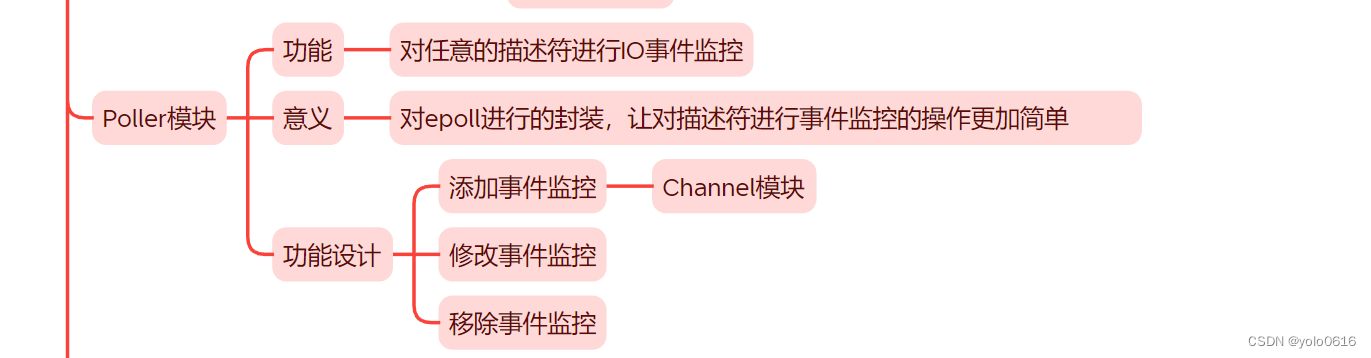
1.7.C++项目:仿muduo库实现并发服务器之Poller模块的设计
项目完整在: 文章目录 一、Poller模块:描述符IO事件监控模块二、提供的功能三、实现思想(一)功能(二)意义(三)功能设计 四、封装思想五、代码(一)框架&#…...

Flutter笔记:build方法、构建上下文BuildContext解析
Flutter笔记 build 方法解析 作者:李俊才 (jcLee95):https://blog.csdn.net/qq_28550263 邮箱 :291148484163.com 本文地址:https://blog.csdn.net/qq_28550263/article/details/133556333 本文主要介绍Flu…...

composer 安装和基本使用
php的包管理软件 如果没有安装php,参考这篇:添加链接描述 1.composer安装 composer官网 需要先安装好php,同时php -v输出有信息 cd /usr/localphp -r "copy(https://install.phpcomposer.com/installer, composer-setup.php);"…...
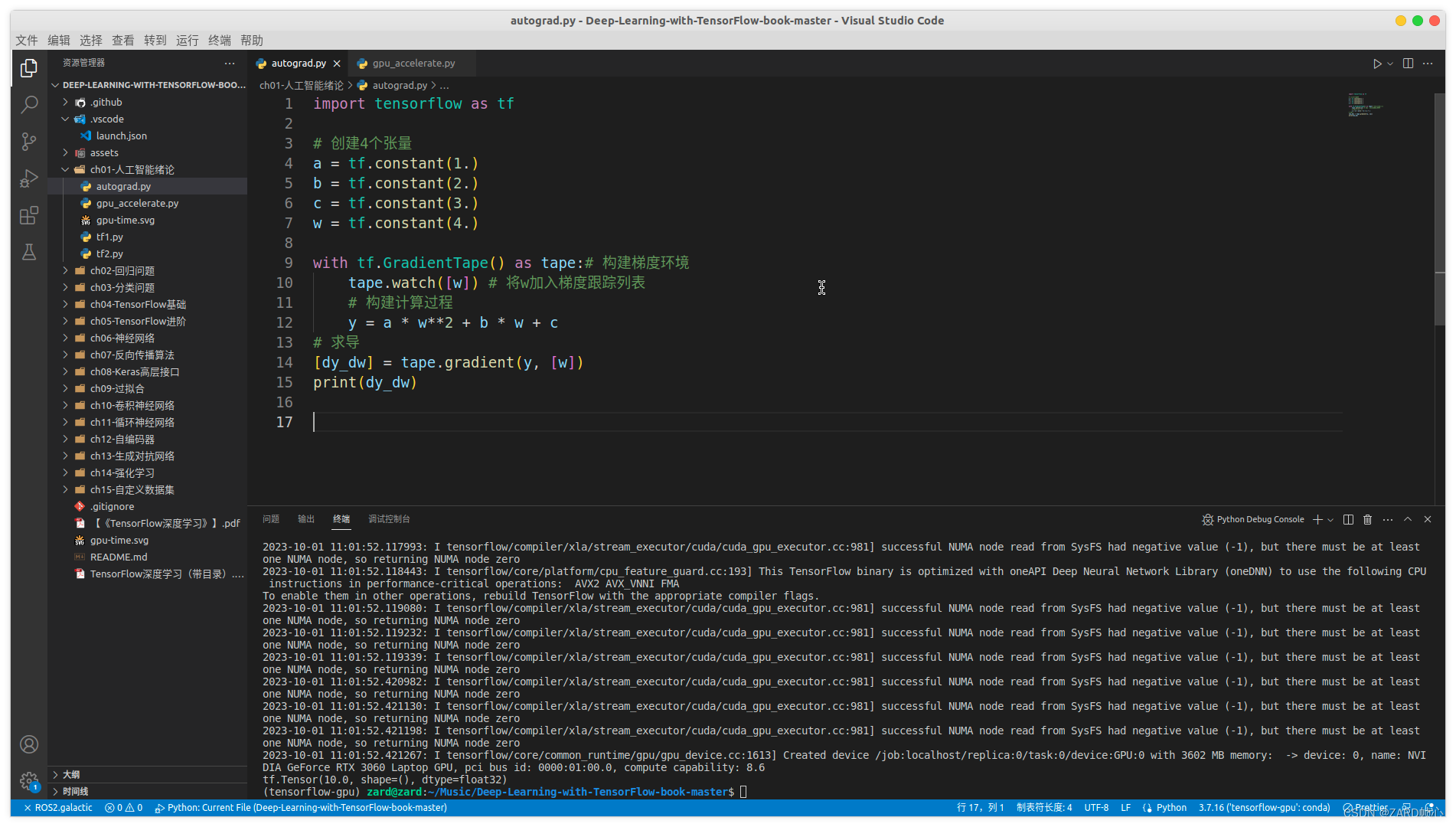
Ubuntu配置深度学习环境(TensorFlow和PyTorch)
文章目录 一、CUDA安装1.1 安装显卡驱动1.2 CUDA安装1.3 安装cuDNN 二、Anaconda安装三、安装TensorFlow和pyTorch3.1 安装pyTorch3.2 安装TensorFlow2 四、安装pyCharm4.1 pyCharm的安装4.2 关联anaconda的Python解释器 五、VScode配置anaconda的Python虚拟环境 前言ÿ…...

【产品经理】国内企业服务SAAS平台的生存与发展
SaaS在国外发展的比较成熟,甚至已经成为了主流,但在国内这几年才掀起热潮;企业服务SaaS平台在少部分行业发展较快,大部分行业在国内还处于起步、探索阶段;SaaS将如何再国内生存和发展? 在企业服务行业做了五…...

【vue 首屏加载优化】
Vue 首屏加载优化指的是通过一系列的技术手段,尽可能地缩短首屏(即页面中可见的部分)的加载时间,提高用户体验。 以下是一些常见的 Vue 首屏加载优化技巧: 使用 Vue SSR(服务端渲染)࿱…...

docker--redis容器部署及与SpringBoot整合-I
文章目录 1. 容器化部署docker2. 如何与SpringBoot集成2.1. 引入依赖2.2. 添加配置信息2.3. 测试类2.4. 内置的Spring Beansredis 主流客户端比较redissonlettucejedis参考1. 容器化部署docker 拉取镜像创建数据目录data 及 配置目录conf创建配置文件redis.conf启动redis容器进…...

力扣 -- 518. 零钱兑换 II(完全背包问题)
解题步骤: 参考代码: 未优化代码: class Solution { public:int change(int amount, vector<int>& coins) {int ncoins.size();//多开一行,多开一列vector<vector<int>> dp(n1,vector<int>(amount1…...
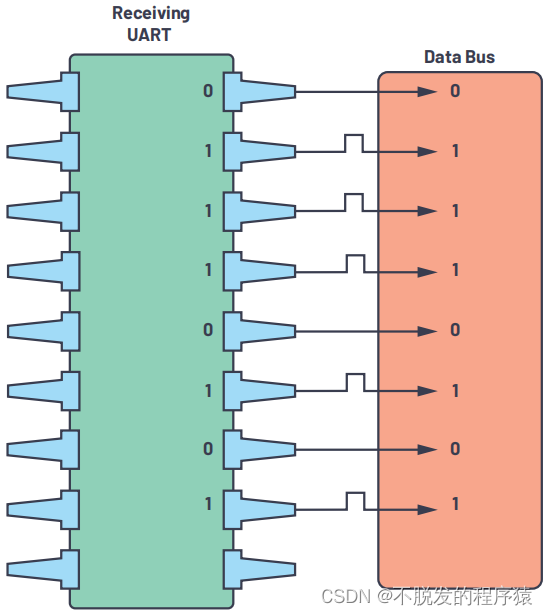
一文搞懂UART通信协议
目录 1、UART简介 2、UART特性 3、UART协议帧 3.1、起始位 3.2、数据位 3.3、奇偶校验位 3.4、停止位 4、UART通信步骤 1、UART简介 UART(Universal Asynchronous Receiver/Transmitter,通用异步收发器)是一种双向、串行、异步的通信…...
【算法|动态规划No.7】leetcode300. 最长递增子序列
个人主页:兜里有颗棉花糖 欢迎 点赞👍 收藏✨ 留言✉ 加关注💓本文由 兜里有颗棉花糖 原创 收录于专栏【手撕算法系列专栏】【LeetCode】 🍔本专栏旨在提高自己算法能力的同时,记录一下自己的学习过程,希望…...
)
别再只用AES了!手把手教你用Java BouncyCastle库实现SM4国密加密(附完整工具类)
国密算法实战:用Java BouncyCastle实现SM4加密的完整指南 在数据安全领域,国际通用算法长期占据主导地位,但随着技术自主可控需求的提升,国产密码算法正成为企业级应用的新选择。SM4作为我国商用密码标准体系中的重要对称加密算法…...

WSL启动器openclaw-wsl-launcher:提升Windows与Linux开发效率的桥梁工具
1. 项目概述:一个为WSL设计的OpenClaw启动器如果你和我一样,日常开发的主力环境是Windows,但核心的编译、部署和测试工作又离不开Linux,那么Windows Subsystem for Linux(WSL)绝对是你绕不开的利器。它让我…...

手势传感器技术:原理、实现与应用解析
1. 手势传感器技术解析:从原理到实现手势传感器本质上是一种基于光学原理的交互设备,其核心技术在于利用红外光的发射与接收来捕捉用户手势动作。与传统的电容式触摸技术不同,手势传感器通过主动发射红外光并测量反射信号的变化,实…...

终极OpenSpeedy游戏加速教程:5分钟解锁老游戏流畅体验
终极OpenSpeedy游戏加速教程:5分钟解锁老游戏流畅体验 【免费下载链接】OpenSpeedy 🎮 An open-source game speed modifier. 项目地址: https://gitcode.com/gh_mirrors/op/OpenSpeedy 还在为经典老游戏在现代电脑上运行卡顿而烦恼吗?…...

电源技术周览:从微生物电池到前沿功率器件深度解析
1. 电源技术周览:从微生物电池到前沿功率器件又到了每周梳理电源技术动态的时候。这周的信息密度不小,从颇具科幻感的微生物燃料电池,到未来十年锂离子电池的市场与技术路线图,再到高压直流输电和无线充电这些与我们生活、工业息息…...

理想汽车AI组织架构重组
把公司拆成心脏、大脑和手脚——理想汽车这波AI组织架构重组到底在赌什么? 导读:李想用一场2小时的全员会,把一家年营收千亿的公司按人体器官逻辑重新组装。这不是比喻,这是组织结构图上的真实节点。从造车到"造人"&…...
)
SAP ABAP OData 接口开发核心知识点梳理(含详图)
在SAP S/4HANA项目开发与前后端对接场景中,OData接口几乎是目前企业最主流、最核心的数据交互方案。无论是SAP Fiori前端页面开发、第三方系统对接、移动端集成,还是外部系统读写SAP业务数据,基本都依赖OData服务实现标准化、轻量化的数据通信…...

安全测试人员必备:手把手教你用WePE+Ghost镜像在VMware里快速部署Win7靶机环境
安全测试人员必备:手把手教你用WePEGhost镜像在VMware里快速部署Win7靶机环境 在网络安全学习和渗透测试领域,拥有一个随时可用的标准化测试环境至关重要。对于刚入门的安全研究员、白帽子或需要进行漏洞复现的技术人员来说,Windows 7系统仍然…...

自我提升智能体的自进化原理和实践
自我提升智能体skill赋予了AI助手从错误中反思、学习并自动繁衍新通用技能的持续进化能力。 1 实际案例 帮我运行测试,看看为什么登录模块失败。 流程如下: 第一步,任务开始前,Hook 触发 activator.sh(通过 UserPromptSubmit 触发)。它不会输出一大堆规则,只是提醒 AI 一…...

别再写for循环了!用Java8的groupingBy,一行代码搞定员工按城市分组统计
告别繁琐循环:Java8 groupingBy在数据分组统计中的革命性应用 每次面对从数据库查询出的员工列表,需要按城市、部门或职级进行分组统计时,你是否还在写着重复的for循环?那些嵌套的if判断、临时变量和累加操作不仅让代码臃肿不堪&a…...