
WARNING: Access control is not enabled for the database.
MongoDB shell version v3.4.24
WARNING: Access control is not enabled for the database.
Read and write access to data and configuration is unrestricted.
1)未启用访问控制
2)读写访问不受限制
D:\MongoDB\Server\3.4\bin>mongo
MongoDB shell version v3.4.24
connecting to: mongodb://127.0.0.1:27017
MongoDB server version: 3.4.24
Welcome to the MongoDB shell.
For interactive help, type "help".
For more comprehensive documentation, seehttp://docs.mongodb.org/
Questions? Try the support grouphttp://groups.google.com/group/mongodb-user
Server has startup warnings:
2023-11-29T16:56:25.314+0800 I CONTROL  [initandlisten]
2023-11-29T16:56:25.314+0800 I CONTROL  [initandlisten] ** WARNING: Access control is not enabled for the database.
2023-11-29T16:56:25.314+0800 I CONTROL  [initandlisten] **          Read and write access to data and configuration is unrestricted.
2023-11-29T16:56:25.314+0800 I CONTROL  [initandlisten]
>
> db
test
>
>
MongoDB: Server has startup warnings ''Access control is not enabled for the database'' - Stack Overflow
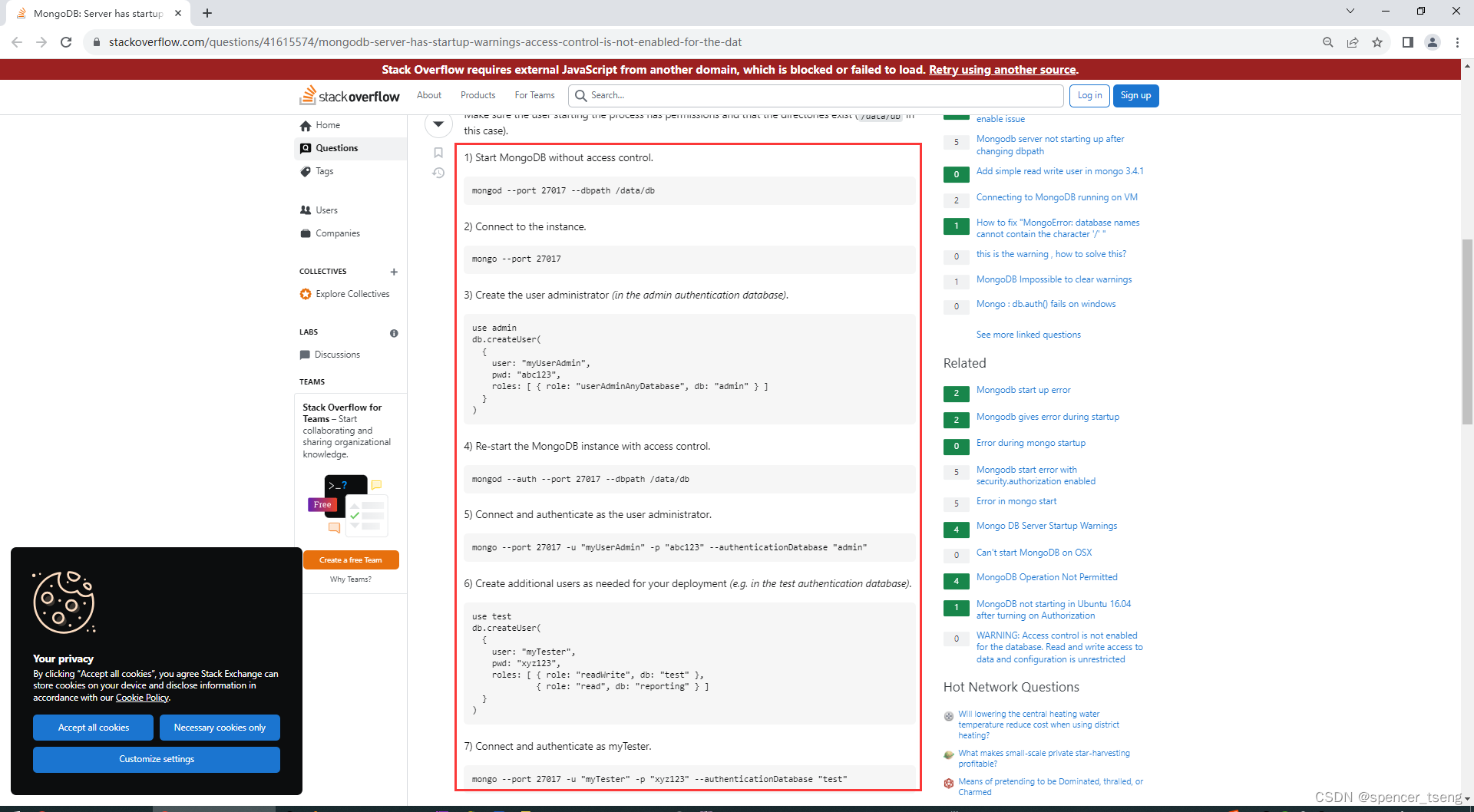
Mongodb v3.4
You need to do the following to create a secure database:
Make sure the user starting the process has permissions and that the directories exist (/data/db in this case).
1) Start MongoDB without access control.
mongod --port 27017 --dbpath /data/db
2) Connect to the instance.
mongo --port 27017
3) Create the user administrator (in the admin authentication database).
use admin
db.createUser({user: "myUserAdmin",pwd: "abc123",roles: [ { role: "userAdminAnyDatabase", db: "admin" } ]}
)
4) Re-start the MongoDB instance with access control.
mongod --auth --port 27017 --dbpath /data/db
5) Connect and authenticate as the user administrator.
mongo --port 27017 -u "myUserAdmin" -p "abc123" --authenticationDatabase "admin"
6) Create additional users as needed for your deployment (e.g. in the test authentication database).
use test
db.createUser({user: "myTester",pwd: "xyz123",roles: [ { role: "readWrite", db: "test" },{ role: "read", db: "reporting" } ]}
)
7) Connect and authenticate as myTester.
mongo --port 27017 -u "myTester" -p "xyz123" --authenticationDatabase "test"
I basically just explained the short version of the official docs here: https://docs.mongodb.com/master/tutorial/enable-authentication/
==
1)

D:\MongoDB\Server\3.4\bin>mongo
MongoDB shell version v3.4.24
connecting to: mongodb://127.0.0.1:27017
MongoDB server version: 3.4.24
Server has startup warnings:
2023-11-29T16:56:25.314+0800 I CONTROL  [initandlisten]
2023-11-29T16:56:25.314+0800 I CONTROL  [initandlisten] ** WARNING: Access control is not enabled for the database.
2023-11-29T16:56:25.314+0800 I CONTROL  [initandlisten] **          Read and write access to data and configuration is unrestricted.
2023-11-29T16:56:25.314+0800 I CONTROL  [initandlisten]
>
>
> use admin
switched to db admin
>
> db.createUser({user:"admin",pwd:"123456",roles:[{role:"userAdminAnyDatabase", db:"admin"}]})
Successfully added user: {"user" : "admin","roles" : [{"role" : "userAdminAnyDatabase","db" : "admin"}]
}
>
>
2)
mongod --auth --port 27017 --dbpath D:\MongoDB\Server\3.4\data\db
【. Is a mongod instance already running?, terminating】

D:\MongoDB\Server\3.4\bin>
D:\MongoDB\Server\3.4\bin>
D:\MongoDB\Server\3.4\bin>mongod --auth --port 27017 --dbpath D:\MongoDB\Server\3.4\data\db
2023-11-30T06:07:07.775+0800 I CONTROL  [initandlisten] MongoDB starting : pid=38192 port=27017 dbpath=D:\MongoDB\Server\3.4\data\db 64-bit host=thinkpad-t440p-zwf
2023-11-30T06:07:07.779+0800 I CONTROL  [initandlisten] targetMinOS: Windows 7/Windows Server 2008 R2
2023-11-30T06:07:07.780+0800 I CONTROL  [initandlisten] db version v3.4.24
2023-11-30T06:07:07.780+0800 I CONTROL  [initandlisten] git version: 865b4f6a96d0f5425e39a18337105f33e8db504d
2023-11-30T06:07:07.783+0800 I CONTROL  [initandlisten] allocator: tcmalloc
2023-11-30T06:07:07.783+0800 I CONTROL  [initandlisten] modules: none
2023-11-30T06:07:07.784+0800 I CONTROL  [initandlisten] build environment:
2023-11-30T06:07:07.784+0800 I CONTROL  [initandlisten]     distmod: 2008plus
2023-11-30T06:07:07.785+0800 I CONTROL  [initandlisten]     distarch: x86_64
2023-11-30T06:07:07.785+0800 I CONTROL  [initandlisten]     target_arch: x86_64
2023-11-30T06:07:07.786+0800 I CONTROL  [initandlisten] options: { net: { port: 27017 }, security: { authorization: "enabled" }, storage: { dbPath: "D:\MongoDB\Server\3.4\data\db" } }
2023-11-30T06:07:07.788+0800 I STORAGE  [initandlisten] exception in initAndListen: 98 Unable to create/open lock file: D:\MongoDB\Server\3.4\data\db\mongod.lock 另一个程序正在使用此文件,进程无法访问。. Is a mongod instance already running?, terminating
2023-11-30T06:07:07.788+0800 I NETWORK  [initandlisten] shutdown: going to close listening sockets...
2023-11-30T06:07:07.788+0800 I NETWORK  [initandlisten] shutdown: going to flush diaglog...
2023-11-30T06:07:07.789+0800 I CONTROL  [initandlisten] now exiting
2023-11-30T06:07:07.789+0800 I CONTROL  [initandlisten] shutting down with code:100D:\MongoDB\Server\3.4\bin>
3)任务管理器结束掉
4)
mongod --auth --port 27017 --dbpath D:\MongoDB\Server\3.4\data\db
Successfully authenticated as principal admin on admin from client 127.0.0.1:52564
Unauthorized: not authorized on admin to execute command { getLog: "startupWarnings" }
Unauthorized: not authorized on admin to execute command { getCmdLineOpts: 1.0 }
Unauthorized: not authorized on admin to execute command { replSetGetStatus: 1.0, forShell: 1.0 }
Unauthorized: not authorized on admin to execute command-CSDN博客

D:\MongoDB\Server\3.4\bin>mongod --auth --port 27017 --dbpath D:\MongoDB\Server\3.4\data\db
2023-11-30T06:15:18.468+0800 I CONTROL  [initandlisten] MongoDB starting : pid=9644 port=27017 dbpath=D:\MongoDB\Server\3.4\data\db 64-bit host=thinkpad-t440p-zwf
2023-11-30T06:15:18.472+0800 I CONTROL  [initandlisten] targetMinOS: Windows 7/Windows Server 2008 R2
2023-11-30T06:15:18.472+0800 I CONTROL  [initandlisten] db version v3.4.24
2023-11-30T06:15:18.472+0800 I CONTROL  [initandlisten] git version: 865b4f6a96d0f5425e39a18337105f33e8db504d
2023-11-30T06:15:18.472+0800 I CONTROL  [initandlisten] allocator: tcmalloc
2023-11-30T06:15:18.473+0800 I CONTROL  [initandlisten] modules: none
2023-11-30T06:15:18.473+0800 I CONTROL  [initandlisten] build environment:
2023-11-30T06:15:18.473+0800 I CONTROL  [initandlisten]     distmod: 2008plus
2023-11-30T06:15:18.473+0800 I CONTROL  [initandlisten]     distarch: x86_64
2023-11-30T06:15:18.473+0800 I CONTROL  [initandlisten]     target_arch: x86_64
2023-11-30T06:15:18.473+0800 I CONTROL  [initandlisten] options: { net: { port: 27017 }, security: { authorization: "enabled" }, storage: { dbPath: "D:\MongoDB\Server\3.4\data\db" } }
2023-11-30T06:15:18.475+0800 I -        [initandlisten] Detected data files in D:\MongoDB\Server\3.4\data\db created by the 'wiredTiger' storage engine, so setting the active storage engine to 'wiredTiger'.
2023-11-30T06:15:18.476+0800 I STORAGE  [initandlisten] wiredtiger_open config: create,cache_size=7523M,session_max=20000,eviction=(threads_min=4,threads_max=4),config_base=false,statistics=(fast),log=(enabled=true,archive=true,path=journal,compressor=snappy),file_manager=(close_idle_time=100000),checkpoint=(wait=60,log_size=2GB),statistics_log=(wait=0),verbose=(recovery_progress),
2023-11-30T06:15:18.781+0800 I STORAGE  [initandlisten] WiredTiger message [1701296118:781568][9644:140709756164912], txn-recover: Main recovery loop: starting at 2/5504
2023-11-30T06:15:18.946+0800 I STORAGE  [initandlisten] WiredTiger message [1701296118:945168][9644:140709756164912], txn-recover: Recovering log 2 through 3
2023-11-30T06:15:19.068+0800 I STORAGE  [initandlisten] WiredTiger message [1701296119:67846][9644:140709756164912], txn-recover: Recovering log 3 through 3
2023-11-30T06:15:20.419+0800 I FTDC     [initandlisten] Initializing full-time diagnostic data capture with directory 'D:/MongoDB/Server/3.4/data/db/diagnostic.data'
2023-11-30T06:15:20.427+0800 I NETWORK  [thread1] waiting for connections on port 27017
2023-11-30T06:15:25.062+0800 I NETWORK  [thread1] connection accepted from 127.0.0.1:52506 #1 (1 connection now open)
2023-11-30T06:15:25.065+0800 I NETWORK  [conn1] received client metadata from 127.0.0.1:52506 conn1: { driver: { name: "mongo-java-driver|sync|spring-boot", version: "4.6.1" }, os: { type: "Windows", name: "Windows 10", architecture: "amd64", version: "10.0" }, platform: "Java/Oracle Corporation/1.8.0_341-b10" }
2023-11-30T06:15:26.157+0800 I NETWORK  [thread1] connection accepted from 127.0.0.1:52510 #2 (2 connections now open)
2023-11-30T06:15:26.162+0800 I NETWORK  [conn2] received client metadata from 127.0.0.1:52510 conn2: { driver: { name: "mongo-java-driver|sync|spring-boot", version: "4.6.1" }, os: { type: "Windows", name: "Windows 10", architecture: "amd64", version: "10.0" }, platform: "Java/Oracle Corporation/1.8.0_341-b10" }
2023-11-30T06:16:48.976+0800 I NETWORK  [thread1] connection accepted from 127.0.0.1:52564 #3 (3 connections now open)
2023-11-30T06:16:48.977+0800 I NETWORK  [conn3] received client metadata from 127.0.0.1:52564 conn3: { application: { name: "MongoDB Shell" }, driver: { name: "MongoDB Internal Client", version: "3.4.24" }, os: { type: "Windows", name: "Microsoft Windows 8", architecture: "x86_64", version: "6.2 (build 9200)" } }
2023-11-30T06:16:48.999+0800 I ACCESS   [conn3] Successfully authenticated as principal admin on admin from client 127.0.0.1:52564
2023-11-30T06:16:49.022+0800 I ACCESS   [conn3] Unauthorized: not authorized on admin to execute command { getLog: "startupWarnings" }
2023-11-30T06:16:49.038+0800 I ACCESS   [conn3] Unauthorized: not authorized on admin to execute command { getCmdLineOpts: 1.0 }
2023-11-30T06:16:49.040+0800 I ACCESS   [conn3] Unauthorized: not authorized on admin to execute command { replSetGetStatus: 1.0, forShell: 1.0 }
5)mongo --port 27017 -u "admin" -p "123456" --authenticationDatabase "admin"
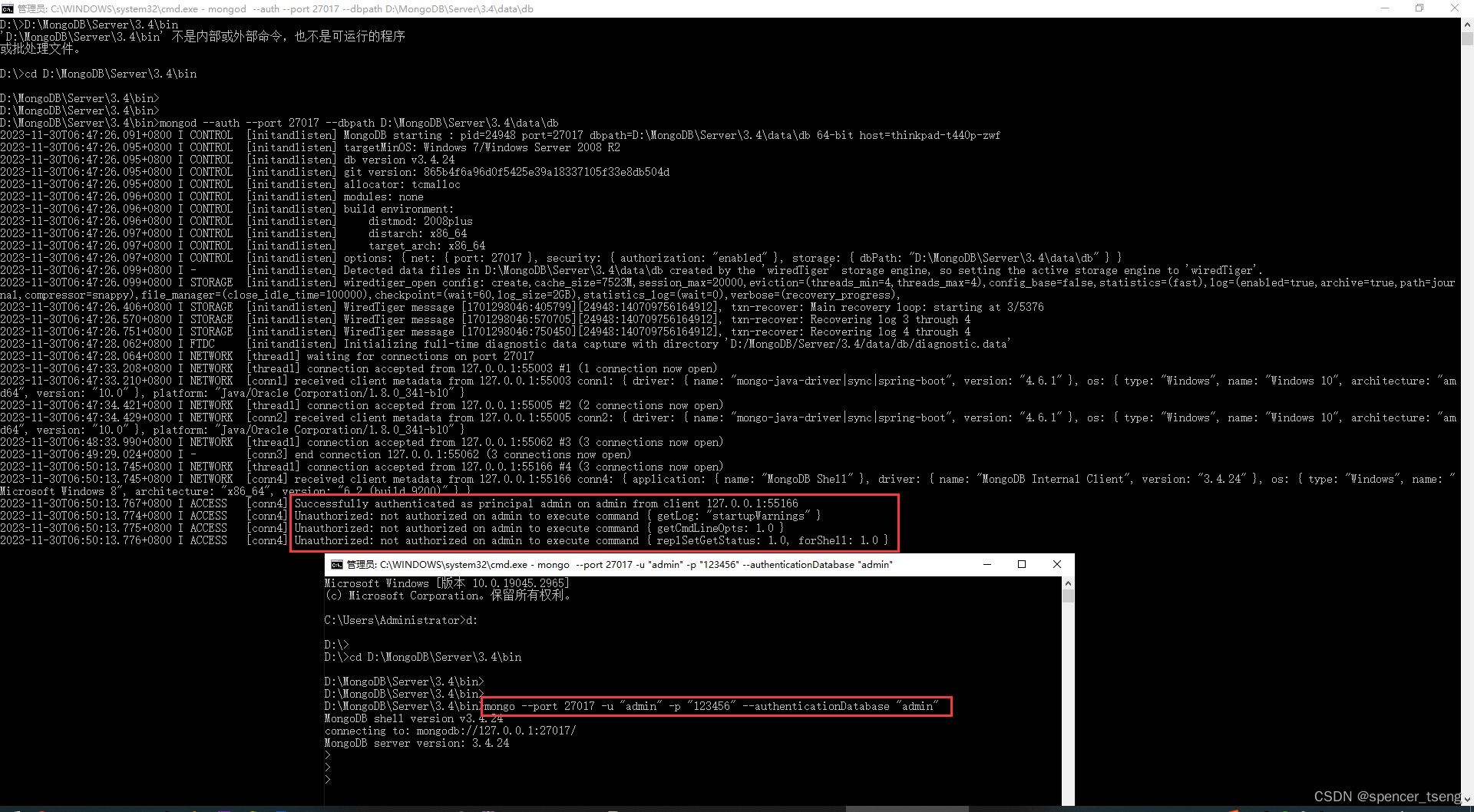
Microsoft Windows [版本 10.0.19045.2965]
(c) Microsoft Corporation。保留所有权利。C:\Users\Administrator>d:D:\>
D:\>cd D:\MongoDB\Server\3.4\binD:\MongoDB\Server\3.4\bin>
D:\MongoDB\Server\3.4\bin>
D:\MongoDB\Server\3.4\bin>mongo --port 27017 -u "admin" -p "123456" --authenticationDatabase "admin"
MongoDB shell version v3.4.24
connecting to: mongodb://127.0.0.1:27017/
MongoDB server version: 3.4.24
相关文章:
WARNING: Access control is not enabled for the database.
MongoDB shell version v3.4.24 WARNING: Access control is not enabled for the database. Read and write access to data and configuration is unrestricted. 1)未启用访问控制 2)读写访问不受限制 D:\MongoDB\Server\3.4\bin>mongo MongoDB shell version v3.4.24 c…...
JavaScript编程进阶 – Return语句
JavaScript编程进阶 – Return语句 JavaScript Programming Advanced – Return Statement By JacksonML 就像人们习惯的函数一样,总觉得在函数体最后需要一个return语句,标志着函数的结束,就像下面这个函数 theFunc() 那样。 function theFunc() { re…...

Python与设计模式--备忘录模式
23种计模式之 前言 (5)单例模式、工厂模式、简单工厂模式、抽象工厂模式、建造者模式、原型模式、(7)代理模式、装饰器模式、适配器模式、门面模式、组合模式、享元模式、桥梁模式、(11)策略模式、责任链模式、命令模式、中介者模…...
04_Flutter自定义Slider滑块
04_Flutter自定义Slider滑块 一.Slider控件基本用法 Column(mainAxisAlignment: MainAxisAlignment.start,children: <Widget>[Text("sliderValue: ${_sliderValue.toInt()}"),Slider(value: _sliderValue,min: 0,max: 100,divisions: 10,thumbColor: Colors.…...

服务器数据恢复—EMC存储raid5故障导致上层应用崩溃的数据恢复案例
服务器存储数据恢复环境: EMC某型号存储,8块组建一组raid5磁盘阵列。上层操作系统采用zfs文件系统。 服务器存储故障&分析: raid5阵列中有2块硬盘未知原因离线,raid5阵列崩溃,上层应用无法正常使用。 服务器数据恢…...
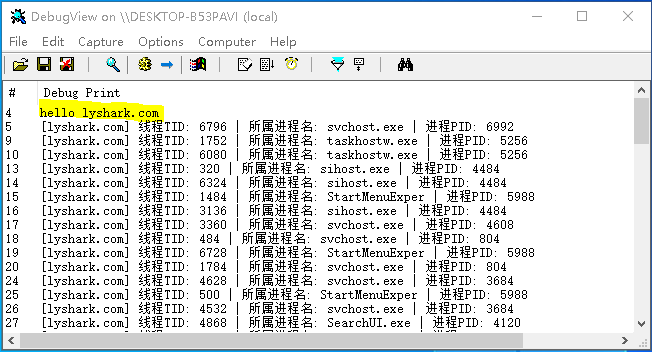
7.1 Windows驱动开发:内核监控进程与线程回调
在前面的文章中LyShark一直在重复的实现对系统底层模块的枚举,今天我们将展开一个新的话题,内核监控,我们以监控进程线程创建为例,在Win10系统中监控进程与线程可以使用微软提供给我们的两个新函数来实现,此类函数的原…...
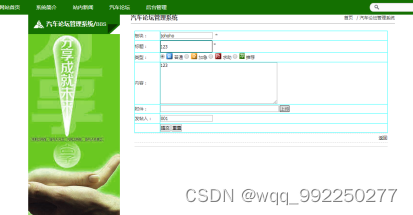
基于ssm的汽车论坛管理系统设计与实现
基于ssm的汽车论坛管理系统设计与实现 摘要:信息化社会内需要与之针对性的信息获取途径,但是途径的扩展基本上为人们所努力的方向,由于站在的角度存在偏差,人们经常能够获得不同类型信息,这也是技术最为难以攻克的课题…...
)
实习开发日志经验总结(一)
文章目录 前言实习日志经验总结 前言 自己之前实习过程中遇到的问题以及相应的解决过程,我都有记录形成比较凌乱的实习日志。故想在整个实习日志的基础上,提炼一些技术知识点或者是解决问题的思路。考虑到实习项目的不方便公开性,所以会隐去…...

【Unity基础】8.简单场景的搭建
【Unity基础】8.简单场景的搭建 大家好,我是Lampard~~ 欢迎来到Unity基础系列博客,所学知识来自B站阿发老师~感谢 (一)场景资源 (1)Import资源包 今天我们将手动去搭一个简单的场景,当…...
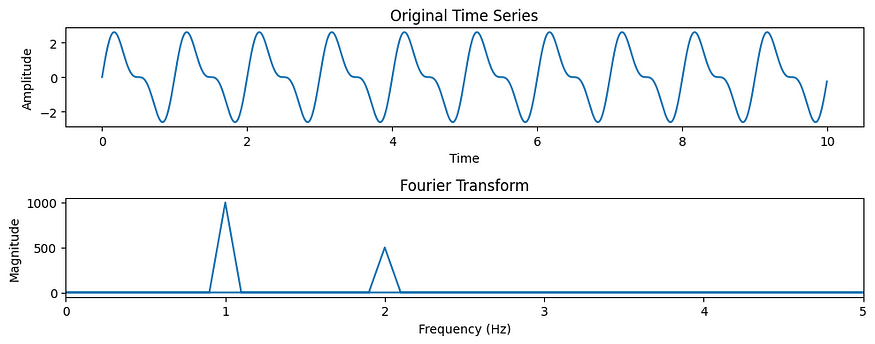
傅里叶变换及其在机器学习中的应用
一、介绍 傅立叶变换是一种数学技术,在各个科学和工程领域发挥着关键作用,其应用范围从信号处理到量子力学。近年来,它在机器学习领域发现了新的意义。本文探讨了傅里叶变换的基础知识及其在机器学习应用中日益增长的重要性。 …...

xorm源码学习
文章目录 XORM源码浅析及实践ORMORM vs. SQLXORM软件架构 ORM 引擎 Engine——DBM*core.DB Golang:database/sql 源码基本结构连接复用,提高性能。增加数据库连接池数量连接管理 database/sql主要内容:sql.DB创建数据库连接sql.Open()DB.conn…...

Vue3中的<script setup>和<script>的区别
相同点 在一个 Vue3 单文件组件 (SFC)中,<script setup> 和 <script> 它们各自最多只能存在一个。 不同点 <script setup> 这个脚本块将被预处理为组件的 setup() 函数,这意味着它将为每一个(也可以说每一次)组件实例都执行。 <…...
)
Docker笔记-Docker搭建最新版zabbix服务端(2023-07-31)
前言 一开始问chartgpt上,搭建的思路是对的,但命令和细节有问题,最后还是依靠StackOverflow解决的。一开始在amd的linux上搭建好docker版的zabbix,但放到arm的机器上就报错了,原因是指令集不匹配,最后跑到…...

QT配合CSS隐藏按钮
第一种方法 在Qt的CSS样式表中,使用 visibility 属性来隐藏按钮。设置 visibility 为 hidden 不可见,而设置为 visible 则可见。 隐藏所有 QPushButton QPushButton {visibility: hidden; }隐藏特定的按钮,用按钮的名称或样式类进行定位就…...

2023亚太地区数学建模C题思路分析+模型+代码+论文
目录 1.2023亚太地区各题思路模型:比赛开始后,第一时间更新,获取见文末名片 3 常见数模问题常见模型分类 3.1 分类问题 3.2 优化问题 详细思路见此名片,开赛第一时间更新 1.亚太地区数学建模ABC题思路模型:9比赛开…...
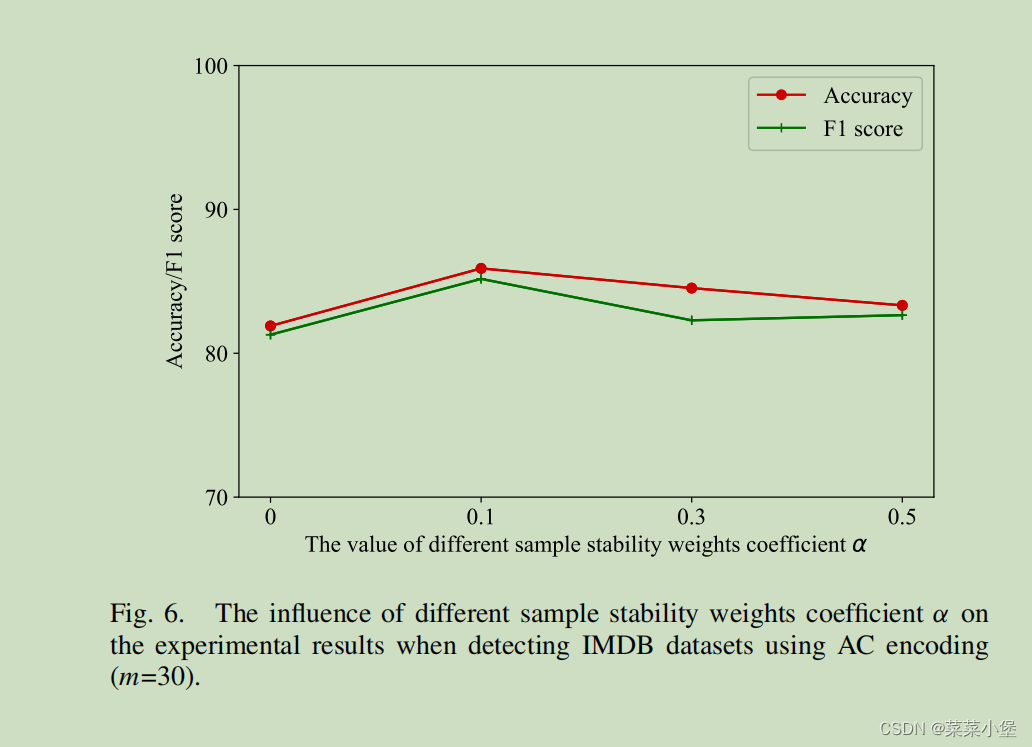
Linguistic Steganalysis in Few-Shot Scenario论文阅读笔记
TIFS期刊 A类期刊 新知识点 Introduction Linguistic Steganalysis in Few-Shot Scenario模型是个预训练方法。 评估了四种文本加密分析方法,TS-CSW、TS-RNN、Zou、SeSy,用于分析和训练的样本都由VAE-Stego生产(编码方式使用AC编码)。 实验是对比在少样…...
)
详细学习Pyqt5的4种项目部件(Item Widget)
Pyqt5相关文章: 快速掌握Pyqt5的三种主窗口 快速掌握Pyqt5的2种弹簧 快速掌握Pyqt5的5种布局 快速弄懂Pyqt5的5种项目视图(Item View) 快速弄懂Pyqt5的4种项目部件(Item Widget) 快速掌握Pyqt5的6种按钮 快速掌握Pyqt5的10种容器&…...
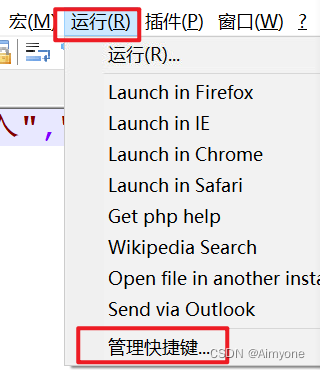
notepad++ 插件JSONView安装
1,前提 开发过程中经常需要处理json格式语句,需要对json数据格式化处理,因为使用的是虚拟机内开发,所以没法连接外网,只能在本地电脑下载插件后,然后上传到虚拟机中,进行安装使用。 2…...
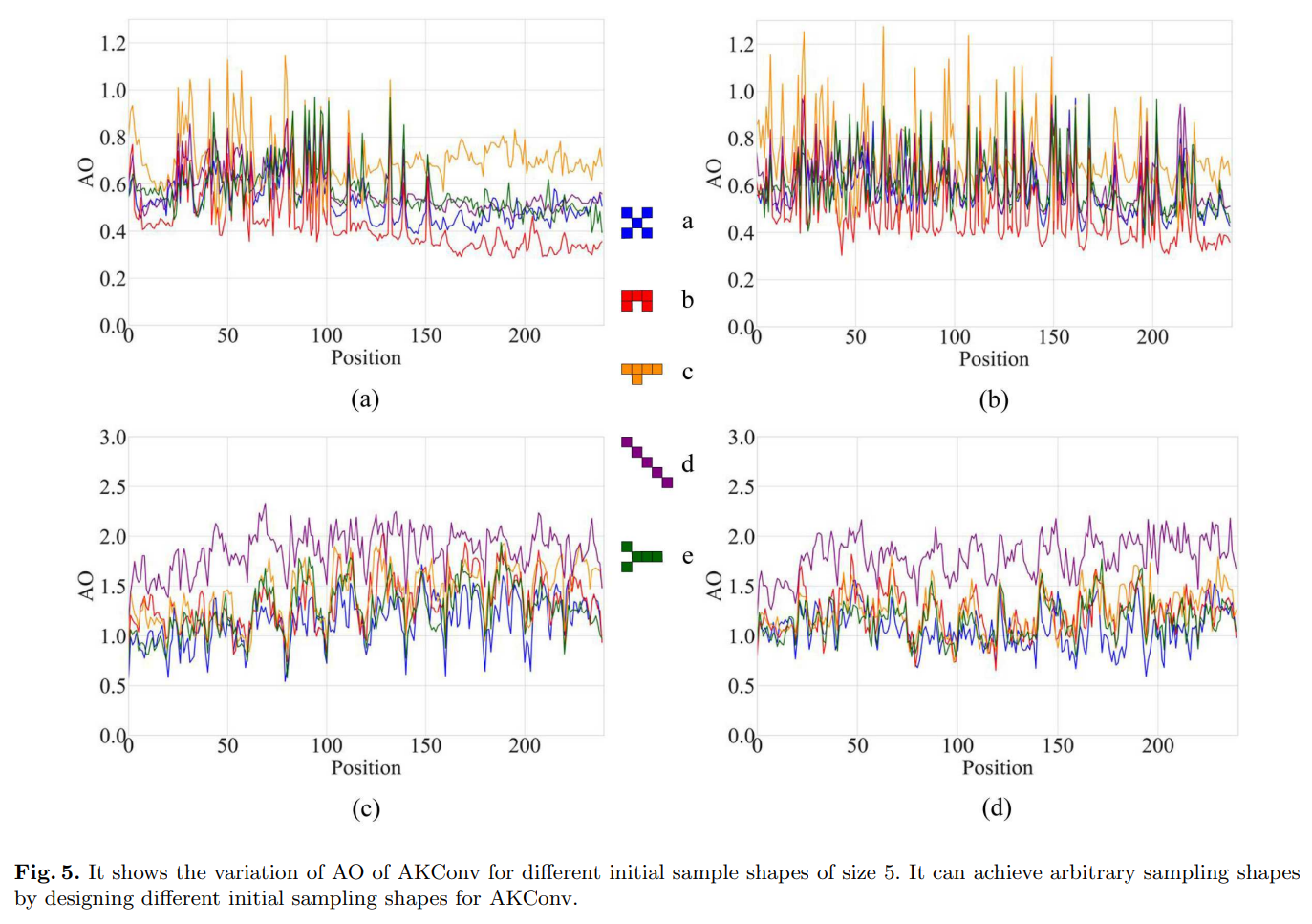
AKConv:具有任意采样形状和任意数目参数的卷积核
文章目录 摘要1、引言2、相关工作3、方法3.1、定义初始采样位置3.2、可变卷积操作3.3、扩展AKConv3.3、扩展AKConv 4、实验4.1、在COCO2017上的目标检测实验4.2、在VOC 712上的目标检测实验4.3、在VisDrone-DET2021上的目标检测实验4.4、比较实验4.5、探索初始采样形状 5、分析…...

如何使用C++开发集群服务
开发集群服务需要掌握以下技术: 分布式系统原理:了解集群的概念、工作原理、负载均衡、容错等相关概念。 网络编程:掌握Socket编程和HTTP协议等。 C编程:熟练掌握C语言的基础知识和STL等常用库。 多线程编程:了解线…...

OpenVSP飞机参数化设计:从零到一的完整建模与气动分析指南
OpenVSP飞机参数化设计:从零到一的完整建模与气动分析指南 【免费下载链接】OpenVSP A parametric aircraft geometry tool 项目地址: https://gitcode.com/gh_mirrors/ope/OpenVSP OpenVSP是一款由NASA开发的免费开源飞机参数化设计工具,它让航空…...
)
Windows11上VMware Workstation 16.1.1保姆级安装与Win11虚拟机配置全流程(含激活与优化)
Windows 11 虚拟化开发环境搭建全指南:从 VMware 安装到系统优化虚拟化技术已经成为现代开发者和运维人员的必备技能。想象一下,你正在开发一个需要跨平台测试的应用程序,或者需要在不影响主系统的情况下尝试新软件——这时候一个可靠的虚拟化…...

18分钟攻陷GitHub!Nx Console投毒事件深度复盘:3800个核心仓库泄露的供应链安全警示
摘要:2026年5月20日,全球最大代码托管平台GitHub遭遇史上最严重的供应链攻击之一。黑客组织TeamPCP通过投毒VS Code扩展市场中的Nx Console v18.95.0版本,仅用18分钟、28次下载就成功渗透GitHub内部网络,窃取了包括Copilot、CodeQ…...

Transformer解码器在量子纠错中的应用:突破表面码实时解码瓶颈
1. 项目概述与核心挑战 量子计算这行干久了,你总会遇到一个绕不开的“拦路虎”:量子纠错。这玩意儿是通往实用化、容错量子计算机的必经之路,但其中的解码问题,尤其是针对表面码这类稳定子码的解码,其复杂度和实时性要…...

Taotoken用量看板与成本分析功能,如何帮助团队控制大模型支出
🚀 告别海外账号与网络限制!稳定直连全球优质大模型,限时半价接入中。 👉 点击领取海量免费额度 Taotoken用量看板与成本分析功能,如何帮助团队控制大模型支出 对于任何将大模型能力集成到产品开发流程中的团队而言&a…...
)
Construct3新手避坑指南:用《幽灵射手》教程搞定你的第一个射击游戏(附B站效果演示)
Construct3新手避坑指南:用《幽灵射手》教程搞定你的第一个射击游戏第一次打开Construct3的《幽灵射手》教程时,我盯着满屏的绿色幽灵和事件表发呆了半小时。为什么子弹穿过了幽灵却没造成伤害?为什么游戏运行三秒后就卡成幻灯片?…...

Kali Web渗透实战:从登录接口到管理员后台的完整链路
1. 这不是Kali的安装教程,而是Web渗透测试者的真实工作切片“精通 Kali Linux Web 渗透测试”——这个标题在各大技术社区里出现频率极高,但绝大多数内容要么是Kali系统安装基础命令罗列,要么是照搬OWASP Top 10概念空谈原理,真正…...

破局奈奎斯特:从同步采样时序抖动到全链路EMC,高精度采集卡的超频设计边界
http://www.z-linear.com 在数据采集卡(DAQ)的选型手册中,工程师们习惯于紧盯“分辨率”和“采样率”这两个显性参数。然而,当面对极其苛刻的工业应用——例如多轴伺服电机的闭环控制、电网电能质量的高次谐波分析、或微弱生物电…...

中介核对对账
...

VMware17装CentOS踩过的那些坑:从镜像选择、密码设置到登录失败的完整避雷指南
VMware17安装CentOS实战避坑指南:从镜像选择到登录失败的深度解析第一次在VMware17上安装CentOS时,我像大多数新手一样,以为只要跟着教程一步步操作就能顺利完成。然而现实给了我一记响亮的耳光——从镜像下载到最终登录,几乎每个…...