
11Spring IoC注解式开发(上)(元注解/声明Bean的注解/注解的使用/负责实例化Bean的注解)
注解的存在主要是为了简化XML的配置。Spring6倡导全注解开发。
注解开发的优点:提高开发效率
注解开发的缺点:在一定程度上违背了OCP原则,使用注解的开发的前提是需求比较固定,变动较小。
1 注解的注解称为元注解
自定义一个注解:
package com.sunsplanter.annotation;import java.lang.annotation.ElementType;
import java.lang.annotation.Retention;
import java.lang.annotation.RetentionPolicy;
import java.lang.annotation.Target;@Target(value = {ElementType.TYPE,ElementType.FIELD})
@Retention(value = RetentionPolicy.RUNTIME)
public @interface Component {String value();
}
- 该注解上面修饰的注解包括:Target注解和Retention注解,这两个注解被称为元注解。
- Target注解用来设置Component注解可以出现的位置,以上代表表示Component注解只能用在类和接口上。
- Retention注解用来设置Component注解的保持性策略.
SOURCE:注解只被保留在Java源文件中,class文件不包含注解.
CLASS:注解最终被保留到class文件中,但不能被反射机制读取.
RUNTIME:注解最终被保留到class文件中,并且可以被反射机制读取.
String value(); 是Component注解中的一个属性。该属性类型String,属性名是value。
2 管中窥豹注解的作用-通过反射机制读取注解
目标:只知道报包名:com.sunsplanter.bean,至于这个包下有多少个Bean我们不知道。哪些Bean上有注解,都不知道.
通过程序全自动化判断: 若Bean类上有Component注解时,则实例化Bean对象,如果没有,则不实例化对象。
我们准备两个Bean,一个上面有注解,一个上面没有注解。
package com.sunsplanter.bean;import com.sunsplanter.annotation.Component;@Component("userBean")
public class User {
}
package com.sunsplanter.bean;public class Vip {
}
package com.sunsplanter.test;import com.sunsplanter.annotation.Component;import java.io.File;
import java.net.URL;
import java.util.Arrays;
import java.util.Enumeration;
import java.util.HashMap;
import java.util.Map;public class Test {public static void main(String[] args) throws Exception {// 存放Bean的Map集合。key存储beanId。value存储Bean。Map<String,Object> beanMap = new HashMap<>();String packageName = "com.sunsplanter.bean";//将com.sunsplanter.bean转化成com/sunsplanter/bean并存到path中String path = packageName.replaceAll("\\.", "/");//获取这个包在系统中的绝对路径:file:/D:/study/spring6/spring6-005-Annotation/target/classes/com/sunsplanter/beanURL url = ClassLoader.getSystemClassLoader().getResource(path);//获取一个绝对路径下的所有子文件,并写入文件数组File file = new File(url.getPath());File[] files = file.listFiles();Arrays.stream(files).forEach(f -> {//获取两个类的相对包路径,如com.sunspalnter.bean.User...String className = packageName + "." + f.getName().split("\\.")[0];try {Class<?> clazz = Class.forName(className);if (clazz.isAnnotationPresent(Component.class)) {Component component = clazz.getAnnotation(Component.class);String beanId = component.value();Object bean = clazz.newInstance();beanMap.put(beanId, bean);}} catch (Exception e) {e.printStackTrace();}});System.out.println(beanMap);}
}
3 声明Bean的注解
通过注解声明该类是一个bean类,今后就会被自动创建bean对象.
负责声明Bean的注解,常见的包括四个:
- @Component
- @Controller
- @Service
- @Repository
通过源码可以看到,@Controller、@Service、@Repository这三个注解都是@Component注解的别名。
也就是说:这四个注解的功能都一样, 只是为了增强程序的可读性,建议:
● 控制器类上使用:Controller(主要用于给前端返回数据的以及接收前端的数据的)
● service类上使用:Service(处理数据用的)
● dao类上使用:Repository
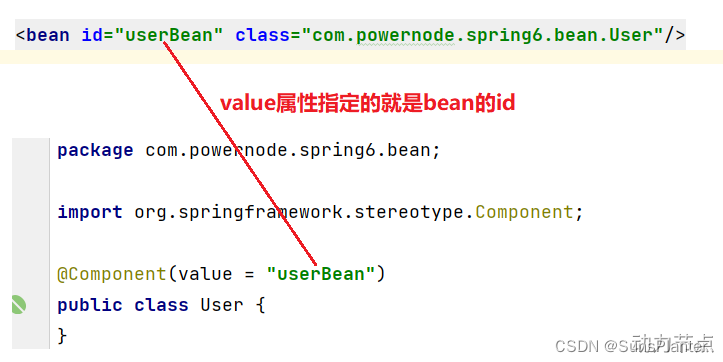
他们都是只有一个value属性。value属性用来指定bean的id,也就是bean的名字。
4 Spring注解的使用
如果使用以上的注解, 就不必再每一个类都使用一个bean标签管理. 如何使用以上的注解呢?
● 第一步:加入aop的依赖
● 第二步:在配置文件中添加context命名空间
● 第三步:在配置文件中指定扫描的包
● 第四步:在Bean类上使用注解
第一步:加入aop的依赖
当加入spring-context依赖之后,会关联加入aop的依赖。所以这一步不用做。
第二步:在配置文件中添加context命名空间, 分别是xmlns:context和xsi:schemeLocation
<?xml version="1.0" encoding="UTF-8"?>
<beans xmlns="http://www.springframework.org/schema/beans"xmlns:xsi="http://www.w3.org/2001/XMLSchema-instance"xmlns:context="http://www.springframework.org/schema/context"xsi:schemaLocation="http://www.springframework.org/schema/beans http://www.springframework.org/schema/beans/spring-beans.xsdhttp://www.springframework.org/schema/context http://www.springframework.org/schema/context/spring-context.xsd">
</beans>
第三步:在配置文件中指定要扫描的包
<?xml version="1.0" encoding="UTF-8"?>
<beans xmlns="http://www.springframework.org/schema/beans"xmlns:xsi="http://www.w3.org/2001/XMLSchema-instance"xmlns:context="http://www.springframework.org/schema/context"xsi:schemaLocation="http://www.springframework.org/schema/beans http://www.springframework.org/schema/beans/spring-beans.xsdhttp://www.springframework.org/schema/context http://www.springframework.org/schema/context/spring-context.xsd"><context:component-scan base-package="com.sunsplanter.bean"/>
</beans>
第四步:在Bean类上使用注解
package com.sunsplanter.bean;import org.springframework.stereotype.Component;@Component(value = "userBean")
public class User {
}
第四步要小心, 存在两个两个Component

第二个时上面学习时自己建的,一定要选第一个.
第五步:编写测试程序
package com.sunsplanter.test;import com.sunsplanter.bean.User;
import org.junit.Test;
import org.springframework.context.ApplicationContext;
import org.springframework.context.support.ClassPathXmlApplicationContext;public class AnnotationTest {@Testpublic void testBean(){ApplicationContext applicationContext = new ClassPathXmlApplicationContext("spring.xml");User userBean = applicationContext.getBean("userBean", User.class);System.out.println(userBean);}
}
成功输出一个对象.
如果注解的属性名是value,那么value是可以省略的。
例如:
package com.sunsplanter.bean;import org.springframework.stereotype.Component;@Component("userBean")
public class User {
}
package com.sunsplanter.test;import com.sunsplanter.bean.User;
import org.junit.Test;
import org.springframework.context.ApplicationContext;
import org.springframework.context.support.ClassPathXmlApplicationContext;public class AnnotationTest {@Testpublic void testBean(){ApplicationContext applicationContext = new ClassPathXmlApplicationContext("spring.xml");User userBean = applicationContext.getBean("userBean", User.class);System.out.println(userBean);}
}
仍能输出一个User对象.
甚至: 如果把value属性彻底去掉,该类在被创建成bean时会被自动指定一个bean id(名字), 默认名字的规律是:Bean类名首字母小写即可。
多个包需要扫描的情况
办法1(常用): 指定需要扫描的多个包的共同父包,扫描这个共同父包. 缺点是如果父包有不需要扫描的包,则会牺牲一些效率.
办法2: 逗号分隔多个需要扫描的包:
<context:component-scan base-package="com.sunsplanter.bean,com.sunsplanter.dao"/>
5 根据注解类型选择性实例化Bean
假设在某个包下有很多Bean,有的Bean上标注了Component,有的标注了Controller,有的标注了Service,有的标注了Repository.
目标: 现在由于某种特殊业务的需要,只允许其中所有的Controller参与Bean管理,其他的都不实例化。
这里为了方便,将这几个类都定义到同一个java源文件中了:
package com.sunsplanter.spring6.bean3;import org.springframework.stereotype.Component;
import org.springframework.stereotype.Controller;
import org.springframework.stereotype.Repository;
import org.springframework.stereotype.Service;@Component
public class Selective_Instantiation_of_Objects{public Selective_Instantiation_of_Objects() {System.out.println("A的无参数构造方法执行");}
}@Controller
class B {public B() {System.out.println("B的无参数构造方法执行");}
}@Service
class C {public C() {System.out.println("C的无参数构造方法执行");}
}@Repository
class D {public D() {System.out.println("D的无参数构造方法执行");}
}@Controller
class E {public E() {System.out.println("E的无参数构造方法执行");}
}
<?xml version="1.0" encoding="UTF-8"?>
<beans xmlns="http://www.springframework.org/schema/beans"xmlns:xsi="http://www.w3.org/2001/XMLSchema-instance"xmlns:context="http://www.springframework.org/schema/context"xsi:schemaLocation="http://www.springframework.org/schema/beans http://www.springframework.org/schema/beans/spring-beans.xsdhttp://www.springframework.org/schema/context http://www.springframework.org/schema/context/spring-context.xsd">
<!--
use-default-filters="true" 表示:使用spring默认的规则,只要有Component、Controller、Service、Repository中的任意一个注解标注,则进行实例化。
use-default-filters="false" 表示:不再spring默认实例化规则,即使有Component、Controller、Service、Repository这些注解标注,也不再实例化。
<context:include-filter type="annotation" expression="org.springframework.stereotype.Controller"/> 表示只有Controller进行实例化。--><context:component-scan base-package="com.sunsplanter.bean" use-default-filters="false"><context:include-filter type="annotation" expression="org.springframework.stereotype.Controller"/></context:component-scan></beans>
测试程序:
@Test
public void testChoose(){ApplicationContext applicationContext = new ClassPathXmlApplicationContext("spring-choose.xml");
}
输出注解为@Controller的B,E构造方法执行.
目标: 现在由于某种特殊业务的需要,除了@Controller外的所有注解都参与Bean管理,仅Controller实例化。
<!--
use-default-filters="true" 表示:使用spring默认的规则,只要有Component、Controller、Service、Repository中的任意一个注解标注,则进行实例化。(不写默认是true)
use-default-filters="false" 表示:不再spring默认实例化规则,即使有Component、Controller、Service、Repository这些注解标注,也不再实例化。
<context:exclude-filter type="annotation" expression="org.springframework.stereotype.Controller"/> 表示将Controller排除出实例化的范围。--><context:component-scan base-package="com.sunsplanter.bean"><context:exclude-filter type="annotation" expression="org.springframework.stereotype.Controller"/></context:component-scan>
相关文章:
11Spring IoC注解式开发(上)(元注解/声明Bean的注解/注解的使用/负责实例化Bean的注解)
注解的存在主要是为了简化XML的配置。Spring6倡导全注解开发。 注解开发的优点:提高开发效率 注解开发的缺点:在一定程度上违背了OCP原则,使用注解的开发的前提是需求比较固定,变动较小。 1 注解的注解称为元注解 自定义一个注解: package com.sunspl…...
k8s 部署Jenkins项目
1、基于helm 部署jenkins 要求:当前集群配置了storageClass,并已指定默认的storageClass,一般情况下,创建的storageClass即为默认类 指定默认storageClass的方式 # 如果是新创建默认类: apiVersion: storage.k8s.io/v1…...

#每日一题#力扣#2085.统计出现过一次的公共字符串
给你两个字符串数组 words1 和 words2 ,请你返回在两个字符串数组中 都恰好出现一次 的字符串的数目。 示例 1: 输入:words1 [“leetcode”,“is”,“amazing”,“as”,“is”], words2 [“amazing”,“leetcode”,“is”] 输出:…...
:简洁优雅,功能强大的编程语言)
Python系列(1):简洁优雅,功能强大的编程语言
Python:简洁优雅,功能强大的编程语言 一、Python的特点二、Python的应用领域 在当今的编程世界中,Python已经成为了一种无处不在的语言。它不仅简单易学,而且功能强大,支持多种编程范式,包括面向对象编程、…...
HarmonyOS应用开发学习笔记 arkTS自定义弹窗(CustomDialog)简单使用 arkTS弹出框回调、监听
HarmonyOS应用开发学习笔记 arkTS自定义弹窗(CustomDialog)简单使用 1、CustomDialog装饰器用于装饰自定义弹框 1、定义弹出框 CustomDialog CustomDialog export struct CustomDialogExample {controller: CustomDialogControllerbuild() {Column() {…...

RabbitMQ(六)消息的持久化
目录 一、简介1.1 定义1.2 消息丢失的场景 二、交换机的持久化方式一:直接 new方式二:channel.exchangeDeclare()方式三:ExchangeBuilder【推荐】 三、队列的持久化方式一:直接 new方式二:channel.queueDeclare()方式三…...
mybatisplus配置
一、新建项目:com.saas.plusdemo 二、配置pom.xml <?xml version"1.0" encoding"UTF-8"?> <project xmlns"http://maven.apache.org/POM/4.0.0" xmlns:xsi"http://www.w3.org/2001/XMLSchema-instance"xsi:sch…...
node-sass@4.7.2 postinstall: `node scripts/build.js`
Can‘t find Python executable “D:\Python36\python.EXE“, you can set the PYTHON env variable.-CSDN博客 gyp ERR! build error gyp ERR! stack Error: C:\Windows\Microsoft.NET\Framework\v4.0.30319\msbuild.exe failed with exit code: 1 gyp ERR! stack at Chil…...
 pyDAL的嵌套查询)
pyDAL一个python的ORM(9) pyDAL的嵌套查询
假设有以下两个表: db.define_table(person,Field(id, string), Field(‘name, string), Field(‘dept, string)) db.define_table(things,Field(id, string), Field(‘name, string), Field(‘owner, string)) 一、使用belongs进行嵌套查询 我们查询要求&#…...

融资项目——EasyExcel操作Excel文件
EasyExcel是Alibaba集团开源的EasyExcel技术,该技术是针对Apache POI技术的封装和优化,主要解决了POI技术的耗内存问题,并且提供了较好的API使用。不需要大量的代码就可以实现excel的操作功能。 1.EasyExcel的配置 首先引入依赖,…...
)
OAI openair3-NAS-UE-EMM代码解读(续)
文件路径openair3/NAS/UE/EMM/emm_main.c 714行之后 1.名称:emm_min_get_registered_plmn() 获取当前注册PLMN的标识; 输入:format:PLMN标识符的字符串表示的请求格式; 输出…...
SQL-条件查询与聚合函数的使用
🎉欢迎您来到我的MySQL基础复习专栏 ☆* o(≧▽≦)o *☆哈喽~我是小小恶斯法克🍹 ✨博客主页:小小恶斯法克的博客 🎈该系列文章专栏:重拾MySQL 🍹文章作者技术和水平很有限,如果文中出现错误&am…...
Qt移植曲线显示
提示:文章写完后,目录可以自动生成,如何生成可参考右边的帮助文档 文章目录 前言一、确定文件组成?1. 复制新文件2.新建ui窗口 二、实际操作2.1 新建Ui窗口,要添加带.h的否则跳转错误2.2添加文件到.h2.3 添加文件cpp 三…...
基于springboot生鲜交易系统源码和论文
首先,论文一开始便是清楚的论述了系统的研究内容。其次,剖析系统需求分析,弄明白“做什么”,分析包括业务分析和业务流程的分析以及用例分析,更进一步明确系统的需求。然后在明白了系统的需求基础上需要进一步地设计系统,主要包括软件架构模式、整体功能模块、数据库设计。本项…...

vue中鼠标拖动触发滚动条的移动
前言 在做后端管理系统中,像弹窗或大的表单时,经常会有滚动条的出现,但有些时候如流程、图片等操作时,仅仅使用鼠标拖动滚动条操作不太方便,如果使用鼠标拖拽图片或容器来触发滚动条的移动就比较方便了 功能设计 如…...
1、理解Transformer:革新自然语言处理的模型
目录 一、论文题目 二、背景与动机 三、卖点与创新 四、解决的问题 五、具体实现细节 0. Transformer 架构的主要组件 1. 注意力、自注意力(Self-Attention)到多头注意力(Multi-Head Attention) 注意力到底是做什么的&…...
)
Acwing847 图中点的层次(bfs)
这道题用的是bfs,一开始用了dfs搜出了答案为4 题目 给定一个 n个点 m 条边的有向图,图中可能存在重边和自环。 所有边的长度都是 1,点的编号为 1∼n。 请你求出 1 号点到 n 号点的最短距离,如果从 1 号点无法走到 n 号点&…...
windows11通过虚拟机安装Ubuntu20.04
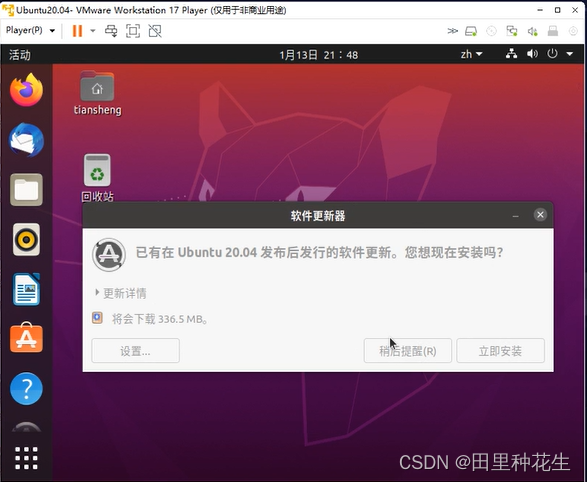
VMware 分为 VMware Workstation Pro 和 VMware Workstation Player, Pro体验期后收费,Player则免费。player 早期不能创建虚拟机,只能Pro创建好后给Player运行,而现在player早已加入创建虚拟机功能,所以使用体验上两者相差不大&a…...
时序预测 | Matlab实现EEMD-SSA-BiLSTM、EEMD-BiLSTM、SSA-BiLSTM、BiLSTM时序预测对比
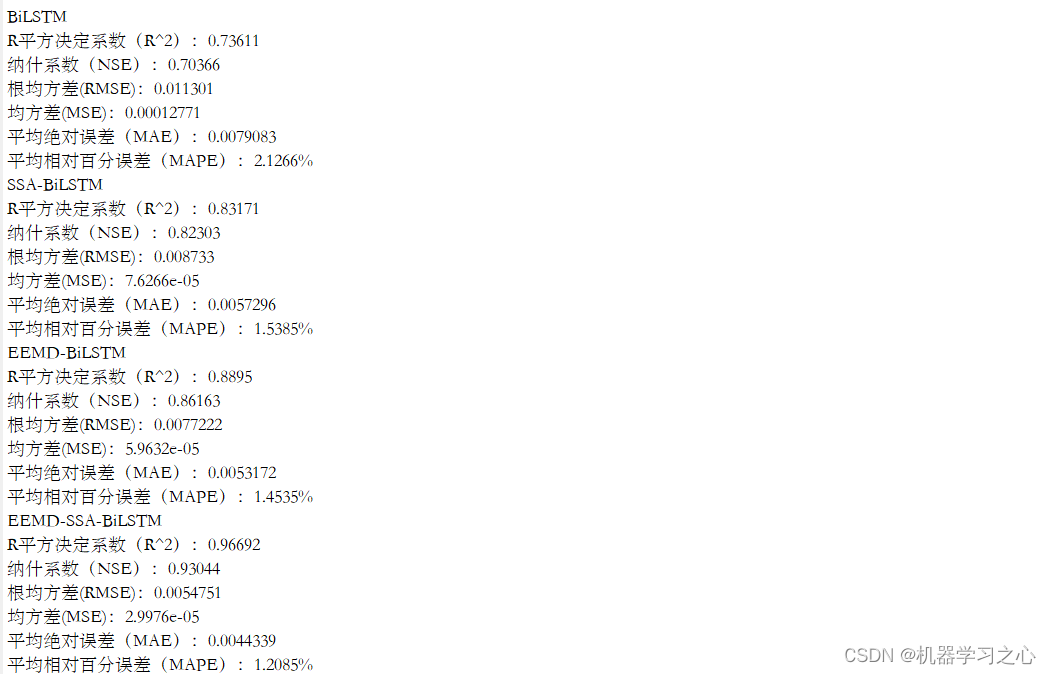
时序预测 | Matlab实现EEMD-SSA-BiLSTM、EEMD-BiLSTM、SSA-BiLSTM、BiLSTM时间序列预测对比 目录 时序预测 | Matlab实现EEMD-SSA-BiLSTM、EEMD-BiLSTM、SSA-BiLSTM、BiLSTM时间序列预测对比预测效果基本介绍程序设计参考资料 预测效果 基本介绍 1.Matlab实现EEMD-SSA-BiLSTM、…...

Android14之解决Pixel手机联网出现感叹号(一百八十)
简介: CSDN博客专家,专注Android/Linux系统,分享多mic语音方案、音视频、编解码等技术,与大家一起成长! 优质专栏:Audio工程师进阶系列【原创干货持续更新中……】🚀 优质专栏:多媒…...

从Shadertoy到Cesium:那些GLSL移植时没人告诉你的分辨率陷阱
GLSL跨平台移植中的分辨率适配陷阱与实战解决方案 当我们将Shadertoy上令人惊艳的GLSL效果移植到Cesium等三维引擎时,往往会遇到一个看似简单却影响深远的问题——分辨率适配。这个问题不仅关乎视觉效果还原度,更直接影响着色器在不同设备上的表现一致性…...
)
保姆级教程:用Coze零代码打造一个能聊天的微信公众号机器人(附服务器配置避坑指南)
零基础玩转Coze:从智能体创建到微信公众号部署全指南 在数字化营销日益重要的今天,拥有一个能24小时响应客户需求的智能客服已成为许多企业的标配。但对于没有技术背景的运营和市场人员来说,开发一个功能完善的聊天机器人似乎遥不可及。Coze平…...

PLC新手必看:三菱FX2N顺序功能图的5个常见错误及解决方法
三菱FX2N顺序功能图实战避坑指南:从原理到调试的完整解决方案 第一次接触三菱FX2N的顺序功能图编程时,那种既兴奋又忐忑的心情至今记忆犹新。看着逻辑清晰的流程图在仿真中运行失常,或是设备突然"抽风"时的茫然,是每个P…...

大模型应用指南:小白程序员必收藏,轻松入门AI前沿技术!
2025年大模型技术已在IT、金融、制造等领域广泛应用,从智能客服到数据分析,助力企业转型。沙丘智库《大模型应用跟踪月报》收录504个案例,揭示行业分布、应用场景及发展趋势。大模型不仅是技术突破,更是时代标志,小白程…...

Obsidian Full Calendar:5步构建个人知识与时间管理一体化系统
Obsidian Full Calendar:5步构建个人知识与时间管理一体化系统 【免费下载链接】obsidian-full-calendar Keep events and manage your calendar alongside all your other notes in your Obsidian Vault. 项目地址: https://gitcode.com/gh_mirrors/obs/obsidian…...

中国跨境电商大会代理授权机制与决策影响分析
对于众多寻求通过“中国跨境电商大会”精准撬动海外市场的企业而言,面对琳琅满目的代理商选择,决策过程本身就是一次关于市场洞察、风险评估与资源匹配的深度考验。一个优质的代理商,不仅是展位的“售票员”,更是企业出海战略的“…...

从GigE Vision到千兆UDP:FPGA图像采集系统的灵活升级与10G MAC预留设计
从GigE Vision到千兆UDP:FPGA图像采集系统的灵活升级与10G MAC预留设计 在工业视觉和机器视觉领域,图像采集系统的带宽需求正以惊人的速度增长。随着4K、8K高分辨率相机的普及,以及多相机同步采集场景的增多,传统的千兆以太网接口…...

说一下@RequestBody和@ResponseBody的区别?
面试 RequestBody:将请求的json数据转换为java对象。 ResponseBody:将返回值的java对象转换为json数据。...

Go语言广播系统设计:基于Channel的高性能事件分发机制
引言 在后端系统架构中,事件广播是一种常见的通信模式。本文将深入分析一个基于Go语言channel实现的广播管理器,探讨其设计思想、实现细节以及在实际项目中的应用价值。 参考代码 点击直达 背景与需求 在许多应用场景中,我们需要实现一对…...

ABC系统实战指南:革新数字电路设计的逻辑综合与形式验证技术突破
ABC系统实战指南:革新数字电路设计的逻辑综合与形式验证技术突破 【免费下载链接】abc ABC: System for Sequential Logic Synthesis and Formal Verification 项目地址: https://gitcode.com/gh_mirrors/ab/abc 在现代集成电路设计流程中,工程师…...