
移动端 h5-table react版本支持虚拟列表
介绍
适用于 react + ts 的 h5 移动端项目 table 组件
github 链接 :https://github.com/duKD/react-h5-table
有帮助的话 给个小星星
有两种表格组件
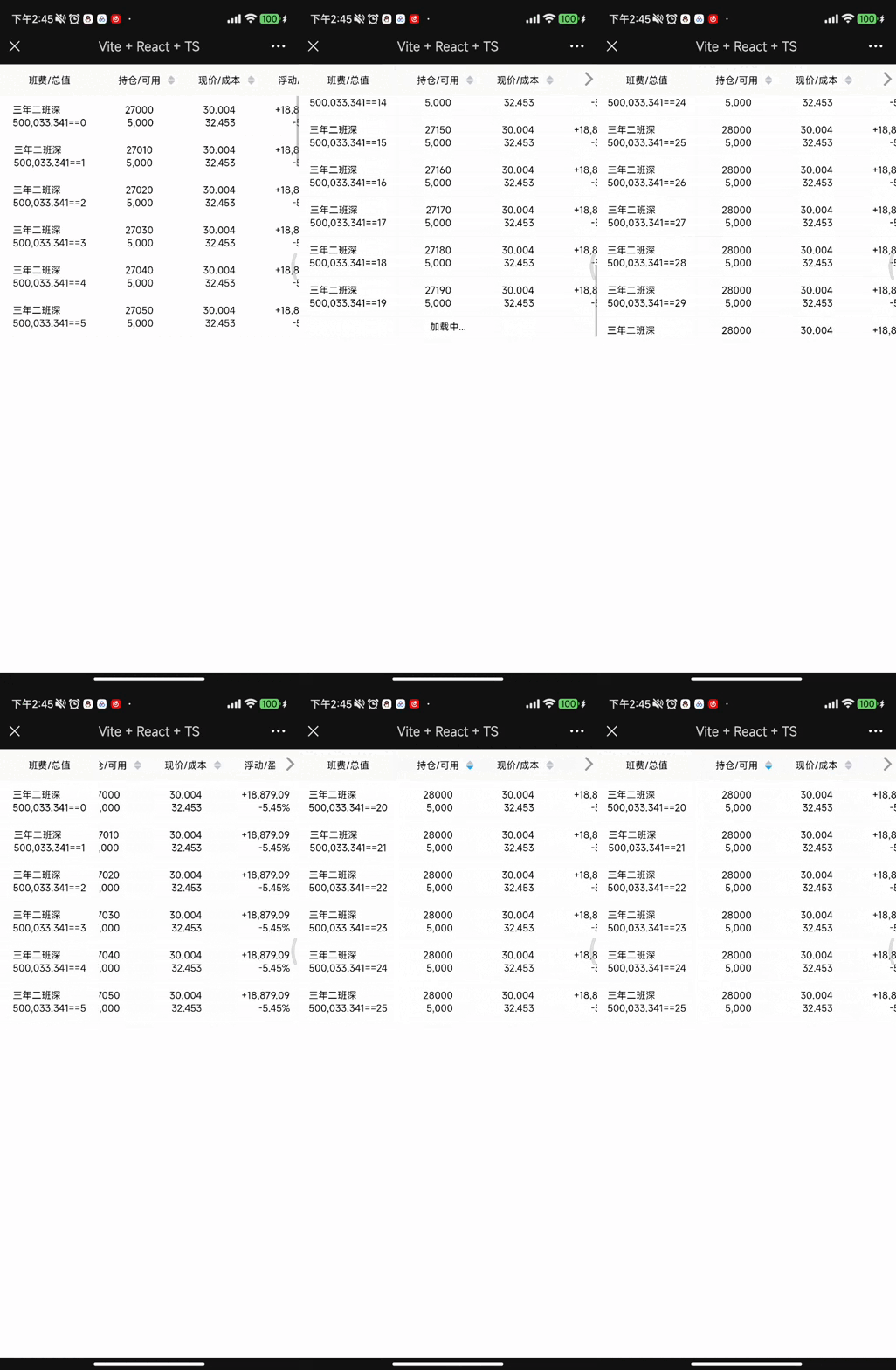
常规的:
支持 左侧固定 滑动 每行点击回调 支持 指定列排序 支持滚动加载更多
效果和之前写的vue3 版本类似
vue3 h5 表格
大数据量时 使用虚拟列表:
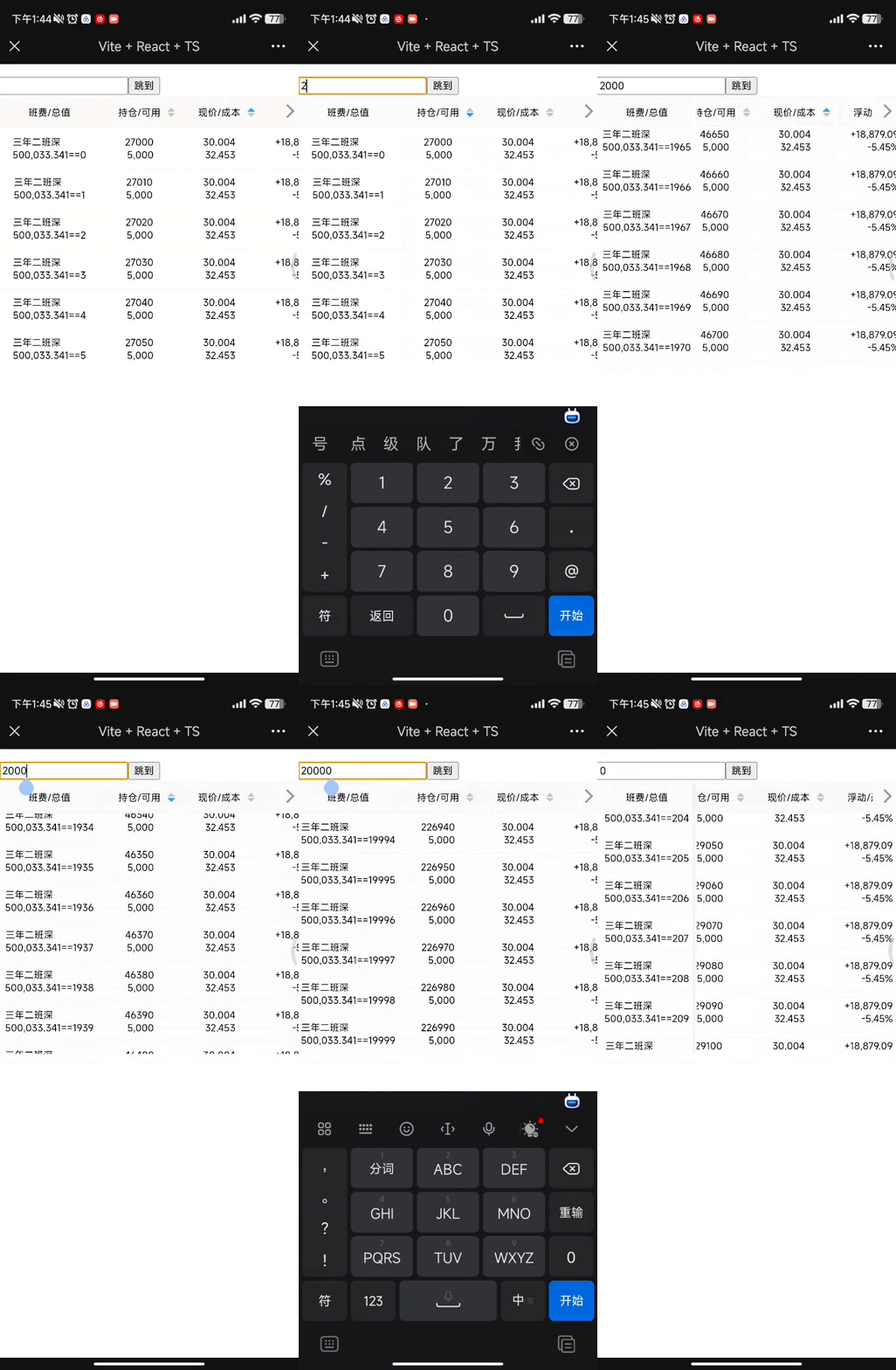
也支持 左侧固定 滑动 每行点击回调 支持 指定列排序 不支持滚动加载
开始
npm i @lqcoder/react-h5-table
入口 引入table样式文件
import "@lqcoder/react-h5-table/scripts/style.css";
常规版使用
相关 props 配置 说明
export type tablePropsType<T = any> = {rowKey?: string; //表格行 key 的取值字段 默认取id字段minTableHeight?: number; //表格最小高度showRowNum?: number; // 表格显示几行headerHeight?: number; // 头部默认高度rowHeight?: number; //每行数据的默认高度column: Array<columnItemType<T>>;tableData: Array<T>;clickOptions?: clickOptions<T>; // 是否需要处理点击事件disable?: boolean; // 是否启用下拉加载pullDownProps?: pullDownPropsType;changePullDownProps?: (args: pullDownPropsType) => void; // 修改加载状态handleHeadSortClick?: (propsKey: string, type: sortStatusType) => void;onload?: () => void; // 数据加载rootValue?: number; //
};export type columnItemType<T = any> = {title: string; // 列名dataIndex: string; // table data key 值width: number; // 列 宽度sortable?: boolean; //是否 支持排序align?: "left" | "center" | "right"; // 布局render?: (item: T, index?: number) => any; //自定义单元格显示的内容
};// 下拉加载相关配置
export type pullDownPropsType = {error?: boolean; // 数据加载失败loading?: boolean; // 数据处于加载状态finish?: boolean; // 数据 是否完全加载loadingText?: string; // 加载文案errorText?: string; // 失败文案finishedText?: string; // 完成文案offset?: number; //触发加载的底部距离
};//  点击相关配置
export type clickOptions<T> = {clickRender: (item: T, index: number) => React.JSX.Element; // 点击列触发渲染clickHeight: number; // 显示栏的高度
};
代码示例:
// App.tsx 文件
import { useRef, useState } from "react";
import {H5Table,clickOptions,columnItemType,sortStatusType,
} from "@lqcoder/react-h5-table";import Styles from "./App.module.scss";function App() {type dataType = {id: number;type?: number;select: string;position: string;use: string;markValue: string;cur: string;cost: string;newPrice: number;float: string;profit: string;count: string;};const column: Array<columnItemType<dataType>> = [{title: "班费/总值",width: 250,dataIndex: "rateAndSum",render(item, _index) {return (<section className="nameAndMarkValue"><div className="name">{item.select}<span className="type">{item.type === 1 ? "深" : "沪"}</span></div><div className="markValue">{item.markValue}=={item.id}</div></section>);},align: "left",},{title: "持仓/可用",dataIndex: "positionAndUse",sortable: true,width: 200,align: "right",render(item, _index) {return (<section className="positionAndUse"><div className="position">{item.position}</div><div className="use">{item.use}</div></section>);},},{title: "现价/成本",dataIndex: "curAndCost",sortable: true,width: 200,align: "right",render(item) {return (<section className="curAndCost"><div className="cur">{item.cur}</div><div className="cost">{item.cost}</div></section>);},},{title: "浮动/盈亏",dataIndex: "float",width: 200,align: "right",render(item) {return (<section className="floatAndProfit"><div className="float">{item.float}</div><div className="profit">{item.profit}</div></section>);},},{title: "账户资产",dataIndex: "count",width: 200,},];const temp = Array.from({ length: 20 }).map((item, index) => {return {id: index,select: "三年二班",type: 1,position: `${27000 + index * 10}`,use: "5,000",markValue: "500,033.341",cur: "30.004",cost: "32.453",newPrice: 20,float: "+18,879.09",profit: "-5.45%",count: "120,121",};});const dataRef = useRef(temp);const [data, setData] = useState(temp);const [pullDownProps, setPullDownProps] = useState({offset: 10,error: false, // 数据加载失败loading: false, // 数据处于加载状态finish: false, // 数据 是否完全加载loadingText: "加载中...", // 加载文案errorText: "出错了", // 失败文案finishedText: "到底了", // 完成文案});const onload = () => {setTimeout(() => {const len = data.length;setData(data.concat(Array.from({ length: 10 }).map((item, index) => {return {id: len + index,select: "三年二班",type: 1,position: "28000",use: "5,000",markValue: "500,033.341",cur: "30.004",cost: "32.453",newPrice: 20,float: "+18,879.09",profit: "-5.45%",count: "120,121",};})));dataRef.current = dataRef.current.concat(Array.from({ length: 10 }).map((item, index) => {return {id: len + index,select: "三年二班",type: 1,position: "28000",use: "5,000",markValue: "500,033.341",cur: "30.004",cost: "32.453",newPrice: 20,float: "+18,879.09",profit: "-5.45%",count: "120,121",};}));setPullDownProps({...pullDownProps,loading: false,});}, 1000);};const changePullDownProps = (args: any) => {setPullDownProps(args);};/*** 处理排序按钮回调 处理逻辑交给开发* @param propsKey 点击的列名* @param type 0 默认 1 升 2 降* @returns*/const handleHeadSortClick = (propsKey: string, type: sortStatusType) => {if (type === 0) {setData(dataRef.current);return;}if (propsKey === "positionAndUse") {if (type === 1) {const temp = [...dataRef.current].sort((a, b) => Number(b.position) - Number(a.position));setData(temp);} else {const temp = [...dataRef.current].sort((a, b) => Number(a.position) - Number(b.position));setData(temp);}}if (propsKey === "curAndCost") {if (type === 1) {const temp = [...dataRef.current].sort((a, b) => Number(b.cur) - Number(a.cur));setData(temp);} else {const temp = [...dataRef.current].sort((a, b) => Number(a.cur) - Number(b.cur));setData(temp);}}};const handelSell = () => {console.log("handelSell----");};const clickOptions: clickOptions<dataType> = {clickRender(item, index) {return (<section className={Styles["rowDownMark"]}><div className={Styles["rowDownMark-item"]} onClick={handelSell}>买入</div><div className={Styles["rowDownMark-item"]}>卖出</div><div className={Styles["rowDownMark-item"]}>行情</div></section>);},clickHeight: 60,};return (<><H5Table<dataType>disablecolumn={column}tableData={data}onload={onload}pullDownProps={pullDownProps}changePullDownProps={changePullDownProps}handleHeadSortClick={handleHeadSortClick}clickOptions={clickOptions}></H5Table></>);
}export default App;
// App.module.scss
.app {color: red;font-size: 20px;.container {color: aqua;}
}
.rowDownMark {width: 100%;display: flex;height: 60px;background-color: #fcfcfc;align-items: center;
}
.rowDownMark-item {flex-grow: 1;color: #309fea;text-align: center;
}大数据量时 使用虚拟列表
相关props 说明
export type virtualTablePropsType<T = any> = {rowKey?: string; //表格行 key 的取值字段 默认取id字段minTableHeight?: number; //表格最小高度showRowNum?: number; // 表格显示几行headerHeight?: number; // 头部默认高度rowHeight?: number; //每行数据的默认高度column: Array<columnItemType<T>>;tableData: Array<T>;clickOptions?: clickOptions<T>; // 是否需要处理点击事件handleHeadSortClick?: (propsKey: string, type: sortStatusType) => void;rootValue?: number; //
};// 0 默认 1 升 2 降
export type sortStatusType = 0 | 1 | 2;export interface virtualTableInstance {scrollIntoView: (index: number) => void;
}export type columnItemType<T = any> = {title: string; // 列名dataIndex: string; // table data key 值width: number; // 列 宽度sortable?: boolean; //是否 支持排序align?: "left" | "center" | "right"; // 布局render?: (item: T, index?: number) => any; //自定义单元格显示的内容
};//  点击相关配置
export type clickOptions<T> = {clickRender: (item: T, index: number) => React.JSX.Element; // 点击列触发渲染clickHeight: number; // 显示栏的高度
};
代码示例:
// App.tsx
import { useRef, useState } from "react";
import {H5VirtualTable,clickOptions,columnItemType,sortStatusType,virtualTableInstance,
} from "@lqcoder/react-h5-table";import Styles from "./App.module.scss";function App() {type dataType = {id: number;type?: number;select: string;position: string;use: string;markValue: string;cur: string;cost: string;newPrice: number;float: string;profit: string;count: string;};const column: Array<columnItemType<dataType>> = [{title: "班费/总值",width: 250,dataIndex: "rateAndSum",render(item, _index) {return (<section className="nameAndMarkValue"><div className="name">{item.select}<span className="type">{item.type === 1 ? "深" : "沪"}</span></div><div className="markValue">{item.markValue}=={item.id}</div></section>);},align: "left",},{title: "持仓/可用",dataIndex: "positionAndUse",sortable: true,width: 200,align: "right",render(item, _index) {return (<section className="positionAndUse"><div className="position">{item.position}</div><div className="use">{item.use}</div></section>);},},{title: "现价/成本",dataIndex: "curAndCost",sortable: true,width: 200,align: "right",render(item) {return (<section className="curAndCost"><div className="cur">{item.cur}</div><div className="cost">{item.cost}</div></section>);},},{title: "浮动/盈亏",dataIndex: "float",width: 200,align: "right",render(item) {return (<section className="floatAndProfit"><div className="float">{item.float}</div><div className="profit">{item.profit}</div></section>);},},{title: "账户资产",dataIndex: "count",width: 200,},];const temp = Array.from({ length: 20000 }).map((item, index) => {return {id: index,select: "三年二班",type: 1,position: `${27000 + index * 10}`,use: "5,000",markValue: "500,033.341",cur: "30.004",cost: "32.453",newPrice: 20,float: "+18,879.09",profit: "-5.45%",count: "120,121",};});const dataRef = useRef(temp);const tableRef = useRef<virtualTableInstance>();const [num, setNum] = useState(1);const [data, setData] = useState(temp);/*** 处理排序按钮回调 处理逻辑交给开发* @param propsKey 点击的列名* @param type 0 默认 1 升 2 降* @returns*/const handleHeadSortClick = (propsKey: string, type: sortStatusType) => {if (type === 0) {setData(dataRef.current);return;}if (propsKey === "positionAndUse") {if (type === 1) {const temp = [...dataRef.current].sort((a, b) => Number(b.position) - Number(a.position));setData(temp);} else {const temp = [...dataRef.current].sort((a, b) => Number(a.position) - Number(b.position));setData(temp);}}if (propsKey === "curAndCost") {if (type === 1) {const temp = [...dataRef.current].sort((a, b) => Number(b.cur) - Number(a.cur));setData(temp);} else {const temp = [...dataRef.current].sort((a, b) => Number(a.cur) - Number(b.cur));setData(temp);}}};const handelSell = () => {console.log("handelSell----");};const clickOptions: clickOptions<dataType> = {clickRender(item, index) {return (<section className={Styles["rowDownMark"]}><div className={Styles["rowDownMark-item"]} onClick={handelSell}>买入</div><div className={Styles["rowDownMark-item"]}>卖出</div><div className={Styles["rowDownMark-item"]}>行情</div></section>);},clickHeight: 60,};const scrollTo = () => {tableRef.current?.scrollIntoView(num);};const getValue = (val: any) => {setNum(Number(val.target.value) || 0);};return (<><input type="text" onChange={getValue} /><button onClick={scrollTo}>跳到</button><H5VirtualTable<dataType>disablecolumn={column}tableData={data}handleHeadSortClick={handleHeadSortClick}clickOptions={clickOptions}ref={tableRef}></H5VirtualTable></>);
}export default App;
// App.module.scss
.app {color: red;font-size: 20px;.container {color: aqua;}
}
.rowDownMark {width: 100%;display: flex;height: 60px;background-color: #fcfcfc;align-items: center;
}
.rowDownMark-item {flex-grow: 1;color: #309fea;text-align: center;
}
相关文章:
移动端 h5-table react版本支持虚拟列表
介绍 适用于 react ts 的 h5 移动端项目 table 组件 github 链接 :https://github.com/duKD/react-h5-table 有帮助的话 给个小星星 有两种表格组件 常规的: 支持 左侧固定 滑动 每行点击回调 支持 指定列排序 支持滚动加载更多 效果和之前写的vue…...
解决Windows系统本地端口被占用的问题
一、解决Windows系统本地端口被占用的问题,首先我们要在虚拟机上人为的占用本地端口 二、占用端口方法:以管理员身份运行cmd;输入net stop http;如果提示是否真的需要停止这些服务,则选择“Y”;完成后输入:sc config http startdisabled 弹出上图内容则成…...
(超全七大错误)Invalid bound statement (not found): com.xxx.dao.xxxDao.add
1.确保你把dao和mapper都在applicationContext.xml中都扫描了 xml文件 <bean id"sqlSessionFactory" class"org.mybatis.spring.SqlSessionFactoryBean"><property name"dataSource" ref"dataSource"/><property nam…...

【操作系统】实验八 proc文件系统
🕺作者: 主页 我的专栏C语言从0到1探秘C数据结构从0到1探秘Linux 😘欢迎关注:👍点赞🙌收藏✍️留言 🏇码字不易,你的👍点赞🙌收藏❤️关注对我真的很重要&…...

基于RMF的信贷风控标签客户分层管理
根据美国 数据库营销研究所Arthur Hughes的研究,客户数据库中有3个神奇的要素,这3个要素构成了数据分析最好的指标:最近一次消费 (Recency)、消费频率(Frequency)、消费金额 (Monetary)。这就是RMF模型,RMF模型是用户分层的重要手…...

【MySQL】如何通过DDL去创建和修改员工信息表
🌈个人主页: Aileen_0v0 🔥热门专栏: 华为鸿蒙系统学习|计算机网络|数据结构与算法 💫个人格言:“没有罗马,那就自己创造罗马~” #mermaid-svg-fmKISDBsFq74ab2Z {font-family:"trebuchet ms",verdana,arial,sans-serif;font-siz…...
Spring 事务原理一
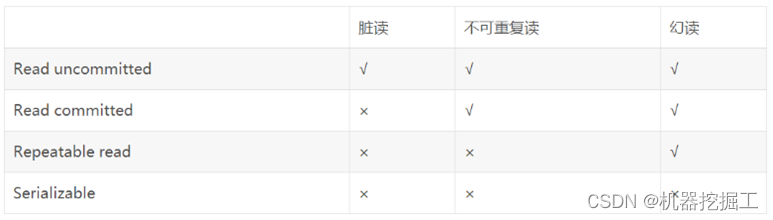
从本篇博客开始,我们将梳理Spring事务相关的知识点。在开始前,想先给自己定一个目标:通过此次梳理要完全理解事务的基本概念及Spring实现事务的基本原理。为实现这个目标我想按以下几个步骤进行: 讲解事务中的一些基本概念使用Sp…...
creo草绘3个实例学习笔记
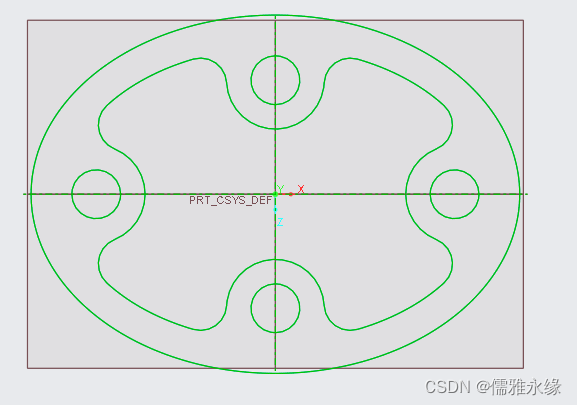
creo草绘3个实例 文章目录 creo草绘3个实例草绘01草绘02草绘03 草绘01 草绘02 草绘03...

Modern C++ std::move的实现原理
前言 有一节我们分析了std::bind的实现原理,本节稍作休息分析一个比较简单的std::move 原理 std::move的原理太简单了,一句话:就是把传进来的参数强转为右值引用类型。作用为调用移动构造函数,或移动赋值函数。下面通过例子和代…...

爬虫工作量由小到大的思维转变---<第四十章 Scrapy Redis 实现IP代理池管理的最佳实践>
前言: 本篇是要结合上篇一起看的姊妹篇:爬虫工作量由小到大的思维转变---<第三十九章 Scrapy-redis 常用的那个RetryMiddleware>-CSDN博客 IP代理池的管理对于确保爬虫的稳定性和数据抓取的匿名性至关重要。围绕Scrapy-Redis框架和一个具体的IP代理池中…...

C# 实现 XOR 密码
XOR密码(异或密码)是一种简单的加密算法,它使用异或(XOR)操作来对明文和密钥进行加密和解密。 异或操作是一种位运算,它对两个二进制数的对应位进行比较,如果两个位相同(都为0或都为…...
【Web前端开发基础】CSS3之空间转换和动画
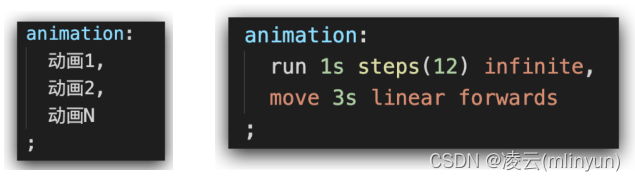
CSS3之空间转换和动画 目录 CSS3之空间转换和动画一、空间转换1.1 概述1.2 3D转换常用的属性1.3 3D转换:translate3d(位移)1.4 3D转换:perspective(视角)1.5 3D转换:rotate3d(旋转&a…...
)
Go实现一个简单的烟花秀效果(附带源码)
在 Go 语言中,要实现烟花秀效果可以使用 github.com/fogleman/gg 包进行绘图。以下是一个简单的例子: 首先,确保你已经安装了(有时候需要梯子才可以安装) github.com/fogleman/gg 包: go get -u github.c…...

【数学建模】插值与拟合
文章目录 插值插值方法用Python解决插值问题 拟合最小二乘拟合数据拟合的Python实现 适用情况 处理由试验、测量得到的大量数据或一些过于复杂而不便于计算的函数表达式时,构造一个简单函数作为要考察数据或复杂函数的近似 定义 给定一组数据,需要确定满…...
全卷积网络:革新图像分析
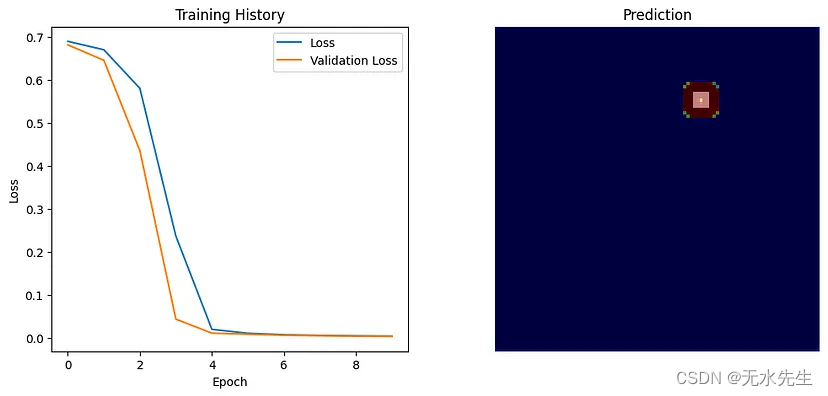
一、介绍 全卷积网络(FCN)的出现标志着计算机视觉领域的一个重要里程碑,特别是在涉及图像分析的任务中。本文深入探讨了 FCN 的概念、它们的架构、它们与传统卷积神经网络 (CNN) 的区别以及它们在各个领域的应用。 就像…...

ubuntu20.04 格式化 硬盘 扩展硬盘GParted
如何在 Ubuntu 22.04 LTS 上安装分区编辑器 GParted?_gparted安装-CSDN博客 sudo apt install gparted 步骤5:启动GParted 安装完成后,您可以在应用程序菜单中找到GParted。点击它以启动分区编辑器。 通过以上步骤,您可以在Ubun…...

docker的资源限制(cgroup)
前瞻 Docker 通过 Cgroup 来控制容器使用的资源配额,包括 CPU、内存、磁盘三大方面, 基本覆盖了常见的资源配额和使用量控制。 Cgroup 是 ControlGroups 的缩写,是 Linux 内核提供的一种可以限制、记录、隔离进程组所使用的物理资源(如 CPU、…...

ChatGPT与文心一言:应用示例与体验比较
ChatGPT 和文心一言哪个更好用? 为了更好地感受ChatGPT和文心一言这两款AI助手如何在实际运用中竞相辉映,我将提供一些典型的应用示例。这些示例都取自真实的用户体验,以帮助解释这两种工具如何让日常生活或工作变得更加轻松。 ChatGPT Ch…...
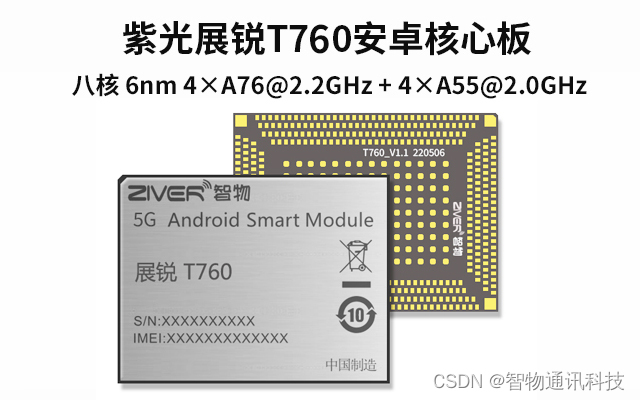
紫光展锐T760_芯片性能介绍_展锐T760安卓核心板定制
展锐T760核心板是一款基于国产5G芯片的智能模块,采用紫光展锐T760制程工艺为台积电6nm工艺,支持工艺具有出色的能效表现。其采用主流的44架构的八核设计,包括4颗2.2GHz A76核心和4颗A55核心设计,内存单元板载可达8GB Ram256GB ROM…...

从动力系统研究看当今数学界
6.3... Milnor’s definition of “attractors” which has been criticized above by us). The work of [KSS2] of asserting the existence of “nice open set” of Ω(p.148) would be likely not verified, for example we think the first sentence “… since f is nont…...

2026健康一体机生产厂家选型与厂商能力全景分析
2026健康一体机生产厂家选型与厂商能力全景分析健康一体机是一种集多项健康检测与管理功能于一体的智能终端设备,可快速完成身高、体重、血压、血糖、血氧、心率、心电、体温、BMI、脂肪含量、基础代谢率等基础体征测量。设备支持数据自动记录、建档、上传与智能分析…...

如何使用日志实现业务全链路追踪
在现代分布式系统架构中,一个业务请求往往需要经过多个服务节点的协同处理,涉及网关、微服务、数据库、缓存、消息队列等多个组件。传统的日志记录方式通常局限于单个服务或模块,难以还原一个完整请求的流转路径,给问题排查、性能…...
)
新手工程师别慌!从零开始搞定一颗新Sensor的完整调试手册(附常见问题排查清单)
新手工程师别慌!从零开始搞定一颗新Sensor的完整调试手册 刚拿到一颗新Sensor时,面对厚厚的Datasheet和复杂的原理图,很多新手工程师都会感到无从下手。本文将带你系统性地梳理整个Sensor调试流程,从关键参数提取到问题排查&#…...

CVPR2019 Oral论文DVC复现指南:用TensorFlow搭建你的第一个端到端深度学习视频压缩模型
CVPR2019 Oral论文DVC复现实战:从零构建端到端视频压缩模型 视频压缩技术正经历从传统编码标准向深度学习范式的革命性转变。2019年CVPR Oral论文《DVC: An End-to-end Deep Video Compression Framework》首次提出了完整的端到端深度学习视频压缩框架,其…...

cua_desktop_operator_cli_skill:用命令行自动化桌面操作的效率利器
1. 项目概述:一个桌面操作员的命令行技能集最近在开源社区里看到一个挺有意思的项目,叫cua_desktop_operator_cli_skill。光看这个名字,可能有点摸不着头脑,但如果你是一个经常需要和电脑桌面、各种应用程序打交道的“操作员”&am…...

基于FastAPI与Cytoscape.js构建个人技能图谱可视化平台
1. 项目概述:一个技能图谱的聚合与沉淀平台最近在整理自己的技术栈和项目经验时,我常常感到一种“知识碎片化”的困扰。学过的框架、用过的工具、解决过的特定问题,都散落在不同的笔记、代码仓库和记忆角落里。当需要快速构建一个原型&#x…...

告别网盘限速困扰:网盘直链下载助手全面解析与应用指南
告别网盘限速困扰:网盘直链下载助手全面解析与应用指南 【免费下载链接】baiduyun 油猴脚本 - 一个免费开源的网盘下载助手 项目地址: https://gitcode.com/gh_mirrors/ba/baiduyun 还在为网盘下载速度缓慢而烦恼吗?网盘直链下载助手作为一款免费…...

Codepack:标准化开发配置与自动化工具链的工程实践
1. 项目概述:一个为开发者准备的“代码行囊” 最近在GitHub上闲逛,发现了一个挺有意思的项目,叫 JasonLovesDoggo/codepack 。乍一看名字,你可能会觉得这又是一个普通的代码库或者工具集。但点进去仔细研究后,我发现…...

基于Next.js 15与React 19构建现代化个人作品集:技术选型与工程实践
1. 项目概述:为什么选择 Next.js 15 构建现代个人作品集 作为一名在前后端领域摸爬滚打了十多年的开发者,我见过也亲手搭建过无数种个人作品集网站。从早期的纯静态 HTML/CSS,到 jQuery 时代,再到 React/Vue 等框架的兴起&#x…...

党建知识竞赛系统推荐:满足各级党组织需求的智能化工具
🚩 党建知识竞赛系统推荐:满足各级党组织需求的智能化工具创新党员教育形式 提升学习实效 推动智慧党建🎯 一、核心价值与功能需求在新时代加强党的建设背景下,如何创新党员教育形式、提升学习实效,是各级党组织面临…...