
fabric搭建生产网络
fabric搭建生产网络
一、生成组织结构与身份证书
解包 hyperledger-fabric-linux-amd64-2.5.0.tar.gz
1.1、crypto-config.yaml配置文件
./bin/cryptogen showtemplate > crypto-config.yaml
将crypto-config.yaml内容修改为:
# ---------------------------------------------------------------------------
# "OrdererOrgs" - Definition of organizations managing orderer nodes
# ---------------------------------------------------------------------------
OrdererOrgs:# ---------------------------------------------------------------------------# Orderer# ---------------------------------------------------------------------------- Name: OrdererDomain: example.comEnableNodeOUs: true# ---------------------------------------------------------------------------# "Specs" - See PeerOrgs below for complete description# ---------------------------------------------------------------------------Specs:- Hostname: orderer0- Hostname: orderer1- Hostname: orderer2# ---------------------------------------------------------------------------
# "PeerOrgs" - Definition of organizations managing peer nodes
# ---------------------------------------------------------------------------
PeerOrgs:# ---------------------------------------------------------------------------# Org1# ---------------------------------------------------------------------------- Name: Org1Domain: org1.example.comEnableNodeOUs: true# ---------------------------------------------------------------------------# "CA"# ---------------------------------------------------------------------------# Uncomment this section to enable the explicit definition of the CA for this# organization.  This entry is a Spec.  See "Specs" section below for details.# ---------------------------------------------------------------------------# CA:#    Hostname: ca # implicitly ca.org1.example.com#    Country: US#    Province: California#    Locality: San Francisco#    OrganizationalUnit: Hyperledger Fabric#    StreetAddress: address for org # default nil#    PostalCode: postalCode for org # default nil# ---------------------------------------------------------------------------# "Specs"# ---------------------------------------------------------------------------# Uncomment this section to enable the explicit definition of hosts in your# configuration.  Most users will want to use Template, below## Specs is an array of Spec entries.  Each Spec entry consists of two fields:#   - Hostname:   (Required) The desired hostname, sans the domain.#   - CommonName: (Optional) Specifies the template or explicit override for#                 the CN.  By default, this is the template:##                              "{{.Hostname}}.{{.Domain}}"##                 which obtains its values from the Spec.Hostname and#                 Org.Domain, respectively.#   - SANS:       (Optional) Specifies one or more Subject Alternative Names#                 to be set in the resulting x509. Accepts template#                 variables {{.Hostname}}, {{.Domain}}, {{.CommonName}}. IP#                 addresses provided here will be properly recognized. Other#                 values will be taken as DNS names.#                 NOTE: Two implicit entries are created for you:#                     - {{ .CommonName }}#                     - {{ .Hostname }}# ---------------------------------------------------------------------------# Specs:#   - Hostname: foo # implicitly "foo.org1.example.com"#     CommonName: foo27.org5.example.com # overrides Hostname-based FQDN set above#     SANS:#       - "bar.{{.Domain}}"#       - "altfoo.{{.Domain}}"#       - "{{.Hostname}}.org6.net"#       - 172.16.10.31#   - Hostname: bar#   - Hostname: baz# ---------------------------------------------------------------------------# "Template"# ---------------------------------------------------------------------------# Allows for the definition of 1 or more hosts that are created sequentially# from a template. By default, this looks like "peer%d" from 0 to Count-1.# You may override the number of nodes (Count), the starting index (Start)# or the template used to construct the name (Hostname).## Note: Template and Specs are not mutually exclusive.  You may define both# sections and the aggregate nodes will be created for you.  Take care with# name collisions# ---------------------------------------------------------------------------Template:Count: 2# Start: 5# Hostname: {{.Prefix}}{{.Index}} # default# SANS:#   - "{{.Hostname}}.alt.{{.Domain}}"# ---------------------------------------------------------------------------# "Users"# ---------------------------------------------------------------------------# Count: The number of user accounts _in addition_ to Admin# ---------------------------------------------------------------------------Users:Count: 1# ---------------------------------------------------------------------------# Org2: See "Org1" for full specification# ---------------------------------------------------------------------------- Name: Org2Domain: org2.example.comEnableNodeOUs: trueTemplate:Count: 2Users:Count: 1
1.2、生成组织结构及身份证书
./bin/cryptogen generate --config=./crypto-config.yaml
执行完该命令后就会在当前目录crypto-config文件夹,里边包括相关的结果及证书,我们可以用tree命令看详细情况,
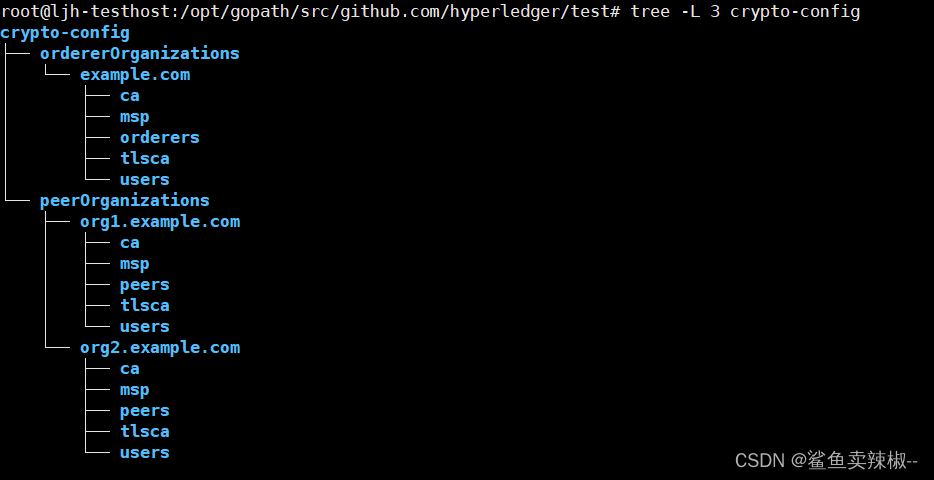
二、生成其他配置文件
2.1、configtx.yaml文件 。
Organizations:- &OrdererOrgName: OrdererOrgSkipAsForeign: falseID: OrdererMSPMSPDir: /opt/gopath/src/github.com/hyperledger/test/crypto-config/ordererOrganizations/example.com/mspPolicies:Readers:Type: SignatureRule: "OR('OrdererMSP.member')"Writers:Type: SignatureRule: "OR('OrdererMSP.member')"Admins:Type: SignatureRule: "OR('OrdererMSP.admin')"Endorsement:Type: SignatureRule: "OR('OrdererMSP.member')"OrdererEndpoints:- orderer0.example.com:7050- orderer1.example.com:8050- orderer2.example.com:9050- &Org1Name: Org1MSPID: Org1MSPMSPDir: /opt/gopath/src/github.com/hyperledger/test/crypto-config/peerOrganizations/org1.example.com/mspPolicies:Readers:Type: SignatureRule: "OR('Org1MSP.admin', 'Org1MSP.peer', 'Org1MSP.client')"Writers:Type: SignatureRule: "OR('Org1MSP.admin', 'Org1MSP.client')"Admins:Type: SignatureRule: "OR('Org1MSP.admin')"Endorsement:Type: SignatureRule: "OR('Org1MSP.peer')"AnchorPeers:- Host: peer0.org1.example.comPort: 7051- &Org2Name: Org2MSPID: Org2MSPMSPDir: /opt/gopath/src/github.com/hyperledger/test/crypto-config/peerOrganizations/org2.example.com/mspPolicies:Readers:Type: SignatureRule: "OR('Org2MSP.admin', 'Org2MSP.peer', 'Org2MSP.client')"Writers:Type: SignatureRule: "OR('Org2MSP.admin', 'Org2MSP.client')"Admins:Type: SignatureRule: "OR('Org2MSP.admin')"Endorsement:Type: SignatureRule: "OR('Org2MSP.peer')"AnchorPeers:- Host: peer0.org2.example.comPort: 9051Capabilities:Channel: &ChannelCapabilitiesV2_0: trueOrderer: &OrdererCapabilitiesV2_0: trueApplication: &ApplicationCapabilitiesV2_5: trueApplication: &ApplicationDefaultsACLs: &ACLsDefault_lifecycle/CheckCommitReadiness: /Channel/Application/Writers_lifecycle/CommitChaincodeDefinition: /Channel/Application/Writers_lifecycle/QueryChaincodeDefinition: /Channel/Application/Writers_lifecycle/QueryChaincodeDefinitions: /Channel/Application/Writerslscc/ChaincodeExists: /Channel/Application/Readerslscc/GetDeploymentSpec: /Channel/Application/Readerslscc/GetChaincodeData: /Channel/Application/Readerslscc/GetInstantiatedChaincodes: /Channel/Application/Readersqscc/GetChainInfo: /Channel/Application/Readersqscc/GetBlockByNumber: /Channel/Application/Readersqscc/GetBlockByHash: /Channel/Application/Readersqscc/GetTransactionByID: /Channel/Application/Readersqscc/GetBlockByTxID: /Channel/Application/Readerscscc/GetConfigBlock: /Channel/Application/Readerscscc/GetChannelConfig: /Channel/Application/Readerspeer/Propose: /Channel/Application/Writerspeer/ChaincodeToChaincode: /Channel/Application/Writersevent/Block: /Channel/Application/Readersevent/FilteredBlock: /Channel/Application/ReadersOrganizations:Policies: &ApplicationDefaultPoliciesLifecycleEndorsement:Type: ImplicitMetaRule: "MAJORITY Endorsement"Endorsement:Type: ImplicitMetaRule: "MAJORITY Endorsement"Readers:Type: ImplicitMetaRule: "ANY Readers"Writers:Type: ImplicitMetaRule: "ANY Writers"Admins:Type: ImplicitMetaRule: "MAJORITY Admins"Capabilities:<<: *ApplicationCapabilitiesOrderer: &OrdererDefaultsOrdererType: etcdraftAddresses:- orderer0.example.com:7050- orderer1.example.com:8050- orderer2.example.com:9050BatchTimeout: 2sBatchSize:MaxMessageCount: 500AbsoluteMaxBytes: 10 MBPreferredMaxBytes: 2 MBMaxChannels: 0Kafka:Brokers:- kafka0:9092- kafka1:9092- kafka2:9092EtcdRaft:Consenters:- Host: orderer0.example.comPort: 7050ClientTLSCert: /opt/gopath/src/github.com/hyperledger/test/crypto-config/ordererOrganizations/example.com/orderers/orderer0.example.com/tls/server.crtServerTLSCert: /opt/gopath/src/github.com/hyperledger/test/crypto-config/ordererOrganizations/example.com/orderers/orderer0.example.com/tls/server.crt- Host: orderer1.example.comPort: 8050ClientTLSCert: /opt/gopath/src/github.com/hyperledger/test/crypto-config/ordererOrganizations/example.com/orderers/orderer1.example.com/tls/server.crtServerTLSCert: /opt/gopath/src/github.com/hyperledger/test/crypto-config/ordererOrganizations/example.com/orderers/orderer1.example.com/tls/server.crt- Host: orderer2.example.comPort: 9050ClientTLSCert: /opt/gopath/src/github.com/hyperledger/test/crypto-config/ordererOrganizations/example.com/orderers/orderer2.example.com/tls/server.crtServerTLSCert: /opt/gopath/src/github.com/hyperledger/test/crypto-config/ordererOrganizations/example.com/orderers/orderer2.example.com/tls/server.crtOptions:TickInterval: 500msElectionTick: 10HeartbeatTick: 1MaxInflightBlocks: 5SnapshotIntervalSize: 16 MBOrganizations:Policies:Readers:Type: ImplicitMetaRule: "ANY Readers"Writers:Type: ImplicitMetaRule: "ANY Writers"Admins:Type: ImplicitMetaRule: "MAJORITY Admins"BlockValidation:Type: ImplicitMetaRule: "ANY Writers"Capabilities:<<: *OrdererCapabilities
Channel: &ChannelDefaultsPolicies:Readers:Type: ImplicitMetaRule: "ANY Readers"Writers:Type: ImplicitMetaRule: "ANY Writers"Admins:Type: ImplicitMetaRule: "MAJORITY AdminsCapabilities:<<: *ChannelCapabilities
Profiles:TwoOrgsOrdererGenesis:<<: *ChannelDefaultsOrderer:<<: *OrdererDefaultsOrganizations:- <<: *OrdererOrgCapabilities:<<: *OrdererCapabilitiesConsortiums:SampleConsortium:Organizations:- <<: *Org1- <<: *Org2TwoOrgsChannel:Consortium: SampleConsortium<<: *ChannelDefaultsApplication:<<: *ApplicationDefaultsOrganizations:- <<: *Org1- <<: *Org2Capabilities:<<: *ApplicationCapabilities
2.2、Orderer服务启动初始区块创建
这一步使用到的工具为configtxgen,关于详细使用情况我们用help即可查看,生成配置文件的命令如下:
root@ljh-testhost:/opt/gopath/src/github.com/hyperledger/test# ./bin/configtxgen -configPath ./config -profile TwoOrgsOrdererGenesis -outputBlock ./channel-artifacts/genesis.block --channelID mychannel

2.3、通道创始文件
root@ljh-testhost:/opt/gopath/src/github.com/hyperledger/test# ./bin/configtxgen -configPath ./config -profile TwoOrgsChannel -outputCreateChannelTx ./channel-artifacts/testchannel.tx -channelID testchannel

2.4、生成锚节点更新配置文件
root@ljh-testhost:/opt/gopath/src/github.com/hyperledger/test# ./bin/configtxgen -configPath ./config -profile TwoOrgsChannel -outputAnchorPeersUpdate ./channel-artifacts/Org1MSPanchors.tx -channelID testchannel -asOrg Org1MSP
root@ljh-testhost:/opt/gopath/src/github.com/hyperledger/test# ./bin/configtxgen -configPath ./config -profile TwoOrgsChannel -outputAnchorPeersUpdate ./channel-artifacts/Org2MSPanchors.tx -channelID testchannel -asOrg Org2MSP

修改config/core.yaml文件:
peer:id: peer0.org1.example.comnetworkId: devlistenAddress: 192.168.134.167:7051chaincodeListenAddress: 192.168.134.167:7052chaincodeAddress: 192.168.134.167:7052address: 192.168.134.167:7051addressAutoDetect: falsegateway:enabled: trueendorsementTimeout: 30sbroadcastTimeout: 30sdialTimeout: 2mkeepalive:interval: 7200stimeout: 20sminInterval: 60sclient:interval: 60stimeout: 20sdeliveryClient:interval: 60stimeout: 20sgossip:bootstrap: 192.168.134.167:7051useLeaderElection: falseorgLeader: truemembershipTrackerInterval: 5sendpoint:maxBlockCountToStore: 10maxPropagationBurstLatency: 10msmaxPropagationBurstSize: 10propagateIterations: 1propagatePeerNum: 3pullInterval: 4spullPeerNum: 3requestStateInfoInterval: 4spublishStateInfoInterval: 4sstateInfoRetentionInterval:publishCertPeriod: 10sskipBlockVerification: falsedialTimeout: 3sconnTimeout: 2srecvBuffSize: 20sendBuffSize: 200digestWaitTime: 1srequestWaitTime: 1500msresponseWaitTime: 2saliveTimeInterval: 5saliveExpirationTimeout: 25sreconnectInterval: 25smaxConnectionAttempts: 120msgExpirationFactor: 20externalEndpoint:election:startupGracePeriod: 15smembershipSampleInterval: 1sleaderAliveThreshold: 10sleaderElectionDuration: 5spvtData:pullRetryThreshold: 60stransientstoreMaxBlockRetention: 1000pushAckTimeout: 3sbtlPullMargin: 10reconcileBatchSize: 10reconcileSleepInterval: 1mreconciliationEnabled: trueskipPullingInvalidTransactionsDuringCommit: falseimplicitCollectionDisseminationPolicy:requiredPeerCount: 0maxPeerCount: 1state:enabled: falsecheckInterval: 10sresponseTimeout: 3sbatchSize: 10blockBufferSize: 20maxRetries: 3# TLS Settingstls:enabled:  trueclientAuthRequired: falsecert:file: /opt/gopath/src/github.com/hyperledger/test/crypto-config/peerOrganizations/org1.example.com/peers/peer0.org1.example.com/tls/server.crtkey:file: /opt/gopath/src/github.com/hyperledger/test/crypto-config/peerOrganizations/org1.example.com/peers/peer0.org1.example.com/tls/server.keyrootcert:file: /opt/gopath/src/github.com/hyperledger/test/crypto-config/peerOrganizations/org1.example.com/peers/peer0.org1.example.com/tls/ca.crtclientRootCAs:files:- /opt/gopath/src/github.com/hyperledger/test/crypto-config/peerOrganizations/org1.example.com/peers/peer0.org1.example.com/tls/ca.crtclientKey:file:clientCert:file:authentication:timewindow: 15mfileSystemPath: /var/hyperledger/production/org1-peer0BCCSP:Default: SW# Settings for the SW crypto provider (i.e. when DEFAULT: SW)SW:Hash: SHA2Security: 256# Location of Key StoreFileKeyStore:# If "", defaults to 'mspConfigPath'/keystoreKeyStore:# Settings for the PKCS#11 crypto provider (i.e. when DEFAULT: PKCS11)PKCS11:# Location of the PKCS11 module libraryLibrary:# Token LabelLabel:# User PINPin:Hash:Security:SoftwareVerify:Immutable:AltID:KeyIds:mspConfigPath: /opt/gopath/src/github.com/hyperledger/test/crypto-config/peerOrganizations/org1.example.com/peers/peer0.org1.example.com/msplocalMspId: Org1MSP# CLI common client config optionsclient:# connection timeoutconnTimeout: 3sdeliveryclient:blockGossipEnabled: truereconnectTotalTimeThreshold: 3600sconnTimeout: 3sreConnectBackoffThreshold: 3600saddressOverrides:localMspType: bccspprofile:enabled:     falselistenAddress: 0.0.0.0:6060handlers:authFilters:-name: DefaultAuth-name: ExpirationCheck    # This filter checks identity x509 certificate expirationdecorators:-name: DefaultDecoratorendorsers:escc:name: DefaultEndorsementlibrary:validators:vscc:name: DefaultValidationlibrary:validatorPoolSize:discovery:enabled: trueauthCacheEnabled: trueauthCacheMaxSize: 1000authCachePurgeRetentionRatio: 0.75orgMembersAllowedAccess: falselimits:concurrency:endorserService: 2500deliverService: 2500gatewayService: 500maxRecvMsgSize: 104857600maxSendMsgSize: 104857600
vm:endpoint: unix:///var/run/docker.sockdocker:tls:enabled: falseca:file: docker/ca.crtcert:file: docker/tls.crtkey:file: docker/tls.keyattachStdout: falsehostConfig:NetworkMode: hostDns:# - 192.168.0.1LogConfig:Type: json-fileConfig:max-size: "50m"max-file: "5"Memory: 2147483648
chaincode:id:path:name:# Generic builder environment, suitable for most chaincode typesbuilder: $(DOCKER_NS)/fabric-ccenv:$(TWO_DIGIT_VERSION)pull: falsegolang:# golang will never need more than baseosruntime: $(DOCKER_NS)/fabric-baseos:$(TWO_DIGIT_VERSION)dynamicLink: falsejava:runtime: $(DOCKER_NS)/fabric-javaenv:$(TWO_DIGIT_VERSION)node:# This is an image based on node:$(NODE_VER)-alpineruntime: $(DOCKER_NS)/fabric-nodeenv:$(TWO_DIGIT_VERSION)externalBuilders:- name: ccaas_builderpath: /opt/hyperledger/ccaas_builderpropagateEnvironment:- CHAINCODE_AS_A_SERVICE_BUILDER_CONFIG# The maximum duration to wait for the chaincode build and install process# to complete.installTimeout: 300sstartuptimeout: 300sexecutetimeout: 30smode: netkeepalive: 0system:_lifecycle: enablecscc: enablelscc: enableqscc: enable# Logging section for the chaincode containerlogging:# Default level for all loggers within the chaincode containerlevel:  info# Override default level for the 'shim' loggershim:   warning# Format for the chaincode container logsformat: '%{color}%{time:2006-01-02 15:04:05.000 MST} [%{module}] %{shortfunc} -> %{level:.4s} %{id:03x}%{color:reset} %{message}'ledger:blockchain:state:stateDatabase: goleveldbtotalQueryLimit: 100000couchDBConfig:couchDBAddress: 127.0.0.1:5984username:password:maxRetries: 3maxRetriesOnStartup: 10requestTimeout: 35sinternalQueryLimit: 1000maxBatchUpdateSize: 1000createGlobalChangesDB: falsecacheSize: 64history:enableHistoryDatabase: truepvtdataStore:collElgProcMaxDbBatchSize: 5000collElgProcDbBatchesInterval: 1000deprioritizedDataReconcilerInterval: 60mpurgeInterval: 100purgedKeyAuditLogging: truesnapshots:rootDir: /var/hyperledger/production/snapshots/org1-peer0
operations:listenAddress: 127.0.0.1:9446tls:enabled: falsecert:file:key:file:clientAuthRequired: falseclientRootCAs:files: []
metrics:provider: disabledstatsd:network: udpaddress: 127.0.0.1:8125writeInterval: 10sprefix:
三.搭建网络
1.普通安装方法
搭建安装orderer节点
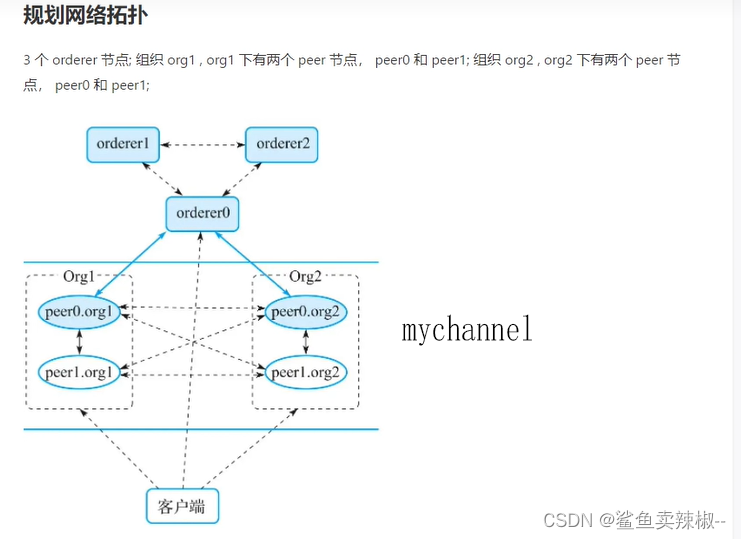
| 节点 | 宿主机 | Hosts | 端口 |
|---|---|---|---|
| orderer0 | 192.168.134.167 | orderer0.example.com | 7050,8443,9443 |
| orderer1 | 192.168.134.167 | orderer1.example.com | 8050,8444,9444 |
| orderer2 | 192.168.134.167 | orderer2.example.com | 9050,8445,9445 |
| org1-peer0 | 192.168.134.167 | peer0.org1.example.com | 7051,7052,9446,8125 |
| org1-peer1 | 192.168.134.167 | peer1.org1.example.com | 8051,7053,9447,8126 |
| org2-peer0 | 192.168.134.167 | peer0.org2.example.com | 9051,7054,9448,8127 |
| org2-peer1 | 192.168.134.167 | peer1.org2.example.com | 10051,7055,9449,8128 |
配置域名解析
root@ljh-testhost:# cat /etc/hosts
192.168.134.167              orderer0.example.com oerderer1.example.com orderer2.example.com
192.168.134.167              peer0.org1.example.com
192.168.134.167              peer1.org1.example.com
192.168.134.167              peer0.org2.example.com
192.168.134.167              peer1.org2.example.com
为了方便操作,创建目录将要使用的文件拷贝进来
root@ljh-testhost:/opt/gopath/src/github.com/hyperledger/test# mkdir orderer0
root@ljh-testhost:/opt/gopath/src/github.com/hyperledger/test# cp bin/orderer   config/orderer.yaml  orderer0/
修改orderer.yaml文件:
---
General:ListenAddress: 192.1168.134.167ListenPort: 7050TLS:Enabled: truePrivateKey: /opt/gopath/src/github.com/hyperledger/test/crypto-config/ordererOrganizations/example.com/orderers/orderer0.example.com/tls/server.keyCertificate: /opt/gopath/src/github.com/hyperledger/test/crypto-config/ordererOrganizations/example.com/orderers/orderer0.example.com/tls/server.crtRootCAs:- /opt/gopath/src/github.com/hyperledger/test/crypto-config/ordererOrganizations/example.com/orderers/orderer0.example.com/tls/ca.crtClientAuthRequired: falseClientRootCAs:Keepalive:ServerMinInterval: 60sServerInterval: 7200sServerTimeout: 20sMaxRecvMsgSize: 104857600MaxSendMsgSize: 104857600Cluster:SendBufferSize: 100ClientCertificate: /opt/gopath/src/github.com/hyperledger/test/crypto-config/ordererOrganizations/example.com/orderers/orderer0.example.com/tls/server.crtClientPrivateKey: /opt/gopath/src/github.com/hyperledger/test/crypto-config/ordererOrganizations/example.com/orderers/orderer0.example.com/tls/server.keyListenPort:ListenAddress:ServerCertificate:ServerPrivateKey:BootstrapMethod: fileBootstrapFile: /opt/gopath/src/github.com/hyperledger/test/channel-artifacts/genesis.blockLocalMSPDir: /opt/gopath/src/github.com/hyperledger/test/crypto-config/ordererOrganizations/example.com/orderers/orderer0.example.com/mspLocalMSPID: OrdererMSPProfile:Enabled: falseAddress: 0.0.0.0:6060BCCSP:Default: SWSW:Hash: SHA2Security: 256FileKeyStore:KeyStore:PKCS11:Library:Label:Pin:Hash:Security:FileKeyStore:KeyStore:Authentication:TimeWindow: 15mFileLedger:# Location: The directory to store the blocks in.Location: /var/hyperledger/production/orderer0
Kafka:Retry:ShortInterval: 5sShortTotal: 10mLongInterval: 5mLongTotal: 12hNetworkTimeouts:DialTimeout: 10sReadTimeout: 10sWriteTimeout: 10sMetadata:RetryBackoff: 250msRetryMax: 3Producer:RetryBackoff: 100msRetryMax: 3Consumer:RetryBackoff: 2sTopic:ReplicationFactor: 3Verbose: falseTLS:Enabled: falsePrivateKey:Certificate:RootCAs:SASLPlain:Enabled: falseUser:Password:Version:
Debug:BroadcastTraceDir:DeliverTraceDir:
Operations:ListenAddress: 127.0.0.1:8443TLS:Enabled: falseCertificate:PrivateKey:ClientAuthRequired: falseClientRootCAs: []
Metrics:Provider: disabledStatsd:Network: udpAddress: 127.0.0.1:8125WriteInterval: 30sPrefix:
Admin:ListenAddress: 127.0.0.1:9443TLS:Enabled: falseCertificate:PrivateKey:ClientAuthRequired: trueClientRootCAs: []
ChannelParticipation:Enabled: falseMaxRequestBodySize: 1 MB
Consensus:WALDir: /var/hyperledger/production/orderer0/etcdraft/walSnapDir: /var/hyperledger/production/orderer0/etcdraft/snapshot
启动orderer0节点并查看:
# nohup ./orderer  start > orderer-log.log 2>&1 &
# tail -f orderer-log.log
2024-04-10 16:50:52.656 CST 0044 INFO [orderer.consensus.etcdraft] hup -> 1 is starting a new election at term 1 channel=mychannel node=1
2024-04-10 16:50:52.656 CST 0045 INFO [orderer.consensus.etcdraft] becomePreCandidate -> 1 became pre-candidate at term 1 channel=mychannel node=1
2024-04-10 16:50:52.656 CST 0046 INFO [orderer.consensus.etcdraft] poll -> 1 received MsgPreVoteResp from 1 at term 1 channel=mychannel node=1
2024-04-10 16:50:52.656 CST 0047 INFO [orderer.consensus.etcdraft] campaign -> 1 [logterm: 1, index: 3] sent MsgPreVote request to 2 at term 1 channel=mychannel node=1
2024-04-10 16:50:52.656 CST 0048 INFO [orderer.consensus.etcdraft] campaign -> 1 [logterm: 1, index: 3] sent MsgPreVote request to 3 at term 1 channel=mychannel node=1
以此类推orderer1和orderer2方法相同,需要修改端口和相关路径。
二进制安装peer节点
部署orh1-peer1节点
确保所有orderer节点启动再部署peer节点。
# mkdir org1-peer  org2-peer
# cd org1-peer/
# mkdir peer0 peer1
# cd org2-peer/
# mkdir peer0 peer1
将需要的文件拷贝到peer0
root@ljh-testhost:/opt/gopath/src/github.com/hyperledger/test/org1-peer/peer0# cp ../../bin/peer  .
root@ljh-testhost:/opt/gopath/src/github.com/hyperledger/test/org1-peer/peer0# cp ../../config/core.yaml  .
修改core.yaml文件内容如下:
peer:id: peer0.org1.example.comnetworkId: devlistenAddress: 192.168.134.167:7051chaincodeListenAddress: 192.168.134.167:7052chaincodeAddress: 192.168.134.167:7052address: 192.168.134.167:7051addressAutoDetect: falsegateway:enabled: trueendorsementTimeout: 30sbroadcastTimeout: 30sdialTimeout: 2mkeepalive:interval: 7200stimeout: 20sminInterval: 60sclient:interval: 60stimeout: 20sdeliveryClient:interval: 60stimeout: 20sgossip:bootstrap: 192.168.134.167:7051useLeaderElection: falseorgLeader: truemembershipTrackerInterval: 5sendpoint:maxBlockCountToStore: 10maxPropagationBurstLatency: 10msmaxPropagationBurstSize: 10propagateIterations: 1propagatePeerNum: 3pullInterval: 4spullPeerNum: 3requestStateInfoInterval: 4spublishStateInfoInterval: 4sstateInfoRetentionInterval:publishCertPeriod: 10sskipBlockVerification: falsedialTimeout: 3sconnTimeout: 2srecvBuffSize: 20sendBuffSize: 200digestWaitTime: 1srequestWaitTime: 1500msresponseWaitTime: 2saliveTimeInterval: 5saliveExpirationTimeout: 25sreconnectInterval: 25smaxConnectionAttempts: 120msgExpirationFactor: 20externalEndpoint:election:startupGracePeriod: 15smembershipSampleInterval: 1sleaderAliveThreshold: 10sleaderElectionDuration: 5spvtData:pullRetryThreshold: 60stransientstoreMaxBlockRetention: 1000pushAckTimeout: 3sbtlPullMargin: 10reconcileBatchSize: 10reconcileSleepInterval: 1mreconciliationEnabled: trueskipPullingInvalidTransactionsDuringCommit: falseimplicitCollectionDisseminationPolicy:requiredPeerCount: 0maxPeerCount: 1state:enabled: falsecheckInterval: 10sresponseTimeout: 3sbatchSize: 10blockBufferSize: 20maxRetries: 3# TLS Settingstls:enabled:  trueclientAuthRequired: falsecert:file: /opt/gopath/src/github.com/hyperledger/test/crypto-config/peerOrganizations/org1.example.com/peers/peer0.org1.example.com/tls/server.crtkey:file: /opt/gopath/src/github.com/hyperledger/test/crypto-config/peerOrganizations/org1.example.com/peers/peer0.org1.example.com/tls/server.keyrootcert:file: /opt/gopath/src/github.com/hyperledger/test/crypto-config/peerOrganizations/org1.example.com/peers/peer0.org1.example.com/tls/ca.crtclientRootCAs:files:- /opt/gopath/src/github.com/hyperledger/test/crypto-config/peerOrganizations/org1.example.com/peers/peer0.org1.example.com/tls/ca.crtclientKey:file:clientCert:file:authentication:timewindow: 15mfileSystemPath: /var/hyperledger/production/org1-peer0BCCSP:Default: SW# Settings for the SW crypto provider (i.e. when DEFAULT: SW)SW:Hash: SHA2Security: 256# Location of Key StoreFileKeyStore:# If "", defaults to 'mspConfigPath'/keystoreKeyStore:# Settings for the PKCS#11 crypto provider (i.e. when DEFAULT: PKCS11)PKCS11:# Location of the PKCS11 module libraryLibrary:# Token LabelLabel:# User PINPin:Hash:Security:SoftwareVerify:Immutable:AltID:KeyIds:mspConfigPath: /opt/gopath/src/github.com/hyperledger/test/crypto-config/peerOrganizations/org1.example.com/peers/peer0.org1.example.com/msplocalMspId: Org1MSP# CLI common client config optionsclient:# connection timeoutconnTimeout: 3sdeliveryclient:blockGossipEnabled: truereconnectTotalTimeThreshold: 3600sconnTimeout: 3sreConnectBackoffThreshold: 3600saddressOverrides:localMspType: bccspprofile:enabled:     falselistenAddress: 0.0.0.0:6060handlers:authFilters:-name: DefaultAuth-name: ExpirationCheck    # This filter checks identity x509 certificate expirationdecorators:-name: DefaultDecoratorendorsers:escc:name: DefaultEndorsementlibrary:validators:vscc:name: DefaultValidationlibrary:validatorPoolSize:discovery:enabled: trueauthCacheEnabled: trueauthCacheMaxSize: 1000authCachePurgeRetentionRatio: 0.75orgMembersAllowedAccess: falselimits:concurrency:endorserService: 2500deliverService: 2500gatewayService: 500maxRecvMsgSize: 104857600maxSendMsgSize: 104857600
vm:endpoint: unix:///var/run/docker.sockdocker:tls:enabled: falseca:file: docker/ca.crtcert:file: docker/tls.crtkey:file: docker/tls.keyattachStdout: falsehostConfig:NetworkMode: hostDns:# - 192.168.0.1LogConfig:Type: json-fileConfig:max-size: "50m"max-file: "5"Memory: 2147483648
chaincode:id:path:name:# Generic builder environment, suitable for most chaincode typesbuilder: $(DOCKER_NS)/fabric-ccenv:$(TWO_DIGIT_VERSION)pull: falsegolang:# golang will never need more than baseosruntime: $(DOCKER_NS)/fabric-baseos:$(TWO_DIGIT_VERSION)dynamicLink: falsejava:runtime: $(DOCKER_NS)/fabric-javaenv:$(TWO_DIGIT_VERSION)node:# This is an image based on node:$(NODE_VER)-alpineruntime: $(DOCKER_NS)/fabric-nodeenv:$(TWO_DIGIT_VERSION)externalBuilders:- name: ccaas_builderpath: /opt/hyperledger/ccaas_builderpropagateEnvironment:- CHAINCODE_AS_A_SERVICE_BUILDER_CONFIG# The maximum duration to wait for the chaincode build and install process# to complete.installTimeout: 300sstartuptimeout: 300sexecutetimeout: 30smode: netkeepalive: 0system:_lifecycle: enablecscc: enablelscc: enableqscc: enable# Logging section for the chaincode containerlogging:# Default level for all loggers within the chaincode containerlevel:  info# Override default level for the 'shim' loggershim:   warning# Format for the chaincode container logsformat: '%{color}%{time:2006-01-02 15:04:05.000 MST} [%{module}] %{shortfunc} -> %{level:.4s} %{id:03x}%{color:reset} %{message}'ledger:blockchain:state:stateDatabase: goleveldbtotalQueryLimit: 100000couchDBConfig:couchDBAddress: 127.0.0.1:5984username:password:maxRetries: 3maxRetriesOnStartup: 10requestTimeout: 35sinternalQueryLimit: 1000maxBatchUpdateSize: 1000createGlobalChangesDB: falsecacheSize: 64history:enableHistoryDatabase: truepvtdataStore:collElgProcMaxDbBatchSize: 5000collElgProcDbBatchesInterval: 1000deprioritizedDataReconcilerInterval: 60mpurgeInterval: 100purgedKeyAuditLogging: truesnapshots:rootDir: /var/hyperledger/production/snapshots/org1-peer0
operations:listenAddress: 127.0.0.1:9446tls:enabled: falsecert:file:key:file:clientAuthRequired: falseclientRootCAs:files: []
metrics:provider: disabledstatsd:network: udpaddress: 127.0.0.1:8125writeInterval: 10sprefix:
启动org1-peer0节点
# nohup ./peer  node start > org1-peer0.log 2>&1  &
# tail -f org1-peer0.log
2024-04-11 11:13:25.479 CST 001b INFO [sccapi] DeploySysCC -> deploying system chaincode 'qscc'
2024-04-11 11:13:25.479 CST 001c INFO [sccapi] DeploySysCC -> deploying system chaincode '_lifecycle'
2024-04-11 11:13:25.479 CST 001d INFO [nodeCmd] serve -> Deployed system chaincodes
2024-04-11 11:13:25.479 CST 001e INFO [discovery] NewService -> Created with config TLS: true, authCacheMaxSize: 1000, authCachePurgeRatio: 0.750000
2024-04-11 11:13:25.479 CST 001f INFO [nodeCmd] serve -> Discovery service activated
2024-04-11 11:13:25.479 CST 0020 INFO [nodeCmd] serve -> Starting peer with Gateway enabled
2024-04-11 11:13:25.479 CST 0021 INFO [nodeCmd] serve -> Starting peer with ID=[peer0.org1.example.com], network ID=[dev], address=[192.168.134.167:7051]
2024-04-11 11:13:25.479 CST 0022 INFO [nodeCmd] serve -> Started peer with ID=[peer0.org1.example.com], network ID=[dev], address=[192.168.134.167:7051]
2024-04-11 11:13:25.479 CST 0023 INFO [kvledger] LoadPreResetHeight -> Loading prereset height from path [/var/hyperledger/production/org1-peer0/ledgersData/chains]
2024-04-11 11:13:25.479 CST 0024 INFO [blkstorage] preResetHtFiles -> No active channels passed
其余peer节点需要修改端口,文件路径。
创建通道
root@ljh-testhost:/opt/gopath/src/github.com/hyperledger/test/org1-peer/peer0# export CORE_PEER_LOCALMSPID=Org1MSP
root@ljh-testhost:/opt/gopath/src/github.com/hyperledger/test/org1-peer/peer0# export CORE_PEER_MSPCONFIGPATH=/opt/gopath/src/github.com/hyperledger/test/crypto-config/peerOrganizations/org1.example.com/users/Admin@org1.example.com/msp
root@ljh-testhost:/opt/gopath/src/github.com/hyperledger/test/org2-peer/peer1# ./peer channel create -o orderer0.example.com:7050 -c testchannel -f "/opt/gopath/src/github.com/hyperledger/test/channel-artifacts/mychannel.tx" --timeout "30s" --tls --cafile /opt/gopath/src/github.com/hyperledger/test/crypto-config/ordererOrganizations/example.com/orderers/orderer0.example.com/msp/tlscacerts/tlsca.example.com-cert.pem

创建成功后会在当前路径下生成 testchannel.block 文件。将文件移动到/opt/gopath/src/github.com/hyperledger/test/channel-artifacts/
root@ljh-testhost:/opt/gopath/src/github.com/hyperledger/test/org2-peer/peer1# cp testchannel.block /opt/gopath/src/github.com/hyperledger/test/channel-artifacts/
加入通道
org1-peer0 加入通道:
root@ljh-testhost:/opt/gopath/src/github.com/hyperledger/test/org2-peer/peer1# export CORE_PEER_TLS_ENABLED=true
export CORE_PEER_LOCALMSPID="Org1MSP"
root@ljh-testhost:/opt/gopath/src/github.com/hyperledger/test/org2-peer/peer1# export CORE_PEER_TLS_ROOTCERT_FILE=/opt/gopath/src/github.com/hyperledger/test/crypto-config/peerOrganizations/org1.example.com/peers/peer0.org1.example.com/tls/ca.crt
root@ljh-testhost:/opt/gopath/src/github.com/hyperledger/test/org2-peer/peer1# export CORE_PEER_MSPCONFIGPATH=/opt/gopath/src/github.com/hyperledger/test/crypto-config/peerOrganizations/org1.example.com/users/Admin@org1.example.com/msp
root@ljh-testhost:/opt/gopath/src/github.com/hyperledger/test/org2-peer/peer1# export CORE_PEER_ADDRESS=peer0.org1.example.com:7051
root@ljh-testhost:/opt/gopath/src/github.com/hyperledger/test/org2-peer/peer1# ./peer channel join -b /opt/gopath/src/github.com/hyperledger/test/channel-artifacts/testchannel.block
节点加入成功。
其余节点只需要修改文件位置和端口。
将所有的的节点加入后查看 peer 节点加入的通道:
./peer channel list

2.Docker方式搭建
所需要的镜像:

前面已经生成过相关文件了,所以直接配置docker-compose文件。
我们将orderer节点和peer节点的docker-compose文件写在一起。在/opt/gopath/src/github.com/hyperledger/test下创建docker-com-op.yaml。
docker-com-op.yaml内容如下:
version: '2.0'services:cli:image: hyperledger/fabric-tools:2.5restart: alwayscontainer_name: fabric-clihostname: fabric-clitty: trueextra_hosts:- "orderer0.example.com:192.168.134.167"- "orderer1.example.com:192.168.134.167"- "orderer2.example.com:192.168.134.167"- "peer0.org1.example.com:192.168.134.167"- "peer1.org1.example.com:192.168.134.167"- "peer0.org2.example.com:192.168.134.167"- "peer1.org2.example.com:192.168.134.167"environment:- CORE_PEER_ID=fabric-cli- CORE_PEER_ADDRESS=peer0.org1.example.com:7051 # default to operate on peer0.org1- CORE_PEER_LOCALMSPID=Org1MSP- CORE_PEER_TLS_CERT_FILE=/etc/hyperledger/fabric/crypto-config/peerOrganizations/org1.example.com/peers/peer0.org1.example.com/tls/server.crt- CORE_PEER_TLS_KEY_FILE=/etc/hyperledger/fabric/crypto-config/peerOrganizations/org1.example.com/peers/peer0.org1.example.com/tls/server.key- CORE_PEER_TLS_ROOTCERT_FILE=/etc/hyperledger/fabric/crypto-config/peerOrganizations/org1.example.com/peers/peer0.org1.example.com/tls/ca.crt- CORE_PEER_MSPCONFIGPATH=/etc/hyperledger/fabric/crypto-config/peerOrganizations/org1.example.com/users/Admin@org1.example.com/msp- FABRIC_LOGGING_SPEC=DEBUG- FABRIC_LOGGING_FORMAT=%{color}[%{id:03x} %{time:01-02 15:04:05.00 MST}] [%{module}] %{shortfunc} -> %{level:.4s}%{color:reset} %{message}- CORE_PEER_TLS_ENABLED=true # to enable TLS, change to true- ORDERER_CA=/etc/hyperledger/fabric/crypto-config/ordererOrganizations/example.com/orderers/orderer0.example.com/msp/tlscacerts/tlsca.example.com-cert.pemvolumes:- ./crypto-config.yaml:/etc/hyperledger/fabric/crypto-config.yaml- ./config/configtx.yaml:/etc/hyperledger/fabric/configtx.yaml- ./crypto-config:/etc/hyperledger/fabric/crypto-config- ./channel-artifacts:/tmp/channel-artifacts- ./chaincodes:/etc/hyperledger/fabric/chaincodesworking_dir: /opt/gopath/src/github.com/hyperledger/fabric/peercommand: bash -c 'cd /tmp; source scripts/func.sh; while true; do sleep 20170504; done'orderer0.example.com: # There can be multiple orderersimage: hyperledger/fabric-orderer:2.5.6restart: alwayscontainer_name: orderer0.example.comhostname: orderer0.example.comports:- "7050:7050"extra_hosts:- "orderer0.example.com:192.168.134.167"- "orderer1.example.com:192.168.134.167"- "orderer2.example.com:192.168.0.105"- "peer0.org1.example.com:192.168.134.167"- "peer1.org1.example.com:192.168.134.167"- "peer0.org2.example.com:192.168.134.167"- "peer1.org2.example.com:192.168.134.167"environment:- FABRIC_LOGGING_FORMAT="%{color}%{time:2006-01-02 15:04:05.000 MST} [%{module}] %{shortfunc} -> %{level:.4s} %{id:03x}%{color:reset} %{message}"- ORDERER_GENERAL_LISTENADDRESS=0.0.0.0 # default: 127.0.0.1- ORDERER_GENERAL_LISTENPORT=7050- ORDERER_GENERAL_GENESISMETHOD=file # default: provisional- ORDERER_GENERAL_BOOTSTRAPFILE=/etc/hyperledger/fabric/orderer.genesis.block # by default, all materials should be put under $FABRIC_CFG_PATH, which defaults to /etc/hyperledger/fabric- ORDERER_GENERAL_LOCALMSPID=OrdererMSP # default: DEFAULT- ORDERER_GENERAL_LOCALMSPDIR=/etc/hyperledger/fabric/msp- ORDERER_GENERAL_LEDGERTYPE=file#- ORDERER_GENERAL_LEDGERTYPE=json # default: file- ORDERER_OPERATIONS_LISTENADDRESS=0.0.0.0:8443 # operation RESTful API- ORDERER_METRICS_PROVIDER=prometheus # prometheus will pull metrics from orderer via /metrics RESTful API#- ORDERER_RAMLEDGER_HISTORY_SIZE=100 #only useful when use ram ledger# enabled TLS- ORDERER_GENERAL_TLS_ENABLED=true # default: false- ORDERER_GENERAL_TLS_PRIVATEKEY=/etc/hyperledger/fabric/tls/server.key- ORDERER_GENERAL_TLS_CERTIFICATE=/etc/hyperledger/fabric/tls/server.crt- ORDERER_GENERAL_TLS_ROOTCAS=[/etc/hyperledger/fabric/tls/ca.crt]# Only required by raft mode- ORDERER_GENERAL_CLUSTER_CLIENTPRIVATEKEY=/etc/hyperledger/fabric/tls/server.key- ORDERER_GENERAL_CLUSTER_CLIENTCERTIFICATE=/etc/hyperledger/fabric/tls/server.crt- ORDERER_GENERAL_CLUSTER_ROOTCAS=[/etc/hyperledger/fabric/tls/ca.crt]- FABRIC_LOGGING_SPEC=DEBUGvolumes:- ./crypto-config/ordererOrganizations/example.com/orderers/orderer0.example.com/msp:/etc/hyperledger/fabric/msp- ./crypto-config/ordererOrganizations/example.com/orderers/orderer0.example.com/tls/:/etc/hyperledger/fabric/tls- ./channel-artifacts/genesis.block:/etc/hyperledger/fabric/orderer.genesis.blockexpose:- "7050" # gRPC- "8443" # Operation RESTcommand: orderer startorderer1.example.com:image: hyperledger/fabric-orderer:2.5.6restart: alwayscontainer_name: orderer1.example.comhostname: orderer1.example.comports:- "8050:7050"extra_hosts:- "orderer0.example.com:192.168.134.167"- "orderer1.example.com:192.168.134.167"- "orderer2.example.com:192.168.134.167"- "peer0.org1.example.com:192.168.134.167"- "peer1.org1.example.com:192.168.134.167"- "peer0.org2.example.com:192.168.134.167"- "peer1.org2.example.com:192.168.134.167"environment:- FABRIC_LOGGING_SPEC=DEBUG- FABRIC_LOGGING_FORMAT="%{color}%{time:2006-01-02 15:04:05.000 MST} [%{module}] %{shortfunc} -> %{level:.4s} %{id:03x}%{color:reset} %{message}"- ORDERER_GENERAL_LISTENADDRESS=0.0.0.0 # default: 127.0.0.1- ORDERER_GENERAL_LISTENPORT=7050- ORDERER_GENERAL_GENESISMETHOD=file # default: provisional- ORDERER_GENERAL_BOOTSTRAPFILE=/etc/hyperledger/fabric/orderer.genesis.block # by default, all materials should be put under $FABRIC_CFG_PATH, which defaults to /etc/hyperledger/fabric- ORDERER_GENERAL_LOCALMSPID=OrdererMSP # default: DEFAULT- ORDERER_GENERAL_LOCALMSPDIR=/etc/hyperledger/fabric/msp- ORDERER_GENERAL_LEDGERTYPE=file#- ORDERER_GENERAL_LEDGERTYPE=json # default: file- ORDERER_OPERATIONS_LISTENADDRESS=0.0.0.0:8443 # operation RESTful API- ORDERER_METRICS_PROVIDER=prometheus # prometheus will pull metrics from orderer via /metrics RESTful API#- ORDERER_RAMLEDGER_HISTORY_SIZE=100 #only useful when use ram ledger# enabled TLS- ORDERER_GENERAL_TLS_ENABLED=true # default: false- ORDERER_GENERAL_TLS_PRIVATEKEY=/etc/hyperledger/fabric/tls/server.key- ORDERER_GENERAL_TLS_CERTIFICATE=/etc/hyperledger/fabric/tls/server.crt- ORDERER_GENERAL_TLS_ROOTCAS=[/etc/hyperledger/fabric/tls/ca.crt]# Only required by raft mode- ORDERER_GENERAL_CLUSTER_CLIENTPRIVATEKEY=/etc/hyperledger/fabric/tls/server.key- ORDERER_GENERAL_CLUSTER_CLIENTCERTIFICATE=/etc/hyperledger/fabric/tls/server.crt- ORDERER_GENERAL_CLUSTER_ROOTCAS=[/etc/hyperledger/fabric/tls/ca.crt]- ORDERER_GENERAL_CLUSTER_SENDBUFFERSIZE=10volumes:- ./crypto-config/ordererOrganizations/example.com/orderers/orderer1.example.com/msp:/etc/hyperledger/fabric/msp- ./crypto-config/ordererOrganizations/example.com/orderers/orderer1.example.com/tls/:/etc/hyperledger/fabric/tls- ./channel-artifacts/genesis.block:/etc/hyperledger/fabric/orderer.genesis.blockcommand: orderer start orderer2.example.com:image: hyperledger/fabric-orderer:latestrestart: alwayscontainer_name: orderer2.example.comhostname: orderer2.example.comports:- "9050:7050"extra_hosts:- "orderer0.example.com:192.168.134.167"- "orderer1.example.com:192.168.134.167"- "orderer2.example.com:192.168.134.167"- "peer0.org1.example.com:192.168.134.167"- "peer1.org1.example.com:192.168.134.167"- "peer0.org2.example.com:192.168.134.167"- "peer1.org2.example.com:192.168.134.167"environment:- FABRIC_LOGGING_SPEC=DEBUG # default: INFO- FABRIC_LOGGING_FORMAT="%{color}%{time:2006-01-02 15:04:05.000 MST} [%{module}] %{shortfunc} -> %{level:.4s} %{id:03x}%{color:reset} %{message}"- ORDERER_GENERAL_LISTENADDRESS=0.0.0.0 # default: 127.0.0.1- ORDERER_GENERAL_LISTENPORT=7050- ORDERER_GENERAL_GENESISMETHOD=file # default: provisional- ORDERER_GENERAL_BOOTSTRAPFILE=/etc/hyperledger/fabric/orderer.genesis.block # by default, all materials should be put under $FABRIC_CFG_PATH, which defaults to /etc/hyperledger/fabric- ORDERER_GENERAL_LOCALMSPID=OrdererMSP # default: DEFAULT- ORDERER_GENERAL_LOCALMSPDIR=/etc/hyperledger/fabric/msp- ORDERER_GENERAL_LEDGERTYPE=file#- ORDERER_GENERAL_LEDGERTYPE=json # default: file- ORDERER_OPERATIONS_LISTENADDRESS=0.0.0.0:8443 # operation RESTful API- ORDERER_METRICS_PROVIDER=prometheus # prometheus will pull metrics from orderer via /metrics RESTful API#- ORDERER_RAMLEDGER_HISTORY_SIZE=100 #only useful when use ram ledger# enabled TLS- ORDERER_GENERAL_TLS_ENABLED=true # default: false- ORDERER_GENERAL_TLS_PRIVATEKEY=/etc/hyperledger/fabric/tls/server.key- ORDERER_GENERAL_TLS_CERTIFICATE=/etc/hyperledger/fabric/tls/server.crt- ORDERER_GENERAL_TLS_ROOTCAS=[/etc/hyperledger/fabric/tls/ca.crt]# Only required by raft mode- ORDERER_GENERAL_CLUSTER_CLIENTPRIVATEKEY=/etc/hyperledger/fabric/tls/server.key- ORDERER_GENERAL_CLUSTER_CLIENTCERTIFICATE=/etc/hyperledger/fabric/tls/server.crt- ORDERER_GENERAL_CLUSTER_ROOTCAS=[/etc/hyperledger/fabric/tls/ca.crt]- ORDERER_GENERAL_CLUSTER_SENDBUFFERSIZE=10volumes:- ./crypto-config/ordererOrganizations/example.com/orderers/orderer2.example.com/msp:/etc/hyperledger/fabric/msp- ./crypto-config/ordererOrganizations/example.com/orderers/orderer2.example.com/tls:/etc/hyperledger/fabric/tls- ./channel-artifacts/genesis.block:/etc/hyperledger/fabric/orderer.genesis.blockcommand: orderer startpeer0.org1.example.com:image: hyperledger/fabric-peer:2.5.6restart: alwayscontainer_name: peer00.org1.example.comhostname: peer0.org1.example.comports:- 7051:7051- 7052:7052- 9443:9443extra_hosts:- "orderer0.example.com:192.168.134.167"- "orderer1.example.com:192.168.134.167"- "orderer2.example.com:192.168.134.167"- "peer0.org1.example.com:192.168.134.167"- "peer1.org1.example.com:192.168.134.167"- "peer0.org2.example.com:192.168.134.167"- "peer1.org2.example.com:192.168.134.167"environment:- FABRIC_LOGGING_SPEC=INFO- FABRIC_LOGGING_FORMAT="%{color}%{time:2006-01-02 15:04:05.000 MST} [%{module}] %{shortfunc} -> %{level:.4s} %{id:03x}%{color:reset} %{message}"- CORE_PEER_ADDRESSAUTODETECT=false- CORE_VM_DOCKER_HOSTCONFIG_NETWORKMODE=host # uncomment this to use specific network- CORE_PEER_GOSSIP_USELEADERELECTION=true- CORE_PEER_GOSSIP_ORGLEADER=false # whether this node is the org leader, default to false- CORE_OPERATIONS_LISTENADDRESS=0.0.0.0:9443 # operation RESTful API- CORE_METRICS_PROVIDER=prometheus # prometheus will pull metrics from fabric via /metrics RESTful API- CORE_PEER_PROFILE_ENABLED=false- CORE_PEER_TLS_ENABLED=true- CORE_PEER_TLS_CERT_FILE=/etc/hyperledger/fabric/tls/server.crt- CORE_PEER_TLS_KEY_FILE=/etc/hyperledger/fabric/tls/server.key- CORE_PEER_TLS_ROOTCERT_FILE=/etc/hyperledger/fabric/tls/ca.crt- CORE_CHAINCODE_BUILDER=hyperledger/fabric-ccenv:2.4.1- CORE_CHAINCODE_GOLANG_RUNTIME=hyperledger/fabric-baseos:2.4.1- CORE_CHAINCODE_JAVA_RUNTIME=hyperledger/fabric-javaenv:2.4.1- CORE_CHAINCODE_NODE_RUNTIME=hyperledger/fabric-nodeenv:2.4.1- CORE_PEER_ID=peer0.org1.example.com- CORE_PEER_ADDRESS=peer0.org1.example.com:7051- CORE_PEER_CHAINCODELISTENADDRESS=0.0.0.0:7052- CORE_PEER_CHAINCODEADDRESS=peer0.org1.example.com:7052- CORE_PEER_GOSSIP_EXTERNALENDPOINT=peer0.org1.example.com:7051- CORE_PEER_GOSSIP_BOOTSTRAP=peer0.org1.example.com:7051- CORE_PEER_LOCALMSPID=Org1MSP- FABRIC_LOGGING_SPEC=DEBUG # info:core.chaincode=debug- CORE_LEDGER_STATE_STATEDATABASE=CouchDB- CORE_LEDGER_STATE_COUCHDBCONFIG_COUCHDBADDRESS=peer0.org1.couchdb:5984- CORE_LEDGER_STATE_COUCHDBCONFIG_USERNAME=admin- CORE_LEDGER_STATE_COUCHDBCONFIG_PASSWORD=adminpwvolumes:- /var/run/docker.sock:/var/run/docker.sock- ./crypto-config/peerOrganizations/org1.example.com/peers/peer0.org1.example.com/msp:/etc/hyperledger/fabric/msp- ./crypto-config/peerOrganizations/org1.example.com/peers/peer0.org1.example.com/tls:/etc/hyperledger/fabric/tlsexpose:- "7051" # gRPC- "9443" # Operation REST#command: bash -c 'bash /tmp/peer_build.sh; peer node start'command: peer node startdepends_on:- orderer0.example.com- orderer1.example.com- orderer2.example.com- peer0.org1.couchdbpeer1.org1.example.com:image: hyperledger/fabric-peer:2.5.6restart: alwayscontainer_name: peer1.org1.example.comhostname: peer1.org1.example.comports:- 8051:7051- 8052:7052- 9444:9443extra_hosts:- "orderer0.example.com:192.168.134.167"- "orderer1.example.com:192.168.134.167"- "orderer2.example.com:192.168.134.167"- "peer0.org1.example.com:192.168.134.167"- "peer1.org1.example.com:192.168.134.167"- "peer0.org2.example.com:192.168.134.167"- "peer1.org2.example.com:192.168.134.167"environment:- FABRIC_LOGGING_SPEC=INFO- FABRIC_LOGGING_FORMAT="%{color}%{time:2006-01-02 15:04:05.000 MST} [%{module}] %{shortfunc} -> %{level:.4s} %{id:03x}%{color:reset} %{message}"- CORE_PEER_ADDRESSAUTODETECT=false- CORE_VM_DOCKER_HOSTCONFIG_NETWORKMODE=host # uncomment this to use specific network- CORE_PEER_GOSSIP_USELEADERELECTION=true- CORE_PEER_GOSSIP_ORGLEADER=false # whether this node is the org leader, default to false- CORE_OPERATIONS_LISTENADDRESS=0.0.0.0:9443 # operation RESTful API- CORE_METRICS_PROVIDER=prometheus # prometheus will pull metrics from fabric via /metrics RESTful API- CORE_PEER_PROFILE_ENABLED=false- CORE_PEER_TLS_ENABLED=true- CORE_PEER_TLS_CERT_FILE=/etc/hyperledger/fabric/tls/server.crt- CORE_PEER_TLS_KEY_FILE=/etc/hyperledger/fabric/tls/server.key- CORE_PEER_TLS_ROOTCERT_FILE=/etc/hyperledger/fabric/tls/ca.crt- CORE_CHAINCODE_BUILDER=hyperledger/fabric-ccenv:2.4.1- CORE_CHAINCODE_GOLANG_RUNTIME=hyperledger/fabric-baseos:2.4.1- CORE_CHAINCODE_JAVA_RUNTIME=hyperledger/fabric-javaenv:2.4.1- CORE_CHAINCODE_NODE_RUNTIME=hyperledger/fabric-nodeenv:2.4.1- CORE_PEER_ID=peer1.org1.example.com- CORE_PEER_ADDRESS=peer1.org1.example.com:8051- CORE_PEER_CHAINCODELISTENADDRESS=0.0.0.0:7052- CORE_PEER_CHAINCODEADDRESS=peer1.org1.example.com:8052- CORE_PEER_GOSSIP_EXTERNALENDPOINT=peer1.org1.example.com:8051- CORE_PEER_GOSSIP_BOOTSTRAP=peer1.org1.example.com:8051- CORE_PEER_LOCALMSPID=Org1MSP- FABRIC_LOGGING_SPEC=DEBUG # info:core.chaincode=debug- CORE_LEDGER_STATE_STATEDATABASE=CouchDB- CORE_LEDGER_STATE_COUCHDBCONFIG_COUCHDBADDRESS=peer1.org1.couchdb:5984- CORE_LEDGER_STATE_COUCHDBCONFIG_USERNAME=admin- CORE_LEDGER_STATE_COUCHDBCONFIG_PASSWORD=adminpwvolumes:- /var/run/docker.sock:/var/run/docker.sock- ./crypto-config/peerOrganizations/org1.example.com/peers/peer1.org1.example.com/msp:/etc/hyperledger/fabric/msp- ./crypto-config/peerOrganizations/org1.example.com/peers/peer1.org1.example.com/tls:/etc/hyperledger/fabric/tlsexpose:- "8051" # gRPC- "8052" # chaincode- "9444" # Operation REST#command: bash -c 'bash /tmp/peer_build.sh; peer node start'command: peer node startdepends_on:- orderer0.example.com- orderer1.example.com- orderer2.example.com- peer1.org1.couchdbpeer0.org1.couchdb:image: couchdb:3.3.2container_name: peer0.org1.couchdbports:- 5984:5984 # this is the restful API addr, can also access fauxton web ui thru http://localhost:5984/_utils/environment:- COUCHDB_USER=admin- COUCHDB_PASSWORD=adminpwpeer1.org1.couchdb:image: couchdb:3.3.2container_name: peer1.org1.couchdbports:- 6984:5984 # this is the restful API addr, can also access fauxton web ui thru http://localhost:5984/_utils/environment:- COUCHDB_USER=admin- COUCHDB_PASSWORD=adminpwpeer0.org2.example.com:image: hyperledger/fabric-peer:2.5restart: alwayscontainer_name: peer00.org2.example.comhostname: peer0.org2.example.comports:- 9051:7051- 9052:7052- 9445:9443extra_hosts:- "orderer0.example.com:192.168.134.167"- "orderer1.example.com:192.168.134.167"- "orderer2.example.com:192.168.134.167"- "peer0.org1.example.com:192.168.134.167"- "peer1.org1.example.com:192.168.134.167"- "peer0.org2.example.com:192.168.134.167"- "peer1.org2.example.com:192.168.134.167"environment:- FABRIC_LOGGING_SPEC=INFO- FABRIC_LOGGING_FORMAT="%{color}%{time:2006-01-02 15:04:05.000 MST} [%{module}] %{shortfunc} -> %{level:.4s} %{id:03x}%{color:reset} %{message}"- CORE_PEER_ADDRESSAUTODETECT=false- CORE_VM_DOCKER_HOSTCONFIG_NETWORKMODE=host # uncomment this to use specific network- CORE_PEER_GOSSIP_USELEADERELECTION=true- CORE_PEER_GOSSIP_ORGLEADER=false # whether this node is the org leader, default to false- CORE_OPERATIONS_LISTENADDRESS=0.0.0.0:9443 # operation RESTful API- CORE_METRICS_PROVIDER=prometheus # prometheus will pull metrics from fabric via /metrics RESTful API- CORE_PEER_PROFILE_ENABLED=false- CORE_PEER_TLS_ENABLED=true- CORE_PEER_TLS_CERT_FILE=/etc/hyperledger/fabric/tls/server.crt- CORE_PEER_TLS_KEY_FILE=/etc/hyperledger/fabric/tls/server.key- CORE_PEER_TLS_ROOTCERT_FILE=/etc/hyperledger/fabric/tls/ca.crt- CORE_CHAINCODE_BUILDER=hyperledger/fabric-ccenv:2.4.1- CORE_CHAINCODE_GOLANG_RUNTIME=hyperledger/fabric-baseos:2.4.1- CORE_CHAINCODE_JAVA_RUNTIME=hyperledger/fabric-javaenv:2.4.1- CORE_CHAINCODE_NODE_RUNTIME=hyperledger/fabric-nodeenv:2.4.1- CORE_PEER_ID=peer0.org2.example.com- CORE_PEER_ADDRESS=peer0.org2.example.com:9051- CORE_PEER_CHAINCODELISTENADDRESS=0.0.0.0:7052- CORE_PEER_CHAINCODEADDRESS=peer0.org2.example.com:9052- CORE_PEER_GOSSIP_EXTERNALENDPOINT=peer0.org2.example.com:9051- CORE_PEER_GOSSIP_BOOTSTRAP=peer0.org2.example.com:9051- CORE_PEER_LOCALMSPID=Org2MSP- FABRIC_LOGGING_SPEC=DEBUG # info:core.chaincode=debug- CORE_LEDGER_STATE_STATEDATABASE=CouchDB- CORE_LEDGER_STATE_COUCHDBCONFIG_COUCHDBADDRESS=peer0.org2.couchdb:5984- CORE_LEDGER_STATE_COUCHDBCONFIG_USERNAME=admin- CORE_LEDGER_STATE_COUCHDBCONFIG_PASSWORD=adminpwvolumes:- /var/run/docker.sock:/var/run/docker.sock- ./crypto-config/peerOrganizations/org2.example.com/peers/peer0.org2.example.com/msp:/etc/hyperledger/fabric/msp- ./crypto-config/peerOrganizations/org2.example.com/peers/peer0.org2.example.com/tls:/etc/hyperledger/fabric/tlsexpose:- "9051" # gRPC- "9445" # Operation REST#command: bash -c 'bash /tmp/peer_build.sh; peer node start'command: peer node startdepends_on:- orderer0.example.com- orderer1.example.com- orderer2.example.com- peer0.org2.couchdbpeer1.org2.example.com:image: hyperledger/fabric-peer:2.5.6restart: alwayscontainer_name: peer1.org2.example.comhostname: peer1.org2.example.comports:- 10051:7051- 10052:7052- 9446:9443extra_hosts:- "orderer0.example.com:192.168.134.167"- "orderer1.example.com:192.168.134.167"- "orderer2.example.com:192.168.134.167"- "peer0.org1.example.com:192.168.134.167"- "peer1.org1.example.com:192.168.134.167"- "peer0.org2.example.com:192.168.134.167"- "peer1.org2.example.com:192.168.134.167"environment:- FABRIC_LOGGING_SPEC=INFO- FABRIC_LOGGING_FORMAT="%{color}%{time:2006-01-02 15:04:05.000 MST} [%{module}] %{shortfunc} -> %{level:.4s} %{id:03x}%{color:reset} %{message}"- CORE_PEER_ADDRESSAUTODETECT=false- CORE_VM_DOCKER_HOSTCONFIG_NETWORKMODE=host # uncomment this to use specific network- CORE_PEER_GOSSIP_USELEADERELECTION=true- CORE_PEER_GOSSIP_ORGLEADER=false # whether this node is the org leader, default to false- CORE_OPERATIONS_LISTENADDRESS=0.0.0.0:9443 # operation RESTful API- CORE_METRICS_PROVIDER=prometheus # prometheus will pull metrics from fabric via /metrics RESTful API- CORE_PEER_PROFILE_ENABLED=false- CORE_PEER_TLS_ENABLED=true- CORE_PEER_TLS_CERT_FILE=/etc/hyperledger/fabric/tls/server.crt- CORE_PEER_TLS_KEY_FILE=/etc/hyperledger/fabric/tls/server.key- CORE_PEER_TLS_ROOTCERT_FILE=/etc/hyperledger/fabric/tls/ca.crt- CORE_CHAINCODE_BUILDER=hyperledger/fabric-ccenv:2.4.1- CORE_CHAINCODE_GOLANG_RUNTIME=hyperledger/fabric-baseos:2.4.1- CORE_CHAINCODE_JAVA_RUNTIME=hyperledger/fabric-javaenv:2.4.1- CORE_CHAINCODE_NODE_RUNTIME=hyperledger/fabric-nodeenv:2.4.1- CORE_PEER_ID=peer1.org2.example.com- CORE_PEER_ADDRESS=peer1.org2.example.com:10051- CORE_PEER_CHAINCODELISTENADDRESS=0.0.0.0:7052- CORE_PEER_CHAINCODEADDRESS=peer1.org2.example.com:10052- CORE_PEER_GOSSIP_EXTERNALENDPOINT=peer1.org2.example.com:10051- CORE_PEER_GOSSIP_BOOTSTRAP=peer1.org2.example.com:10051- CORE_PEER_LOCALMSPID=Org2MSP- FABRIC_LOGGING_SPEC=DEBUG # info:core.chaincode=debug- CORE_LEDGER_STATE_STATEDATABASE=CouchDB- CORE_LEDGER_STATE_COUCHDBCONFIG_COUCHDBADDRESS=peer1.org2.couchdb:5984- CORE_LEDGER_STATE_COUCHDBCONFIG_USERNAME=admin- CORE_LEDGER_STATE_COUCHDBCONFIG_PASSWORD=adminpwvolumes:- /var/run/docker.sock:/var/run/docker.sock- ./crypto-config/peerOrganizations/org2.example.com/peers/peer1.org2.example.com/msp:/etc/hyperledger/fabric/msp- ./crypto-config/peerOrganizations/org2.example.com/peers/peer1.org2.example.com/tls:/etc/hyperledger/fabric/tlsexpose:- "10051" # gRPC- "9446" # Operation REST#command: bash -c 'bash /tmp/peer_build.sh; peer node start'command: peer node startdepends_on:- orderer0.example.com- orderer1.example.com- orderer2.example.com- peer1.org2.couchdbpeer0.org2.couchdb:image: couchdb:3.3.2container_name: peer0.org2.couchdbports:- 7984:5984 # this is the restful API addr, can also access fauxton web ui thru http://localhost:5984/_utils/environment:- COUCHDB_USER=admin- COUCHDB_PASSWORD=adminpwpeer1.org2.couchdb:image: couchdb:3.3.2container_name: peer1.org2.couchdbports:- 8984:5984 # this is the restful API addr, can also access fauxton web ui thru http://localhost:5984/_utils/environment:- COUCHDB_USER=admin- COUCHDB_PASSWORD=adminpw
启动:
root@ljh-testhost:/opt/gopath/src/github.com/hyperledger/test# docker-compose -f docker-com-op.yaml up -d
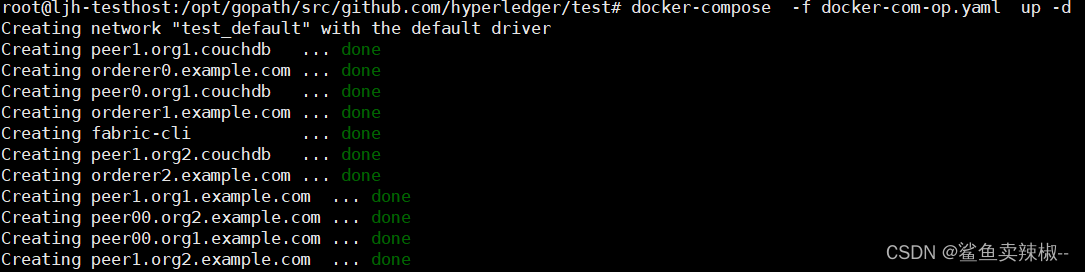
创建通道
进入cli容器:
docker exec -it fabric-cli bash
export APP_CHANNEL=testchannel
export TIMEOUT=30
export CORE_PEER_LOCALMSPID=Org1MSP
export CORE_PEER_MSPCONFIGPATH=/etc/hyperledger/fabric/crypto-config/peerOrganizations/org1.example.com/users/Admin@org1.example.com/msppeer channel create -o orderer0.example.com:7050 -c ${APP_CHANNEL} -f "/tmp/channel-artifacts/$APP_CHANNEL.tx" --timeout "${TIMEOUT}s" --tls --cafile /etc/hyperledger/fabric/crypto-config/ordererOrganizations/example.com/orderers/orderer0.example.com/msp/tlscacerts/tlsca.example.com-cert.pem
创建成功后会在当前路径下生成 testchannel.block 文件。
mv testchannel.block /tmp/channel-artifacts/
加入通道
进入 cli 容器:
docker exec -it fabric-cli bash
org1-peer0加入通道:
export CORE_PEER_TLS_ENABLED=true
export CORE_PEER_LOCALMSPID="Org1MSP"
export CORE_PEER_TLS_ROOTCERT_FILE=/etc/hyperledger/fabric/crypto-config/peerOrganizations/org1.example.com/peers/peer0.org1.example.com/tls/ca.crt
export CORE_PEER_MSPCONFIGPATH=/etc/hyperledger/fabric/crypto-config/peerOrganizations/org1.example.com/users/Admin@org1.example.com/msp
export CORE_PEER_ADDRESS=peer0.org1.example.com:7051peer channel join -b /tmp/channel-artifacts/testchannel.block
加入成功结果如下:
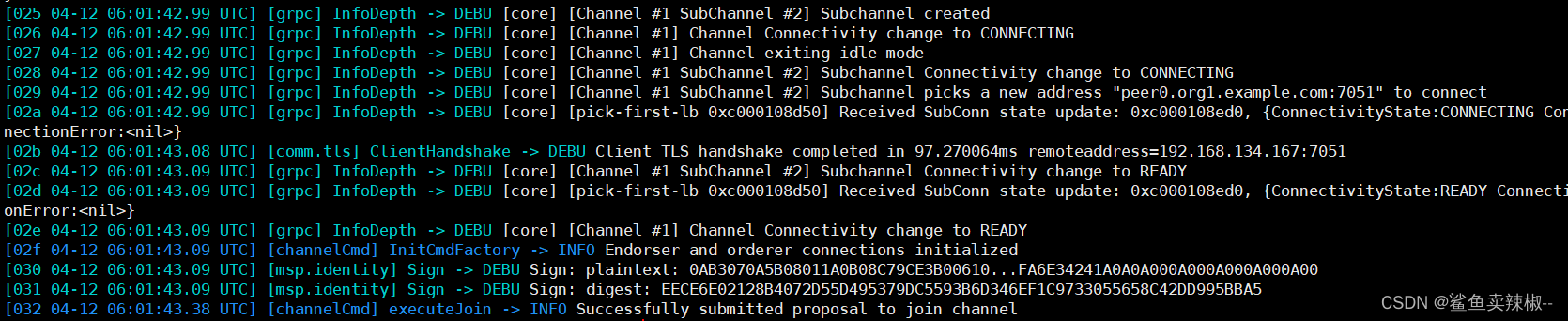
org1-peer1 加入通道:
export CORE_PEER_TLS_ENABLED=true
export CORE_PEER_LOCALMSPID="Org1MSP"
export CORE_PEER_TLS_ROOTCERT_FILE=/etc/hyperledger/fabric/crypto-config/peerOrganizations/org1.example.com/peers/peer1.org1.example.com/tls/ca.crt
export CORE_PEER_MSPCONFIGPATH=/etc/hyperledger/fabric/crypto-config/peerOrganizations/org1.example.com/users/Admin@org1.example.com/msp
export CORE_PEER_ADDRESS=peer1.org1.example.com:8051peer channel join -b /tmp/channel-artifacts/testchannel.block
org2-peer0 加入通道:
export CORE_PEER_TLS_ENABLED=true
export CORE_PEER_LOCALMSPID="Org2MSP"
export CORE_PEER_TLS_ROOTCERT_FILE=/etc/hyperledger/fabric/crypto-config/peerOrganizations/org2.example.com/peers/peer0.org2.example.com/tls/ca.crt
export CORE_PEER_MSPCONFIGPATH=/etc/hyperledger/fabric/crypto-config/peerOrganizations/org2.example.com/users/Admin@org2.example.com/msp
export CORE_PEER_ADDRESS=peer0.org2.example.com:9051peer channel join -b /tmp/channel-artifacts/testchannel.block
org2-peer1 加入通道:
export CORE_PEER_TLS_ENABLED=true
export CORE_PEER_LOCALMSPID="Org2MSP"
export CORE_PEER_TLS_ROOTCERT_FILE=/etc/hyperledger/fabric/crypto-config/peerOrganizations/org2.example.com/peers/peer0.org2.example.com/tls/ca.crt
export CORE_PEER_MSPCONFIGPATH=/etc/hyperledger/fabric/crypto-config/peerOrganizations/org2.example.com/users/Admin@org2.example.com/msp
export CORE_PEER_ADDRESS=peer1.org2.example.com:10051peer channel join -b /tmp/channel-artifacts/testchannel.block
更新锚节点
org1 更新锚节点:
export CORE_PEER_TLS_ENABLED=true
export CORE_PEER_LOCALMSPID="Org1MSP"
export CORE_PEER_TLS_ROOTCERT_FILE=/etc/hyperledger/fabric/crypto-config/peerOrganizations/org1.example.com/peers/peer0.org1.example.com/tls/ca.crt
export CORE_PEER_MSPCONFIGPATH=/etc/hyperledger/fabric/crypto-config/peerOrganizations/org1.example.com/users/Admin@org1.example.com/msp
export CORE_PEER_ADDRESS=peer0.org1.example.com:7051peer channel update -o orderer0.example.com:7050 -c testchannel -f /tmp/channel-artifacts/Org1MSPanchors.tx --tls --cafile /etc/hyperledger/fabric/crypto-config/ordererOrganizations/example.com/orderers/orderer0.example.com/msp/tlscacerts/tlsca.example.com-cert.pem
org2 更新锚节点:
export CORE_PEER_TLS_ENABLED=true
export CORE_PEER_LOCALMSPID="Org2MSP"
export CORE_PEER_TLS_ROOTCERT_FILE=/etc/hyperledger/fabric/crypto-config/peerOrganizations/org2.example.com/peers/peer0.org2.example.com/tls/ca.crt
export CORE_PEER_MSPCONFIGPATH=/etc/hyperledger/fabric/crypto-config/peerOrganizations/org2.example.com/users/Admin@org2.example.com/msp
export CORE_PEER_ADDRESS=peer0.org2.example.com:9051peer channel update -o orderer0.example.com:7050 -c testchannel -f /tmp/channel-artifacts/Org2MSPanchors.tx --tls --cafile /etc/hyperledger/fabric/crypto-config/ordererOrganizations/example.com/orderers/orderer0.example.com/msp/tlscacerts/tlsca.example.com-cert.pem
锚节点配置更新后,同一通道内不同组织之间的 Peer 也可以进行 Gossip 通信,共同维护通道账本。后续,用户可以通过智能合约使用通道账本。
安装链码
在宿主机和 docker cli 容器挂载的 chaincodes 目录下下载合约代码:
git clone https://gitee.com/kernelHP/hyperledger-fabric-contract-java-demo.gitcd hyperledger-fabric-contract-java-demo/
编译打包源码:
mvn compile package -DskipTests -Dmaven.test.skip=true
mv target/chaincode.jar $PWD# 删除编译后产生的 target 目录; src 源代码目录; pom.xml
rm -rf target/ src/ pom.xml
在cli容器中打包链码,进入 cli 容器:
docker exec -it fabric-cli bash
cd /etc/hyperledger/fabric/chaincodes/
打包链码:
peer lifecycle chaincode package hyperledger-fabric-contract-java-demo.tar.gz --path /etc/hyperledger/fabric/chaincodes/hyperledger-fabric-contract-java-demo/ --lang java --label hyperledger-fabric-contract-java-demo_1
在peer节点安装链码
(不是所有的peer节点都需要安装链码,如果这个peer节点作为背书节点就必须安装链码)
cd /etc/hyperledger/fabric/chaincodes/
org1-peer0节点:
export CORE_PEER_TLS_ENABLED=true
export CORE_PEER_LOCALMSPID="Org1MSP"
export CORE_PEER_TLS_ROOTCERT_FILE=/etc/hyperledger/fabric/crypto-config/peerOrganizations/org1.example.com/peers/peer0.org1.example.com/tls/ca.crt
export CORE_PEER_MSPCONFIGPATH=/etc/hyperledger/fabric/crypto-config/peerOrganizations/org1.example.com/users/Admin@org1.example.com/msp
export CORE_PEER_ADDRESS=peer0.org1.example.com:7051peer lifecycle chaincode install hyperledger-fabric-contract-java-demo.tar.gz
org1-peer1节点:
export CORE_PEER_TLS_ENABLED=true
export CORE_PEER_LOCALMSPID="Org1MSP"
export CORE_PEER_TLS_ROOTCERT_FILE=/etc/hyperledger/fabric/crypto-config/peerOrganizations/org1.example.com/peers/peer1.org1.example.com/tls/ca.crt
export CORE_PEER_MSPCONFIGPATH=/etc/hyperledger/fabric/crypto-config/peerOrganizations/org1.example.com/users/Admin@org1.example.com/msp
export CORE_PEER_ADDRESS=peer1.org1.example.com:8051peer lifecycle chaincode install hyperledger-fabric-contract-java-demo.tar.gz
org0-peer2节点:
export CORE_PEER_TLS_ENABLED=true
export CORE_PEER_LOCALMSPID="Org2MSP"
export CORE_PEER_TLS_ROOTCERT_FILE=/etc/hyperledger/fabric/crypto-config/peerOrganizations/org2.example.com/peers/peer0.org2.example.com/tls/ca.crt
export CORE_PEER_MSPCONFIGPATH=/etc/hyperledger/fabric/crypto-config/peerOrganizations/org2.example.com/users/Admin@org2.example.com/msp
export CORE_PEER_ADDRESS=peer0.org2.example.com:9051peer lifecycle chaincode install hyperledger-fabric-contract-java-demo.tar.gz
org1-peer2节点:
export CORE_PEER_TLS_ENABLED=true
export CORE_PEER_LOCALMSPID="Org2MSP"
export CORE_PEER_TLS_ROOTCERT_FILE=/etc/hyperledger/fabric/crypto-config/peerOrganizations/org2.example.com/peers/peer0.org2.example.com/tls/ca.crt
export CORE_PEER_MSPCONFIGPATH=/etc/hyperledger/fabric/crypto-config/peerOrganizations/org2.example.com/users/Admin@org2.example.com/msp
export CORE_PEER_ADDRESS=peer1.org2.example.com:10051peer lifecycle chaincode install hyperledger-fabric-contract-java-demo.tar.gz
查询包 ID:
peer lifecycle chaincode queryinstalled包 ID 是链码标签和链码二进制文件的哈希值的组合。每个 peer 节点将生成相同的包 ID。你应该看到类似于以下内容的输出:
Installed chaincodes on peer:
Package ID: hyperledger-fabric-contract-java-demo_1:3acf47564a122fd5ef7f7a24ff161573be5c325b5c4c0a1ae75fd9b17fa23988, Label: hyperledger-fabric-contract-java-demo_1
将包 ID 保存为环境变量:
export CC_PACKAGE_ID=hyperledger-fabric-contract-java-demo_1:3acf47564a122fd5ef7f7a24ff161573be5c325b5c4c0a1ae75fd9b17fa23988
批准链码
org1批准链码:
export CORE_PEER_TLS_ENABLED=true
export CORE_PEER_LOCALMSPID="Org1MSP"
export CORE_PEER_TLS_ROOTCERT_FILE=/etc/hyperledger/fabric/crypto-config/peerOrganizations/org1.example.com/peers/peer0.org1.example.com/tls/ca.crt
export CORE_PEER_MSPCONFIGPATH=/etc/hyperledger/fabric/crypto-config/peerOrganizations/org1.example.com/users/Admin@org1.example.com/msp
export CORE_PEER_ADDRESS=peer0.org1.example.com:7051peer lifecycle chaincode approveformyorg -o orderer0.example.com:7050 --ordererTLSHostnameOverride orderer0.example.com --channelID testchannel --name hyperledger-fabric-contract-java-demo --version 1.0 --package-id $CC_PACKAGE_ID --sequence 1 --tls --cafile /etc/hyperledger/fabric/crypto-config/ordererOrganizations/example.com/orderers/orderer0.example.com/msp/tlscacerts/tlsca.example.com-cert.pem
org2批准链码:
export CORE_PEER_TLS_ENABLED=true
export CORE_PEER_LOCALMSPID="Org2MSP"
export CORE_PEER_TLS_ROOTCERT_FILE=/etc/hyperledger/fabric/crypto-config/peerOrganizations/org2.example.com/peers/peer0.org2.example.com/tls/ca.crt
export CORE_PEER_MSPCONFIGPATH=/etc/hyperledger/fabric/crypto-config/peerOrganizations/org2.example.com/users/Admin@org2.example.com/msp
export CORE_PEER_ADDRESS=peer0.org2.example.com:9051peer lifecycle chaincode approveformyorg -o orderer0.example.com:7050 --ordererTLSHostnameOverride orderer0.example.com --channelID testchannel --name hyperledger-fabric-contract-java-demo --version 1.0 --package-id $CC_PACKAGE_ID --sequence 1 --tls --cafile /etc/hyperledger/fabric/crypto-config/ordererOrganizations/example.com/orderers/orderer0.example.com/msp/tlscacerts/tlsca.example.com-cert.pem

检查通道成员是否已批准相同的链码定义:
root@fabric-cli:/etc/hyperledger/fabric/chaincodes# peer lifecycle chaincode checkcommitreadiness --channelID testchannel --name hyperledger-fabric-contract-java-demo --version 1.0 --sequence 1 --tls --cafile /etc/hyperledger/fabric/crypto-config/ordererOrganizations/example.com/orderers/orderer0.example.com/msp/tlscacerts/tlsca.example.com-cert.pem --output json

上图表示testchannel通道中Org1和Org2都批准了这个链码。
将链码提交到通道:
peer lifecycle chaincode commit -o orderer0.example.com:7050 --ordererTLSHostnameOverride orderer0.example.com --channelID testchannel --name hyperledger-fabric-contract-java-demo --version 1.0 --sequence 1 --tls --cafile /etc/hyperledger/fabric/crypto-config/ordererOrganizations/example.com/orderers/orderer0.example.com/msp/tlscacerts/tlsca.example.com-cert.pem --peerAddresses peer0.org1.example.com:7051 --tlsRootCertFiles /etc/hyperledger/fabric/crypto-config/peerOrganizations/org1.example.com/peers/peer0.org1.example.com/tls/ca.crt --peerAddresses peer0.org2.example.com:9051 --tlsRootCertFiles /etc/hyperledger/fabric/crypto-config/peerOrganizations/org2.example.com/peers/peer0.org2.example.com/tls/ca.crt
结果如下:

用 peer lifecycle chaincode querycommitted 命令来确认链码定义已提交给通道:
peer lifecycle chaincode querycommitted --channelID testchannel --name hyperledger-fabric-contract-java-demo --cafile /etc/hyperledger/fabric/crypto-config/ordererOrganizations/example.com/orderers/orderer0.example.com/msp/tlscacerts/tlsca.example.com-cert.pem
结果如下:

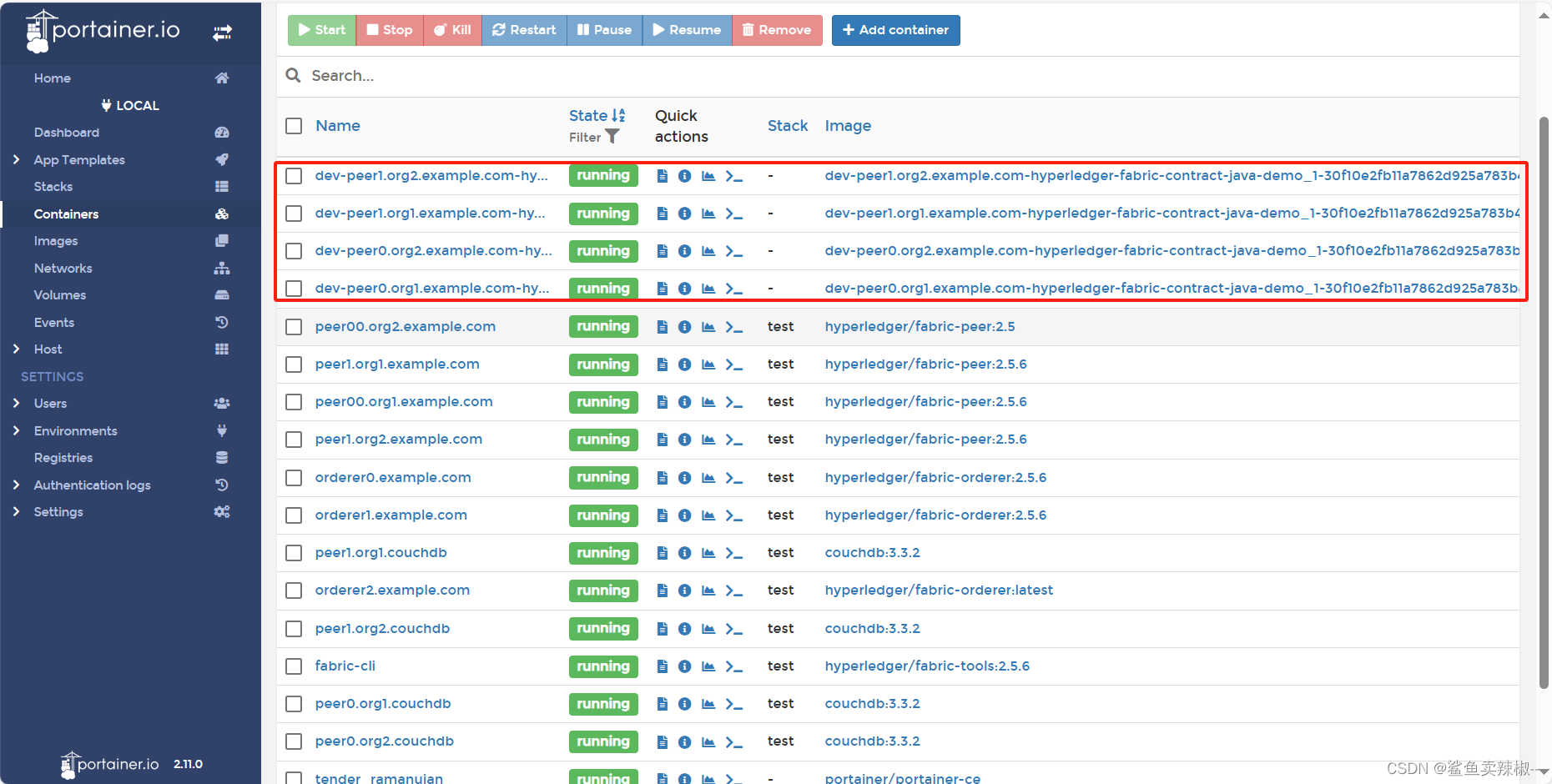
可以看到四个链码容器都已经启动。
调用链码
## 调用 createCat 函数
peer chaincode invoke -o orderer0.example.com:7050 --ordererTLSHostnameOverride orderer0.example.com --tls --cafile /etc/hyperledger/fabric/crypto-config/ordererOrganizations/example.com/orderers/orderer0.example.com/msp/tlscacerts/tlsca.example.com-cert.pem -C testchannel -n hyperledger-fabric-contract-java-demo --peerAddresses peer0.org1.example.com:7051 --tlsRootCertFiles /etc/hyperledger/fabric/crypto-config/peerOrganizations/org1.example.com/peers/peer0.org1.example.com/tls/ca.crt --peerAddresses peer0.org2.example.com:9051 --tlsRootCertFiles /etc/hyperledger/fabric/crypto-config/peerOrganizations/org2.example.com/peers/peer0.org2.example.com/tls/ca.crt -c '{"function":"createCat","Args":["cat-0" , "tom" ,  "3" , "blue" , "bigbluecat"]}# 调用 queryCat 函数peer chaincode query -C testchannel -n hyperledger-fabric-contract-java-demo -c '{"Args":["queryCat" , "cat-0"]}'
查看链码容器日志可以看到链码调用成功。
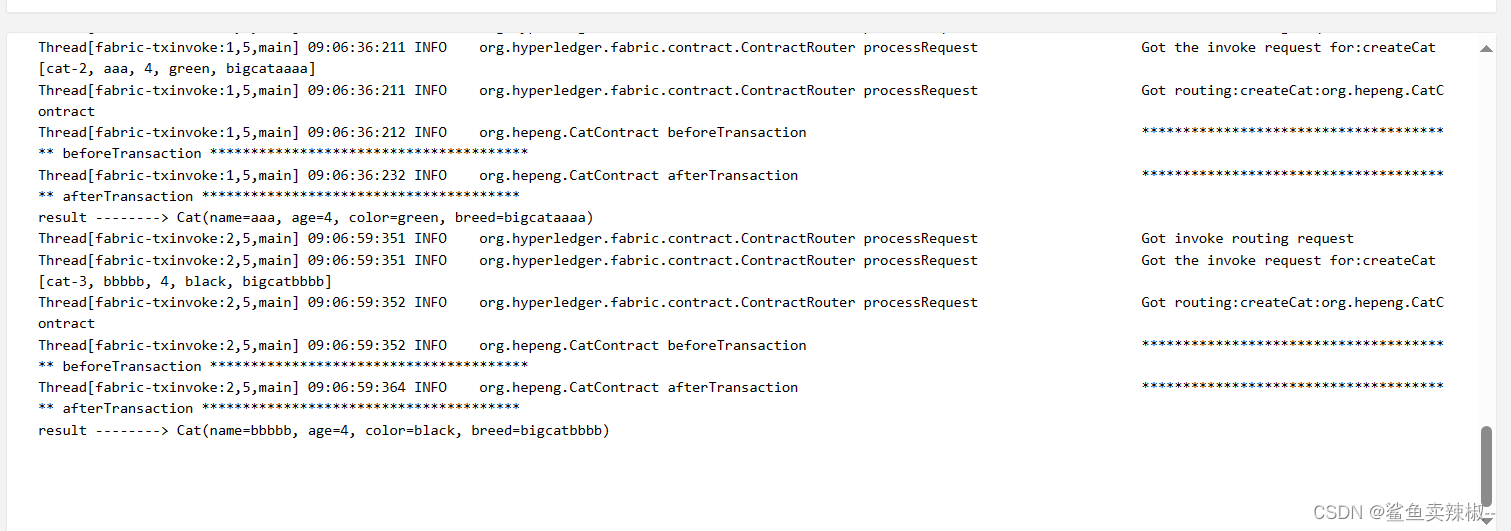
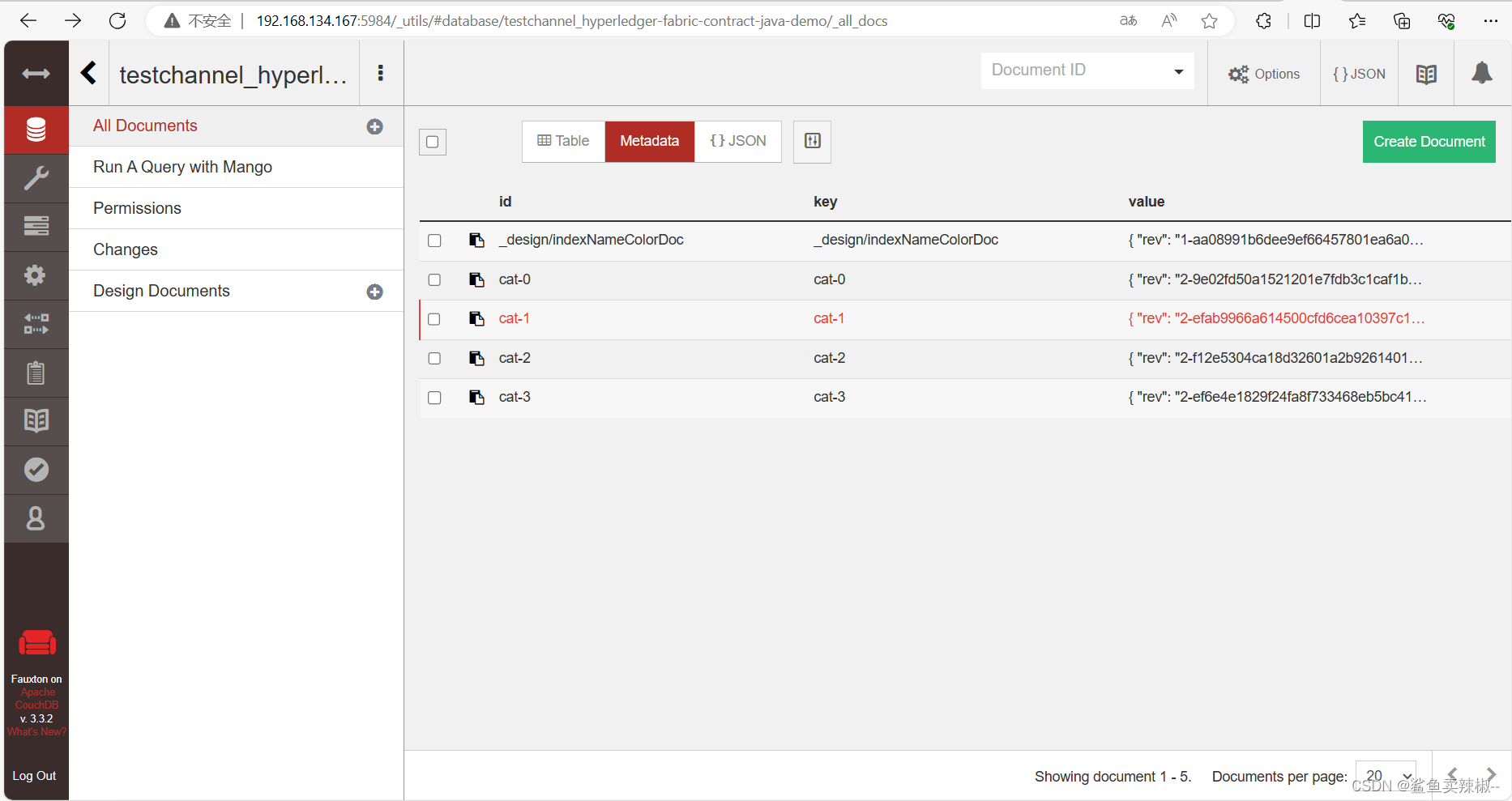
四.部署 Fabric CA
一、编写CA容器启动配置docker-compose-ca.yaml
docker-compose-ca.yaml
version: '2.0'networks:fabric-ca:name: fabric-caservices:ca-tls:container_name: ca-tlsimage: hyperledger/fabric-ca:1.5.9command: sh -c 'fabric-ca-server start -d -b tls-ca-admin:tls-ca-adminpw --port 7052'environment:- FABRIC_CA_SERVER_HOME=/tmp/hyperledger/fabric-ca/crypto- FABRIC_CA_SERVER_TLS_ENABLED=true- FABRIC_CA_SERVER_CSR_CN=ca-tls- FABRIC_CA_SERVER_CSR_HOSTS=0.0.0.0- FABRIC_CA_SERVER_DEBUG=true- FABRIC_CA_SERVER_DB_TYPE=mysql- FABRIC_CA_SERVER_DB_DATASOURCE=root:224216@tcp(192.168.3.37:3306)/fabric_ca_tls?parseTime=truevolumes:- /tmp/hyperledger/tls-ca:/tmp/hyperledger/fabric-canetworks:- fabric-caports:- 7052:7052rca-org0:container_name: rca-org0image: hyperledger/fabric-ca:1.5.9command: /bin/bash -c 'fabric-ca-server start -d -b rca-org0-admin:rca-org0-adminpw --port 7053'environment:- FABRIC_CA_SERVER_HOME=/tmp/hyperledger/fabric-ca/crypto- FABRIC_CA_SERVER_TLS_ENABLED=true- FABRIC_CA_SERVER_CSR_CN=rca-org0- FABRIC_CA_SERVER_CSR_HOSTS=0.0.0.0- FABRIC_CA_SERVER_DEBUG=true- FABRIC_CA_SERVER_DB_TYPE=mysql- FABRIC_CA_SERVER_DB_DATASOURCE=root:224216@tcp(192.168.3.37:3306)/fabric_rca_org0?parseTime=truevolumes:- /tmp/hyperledger/org0/ca:/tmp/hyperledger/fabric-canetworks:- fabric-caports:- 7053:7053rca-org1:container_name: rca-org1image: hyperledger/fabric-ca:1.5.9command: /bin/bash -c 'fabric-ca-server start -d -b rca-org1-admin:rca-org1-adminpw'environment:- FABRIC_CA_SERVER_HOME=/tmp/hyperledger/fabric-ca/crypto- FABRIC_CA_SERVER_TLS_ENABLED=true- FABRIC_CA_SERVER_CSR_CN=rca-org1- FABRIC_CA_SERVER_CSR_HOSTS=0.0.0.0- FABRIC_CA_SERVER_DEBUG=true- FABRIC_CA_SERVER_DB_TYPE=mysql- FABRIC_CA_SERVER_DB_DATASOURCE=root:224216@tcp(192.168.3.37:3306)/fabric_rca_org1?parseTime=truevolumes:- /tmp/hyperledger/org1/ca:/tmp/hyperledger/fabric-canetworks:- fabric-caports:- 7054:7054rca-org2:container_name: rca-org2image: hyperledger/fabric-ca:1.5.9command: /bin/bash -c 'fabric-ca-server start -d -b rca-org2-admin:rca-org2-adminpw --port 7055'environment:- FABRIC_CA_SERVER_HOME=/tmp/hyperledger/fabric-ca/crypto- FABRIC_CA_SERVER_TLS_ENABLED=true- FABRIC_CA_SERVER_CSR_CN=rca-org2- FABRIC_CA_SERVER_CSR_HOSTS=0.0.0.0- FABRIC_CA_SERVER_DEBUG=true- FABRIC_CA_SERVER_DB_TYPE=mysql- FABRIC_CA_SERVER_DB_DATASOURCE=root:224216@tcp(192.168.3.37:3306)/fabric_rca_org2?parseTime=truevolumes:- /tmp/hyperledger/org2/ca:/tmp/hyperledger/fabric-canetworks:- fabric-caports:- 7055:7055
需要在数据库上创建相应的库。
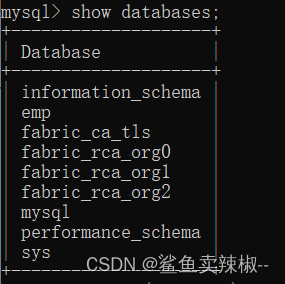
启动:
docker-compose -f docker-compose-ca.yaml up -d
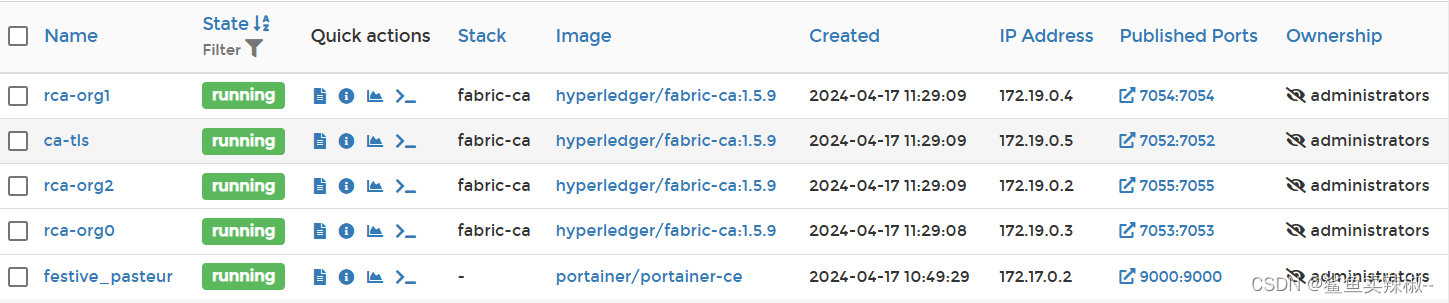
工作目录结构:
ls /tmp/hyperledger
.
├── fabric-ca-client
├── org0
├── org1
├── org2
└── tls-ca
需要有fabric-ca-client二进制文件。
二、在CA上注册成员并颁发证书
注册 TLS CA 管理员,注册节点身份
到/tmp/hyperledger目录下
cd /tmp/hyperledger
export FABRIC_CA_CLIENT_TLS_CERTFILES=/tmp/hyperledger/tls-ca/crypto/tls-ca-cert.pem
export FABRIC_CA_CLIENT_HOME=/tmp/hyperledger/tls-ca/admincp tls-ca/crypto/ca-cert.pem tls-ca/crypto/tls-ca-cert.pem./fabric-ca-client enroll -d -u https://tls-ca-admin:tls-ca-adminpw@0.0.0.0:7052
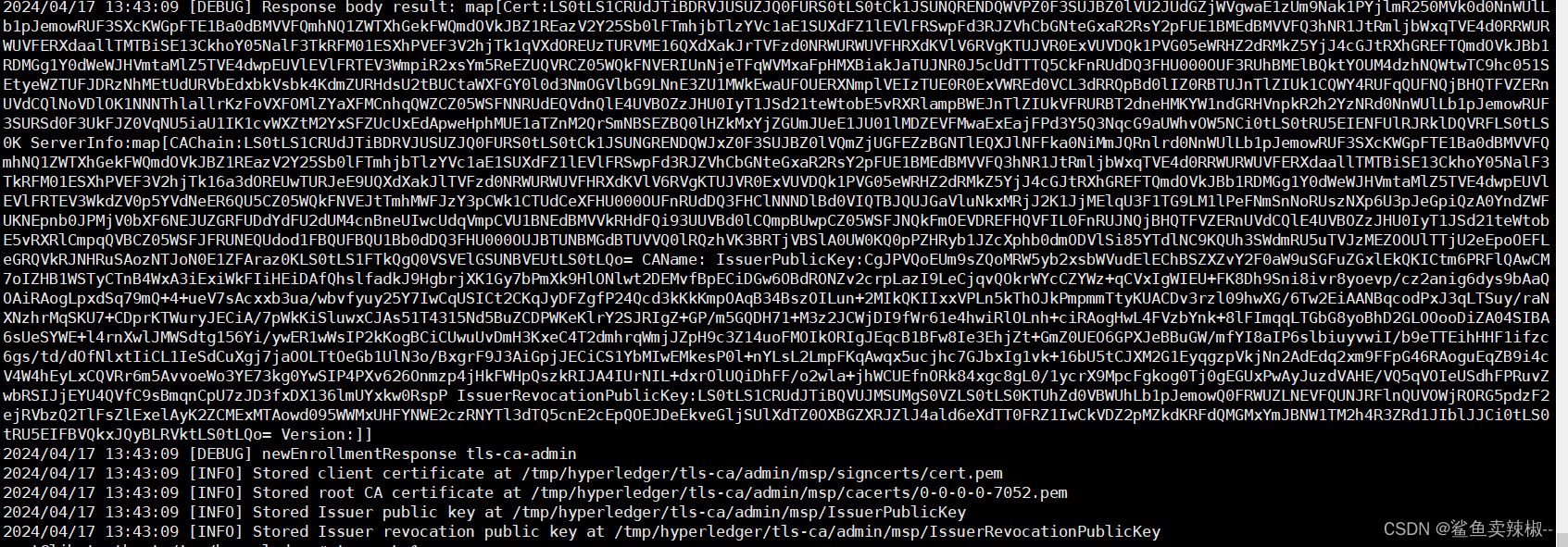
将节点注册到tlsCA上
1.将org1的两个peer节点注册到tlsCA上:
./fabric-ca-client register -d --id.name peer0.org1.example.com --id.secret peer1PW --id.type peer -u https://0.0.0.0:7052
./fabric-ca-client register -d --id.name peer1.org1.example.com --id.secret peer2PW --id.type peer -u https://0.0.0.0:7052
2.将org2的两个peer节点注册到tlsCA上:
./fabric-ca-client register -d --id.name peer0.org2.example.com --id.secret peer1PW --id.type peer -u https://0.0.0.0:7052
./fabric-ca-client register -d --id.name peer1.org2.example.com --id.secret peer2PW --id.type peer -u https://0.0.0.0:7052
3.注册 3 个 orderer 节点:
./fabric-ca-client register -d --id.name orderer0.example.com --id.secret ordererPW --id.type orderer -u https://0.0.0.0:7052./fabric-ca-client register -d --id.name orderer1.example.com --id.secret ordererPW --id.type orderer -u https://0.0.0.0:7052./fabric-ca-client register -d --id.name orderer2.example.com --id.secret ordererPW --id.type orderer -u https://0.0.0.0:7052
节点注册成功后数据库会生成数据
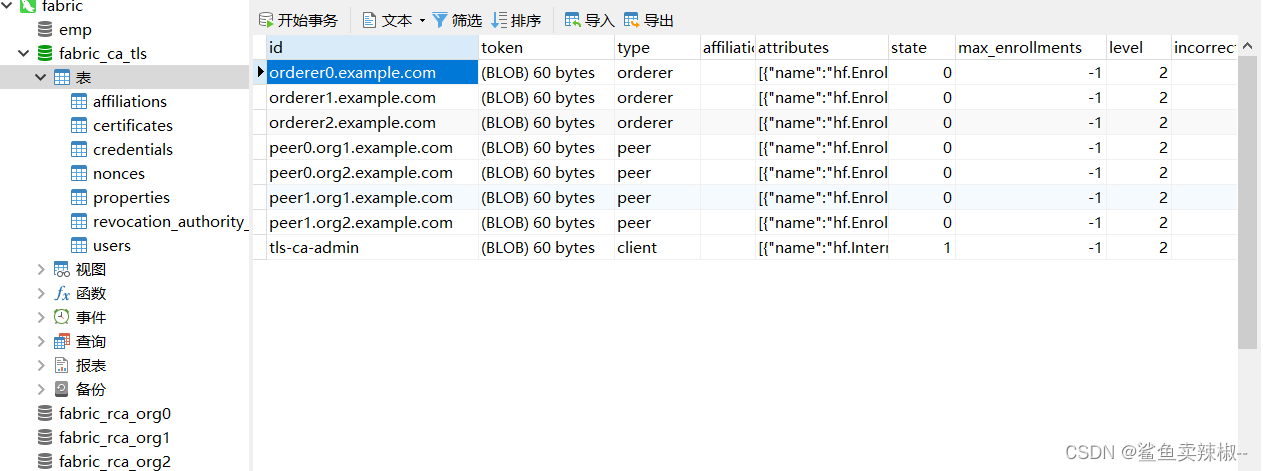
注册orderer节点和org0的管理员
1.register orderer1 节点 & org0 管理员
export FABRIC_CA_CLIENT_TLS_CERTFILES=/tmp/hyperledger/org0/ca/crypto/ca-cert.pem
export FABRIC_CA_CLIENT_HOME=/tmp/hyperledger/org0/ca/admin./fabric-ca-client enroll -d -u https://rca-org0-admin:rca-org0-adminpw@0.0.0.0:7053./fabric-ca-client register -d --id.name orderer0.example.com --id.secret ordererpw --id.type orderer -u https://0.0.0.0:7053./fabric-ca-client register -d --id.name admin-org0 --id.secret org0adminpw --id.type admin --id.attrs "hf.Registrar.Roles=*,hf.Registrar.DelegateRoles=*,hf.AffiliationMgr=true,hf.Registrar.Attributes=*,hf.Revoker=true,hf.GenCRL=true,admin=true:ecert" -u https://0.0.0.0:7053
2.register orderer2 节点
./fabric-ca-client register -d --id.name orderer1.example.com --id.secret ordererpw --id.type orderer -u https://0.0.0.0:7053
3.register orderer3 节点
./fabric-ca-client register -d --id.name orderer2.example.com --id.secret ordererpw --id.type orderer -u https://0.0.0.0:7053
结果如下:
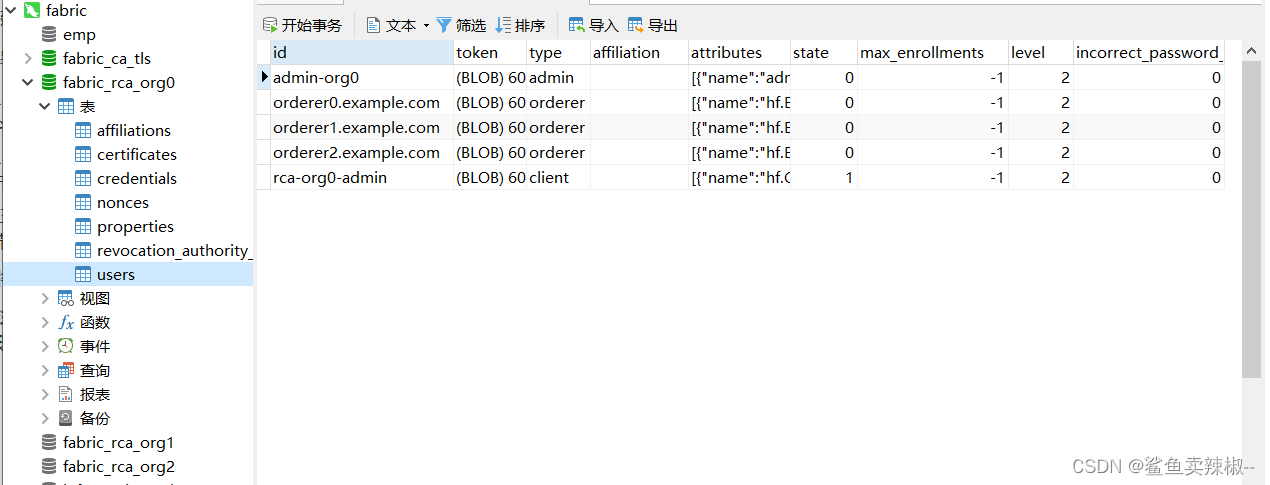
注册org1的peer节点和登记org1的管理员
export FABRIC_CA_CLIENT_TLS_CERTFILES=/tmp/hyperledger/org1/ca/crypto/ca-cert.pem
export FABRIC_CA_CLIENT_HOME=/tmp/hyperledger/org1/ca/admin./fabric-ca-client enroll -d -u https://rca-org1-admin:rca-org1-adminpw@0.0.0.0:7054./fabric-ca-client register -d --id.name peer0.org1.example.com --id.secret peer1PW --id.type peer -u https://0.0.0.0:7054./fabric-ca-client register -d --id.name peer1.org1.example.com --id.secret peer2PW --id.type peer -u https://0.0.0.0:7054./fabric-ca-client register -d --id.name admin-org1 --id.secret org1AdminPW --id.type admin --id.attrs "hf.Registrar.Roles=*,hf.Registrar.DelegateRoles=*,hf.AffiliationMgr=true,hf.Registrar.Attributes=*,hf.Revoker=true,hf.GenCRL=true,admin=true:ecert" -u https://0.0.0.0:7054./fabric-ca-client register -d --id.name user-org1 --id.secret org1UserPW --id.type user -u https://0.0.0.0:7054
注册org2的peer节点和登记org2的管理员
export FABRIC_CA_CLIENT_TLS_CERTFILES=/tmp/hyperledger/org2/ca/crypto/ca-cert.pem
export FABRIC_CA_CLIENT_HOME=/tmp/hyperledger/org2/ca/admin./fabric-ca-client enroll -d -u https://rca-org2-admin:rca-org2-adminpw@0.0.0.0:7055./fabric-ca-client register -d --id.name peer0.org2.example.com --id.secret peer1PW --id.type peer -u https://0.0.0.0:7055./fabric-ca-client register -d --id.name peer1.org2.example.com --id.secret peer2PW --id.type peer -u https://0.0.0.0:7055./fabric-ca-client register -d --id.name admin-org2 --id.secret org2AdminPW --id.type admin --id.attrs "hf.Registrar.Roles=*,hf.Registrar.DelegateRoles=*,hf.AffiliationMgr=true,hf.Registrar.Attributes=*,hf.Revoker=true,hf.GenCRL=true,admin=true:ecert" -u https://0.0.0.0:7055./fabric-ca-client register -d --id.name user-org2 --id.secret org2UserPW --id.type user -u https://0.0.0.0:7055
Enroll Org1’s Peers
Enroll Peer1
enroll Org1 Peer1 ECert 证书
mkdir -p org1/peer1/assets/ca/ && cp org1/ca/crypto/ca-cert.pem org1/peer1/assets/ca/org1-ca-cert.pemexport FABRIC_CA_CLIENT_HOME=/tmp/hyperledger/org1/peer1
export FABRIC_CA_CLIENT_TLS_CERTFILES=/tmp/hyperledger/org1/peer1/assets/ca/org1-ca-cert.pem
export FABRIC_CA_CLIENT_MSPDIR=msp./fabric-ca-client enroll -d -u https://peer0.org1.example.com:peer1PW@0.0.0.0:7054# 更改私钥文件名称
mv org1/peer1/msp/keystore/2432163c466914126ceb45252b6d6cdcc5768c043f35b1e4d7614f0fba12736f_sk org1/peer1/msp/keystore/priv_skmkdir -p org1/peer1/msp/admincerts/
Enroll Org1 Peer1 TLS 证书
mkdir -p org1/peer1/assets/tls-ca/ && cp tls-ca/crypto/tls-ca-cert.pem org1/peer1/assets/tls-ca/tls-ca-cert.pemexport FABRIC_CA_CLIENT_HOME=/tmp/hyperledger/org1/peer1
export FABRIC_CA_CLIENT_MSPDIR=tls-msp
export FABRIC_CA_CLIENT_TLS_CERTFILES=/tmp/hyperledger/org1/peer1/assets/tls-ca/tls-ca-cert.pem./fabric-ca-client enroll -d -u https://peer0.org1.example.com:peer1PW@0.0.0.0:7052 --enrollment.profile tls --csr.hosts peer0.org1.example.com# 将 keystore 路径下的文件改名为 key.pem
mv org1/peer1/tls-msp/keystore/8d44368728e2be0dfc1b6c883e88d548cfbf1c1538f65682ebc3df4b11b2b61c_sk org1/peer1/tls-msp/keystore/key.pem
Enroll Peer2
Enroll Org1 Peer2 ECert 证书
mkdir -p org1/peer2/assets/ca/ && cp org1/ca/crypto/ca-cert.pem org1/peer2/assets/ca/org1-ca-cert.pemexport FABRIC_CA_CLIENT_HOME=/tmp/hyperledger/org1/peer2
export FABRIC_CA_CLIENT_TLS_CERTFILES=/tmp/hyperledger/org1/peer2/assets/ca/org1-ca-cert.pem
export FABRIC_CA_CLIENT_MSPDIR=msp./fabric-ca-client enroll -d -u https://peer1.org1.example.com:peer2PW@0.0.0.0:7054# 修改私钥文件名称
mv org1/peer2/msp/keystore/3549be7da2d926fad2475545502ebff7daaa545e240cbaf558f94900a9897e70_sk org1/peer2/msp/keystore/priv_skmkdir -p org1/peer2/msp/admincerts/
Enroll Org1 Peer2 TLS 证书
mkdir -p org1/peer2/assets/tls-ca/ && cp tls-ca/crypto/tls-ca-cert.pem org1/peer2/assets/tls-ca/tls-ca-cert.pemexport FABRIC_CA_CLIENT_HOME=/tmp/hyperledger/org1/peer2
export FABRIC_CA_CLIENT_MSPDIR=tls-msp
export FABRIC_CA_CLIENT_TLS_CERTFILES=/tmp/hyperledger/org1/peer2/assets/tls-ca/tls-ca-cert.pem./fabric-ca-client enroll -d -u https://peer1.org1.example.com:peer2PW@0.0.0.0:7052 --enrollment.profile tls --csr.hosts peer1.org1.example.com# 将 keystore 路径下的文件改名为 key.pem
mv org1/peer2/tls-msp/keystore/dc27baa8559aac2133dc34626d36b7fe6d63835fe82b2858e489f8a2f8db358f_sk org1/peer2/tls-msp/keystore/key.pem
Enroll Org1’s Admin
export FABRIC_CA_CLIENT_HOME=/tmp/hyperledger/org1/admin
export FABRIC_CA_CLIENT_TLS_CERTFILES=/tmp/hyperledger/org1/peer1/assets/ca/org1-ca-cert.pem
export FABRIC_CA_CLIENT_MSPDIR=msp./fabric-ca-client enroll -d -u https://admin-org1:org1AdminPW@0.0.0.0:7054mv /tmp/hyperledger/org1/admin/msp/keystore/8efa890a38c1e38ca4605ecfcdb997f84e1c913c7abe731dc9e1a8e6e3934933_sk /tmp/hyperledger/org1/admin/msp/keystore/priv_skcp /tmp/hyperledger/org1/admin/msp/signcerts/cert.pem /tmp/hyperledger/org1/peer1/msp/admincerts/org1-admin-cert.pemcp /tmp/hyperledger/org1/admin/msp/signcerts/cert.pem /tmp/hyperledger/org1/peer2/msp/admincerts/org1-admin-cert.pem
Enroll Org2’s Peers
Enroll Org2 Peer1
Enroll Org2 Peer1 ECert 证书
mkdir -p org2/peer1/assets/ca/ && cp org2/ca/crypto/ca-cert.pem org2/peer1/assets/ca/org2-ca-cert.pemexport FABRIC_CA_CLIENT_HOME=/tmp/hyperledger/org2/peer1
export FABRIC_CA_CLIENT_TLS_CERTFILES=/tmp/hyperledger/org2/peer1/assets/ca/org2-ca-cert.pem
export FABRIC_CA_CLIENT_MSPDIR=msp./fabric-ca-client enroll -d -u https://peer0.org2.example.com:peer1PW@0.0.0.0:7055# 修改私钥文件名称
mv org2/peer1/msp/keystore/bb058d805f66c8ee729afd10129df168e11cd8ed31cfd10c7ce02187db82166c_sk org2/peer1/msp/keystore/priv_sk
Enroll Org2 Peer1 TLS 证书
mkdir org2/peer1/assets/tls-ca/ && cp tls-ca/crypto/tls-ca-cert.pem org2/peer1/assets/tls-ca/tls-ca-cert.pemexport FABRIC_CA_CLIENT_HOME=/tmp/hyperledger/org2/peer1
export FABRIC_CA_CLIENT_MSPDIR=tls-msp
export FABRIC_CA_CLIENT_TLS_CERTFILES=/tmp/hyperledger/org2/peer1/assets/tls-ca/tls-ca-cert.pem./fabric-ca-client enroll -d -u https://peer0.org2.example.com:peer1PW@0.0.0.0:7052 --enrollment.profile tls --csr.hosts peer0.org2.example.com# 修改私钥文件名称
mv org2/peer1/tls-msp/keystore/eb795b5dbf2f6436f46469c2a2e8f5598e9335b5bc4cfbb280ee1b6867a90345_sk org2/peer1/tls-msp/keystore/key.pem
Enroll Org2 Peer2
Enroll Org2 Peer2 ECert 证书
mkdir -p org2/peer2/assets/ca/ && cp org2/ca/crypto/ca-cert.pem org2/peer2/assets/ca/org2-ca-cert.pemexport FABRIC_CA_CLIENT_HOME=/tmp/hyperledger/org2/peer2
export FABRIC_CA_CLIENT_TLS_CERTFILES=/tmp/hyperledger/org2/peer2/assets/ca/org2-ca-cert.pem
export FABRIC_CA_CLIENT_MSPDIR=msp./fabric-ca-client enroll -d -u https://peer1.org2.example.com:peer2PW@0.0.0.0:7055# 修改私钥文件名称
mv org2/peer2/msp/keystore/84a97f4e907eb88ffa81d3d570a8606e74256bcfb8859a1bec724b367c49880b_sk org2/peer2/msp/keystore/priv_sk
Enroll Org2 Peer2 TLS 证书
mkdir -p org2/peer2/assets/tls-ca/ && cp tls-ca/crypto/tls-ca-cert.pem org2/peer2/assets/tls-ca/tls-ca-cert.pemexport FABRIC_CA_CLIENT_HOME=/tmp/hyperledger/org2/peer2
export FABRIC_CA_CLIENT_MSPDIR=tls-msp
export FABRIC_CA_CLIENT_TLS_CERTFILES=/tmp/hyperledger/org2/peer2/assets/tls-ca/tls-ca-cert.pem./fabric-ca-client enroll -d -u https://peer1.org2.example.com:peer2PW@0.0.0.0:7052 --enrollment.profile tls --csr.hosts peer1.org2.example.com# 修改私钥文件名称
mv org2/peer2/tls-msp/keystore/010801fcb24fcf258f906fe1090e2b3b22e79cac16bf6ba14dee63e86203a24f_sk org2/peer2/tls-msp/keystore/key.pem
Enroll Org2’s Admin
mkdir -p org2/peer1/msp/admincerts
mkdir -p org2/peer2/msp/admincertsexport FABRIC_CA_CLIENT_HOME=/tmp/hyperledger/org2/admin
export FABRIC_CA_CLIENT_TLS_CERTFILES=/tmp/hyperledger/org2/peer1/assets/ca/org2-ca-cert.pem
export FABRIC_CA_CLIENT_MSPDIR=msp./fabric-ca-client enroll -d -u https://admin-org2:org2AdminPW@0.0.0.0:7055cp org2/admin/msp/signcerts/cert.pem org2/peer1/msp/admincerts/org2-admin-cert.pemcp org2/admin/msp/signcerts/cert.pem org2/peer2/msp/admincerts/org2-admin-cert.pem
Enroll Orderer
Enroll Orderer1
Enroll Orderer1 ECert 证书
mkdir -p org0/orderer1/assets/ca/ && cp org0/ca/crypto/ca-cert.pem org0/orderer1/assets/ca/org0-ca-cert.pemexport FABRIC_CA_CLIENT_HOME=/tmp/hyperledger/org0/orderer1
export FABRIC_CA_CLIENT_MSPDIR=msp
export FABRIC_CA_CLIENT_TLS_CERTFILES=/tmp/hyperledger/org0/orderer1/assets/ca/org0-ca-cert.pem./fabric-ca-client enroll -d -u https://orderer0.example.com:ordererpw@0.0.0.0:7053mv org0/orderer1/msp/keystore/308fb646f0ad42341a05c918b409617b620827560d2f2383ca24a6e3982cb197_sk org0/orderer1/msp/keystore/priv_sk
Enroll Orderer1 TLS 证书
mkdir -p org0/orderer1/assets/tls-ca/ && cp tls-ca/crypto/tls-ca-cert.pem org0/orderer1/assets/tls-ca/tls-ca-cert.pemexport FABRIC_CA_CLIENT_HOME=/tmp/hyperledger/org0/orderer1
export FABRIC_CA_CLIENT_MSPDIR=tls-msp
export FABRIC_CA_CLIENT_TLS_CERTFILES=/tmp/hyperledger/org0/orderer1/assets/tls-ca/tls-ca-cert.pem./fabric-ca-client enroll -d -u https://orderer0.example.com:ordererPW@0.0.0.0:7052 --enrollment.profile tls --csr.hosts 'orderer0.example.com,orderer0,192.169.0.105'mv org0/orderer1/tls-msp/keystore/c2cce90a7f26f197e457e5111d6728d6c3d463988b9be7cd056852f00b3ea400_sk org0/orderer1/tls-msp/keystore/key.pem
Enroll Orderer2
Enroll Orderer2 ECert 证书
mkdir -p org0/orderer2/assets/ca/ && cp org0/ca/crypto/ca-cert.pem org0/orderer2/assets/ca/org0-ca-cert.pemexport FABRIC_CA_CLIENT_MSPDIR=msp
export FABRIC_CA_CLIENT_HOME=/tmp/hyperledger/org0/orderer2
export FABRIC_CA_CLIENT_TLS_CERTFILES=/tmp/hyperledger/org0/orderer2/assets/ca/org0-ca-cert.pem./fabric-ca-client enroll -d -u https://orderer1.example.com:ordererpw@0.0.0.0:7053mv org0/orderer2/msp/keystore/831a45f3df3d6c9c474b3dfffa526a05785e8bac3676334ef680f84f68a17ee2_sk org0/orderer2/msp/keystore/priv_sk
Enroll Orderer2 TLS 证书
mkdir -p org0/orderer2/assets/tls-ca/ && cp tls-ca/crypto/tls-ca-cert.pem org0/orderer2/assets/tls-ca/tls-ca-cert.pemexport FABRIC_CA_CLIENT_HOME=/tmp/hyperledger/org0/orderer2
export FABRIC_CA_CLIENT_MSPDIR=tls-msp
export FABRIC_CA_CLIENT_TLS_CERTFILES=/tmp/hyperledger/org0/orderer2/assets/tls-ca/tls-ca-cert.pem./fabric-ca-client enroll -d -u https://orderer1.example.com:ordererPW@0.0.0.0:7052 --enrollment.profile tls --csr.hosts 'orderer1.example.com,orderer1,192.168.0.105'mv org0/orderer2/tls-msp/keystore/ceadf80a731d7a88db54af9a7a15152bf75359a840d518f74768ae1c814082b0_sk org0/orderer2/tls-msp/keystore/key.pem
Enroll Orderer3
Enroll Orderer3 ECert 证书
mkdir -p org0/orderer3/assets/ca/ && cp org0/ca/crypto/ca-cert.pem org0/orderer3/assets/ca/org0-ca-cert.pemexport FABRIC_CA_CLIENT_MSPDIR=msp
export FABRIC_CA_CLIENT_HOME=/tmp/hyperledger/org0/orderer3
export FABRIC_CA_CLIENT_TLS_CERTFILES=/tmp/hyperledger/org0/orderer3/assets/ca/org0-ca-cert.pem./fabric-ca-client enroll -d -u https://orderer2.example.com:ordererpw@0.0.0.0:7053mv org0/orderer3/msp/keystore/ca8de010ce09bb6da6f5604e913f975c1cfa80281d3a89040dfd320c8c756ba0_sk org0/orderer3/msp/keystore/priv_sk
Enroll Orderer3 TLS 证书
mkdir -p org0/orderer3/assets/tls-ca/ && cp tls-ca/crypto/tls-ca-cert.pem org0/orderer3/assets/tls-ca/tls-ca-cert.pemexport FABRIC_CA_CLIENT_HOME=/tmp/hyperledger/org0/orderer3
export FABRIC_CA_CLIENT_MSPDIR=tls-msp
export FABRIC_CA_CLIENT_TLS_CERTFILES=/tmp/hyperledger/org0/orderer3/assets/tls-ca/tls-ca-cert.pem./fabric-ca-client enroll -d -u https://orderer2.example.com:ordererPW@0.0.0.0:7052 --enrollment.profile tls --csr.hosts 'orderer2.example.com,orderer2,192.168.0.105'mv org0/orderer3/tls-msp/keystore/889f112d9bc39d73e6ac7dc5ac6d4e340bdf690859a75b2d813a60546cddbf45_sk org0/orderer3/tls-msp/keystore/key.pem
Enroll Org0’s Admin
export FABRIC_CA_CLIENT_HOME=/tmp/hyperledger/org0/admin
export FABRIC_CA_CLIENT_TLS_CERTFILES=/tmp/hyperledger/org0/ca/crypto/ca-cert.pem
export FABRIC_CA_CLIENT_MSPDIR=msp./fabric-ca-client enroll -d -u https://admin-org0:org0adminpw@0.0.0.0:7053mv /tmp/hyperledger/org0/admin/msp/keystore/58611ce1d5edfc0c73067400aedc0ff7abcb663f674b23a337c529dfd9afe331_sk /tmp/hyperledger/org0/admin/msp/keystore/priv_skmkdir /tmp/hyperledger/org0/orderer1/msp/admincerts && cp /tmp/hyperledger/org0/admin/msp/signcerts/cert.pem /tmp/hyperledger/org0/orderer1/msp/admincerts/orderer-admin-cert.pemmkdir /tmp/hyperledger/org0/orderer2/msp/admincerts && cp /tmp/hyperledger/org0/admin/msp/signcerts/cert.pem /tmp/hyperledger/org0/orderer2/msp/admincerts/orderer-admin-cert.pemmkdir /tmp/hyperledger/org0/orderer3/msp/admincerts && cp /tmp/hyperledger/org0/admin/msp/signcerts/cert.pem /tmp/hyperledger/org0/orderer3/msp/admincerts/orderer-admin-cert.pem
构建 Orderer 本地 MSP 结构
Orderer 1 Local MSP
mkdir -p crypto-config/ordererOrganizations/example.com/orderers/orderer0.example.com/mspmkdir -p crypto-config/ordererOrganizations/example.com/orderers/orderer0.example.com/tls# TLS 私钥
cp org0/orderer1/tls-msp/keystore/key.pem crypto-config/ordererOrganizations/example.com/orderers/orderer0.example.com/tls/server.key# TLS 签名证书
cp org0/orderer1/tls-msp/signcerts/cert.pem crypto-config/ordererOrganizations/example.com/orderers/orderer0.example.com/tls/server.crt# TLS 根证书
cp org0/orderer1/tls-msp/tlscacerts/tls-0-0-0-0-7052.pem crypto-config/ordererOrganizations/example.com/orderers/orderer0.example.com/tls/ca.crtcp -r org0/orderer1/msp/ crypto-config/ordererOrganizations/example.com/orderers/orderer0.example.com/mv crypto-config/ordererOrganizations/example.com/orderers/orderer0.example.com/msp/cacerts/0-0-0-0-7053.pem crypto-config/ordererOrganizations/example.com/orderers/orderer0.example.com/msp/cacerts/ca.example.com-cert.pemmkdir -p crypto-config/ordererOrganizations/example.com/orderers/orderer0.example.com/msp/tlscacerts && cp org0/orderer1/tls-msp/tlscacerts/tls-0-0-0-0-7052.pem crypto-config/ordererOrganizations/example.com/orderers/orderer0.example.com/msp/tlscacerts/tlsca.example.com-cert.pem# 编写 config.yaml 文件
vim crypto-config/ordererOrganizations/example.com/orderers/orderer0.example.com/msp/config.yamlNodeOUs:Enable: trueClientOUIdentifier:Certificate: cacerts/ca.example.com-cert.pemOrganizationalUnitIdentifier: clientPeerOUIdentifier:Certificate: cacerts/ca.example.com-cert.pemOrganizationalUnitIdentifier: peerAdminOUIdentifier:Certificate: cacerts/ca.example.com-cert.pemOrganizationalUnitIdentifier: adminOrdererOUIdentifier:Certificate: cacerts/ca.example.com-cert.pemOrganizationalUnitIdentifier: orderer
Orderer 2 Local MSP
mkdir -p crypto-config/ordererOrganizations/example.com/orderers/orderer1.example.com/mspmkdir -p crypto-config/ordererOrganizations/example.com/orderers/orderer1.example.com/tls# TLS 私钥
cp org0/orderer2/tls-msp/keystore/key.pem crypto-config/ordererOrganizations/example.com/orderers/orderer1.example.com/tls/server.key# TLS 签名证书
cp org0/orderer2/tls-msp/signcerts/cert.pem crypto-config/ordererOrganizations/example.com/orderers/orderer1.example.com/tls/server.crt# TLS 根证书
cp org0/orderer2/tls-msp/tlscacerts/tls-0-0-0-0-7052.pem crypto-config/ordererOrganizations/example.com/orderers/orderer1.example.com/tls/ca.crt# MSP
cp -r org0/orderer2/msp/ crypto-config/ordererOrganizations/example.com/orderers/orderer1.example.com/mv crypto-config/ordererOrganizations/example.com/orderers/orderer1.example.com/msp/cacerts/0-0-0-0-7053.pem crypto-config/ordererOrganizations/example.com/orderers/orderer1.example.com/msp/cacerts/ca.example.com-cert.pemmkdir -p crypto-config/ordererOrganizations/example.com/orderers/orderer1.example.com/msp/tlscacerts && cp org0/orderer2/tls-msp/tlscacerts/tls-0-0-0-0-7052.pem crypto-config/ordererOrganizations/example.com/orderers/orderer1.example.com/msp/tlscacerts/tlsca.example.com-cert.pem# 编写 config.yaml 文件
vim crypto-config/ordererOrganizations/example.com/orderers/orderer1.example.com/msp/config.yamlNodeOUs:Enable: trueClientOUIdentifier:Certificate: cacerts/ca.example.com-cert.pemOrganizationalUnitIdentifier: clientPeerOUIdentifier:Certificate: cacerts/ca.example.com-cert.pemOrganizationalUnitIdentifier: peerAdminOUIdentifier:Certificate: cacerts/ca.example.com-cert.pemOrganizationalUnitIdentifier: adminOrdererOUIdentifier:Certificate: cacerts/ca.example.com-cert.pemOrganizationalUnitIdentifier: orderer
Orderer 3 Local MSP
mkdir -p crypto-config/ordererOrganizations/example.com/orderers/orderer2.example.com/mspmkdir -p crypto-config/ordererOrganizations/example.com/orderers/orderer2.example.com/tls# TLS 私钥
cp org0/orderer3/tls-msp/keystore/key.pem crypto-config/ordererOrganizations/example.com/orderers/orderer2.example.com/tls/server.key# TLS 签名证书
cp org0/orderer3/tls-msp/signcerts/cert.pem crypto-config/ordererOrganizations/example.com/orderers/orderer2.example.com/tls/server.crt# TLS 根证书
cp org0/orderer3/tls-msp/tlscacerts/tls-0-0-0-0-7052.pem crypto-config/ordererOrganizations/example.com/orderers/orderer2.example.com/tls/ca.crt# MSP
cp -r org0/orderer3/msp/ crypto-config/ordererOrganizations/example.com/orderers/orderer2.example.com/mv crypto-config/ordererOrganizations/example.com/orderers/orderer2.example.com/msp/cacerts/0-0-0-0-7053.pem crypto-config/ordererOrganizations/example.com/orderers/orderer2.example.com/msp/cacerts/ca.example.com-cert.pemmkdir -p crypto-config/ordererOrganizations/example.com/orderers/orderer2.example.com/msp/tlscacerts && cp org0/orderer3/tls-msp/tlscacerts/tls-0-0-0-0-7052.pem crypto-config/ordererOrganizations/example.com/orderers/orderer2.example.com/msp/tlscacerts/tlsca.example.com-cert.pem# 编写 config.yaml 文件
vim crypto-config/ordererOrganizations/example.com/orderers/orderer2.example.com/msp/config.yamlNodeOUs:Enable: trueClientOUIdentifier:Certificate: cacerts/ca.example.com-cert.pemOrganizationalUnitIdentifier: clientPeerOUIdentifier:Certificate: cacerts/ca.example.com-cert.pemOrganizationalUnitIdentifier: peerAdminOUIdentifier:Certificate: cacerts/ca.example.com-cert.pemOrganizationalUnitIdentifier: adminOrdererOUIdentifier:Certificate: cacerts/ca.example.com-cert.pemOrganizationalUnitIdentifier: orderer
crypto-config/ordererOrganizations/example.com/msp/
mkdir -p crypto-config/ordererOrganizations/example.com/msp/admincerts
mkdir -p crypto-config/ordererOrganizations/example.com/msp/cacerts
mkdir -p crypto-config/ordererOrganizations/example.com/msp/tlscacertscp org0/orderer1/tls-msp/tlscacerts/tls-0-0-0-0-7052.pem crypto-config/ordererOrganizations/example.com/msp/tlscacerts/tlsca.example.com-cert.pemcp org0/orderer1/msp/cacerts/0-0-0-0-7053.pem crypto-config/ordererOrganizations/example.com/msp/cacerts/ca.example.com-cert.pemcp /tmp/hyperledger/org0/admin/msp/signcerts/cert.pem crypto-config/ordererOrganizations/example.com/msp/admincerts/orderer-admin-cert.pem# 编写 config.yaml 文件
vim crypto-config/ordererOrganizations/example.com/msp/config.yamlNodeOUs:Enable: trueClientOUIdentifier:Certificate: cacerts/ca.example.com-cert.pemOrganizationalUnitIdentifier: clientPeerOUIdentifier:Certificate: cacerts/ca.example.com-cert.pemOrganizationalUnitIdentifier: peerAdminOUIdentifier:Certificate: cacerts/ca.example.com-cert.pemOrganizationalUnitIdentifier: adminOrdererOUIdentifier:Certificate: cacerts/ca.example.com-cert.pemOrganizationalUnitIdentifier: orderer
构建 Org1 Peer 本地 MSP 结构
Org1 Peer1 Local MSP
mkdir -p crypto-config/peerOrganizations/org1.example.com/peers/peer0.org1.example.com/ && cp -r org1/peer1/msp/ crypto-config/peerOrganizations/org1.example.com/peers/peer0.org1.example.commkdir -p crypto-config/peerOrganizations/org1.example.com/peers/peer0.org1.example.com/tlscp org1/peer1/tls-msp/signcerts/cert.pem crypto-config/peerOrganizations/org1.example.com/peers/peer0.org1.example.com/tls/server.crtcp org1/peer1/tls-msp/keystore/key.pem crypto-config/peerOrganizations/org1.example.com/peers/peer0.org1.example.com/tls/server.keycp org1/peer1/tls-msp/tlscacerts/tls-0-0-0-0-7052.pem crypto-config/peerOrganizations/org1.example.com/peers/peer0.org1.example.com/tls/ca.crt# 编写 config.yaml 文件
vim crypto-config/peerOrganizations/org1.example.com/peers/peer0.org1.example.com/msp/config.yamlNodeOUs:Enable: trueClientOUIdentifier:Certificate: cacerts/0-0-0-0-7054.pemOrganizationalUnitIdentifier: clientPeerOUIdentifier:Certificate: cacerts/0-0-0-0-7054.pemOrganizationalUnitIdentifier: peerAdminOUIdentifier:Certificate: cacerts/0-0-0-0-7054.pemOrganizationalUnitIdentifier: adminOrdererOUIdentifier:Certificate: cacerts/0-0-0-0-7054.pemOrganizationalUnitIdentifier: orderer
Org1 Peer2 Local MSP
mkdir -p crypto-config/peerOrganizations/org1.example.com/peers/peer1.org1.example.com/ && cp -r org1/peer2/msp/ crypto-config/peerOrganizations/org1.example.com/peers/peer1.org1.example.com/mkdir -p crypto-config/peerOrganizations/org1.example.com/peers/peer1.org1.example.com/tlscp org1/peer2/tls-msp/signcerts/cert.pem crypto-config/peerOrganizations/org1.example.com/peers/peer1.org1.example.com/tls/server.crtcp org1/peer2/tls-msp/keystore/key.pem crypto-config/peerOrganizations/org1.example.com/peers/peer1.org1.example.com/tls/server.keycp org1/peer2/tls-msp/tlscacerts/tls-0-0-0-0-7052.pem crypto-config/peerOrganizations/org1.example.com/peers/peer1.org1.example.com/tls/ca.crt# 编写 config.yaml 文件
vim crypto-config/peerOrganizations/org1.example.com/peers/peer1.org1.example.com/msp/config.yamlNodeOUs:Enable: trueClientOUIdentifier:Certificate: cacerts/0-0-0-0-7054.pemOrganizationalUnitIdentifier: clientPeerOUIdentifier:Certificate: cacerts/0-0-0-0-7054.pemOrganizationalUnitIdentifier: peerAdminOUIdentifier:Certificate: cacerts/0-0-0-0-7054.pemOrganizationalUnitIdentifier: adminOrdererOUIdentifier:Certificate: cacerts/0-0-0-0-7054.pemOrganizationalUnitIdentifier: orderer
crypto-config/peerOrganizations/org1.example.com/msp
mkdir -p crypto-config/peerOrganizations/org1.example.com/msp/admincerts
mkdir -p crypto-config/peerOrganizations/org1.example.com/msp/cacerts
mkdir -p crypto-config/peerOrganizations/org1.example.com/msp/tlscacertscp org1/admin/msp/cacerts/0-0-0-0-7054.pem crypto-config/peerOrganizations/org1.example.com/msp/cacerts/ca.org1.example.com-cert.pemcp org1/peer1/tls-msp/tlscacerts/tls-0-0-0-0-7052.pem crypto-config/peerOrganizations/org1.example.com/msp/tlscacerts/tlsca.org1.example.com-cert.pemcp /tmp/hyperledger/org1/admin/msp/signcerts/cert.pem crypto-config/peerOrganizations/org1.example.com/msp/admincerts/org1-admin-cert.pem# 编写 config.yaml 文件
vim crypto-config/peerOrganizations/org1.example.com/msp/config.yamlNodeOUs:Enable: trueClientOUIdentifier:Certificate: cacerts/ca.org1.example.com-cert.pemOrganizationalUnitIdentifier: clientPeerOUIdentifier:Certificate: cacerts/ca.org1.example.com-cert.pemOrganizationalUnitIdentifier: peerAdminOUIdentifier:Certificate: cacerts/ca.org1.example.com-cert.pemOrganizationalUnitIdentifier: adminOrdererOUIdentifier:Certificate: cacerts/ca.org1.example.com-cert.pemOrganizationalUnitIdentifier: orderer
crypto-config/peerOrganizations/org1.example.com/users
mkdir -p crypto-config/peerOrganizations/org1.example.com/users/Admin@org1.example.comcp -r org1/admin/msp/ crypto-config/peerOrganizations/org1.example.com/users/Admin@org1.example.commkdir -p crypto-config/peerOrganizations/org1.example.com/users/Admin\@org1.example.com/msp/admincertscp /tmp/hyperledger/org1/admin/msp/signcerts/cert.pem crypto-config/peerOrganizations/org1.example.com/users/Admin\@org1.example.com/msp/admincerts/org1-admin-cert.pemmkdir -p crypto-config/peerOrganizations/org1.example.com/users/Admin\@org1.example.com/msp/tlscacertscp org1/peer1/tls-msp/tlscacerts/tls-0-0-0-0-7052.pem crypto-config/peerOrganizations/org1.example.com/users/Admin\@org1.example.com/msp/tlscacerts/tlsca.org1.example.com-cert.pem# 编写 config.yaml 文件
vim crypto-config/peerOrganizations/org1.example.com/users/Admin@org1.example.com/msp/config.yamlNodeOUs:Enable: trueClientOUIdentifier:Certificate: cacerts/0-0-0-0-7054.pemOrganizationalUnitIdentifier: clientPeerOUIdentifier:Certificate: cacerts/0-0-0-0-7054.pemOrganizationalUnitIdentifier: peerAdminOUIdentifier:Certificate: cacerts/0-0-0-0-7054.pemOrganizationalUnitIdentifier: adminOrdererOUIdentifier:Certificate: cacerts/0-0-0-0-7054.pemOrganizationalUnitIdentifier: orderer
构建 Org2 Peer 本地 MSP 结构
Org2 Peer1 Local MSP
mkdir -p crypto-config/peerOrganizations/org2.example.com/peers/peer0.org2.example.com/ && cp -r org2/peer1/msp/ crypto-config/peerOrganizations/org2.example.com/peers/peer0.org2.example.commkdir -p crypto-config/peerOrganizations/org2.example.com/peers/peer0.org2.example.com/tlscp org2/peer1/tls-msp/signcerts/cert.pem crypto-config/peerOrganizations/org2.example.com/peers/peer0.org2.example.com/tls/server.crtcp org2/peer1/tls-msp/keystore/key.pem crypto-config/peerOrganizations/org2.example.com/peers/peer0.org2.example.com/tls/server.keycp org2/peer1/tls-msp/tlscacerts/tls-0-0-0-0-7052.pem crypto-config/peerOrganizations/org2.example.com/peers/peer0.org2.example.com/tls/ca.crt# 编写 config.yaml 文件
vim crypto-config/peerOrganizations/org2.example.com/peers/peer0.org2.example.com/msp/config.yamlNodeOUs:Enable: trueClientOUIdentifier:Certificate: cacerts/0-0-0-0-7055.pemOrganizationalUnitIdentifier: clientPeerOUIdentifier:Certificate: cacerts/0-0-0-0-7055.pemOrganizationalUnitIdentifier: peerAdminOUIdentifier:Certificate: cacerts/0-0-0-0-7055.pemOrganizationalUnitIdentifier: adminOrdererOUIdentifier:Certificate: cacerts/0-0-0-0-7055.pemOrganizationalUnitIdentifier: orderer
Org2 Peer2 Local MSP
mkdir -p crypto-config/peerOrganizations/org2.example.com/peers/peer1.org2.example.com/ && cp -r org2/peer2/msp/ crypto-config/peerOrganizations/org2.example.com/peers/peer1.org2.example.com/mkdir -p crypto-config/peerOrganizations/org2.example.com/peers/peer1.org2.example.com/tlscp org2/peer2/tls-msp/signcerts/cert.pem crypto-config/peerOrganizations/org2.example.com/peers/peer1.org2.example.com/tls/server.crtcp org2/peer2/tls-msp/keystore/key.pem crypto-config/peerOrganizations/org2.example.com/peers/peer1.org2.example.com/tls/server.keycp org2/peer2/tls-msp/tlscacerts/tls-0-0-0-0-7052.pem crypto-config/peerOrganizations/org2.example.com/peers/peer1.org2.example.com/tls/ca.crt# 编写 config.yaml 文件
vim crypto-config/peerOrganizations/org2.example.com/peers/peer1.org2.example.com/msp/config.yamlNodeOUs:Enable: trueClientOUIdentifier:Certificate: cacerts/0-0-0-0-7055.pemOrganizationalUnitIdentifier: clientPeerOUIdentifier:Certificate: cacerts/0-0-0-0-7055.pemOrganizationalUnitIdentifier: peerAdminOUIdentifier:Certificate: cacerts/0-0-0-0-7055.pemOrganizationalUnitIdentifier: adminOrdererOUIdentifier:Certificate: cacerts/0-0-0-0-7055.pemOrganizationalUnitIdentifier: orderer
crypto-config/peerOrganizations/org2.example.com/msp
mkdir -p crypto-config/peerOrganizations/org2.example.com/msp/admincerts
mkdir -p crypto-config/peerOrganizations/org2.example.com/msp/cacerts
mkdir -p crypto-config/peerOrganizations/org2.example.com/msp/tlscacertscp org2/admin/msp/cacerts/0-0-0-0-7055.pem crypto-config/peerOrganizations/org2.example.com/msp/cacerts/ca.org2.example.com-cert.pemcp org2/peer1/tls-msp/tlscacerts/tls-0-0-0-0-7052.pem crypto-config/peerOrganizations/org2.example.com/msp/tlscacerts/tlsca.org2.example.com-cert.pemcp /tmp/hyperledger/org2/admin/msp/signcerts/cert.pem crypto-config/peerOrganizations/org2.example.com/msp/admincerts/org2-admin-cert.pem# 编写 config.yaml 文件
vim crypto-config/peerOrganizations/org2.example.com/msp/config.yamlNodeOUs:Enable: trueClientOUIdentifier:Certificate: cacerts/ca.org2.example.com-cert.pemOrganizationalUnitIdentifier: clientPeerOUIdentifier:Certificate: cacerts/ca.org2.example.com-cert.pemOrganizationalUnitIdentifier: peerAdminOUIdentifier:Certificate: cacerts/ca.org2.example.com-cert.pemOrganizationalUnitIdentifier: adminOrdererOUIdentifier:Certificate: cacerts/ca.org2.example.com-cert.pemOrganizationalUnitIdentifier: orderer
crypto-config/peerOrganizations/org2.example.com/users
mkdir -p crypto-config/peerOrganizations/org2.example.com/users/Admin@org2.example.comcp -r org2/admin/msp/ crypto-config/peerOrganizations/org2.example.com/users/Admin@org2.example.commkdir -p crypto-config/peerOrganizations/org2.example.com/users/Admin\@org2.example.com/msp/admincertscp /tmp/hyperledger/org2/admin/msp/signcerts/cert.pem crypto-config/peerOrganizations/org2.example.com/users/Admin\@org2.example.com/msp/admincerts/org2-admin-cert.pemmkdir -p crypto-config/peerOrganizations/org2.example.com/users/Admin\@org2.example.com/msp/tlscacertscp org2/peer1/tls-msp/tlscacerts/tls-0-0-0-0-7052.pem crypto-config/peerOrganizations/org2.example.com/users/Admin\@org2.example.com/msp/tlscacerts/tlsca.org2.example.com-cert.pem# 编写 config.yaml 文件
vim crypto-config/peerOrganizations/org2.example.com/users/Admin@org2.example.com/msp/config.yamlNodeOUs:Enable: trueClientOUIdentifier:Certificate: cacerts/0-0-0-0-7055.pemOrganizationalUnitIdentifier: clientPeerOUIdentifier:Certificate: cacerts/0-0-0-0-7055.pemOrganizationalUnitIdentifier: peerAdminOUIdentifier:Certificate: cacerts/0-0-0-0-7055.pemOrganizationalUnitIdentifier: adminOrdererOUIdentifier:Certificate: cacerts/0-0-0-0-7055.pemOrganizationalUnitIdentifier: orderer
准备好 MSP 目录结构后就可以搭建 Fabric 网络了
。
ntifier:
Certificate: cacerts/0-0-0-0-7055.pem
OrganizationalUnitIdentifier: peer
AdminOUIdentifier:
Certificate: cacerts/0-0-0-0-7055.pem
OrganizationalUnitIdentifier: admin
OrdererOUIdentifier:
Certificate: cacerts/0-0-0-0-7055.pem
OrganizationalUnitIdentifier: orderer
###### crypto-config/peerOrganizations/org2.example.com/mspmkdir -p crypto-config/peerOrganizations/org2.example.com/msp/admincerts
mkdir -p crypto-config/peerOrganizations/org2.example.com/msp/cacerts
mkdir -p crypto-config/peerOrganizations/org2.example.com/msp/tlscacerts
cp org2/admin/msp/cacerts/0-0-0-0-7055.pem crypto-config/peerOrganizations/org2.example.com/msp/cacerts/ca.org2.example.com-cert.pem
cp org2/peer1/tls-msp/tlscacerts/tls-0-0-0-0-7052.pem crypto-config/peerOrganizations/org2.example.com/msp/tlscacerts/tlsca.org2.example.com-cert.pem
cp /tmp/hyperledger/org2/admin/msp/signcerts/cert.pem crypto-config/peerOrganizations/org2.example.com/msp/admincerts/org2-admin-cert.pem
编写 config.yaml 文件
vim crypto-config/peerOrganizations/org2.example.com/msp/config.yaml
NodeOUs:
Enable: true
ClientOUIdentifier:
Certificate: cacerts/ca.org2.example.com-cert.pem
OrganizationalUnitIdentifier: client
PeerOUIdentifier:
Certificate: cacerts/ca.org2.example.com-cert.pem
OrganizationalUnitIdentifier: peer
AdminOUIdentifier:
Certificate: cacerts/ca.org2.example.com-cert.pem
OrganizationalUnitIdentifier: admin
OrdererOUIdentifier:
Certificate: cacerts/ca.org2.example.com-cert.pem
OrganizationalUnitIdentifier: orderer
###### crypto-config/peerOrganizations/org2.example.com/usersmkdir -p crypto-config/peerOrganizations/org2.example.com/users/Admin@org2.example.com
cp -r org2/admin/msp/ crypto-config/peerOrganizations/org2.example.com/users/Admin@org2.example.com
mkdir -p crypto-config/peerOrganizations/org2.example.com/users/Admin@org2.example.com/msp/admincerts
cp /tmp/hyperledger/org2/admin/msp/signcerts/cert.pem crypto-config/peerOrganizations/org2.example.com/users/Admin@org2.example.com/msp/admincerts/org2-admin-cert.pem
mkdir -p crypto-config/peerOrganizations/org2.example.com/users/Admin@org2.example.com/msp/tlscacerts
cp org2/peer1/tls-msp/tlscacerts/tls-0-0-0-0-7052.pem crypto-config/peerOrganizations/org2.example.com/users/Admin@org2.example.com/msp/tlscacerts/tlsca.org2.example.com-cert.pem
编写 config.yaml 文件
vim crypto-config/peerOrganizations/org2.example.com/users/Admin@org2.example.com/msp/config.yaml
NodeOUs:
Enable: true
ClientOUIdentifier:
Certificate: cacerts/0-0-0-0-7055.pem
OrganizationalUnitIdentifier: client
PeerOUIdentifier:
Certificate: cacerts/0-0-0-0-7055.pem
OrganizationalUnitIdentifier: peer
AdminOUIdentifier:
Certificate: cacerts/0-0-0-0-7055.pem
OrganizationalUnitIdentifier: admin
OrdererOUIdentifier:
Certificate: cacerts/0-0-0-0-7055.pem
OrganizationalUnitIdentifier: orderer
准备好 MSP 目录结构后就可以搭建 Fabric 网络了。
相关文章:
fabric搭建生产网络
fabric搭建生产网络 一、生成组织结构与身份证书 解包 hyperledger-fabric-linux-amd64-2.5.0.tar.gz 1.1、crypto-config.yaml配置文件 ./bin/cryptogen showtemplate > crypto-config.yaml 将crypto-config.yaml内容修改为: # -------------------------…...

聊聊 ASP.NET Core 中间件(二):中间件和筛选器的区别
前言 有些小伙伴看到上一篇文章后,可能会发现中间件和我们之前讲的筛选器非常类似,比如它们都是通过 next 串起来的一系列的组件,并且都可以在请求处理前后执行代码,都可以通过不执行 next 来进行请求的终止。那么筛选器和中间件…...

Nginx配置Https缺少SSL模块
1、Linux下Nginx配置https nginx下载和安装此处就忽略,可自行百度 1.1、配置https 打开nginx配置文件 vim /opt/app/nginx/conf/nginx.conf相关https配置 server {listen 443 ssl; #开放端口server_name echarts.net;#域名#redirect to https#ssl on; #旧版#ssl证…...
超详细——集成学习——Adaboost实现多分类——附代码
资料参考 1.【集成学习】boosting与bagging_哔哩哔哩_bilibili 集成学习——boosting与bagging 强学习器:效果好,模型复杂 弱学习器:效果不是很好,模型简单 优点 集成学习通过将多个学习器进行结合,常可获得比单一…...
串口通信标准RS232 RS485 RS422的区别
很多工程师经常把RS-232、RS-422、RS-485称为通讯协议,其实这是不对的,它们仅仅是关于串口通讯的一个机械和电气接口标准(顶多是网络协议中的物理层),不是通讯协议,那它们又有哪些区别呢: 第一…...

jdk环境安装
jdk安装 创建软件安装的目录 mkdir -p /bigdata/{soft,server} /bigdata/soft 安装文件的存放目录 /bigdata/server 软件安装的目录 把安装的软件上传到/bigdata/soft 目录 解压到指定目录 -C :指定解压到指定目录 tar -zxvf /bigdata/soft/jdk-8u241-linux-x64.tar.gz -C /b…...
QT+网络调试助手+TCP服务器
一、UI界面设计 二、单线程 代码设计 1、 查找合法的本地地址,用于当作服务器的IP地址 #include <QThread> #include <QTcpSocket> #include <QNetworkInterface> #include <QMessageBox>QList<QHostAddress> ipAddressesList QNe…...
场景)
【unity】(1)场景
Unity的场景(Scene)是构建游戏中各种环境和级别的基础。一个场景可以包含游戏中的所有对象,如角色、道具、地形等。 创建和管理场景 创建新场景: 在Unity编辑器中,选择File > New Scene,或者使用快捷键…...

【Linux】进程间通信IPC机制
目录 一、无名管道 二、有名管道 三、共享内存 四、信号量 五、消息队列 六、套接字 一、无名管道 1.只能用于具有亲缘关系的进程之间的通信(也就是父子进程或者兄弟进程)。 2.是一个单工的通信模式,具有固定的读端和写端。 3.管道也可以看成是一种特殊的文件…...
【如此简单!数据库入门系列】之效率基石 -- 磁盘空间管理
文章目录 1 前言2 磁盘空间管理3 磁盘空间管理的实现4 存储对象关系5 总结6 系列文章 1 前言 如何将表中的记录存储在物理磁盘上呢? 概念模式中,记录(Record)表示表中的一行数据,由多个列(字段或者属性&…...
专业渗透测试 Phpsploit-Framework(PSF)框架软件小白入门教程(五)
本系列课程,将重点讲解Phpsploit-Framework框架软件的基础使用! 本文章仅提供学习,切勿将其用于不法手段! 继续接上一篇文章内容,讲述如何进行Phpsploit-Framework软件的基础使用和二次开发。 在下面的图片中&#…...
5月7日监控二叉树+斐波那契数
968.监控二叉树 给定一个二叉树,我们在树的节点上安装摄像头。 节点上的每个摄影头都可以监视其父对象、自身及其直接子对象。 计算监控树的所有节点所需的最小摄像头数量。 示例 1: 输入:[0,0,null,0,0] 输出:1 解释ÿ…...

C++类的设计编程示例
一、银行账户类 【问题描述】 定义银行账户BankAccount类。 私有数据成员:余额balance(整型)。 公有成员方法: 无参构造方法BankAccount():将账户余额初始化为0; 带参构造方法BankAccount(int m)࿱…...
YOLOv5 V7.0 - rknn模型的验证 输出精度(P)、召回率(R)、mAP50、mAP50-95
1.简介 RKNN官方没有提供YOLOv5模型的验证工具,而YOLOv5自带的验证工具只能验证pytorch、ONNX等常见格式的模型性能,无法运行rknn格式。考虑到YOLOv5模型转换为rknn会有一定的精度损失,但是需要具体数值才能进行评估,所以需要一个…...
CUDA、CUDNN、Pytorch三者之间的关系
这个东西嘛,我一开始真的是一头雾水,安装起来真是麻烦死了。但是随着要复现的项目越来越多,我也不得不去学会他们是什么,以及他们之间的关系。 首先,一台电脑里面允许有多种版本的cuda存在,然后cuda分为run…...

vue-cli2,vue-cli3,vite 生产环境去掉console.log
console.log一般都是在开发环境下使用的,在生产环境下需要去除 ,如果手动删除未免也太累了,我们可以用插件对于具体环境全局处理。 vue-cli2 项目build 下面webpack.prod.config.js 文件中: plugins: [new webpack.DefinePlugin({process.en…...
Docker-Compose编排LNMP并部署WordPress
前言 随着云计算和容器化技术的快速发展,使用 Docker Compose 编排 LNMP 环境已经成为快速部署 Web 应用程序的一种流行方式。LNMP 环境由 Linux、Nginx、MySQL 和 PHP 组成,为运行 Web 应用提供了稳定的基础。本文将介绍如何通过 Docker Compose 编排 …...

附录C:招聘流程
< 回到目录 附录C:招聘流程 _xxx_公司的招聘 使命 只雇佣顶级人才。 他们是能够胜任工作,并与 _(你的公司名称)_ 的企业文化相匹配的超级明星。 方法 记分卡。招聘经理创建一份文件,详细描述此职位的工作内容…...
1688快速获取整店铺列表 采集接口php Python
在电子商务的浪潮中,1688平台作为中国领先的批发交易平台,为广大商家提供了一个展示和销售商品的广阔舞台;然而,要在众多店铺中脱颖而出,快速获取商品列表并进行有效营销是关键。 竞争对手分析 价格比较:…...

CTF-WEB(MISC)
安全攻防知识——CTF之MISC - 知乎 CTF之MISC杂项从入门到放弃_ctf杂项 你的名字-CSDN博客 CTF MICS笔记总结_archpr 掩码攻击-CSDN博客 一、图片隐写 CTF杂项---文件类型识别、分离、合并、隐写_ctf图片分离-CSDN博客 EXIF(Exchangeable Image File)是…...

标准输入流,输出流,错误流 以及 重定向 的原理
标准输入流、输出流、错误流在操作系统与C语言中的表达 1. 操作系统层面(Linux/Unix) 在操作系统层面,标准输入、标准输出和标准错误流通过文件描述符(File Descriptor) 来标识:流类型文件描述符 (fd)默认设…...
)
别再折腾DLL了!用Matlab R2023b调用Python版CoolProp计算流体物性(保姆级避坑指南)
告别DLL噩梦:Matlab R2023b无缝集成Python版CoolProp全攻略 热力学计算在能源、化工、航空航天等领域无处不在,但传统的手工查表或编写复杂物性方程的方式早已无法满足现代工程需求。CoolProp作为开源热力学数据库,支持50多种纯流体和混合物…...

VScode搭建一体化ROS开发环境:从配置到调试的完整实践指南
1. 项目概述与核心价值最近在带几个新同事上手机器人项目,发现他们配置ROS开发环境时,总会在各种依赖、路径和编译问题上卡壳,一折腾就是大半天。这让我想起自己刚接触ROS那会儿,也是被环境配置搞得焦头烂额,明明照着官…...
)
【微信取证篇】从微信收藏文件看微信存储加密逻辑(附解密工具思路)
1. 微信收藏文件的存储结构解析 第一次打开微信收藏夹时,你可能不会想到那些随手保存的图片、视频和文档,在手机存储里竟会以三种完全不同的形态存在。作为一名长期研究移动应用数据存储的开发者,我发现微信对收藏文件的处理方式堪称"精…...

UE5新手避坑指南:从导入FBX模型到材质贴图,搞定你的第一个Submarine Actor
UE5新手避坑实战:从模型导入到材质优化的全流程解决方案 当第一次打开虚幻引擎5的编辑器界面时,大多数初学者都会被其强大的功能和复杂的界面所震撼。作为次世代游戏开发的核心工具,UE5带来了Nanite虚拟几何体、Lumen全局光照等革命性技术&a…...
)
手把手教你用STM32CubeMX和Keil MDK玩转极海APM32F072RB(附ST-LINK避坑指南)
从STM32到极海APM32F072RB的平滑迁移实战指南 当ST芯片供货紧张时,许多工程师开始将目光转向国产替代方案。极海半导体的APM32系列因其与STM32的高度兼容性而备受关注。作为曾经深度依赖STM32生态的开发者,我在最近三个项目中成功将APM32F072RB投入实际应…...

混合AI路由器架构:实现高效智能任务分发
1. 混合AI路由器架构解析 在当今AI技术快速发展的背景下,超级代理系统正逐渐从理论走向实践。这类系统面临的核心挑战是如何在保证响应质量的同时,实现高效、低成本的规模化部署。混合AI路由器架构通过分层决策机制,巧妙地解决了这一难题。 …...
)
手把手教你用ROS小车仿真搞定LIO-SAM建图与NDT定位(附避坑配置)
从零实现ROS仿真环境下的LIO-SAM建图与NDT定位全流程指南 在机器人自主导航领域,激光雷达与惯性测量单元(IMU)的融合建图定位技术已成为工业级应用的主流方案。本文将基于steer_mini_gazebo仿真平台,完整演示如何配置LIO-SAM实时建图系统与Autoware的ND…...

HPM6750 BGA196封装XPI0 CA端口缺失的CB端口启动解决方案
1. 项目概述与核心挑战最近在做一个对PCB尺寸有严格限制的嵌入式项目,主控芯片选用了先楫半导体的高性能MCU HPM6750。为了压缩板子面积,我放弃了引脚更丰富的BGA289封装(HPM6750IVM2),转而选择了更紧凑的BGA196封装&a…...

【免费下载】 Cadence Allegro 多层板设计经典案例分享:助你快速提升设计技能
Cadence Allegro 多层板设计经典案例分享:助你快速提升设计技能 项目介绍 在电子设计领域,Cadence Allegro 是一款广泛使用的 PCB 设计软件,尤其在多层板设计中表现出色。为了帮助广大工程师和学习者更好地掌握 Allegro 的使用技巧࿰…...