
word中插入zotero引用
1、参考文献末尾没有文献?
在文献条目要显示的地方点击“refresh”

2、参考文献条目没有悬挂缩进?
把“书目”添加到样式库中,修改样式为悬挂缩进1.5字符

3、交叉引用?
宏

新建一个宏

粘贴下面代码
Public Sub ZoteroLinkCitation()' get selected area (if applicable)Dim nStart&, nEnd&nStart = Selection.StartnEnd = Selection.End' toggle screen updatingApplication.ScreenUpdating = False' define variablesDim title As StringDim titleAnchor As StringDim style As StringDim fieldCode As StringDim numOrYear As StringDim pos&, n1&, n2&, n3&ActiveWindow.View.ShowFieldCodes = TrueSelection.Find.ClearFormatting' find the Zotero bibliographyWith Selection.Find.Text = "^d ADDIN ZOTERO_BIBL".Replacement.Text = "".Forward = True.Wrap = wdFindContinue.Format = False.MatchCase = False.MatchWholeWord = False.MatchWildcards = False.MatchSoundsLike = False.MatchAllWordForms = FalseEnd WithSelection.Find.Execute' add bookmark for the Zotero bibliographyWith ActiveDocument.Bookmarks.Add Range:=Selection.Range, Name:="Zotero_Bibliography".DefaultSorting = wdSortByName.ShowHidden = TrueEnd With' loop through each field in the documentFor Each aField In ActiveDocument.Fields' check if the field is a Zotero in-text reference'##################################################If InStr(aField.Code, "ADDIN ZOTERO_ITEM") > 0 ThenfieldCode = aField.Code'#############' Prepare' Plain citation== Format of Textfield shown' must be in BracketsDim plain_Cit As StringplCitStrBeg = """plainCitation"":""["plCitStrEnd = "]"""n1 = InStr(fieldCode, plCitStrBeg)n1 = n1 + Len(plCitStrBeg)n2 = InStr(Mid(fieldCode, n1, Len(fieldCode) - n1), plCitStrEnd) - 1 + n1plain_Cit = Mid$(fieldCode, n1 - 1, n2 - n1 + 2)'Reference 'as shown' in word as a string'Title array in fieldCode (all referenced Titles within this field)Dim array_RefTitle(32) As Stringi = 0Do While InStr(fieldCode, """title"":""") > 0n1 = InStr(fieldCode, """title"":""") + Len("""title"":""")n2 = InStr(Mid(fieldCode, n1, Len(fieldCode) - n1), """,""") - 1 + n1If n2 < n1 Then 'Exception the type 'Article'n2 = InStr(Mid(fieldCode, n1, Len(fieldCode) - n1), "}") - 1 + n1 - 1End Ifarray_RefTitle(i) = Mid(fieldCode, n1, n2 - n1)fieldCode = Mid(fieldCode, n2 + 1, Len(fieldCode) - n2 - 1)i = i + 1LoopTitles_in_Cit = i'Number array with References shown in PlainCit'Numer is equal or less than Titels, depending on the type'[3], [8]-[10]; [2]-[4]; [2], [4], [5]' All citations have to be in Brackets each! [3], [8] not [3, 8]' This doesnt work otherwise!' --> treatment of other delimiters could be implemented hereDim RefNumber(32) As Stringi = 0Do While (InStr(plain_Cit, "]") Or InStr(plain_Cit, "[")) > 0n1 = InStr(plain_Cit, "[")n2 = InStr(plain_Cit, "]")RefNumber(i) = Mid(plain_Cit, n1 + 1, n2 - (n1 + 1))plain_Cit = Mid(plain_Cit, n2 + 1, Len(plain_Cit) - (n2 + 1) + 1)i = i + 1LoopRefs_in_Cit = i'treat only the shown references (skip the rest)'[3], [8]-[10] --> skip [9]'Order of titles given from fieldcode, not checked!If Titles_in_Cit > Refs_in_Cit Thenarray_RefTitle(Refs_in_Cit - 1) = array_RefTitle(Titles_in_Cit - 1)i = 1Do While Refs_in_Cit + i <= Titles_in_Citarray_RefTitle(Refs_in_Cit + i - 1) = ""i = i + 1LoopEnd If'#############'Make the linksFor Refs = 0 To Refs_in_Cit - 1 Step 1title = array_RefTitle(Refs)array_RefTitle(Refs) = ""' make title a valid bookmark nametitleAnchor = titletitleAnchor = MakeValidBMName(titleAnchor)ActiveWindow.View.ShowFieldCodes = FalseSelection.GoTo What:=wdGoToBookmark, Name:="Zotero_Bibliography"'' locate the corresponding reference in the bibliography'' by searching for its titleSelection.Find.ClearFormattingWith Selection.Find.Text = Left(title, 255).Replacement.Text = "".Forward = True.Wrap = wdFindContinue.Format = False.MatchCase = False.MatchWholeWord = False.MatchWildcards = False.MatchSoundsLike = False.MatchAllWordForms = FalseEnd WithSelection.Find.Execute' select the whole caption (for mouseover tooltip)Selection.MoveStartUntil ("["), Count:=wdBackwardSelection.MoveEndUntil (vbBack)lnkcap = "[" & Selection.Textlnkcap = Left(lnkcap, 70)' add bookmark for the reference within the bibliographySelection.ShrinkWith ActiveDocument.Bookmarks.Add Range:=Selection.Range, Name:=titleAnchor.DefaultSorting = wdSortByName.ShowHidden = TrueEnd With' jump back to the fieldaField.Select' find and select the numeric part of the field which will become the hyperlinkSelection.Find.ClearFormattingWith Selection.Find.Text = RefNumber(Refs).Replacement.Text = "".Forward = True.Wrap = wdFindContinue.Format = False.MatchCase = False.MatchWholeWord = False.MatchWildcards = False.MatchSoundsLike = False.MatchAllWordForms = FalseEnd WithSelection.Find.ExecutenumOrYear = Selection.Range.Text & ""' store current stylestyle = Selection.style' Generate the Hyperlink -->Forward!ActiveDocument.Hyperlinks.Add Anchor:=Selection.Range, Address:="", SubAddress:=titleAnchor, ScreenTip:=lnkcap, TextToDisplay:="" & numOrYear' reset the style' comment if you want standard link styleaField.SelectWith Selection.Font.Underline = wdUnderlineNone.ColorIndex = wdBlackEnd WithNext Refs 'References in CitEnd If 'If Zotero-Field'#########################Next aField ' next field' go back to original range selectedActiveWindow.View.ShowFieldCodes = FalseActiveDocument.Range(nStart, nEnd).SelectEnd SubFunction MakeValidBMName(strIn As String)Dim pFirstChr As StringDim i As LongDim tempStr As StringstrIn = Trim(strIn)pFirstChr = Left(strIn, 1)If Not pFirstChr Like "[A-Za-z]" ThenstrIn = "A_" & strInEnd IfFor i = 1 To Len(strIn)Select Case Asc(Mid$(strIn, i, 1))Case 49 To 57, 65 To 90, 97 To 122tempStr = tempStr & Mid$(strIn, i, 1)Case ElsetempStr = tempStr & "_"End SelectNext itempStr = Replace(tempStr, " ", " ")MakeValidBMName = Left(tempStr, 40)End Function运行即可
4、多篇参考文献[1,2]修改成[1-2]
点击“多重参考来源”-点击左下角“编辑器”即可

相关文章:
word中插入zotero引用
1、参考文献末尾没有文献? 在文献条目要显示的地方点击“refresh” 2、参考文献条目没有悬挂缩进? 把“书目”添加到样式库中,修改样式为悬挂缩进1.5字符 3、交叉引用? 宏 新建一个宏 粘贴下面代码 Public Sub ZoteroLinkCita…...

需求上线,为什么要刷缓存?
在需求上线的过程中,刷缓存主要有以下几个重要原因: 一、保证数据的准确性 旧数据残留问题 缓存是为了加快数据访问速度而存储的数据副本。在需求更新后,之前缓存中的数据可能已经不符合新的业务逻辑。例如,一个电商网站修改了商…...

TVS二极管选型【EMC】
TVS器件并联在电路中,当电路正常工作时,他处于截止状态(高阻态),不影响线路正常工作,当线路处于异常过压并达到其击穿电压时,他迅速由高阻态变为低阻态,给瞬间电流提供一个低阻抗导通…...

《从入门到精通:蓝桥杯编程大赛知识点全攻略》(一)-递归实现指数型枚举、递归实现排列型枚举
本篇博客将聚焦于通过递归来实现两种经典的枚举方法:指数型枚举和排列型枚举。这两种枚举方式在计算机科学和算法竞赛中都有广泛应用,无论是在解题中,还是在实际工作中都极具价值。 目录 前言 斐波那契数列递归 递归实现指数型枚举 算法思…...

C#对线程同步的应用
什么是线程同步?线程同步的应用场景有哪些?在C#中有哪些线程同步方式?下面对这些问题做一个总结,让大家在面试的时候遇到这些问题能够游刃有余。 线程同步是指在多线程环境下,多个线程同时访问共享资源时,确…...

基于微信小程序的面部动作检测系统
引言 本技术文档旨在详细阐述一个基于微信小程序的面部动作检测系统的技术路线、实现方法及关键技术框架。系统的核心功能包括检测用户的左右转头、眨眼和张嘴动作,并根据检测结果逐步引导用户完成任务。为确保系统的安全性和准确性,特别是防止用户通过…...
Activation Functions
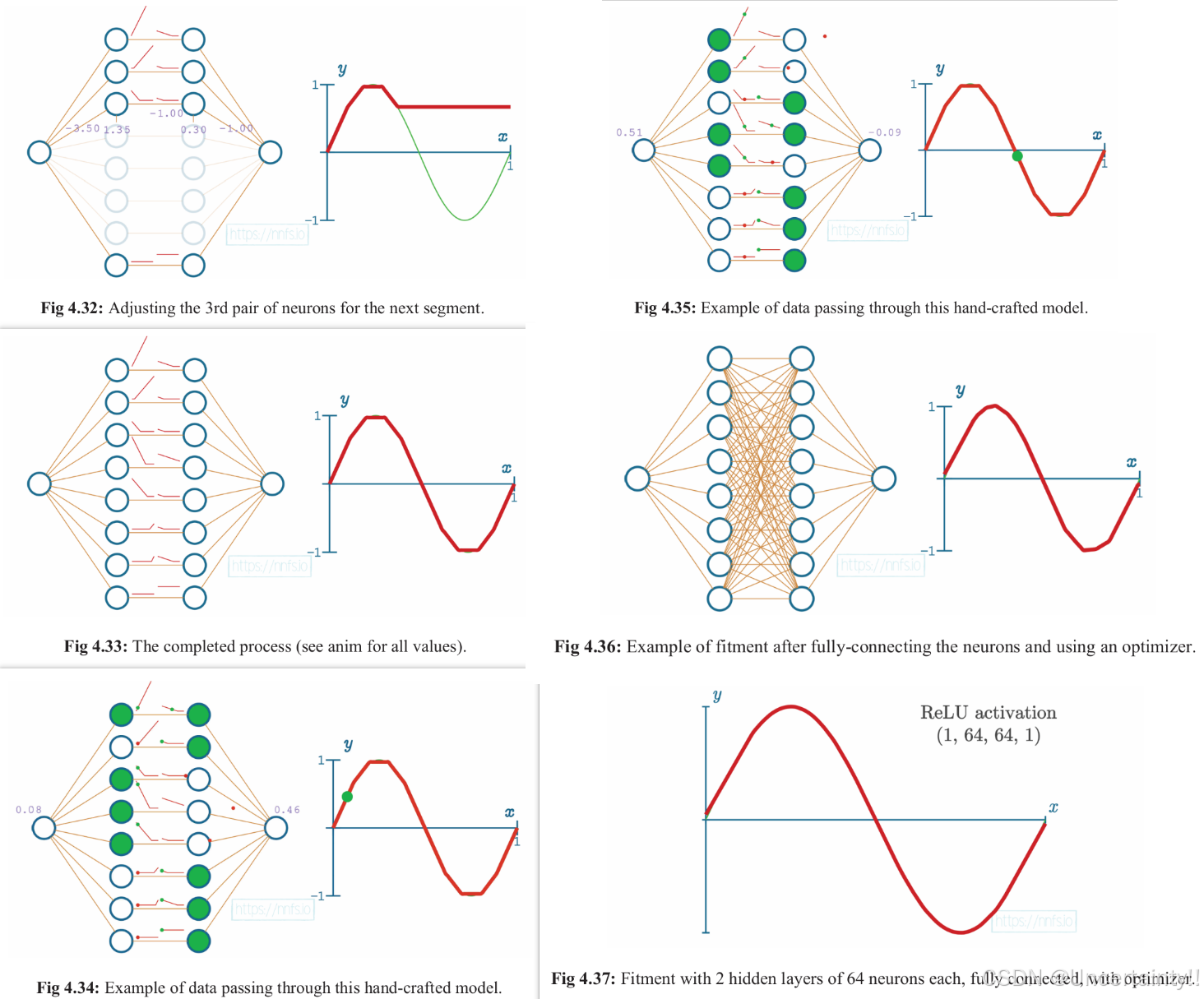
Chapter4:Activation Functions 声明:本篇博客笔记来源于《Neural Networks from scratch in Python》,作者的youtube 其实关于神经网络的入门博主已经写过几篇了,这里就不再赘述,附上链接。 1.一文窥见神经网络 2.神经…...

《Vue3实战教程》37:Vue3生产部署
如果您有疑问,请观看视频教程《Vue3实战教程》 生产部署 开发环境 vs. 生产环境 在开发过程中,Vue 提供了许多功能来提升开发体验: 对常见错误和隐患的警告对组件 props / 自定义事件的校验响应性调试钩子开发工具集成 然而ÿ…...

Linux:各发行版及其包管理工具
相关阅读 Linuxhttps://blog.csdn.net/weixin_45791458/category_12234591.html?spm1001.2014.3001.5482 Debian 包管理工具:dpkg(低级包管理器)、apt(高级包管理器,建立在dpkg基础上)包格式:…...
【计算机网络】课程 作业一 搭建连续覆盖的办公网络
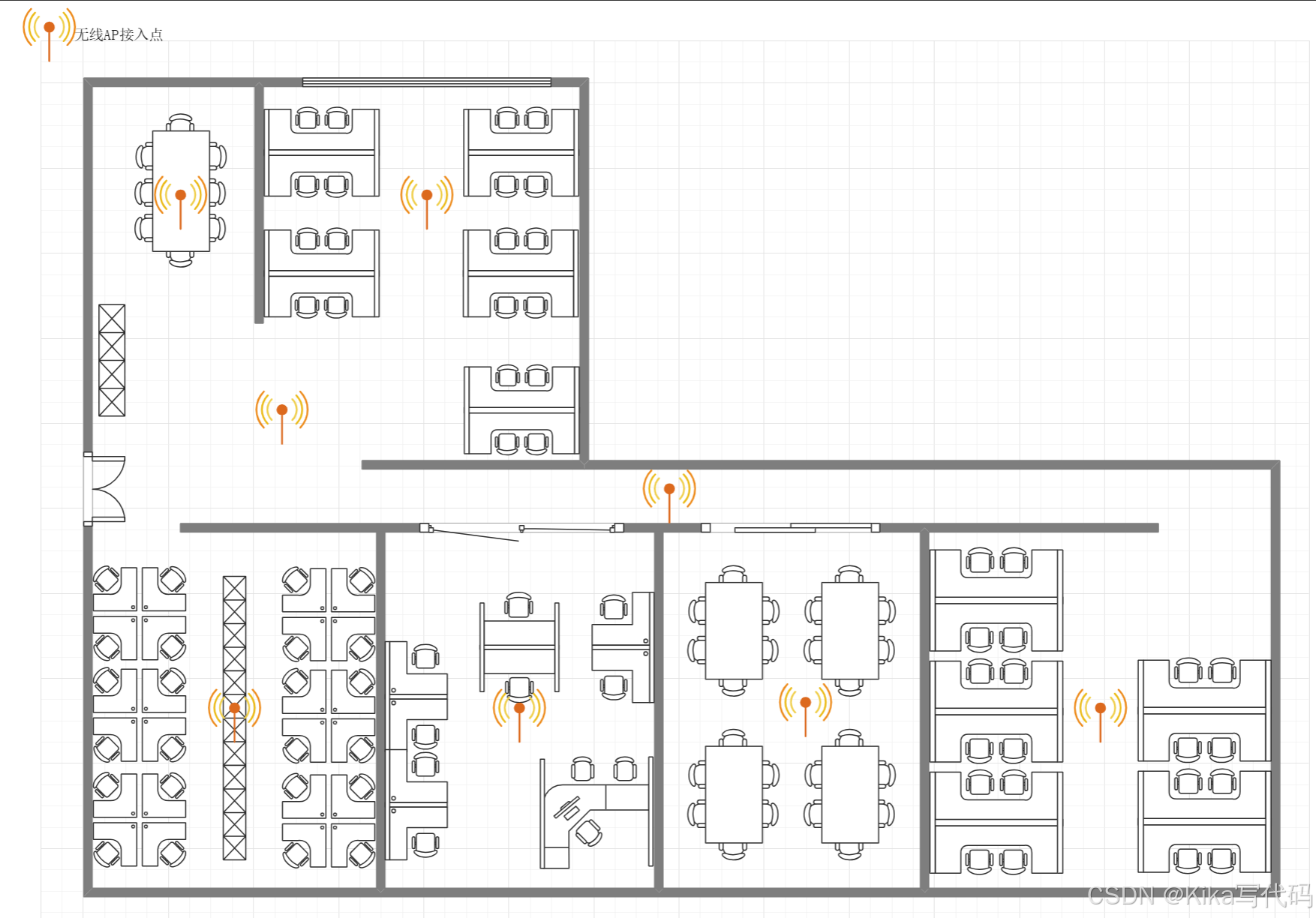
作业一 搭建连续覆盖的办公网络 题目:论述题(共1题,100分) 充分利用所学习的数据链路层局域网知识,加上物理层的基础知识,请给一个办公场所(三层,每层约100平方)…...
)
C++ 设计模式:单例模式(Singleton Pattern)
链接:C 设计模式 链接:C 设计模式 - 享元模式 单例模式(Singleton Pattern)是创建型设计模式,它确保一个类只有一个实例,并提供一个全局访问点来访问这个实例。单例模式在需要全局共享资源或控制实例数量的…...

OpenCV调整图像亮度和对比度
【欢迎关注编码小哥,学习更多实用的编程方法和技巧】 1、基本方法---线性变换 // 亮度和对比度调整 cv::Mat adjustBrightnessContrast(const cv::Mat& src, double alpha, int beta) {cv::Mat dst;src.convertTo(dst, -1, alpha, beta);return dst; }// 使用…...
Kafka Offset explorer使用
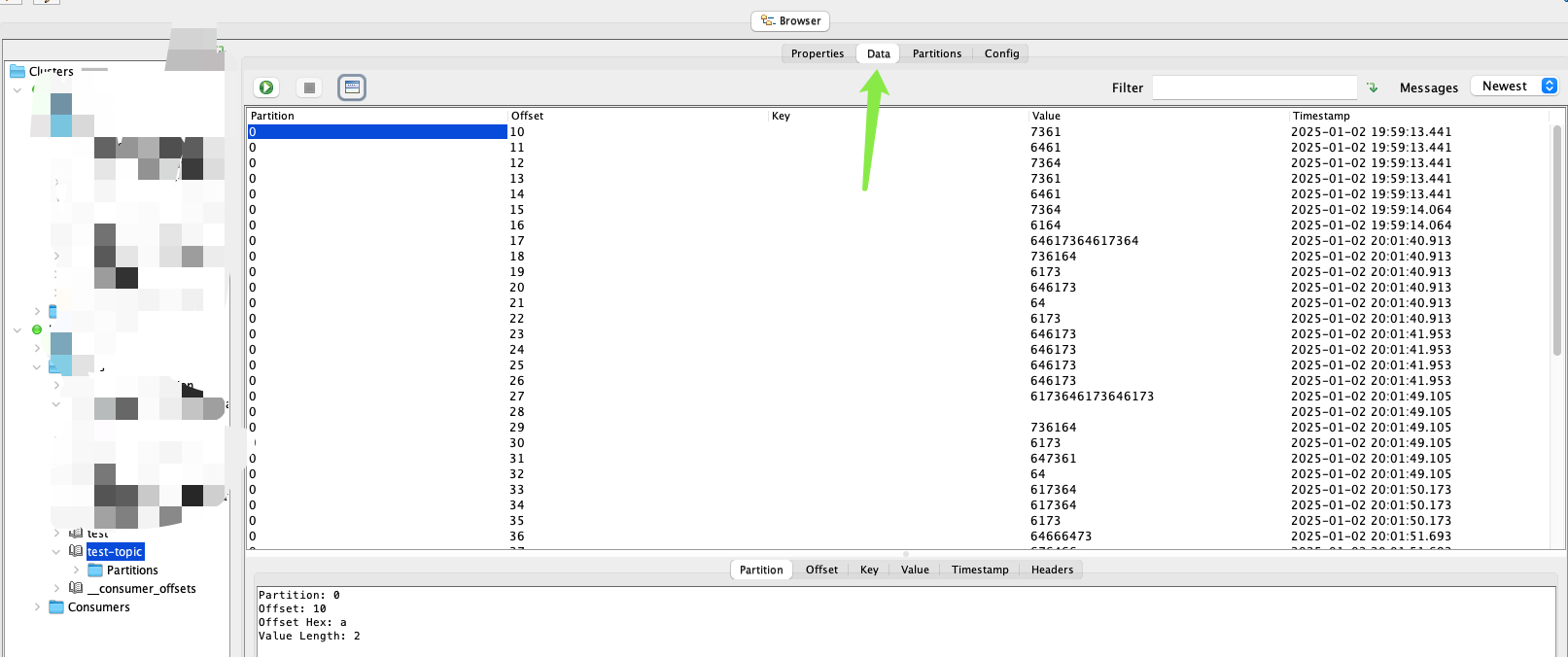
Kafka集群配置好以后以后运维这边先用工具测试一下,便于rd展开后续的工作,本地调试时一般使用Offset explorer工具进行连接 使用SASL(Simple Authentication and Security Layer)验证方式 使用SCRAM-SHA-256(Salted Challenge Response Authentication…...
二维码文件在线管理系统-收费版
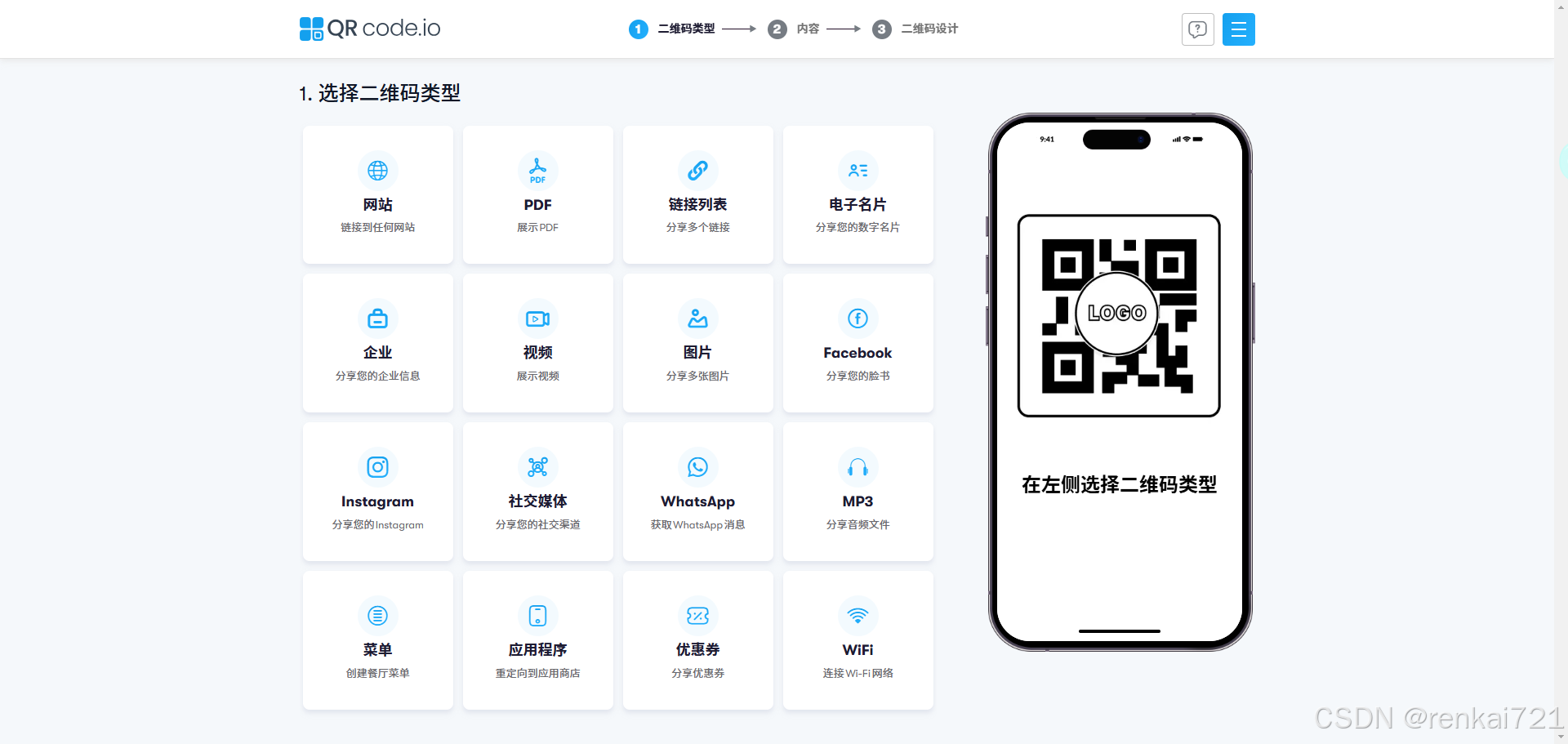
需求背景 如果大家想要在网上管理自己的文件,而且需要生成二维码,下面推荐【草料二维码】,这个系统很好。特别适合那些制造业,实体业的使用手册,你可以生成一个二维码,贴在设备上,然后这个二维码…...

UE4.27 Android环境下获取手机电量
获取电量方法 使用的方法时FAndroidMisc::GetBatteryLevel(); 出现的问题 但是在电脑上编译时发现,会发现编译无法通过。 因为安卓环境下编译时,包含 #include "Android/AndroidPlatformMisc.h" 头文件是可以正常链接的,但在电…...

vue-i18n报错
1. 开发环境报错Uncaught (in promise) TypeError: ‘set’ on proxy: trap returned falsish for property ‘$t’ legacy需要设置为false const i18n createI18n({legacy: false,// 默认语言locale: lang,// 设置语言环境messages, })2. 打包配置tsc --noEmit时报错&#…...
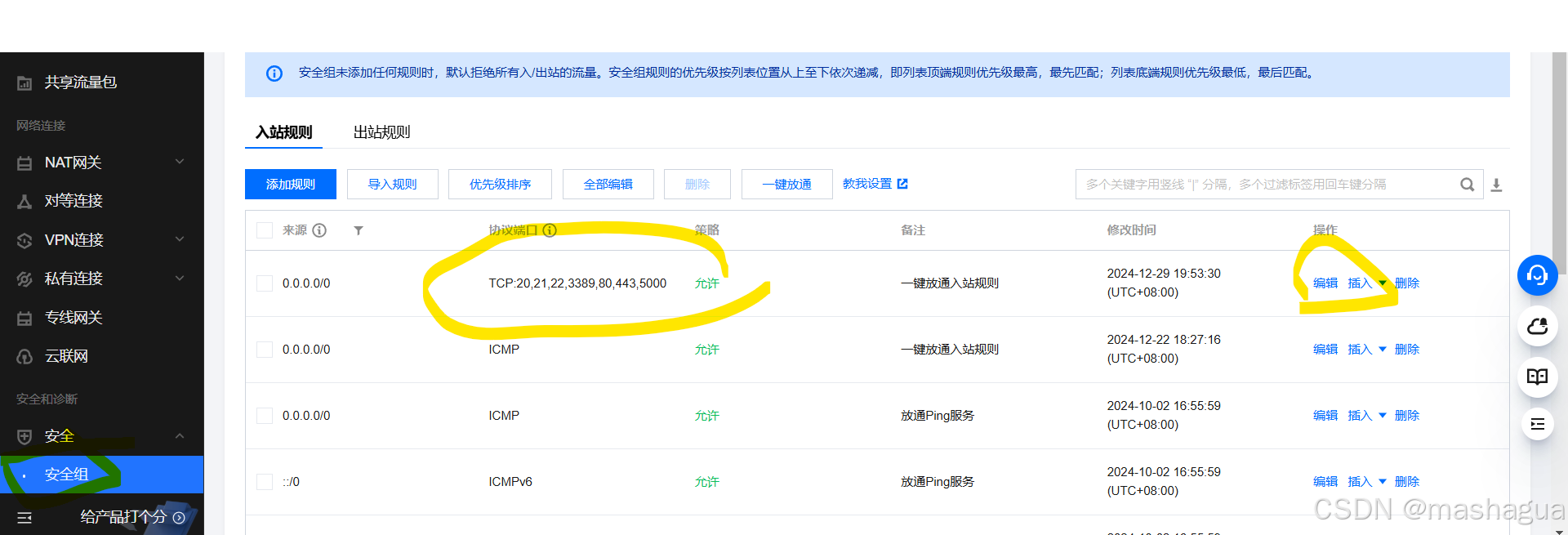
Docker新手:在tencent云上实现Python服务打包到容器
1 使用docker的原因 一致性和可移植性:Docker 容器可以在任何支持 Docker 的环境中运行,无论是开发者的笔记本电脑、测试服务器还是生产环境。这确保了应用在不同环境中的行为一致,减少了“在我的机器上可以运行”的问题。 隔离性ÿ…...

React基础知识学习
学习React前端框架是一个系统而深入的过程,以下是一份详细的学习指南: 一、React基础知识 React简介 React是一个用于构建用户界面的JavaScript库,由Facebook开发和维护。它强调组件化和声明式编程,使得构建复杂的用户界面变得更…...
ES IK分词器插件
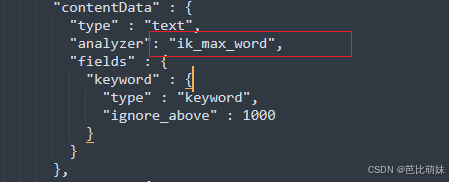
前言 ES中默认了许多分词器,但是对中文的支持并不友好,IK分词器是一个专门为中文文本设计的分词工具,它不是ES的内置组件,而是一个需要单独安装和配置的插件。 Ik分词器的下载安装(Winows 版本) 下载地址:…...

二十三种设计模式-抽象工厂模式
抽象工厂模式(Abstract Factory Pattern)是一种创建型设计模式,它提供了一种方式,用于创建一系列相关或相互依赖的对象,而不需要指定它们具体的类。这种模式主要用于系统需要独立于其产品的创建逻辑时,并且…...

从理论到实践:基于状态观测器的闭环系统设计与MATLAB仿真
1. 当状态看不见时,我们如何控制一个系统? 想象一下你在驾驶一辆汽车,但仪表盘全部失灵——看不到车速、转速、油量,甚至连方向盘转角都不知道。这时候如果要保持车道,你会怎么做?这就是控制工程中经典的状…...

intv_ai_mk11详细步骤:24GB单卡部署Llama模型并启用Web UI全流程
24GB单卡部署Llama模型并启用Web UI全流程指南 1. 环境准备与快速部署 在开始部署intv_ai_mk11模型前,我们需要确保硬件和软件环境满足基本要求。这个中等规模的Llama架构模型可以在单张24GB显存的GPU上流畅运行,非常适合个人开发者和小型团队使用。 …...

魔兽世界插件开发5分钟速成:从零掌握API查询与宏命令管理终极指南
魔兽世界插件开发5分钟速成:从零掌握API查询与宏命令管理终极指南 【免费下载链接】wow_api Documents of wow API -- 魔兽世界API资料以及宏工具 项目地址: https://gitcode.com/gh_mirrors/wo/wow_api 魔兽世界API文档平台与宏工具是一个专为《魔兽世界》玩…...
输入法引擎+雾凇拼音+万象语言模型)
FedoraWorkstation43安装中州韵(ibus-rime)输入法引擎+雾凇拼音+万象语言模型
1、安装ibus-rime sudo dnf install ibus-rime librime-devel librime-tools librime-lua2、使用东风破工具安装雾凇 cd ~/ git clone https://github.com/rime/plum.git plum cd plum bash rime-install iDvel/rime-ice:others/recipes/full # 更多参考 https://github.com/iD…...

Claude Code自动模式上线:AI开始自己改代码了
导读最近 Claude Code 推出了一个关键更新:自动决策模式(Auto Mode)正式上线。这次不是模型升级,而是权限变化:AI可以自行决定是否修改代码可以直接写入文件不再需要开发者逐步确认每一步操作目前已经在企业版和API用户…...

Wan2.2-I2V-A14B效果展示:水墨风、赛博朋克、胶片质感视频样例
Wan2.2-I2V-A14B效果展示:水墨风、赛博朋克、胶片质感视频样例 1. 惊艳的视频生成能力 Wan2.2-I2V-A14B文生视频模型展现了令人惊叹的创作能力,能够根据简单的文字描述生成高质量、风格多样的视频内容。这款专为RTX 4090D 24GB显存优化的私有部署镜像&…...

Flutter鸿蒙开发环境:从零到一,手把手解决环境配置与编译难题
1. 环境准备:搭建Flutter鸿蒙开发的基石 第一次接触Flutter鸿蒙开发时,环境配置就像盖房子的地基,看似简单却最容易踩坑。我在Windows系统上反复折腾了三天才搞定所有环境,这里把血泪经验总结成保姆级教程。首先需要明确的是&…...

分组网络频率同步互通测试
概述随着3G/4G网络大规模的部署和应用,网络和业务的全IP化发展,分组传送技术将替代SDH/MSTP网络而成为主流的传送承载网络。这时,一方面新的传送网络技术会对网络的同步性能提出相应的要求,另一方面在通信网络由电路交换型向分组交…...

批量加密RAR文件超简单!WinRAR自动加密技巧
Rar压缩包是大家经常使用的文件,并且可以进行加密,也是一种文件加密方式,那么当你有很多文件都需要压缩加密,按照正常加密方法来说,我们需要重复操作多次才能实现。其实我们可以使用自动加密功能来完成批量加密。 不过…...

5个Windows运行Android应用方案测评:普通用户的轻量级跨平台解决方案
5个Windows运行Android应用方案测评:普通用户的轻量级跨平台解决方案 【免费下载链接】APK-Installer An Android Application Installer for Windows 项目地址: https://gitcode.com/GitHub_Trending/ap/APK-Installer 在数字化办公与娱乐日益融合的今天&am…...